Last updated: October 2026
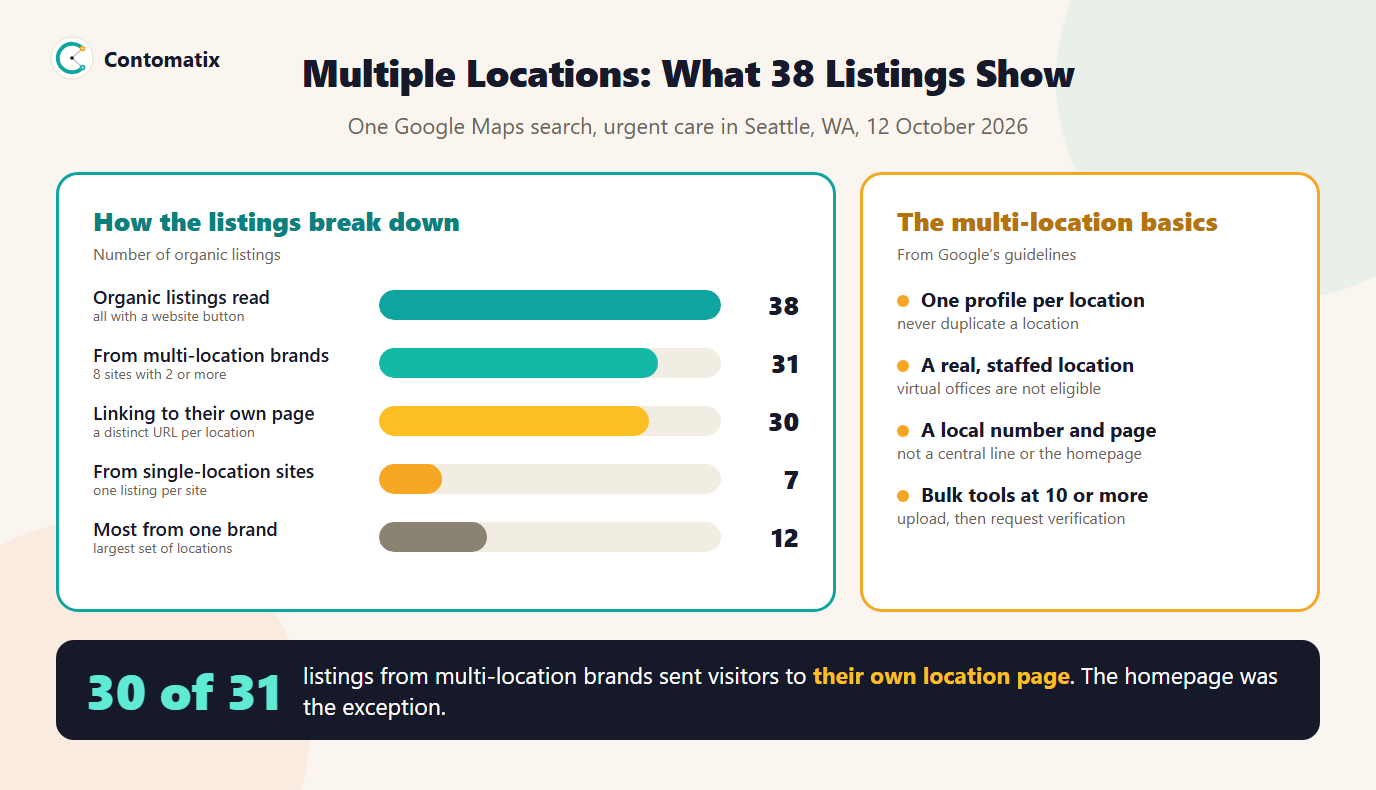
In one Google Maps search for urgent care in Seattle, 31 of the 38 organic listings came from brands with more than one location, and 30 of those 31 sent the visitor to a page built for that specific clinic. That is the pattern behind local SEO for multiple locations: one profile and one page per location, kept consistent under a single brand, and managed at scale.
This guide uses that real snapshot and Google's own rules for chains to show how the setup works, what to put on a location page, when bulk tools become available and how to report on many locations without drowning in numbers. If you run a single location, start with our guide to local SEO for small business.
What Multi-Location SEO Is
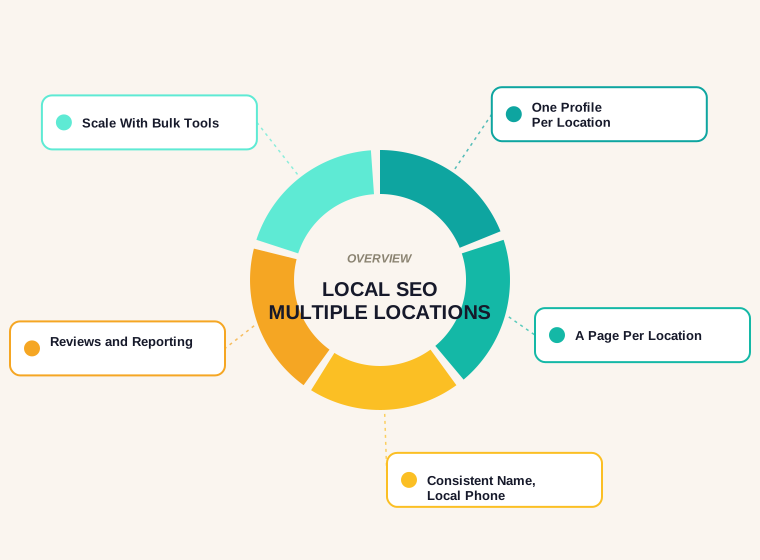
Multi-location SEO is the work of making each branch of a business visible for the searches near it, while keeping the brand coherent. It sits on three layers: a Google Business Profile for every location, a page on your site for every location, and consistent details such as name, phone number and categories across both. Get one layer wrong and the others cannot compensate.
What 38 Real Listings Look Like
We ran one Maps search, "urgent care in Seattle, WA", scrolled the full list and recorded every organic listing, without naming any brand.
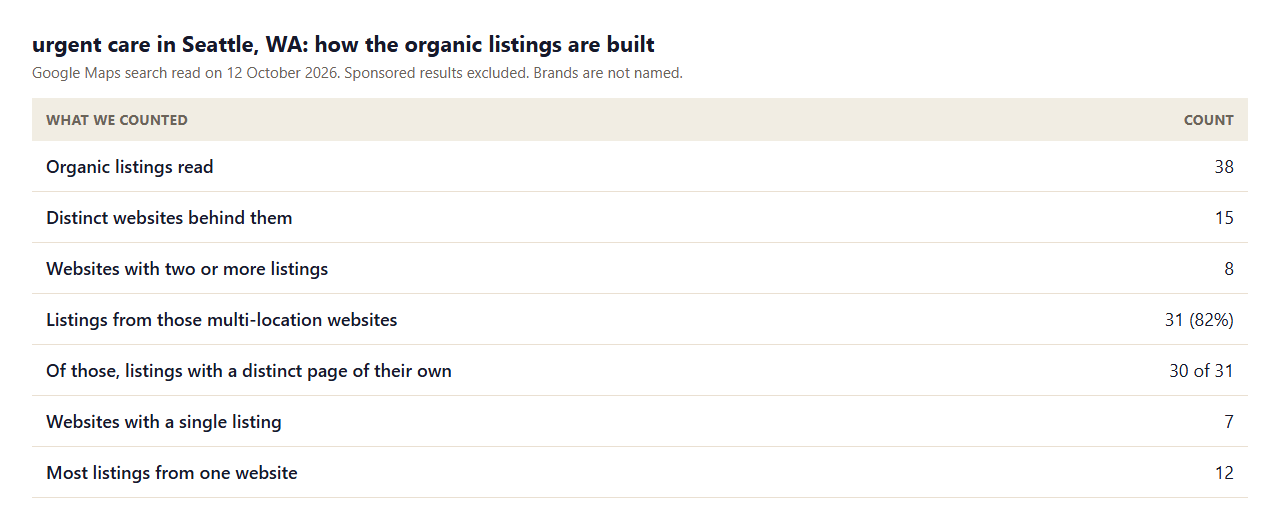
- Most listings belong to chains. 82 percent of the listings came from the 8 websites that appeared more than once, and one brand alone accounted for 12.
- Each location tends to have its own page. 30 of 31 multi-location listings pointed at a distinct URL. In one case two listings shared the same page.
- The names carry the place. Listings often end in a neighbourhood or street, which helps people tell branches apart.
One Profile Per Location
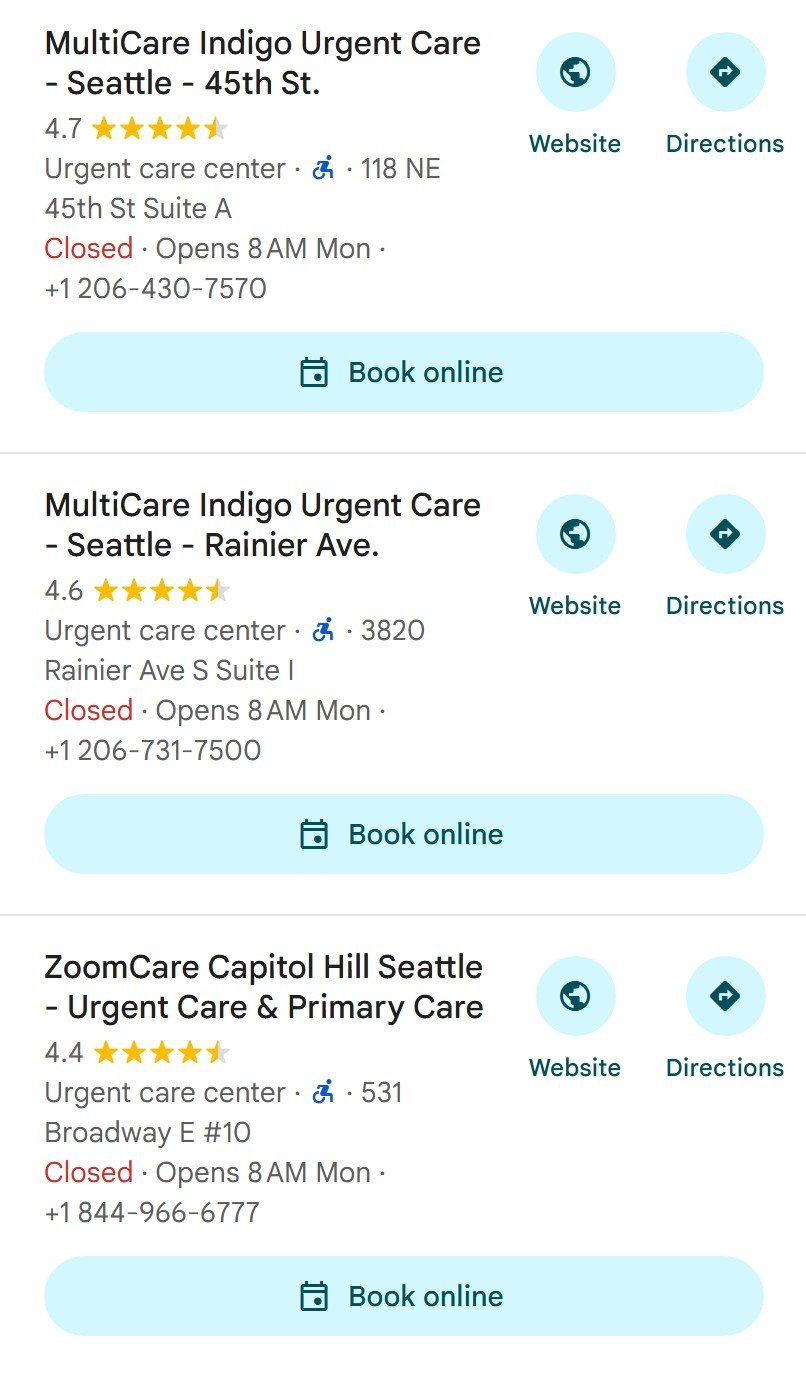
Google's guidelines say each physical location gets its own profile, and that you should not create more than one profile for a location, in one account or several. A location has to be real and operational: a virtual office is not eligible, and a co-working space must have signage, receive customers and be staffed during business hours by your own staff.
For chains, locations in the same country should share one name, with exceptions for consistently used sub-brands, and they should share the category that best represents the business. Use a local phone number where you can, under the direct control of the business, and a website address that represents the individual location, not one that redirects somewhere else.
Read the full text in Google's Business Profile guidelines, including the section for chains, departments and practitioners.
A Page for Every Location
The Business Profile points to your site, and the page it points to decides how useful the visit is. A strong location page contains information that is true only of that branch:
- The address, a map link, directions and parking or transit notes.
- Hours, including holiday exceptions, and a local phone number.
- The services actually offered there, and the people who work there.
- Photos of that location and, where you have them, reviews from its customers.
- Links to related locations and back to your location hub.
Make each page genuinely different. Google's spam policies describe doorway abuse as pages made to rank for similar queries that lead users to a less useful destination, including multiple pages aimed at cities that funnel to one place. A page that is the same template with the town name swapped is exactly that risk. If a branch has nothing distinct to say, it may not need a page of its own.
Local SEO for Franchises and Chains
Franchises add an ownership layer. The brand owns the standard, and each franchisee runs a location, so decide who controls what: who answers reviews, who edits the profile, who owns the page. Without that, you get inconsistent hours, abandoned profiles and duplicates. Write the rules down, keep a single list of locations with their store codes, and review it on a schedule.
Bulk Management at 10 or More Locations
Google's help pages describe bulk verification for larger businesses. The eligibility line is that the spreadsheet has 10 or more profiles from the same business, that it lists every profile you manage, and that the business is not a service-area business. Duplicate, suspended or disabled profiles do not count towards the ten.
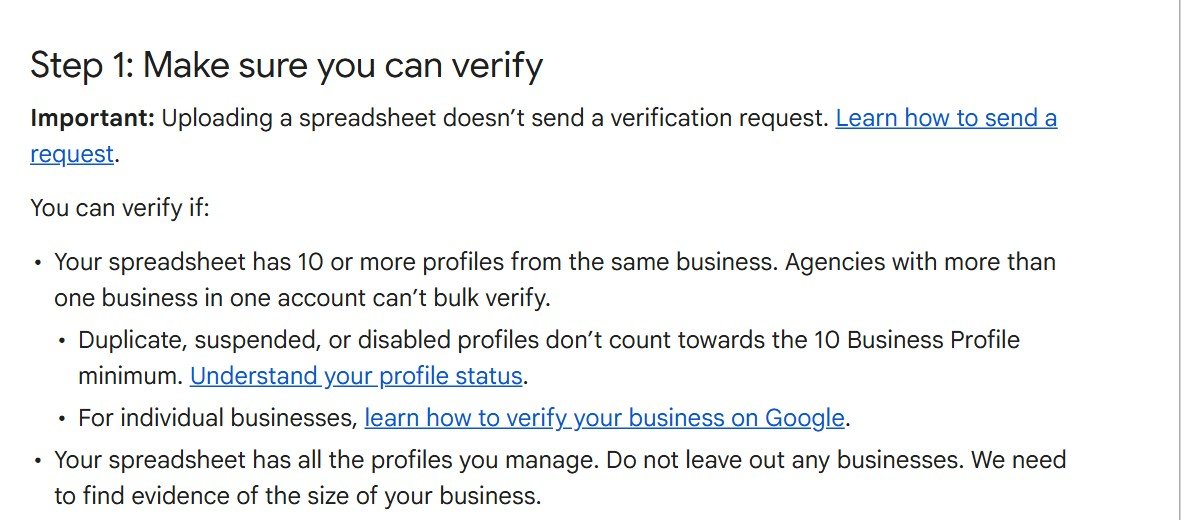
Under ten locations, add and verify them one at a time. Over ten, the upload route saves time, but it makes accuracy more important, because an error repeated across a spreadsheet is repeated across every profile.
Reviews, Reporting and Local SEO Metrics
Many locations produce many numbers. Decide which few matter and report them per location and in total.
- Visibility: where each location appears for its main search, checked from points around the branch. Our geo-grid rank planner builds those check points.
- Engagement: calls, direction requests and website clicks from each profile.
- Reviews: count, average rating and response time per location.
- Page performance: impressions, clicks and conversions for each location page in Search Console and analytics.
Review the weakest locations first, because a shared template or a missing detail often explains several at once. For help finding which pages to improve, see our guide to a content audit for SEO.
Site Structure for Many Locations
Give the locations a home. A hub page at a stable address lists all branches, grouped by region, and links to each location page. Each location page links back to the hub and to its nearest neighbours. Keep the hierarchy shallow so that every location is a couple of clicks from the homepage, and list location pages in your sitemap. If you have many, splitting them into their own sitemap lets you see their indexing separately in Search Console.
A Location Page Outline You Can Reuse
A template saves time, as long as the content inside it is real for each branch. This outline works for most multi-location businesses.
- Heading and intro. The service and the place, with one sentence that only fits this branch.
- Key details block. Address, phone, hours, directions and an embedded map, kept in plain text so it can be read and copied.
- Services here. The services this branch offers, linked to the main service pages, with differences from other branches stated.
- People and proof. The team, local photos and reviews from this location's customers.
- Getting here. Parking, transit and landmarks, written by someone who knows the area.
- Questions. Three or four questions that patients or customers of this branch actually ask.
- Nearby locations. Links to the closest branches and back to the hub.
Add structured data for the location only if it matches what is visible on the page, and keep the address and phone in the markup identical to the page and the profile.
A 90-Day Rollout
Do not try to fix every location at once. Sequence the work so that each stage unblocks the next.
- Days 1 to 30: clean the foundation. Build the master list of locations, find and merge duplicate profiles, and confirm name, categories, hours and phone numbers for each.
- Days 31 to 60: build the pages. Create the hub and the location pages, point every profile's website link at its own page and add tracking tags to those links.
- Days 61 to 90: operate and measure. Set up review replies, start per-location reporting and review the weakest branches.
When a Location Closes or Moves
Locations change, and the web should follow. If a branch closes, mark its profile as closed so searchers are not sent to an empty address, and point its page to the nearest open location with a permanent redirect so visitors and links are not lost. If a branch moves, update the profile, the page and the markup together, and keep the old address in the page history if customers might still go there. Left alone, stale locations are the commonest source of poor reviews at chains.
Common Mistakes
- Duplicate profiles. Two profiles for one location, often created by different people at different times.
- Every profile pointing at the homepage. Visitors then have to find their branch themselves.
- Copied location pages. The same text with a different town name adds nothing and invites the doorway problem.
- A central call centre number. Google asks for a local number under the business's direct control where possible.
- No owner for reviews. Unanswered reviews at a branch reflect on the whole brand.
Limits of This Snapshot
- It is one search, in one city, in one category, on one day. Another category may look different.
- We matched listings to websites by domain, so two sites run by one owner would count as separate brands.
- The snapshot shows what is visible. It does not show why any listing ranks where it does.
Key Takeaways
- In our Maps check, 82 percent of listings came from multi-location brands, and 30 of 31 of those linked to a page of their own.
- Google wants one profile per real, staffed location, with a consistent name and a local number.
- Give every location a distinct page with details only that branch has, and avoid template clones.
- Bulk verification applies at 10 or more profiles and excludes service-area businesses.
- Report a few metrics per location and look at the weakest ones first.
If you manage several locations and want a setup that scales, Contomatix can audit your profiles and pages. Get in touch and we will take a look.
Frequently Asked Questions
How do I do local SEO for multiple locations?
Create one Business Profile per real location, build a distinct page for each on your site, keep the name, categories and contact details consistent, and manage reviews and reporting per location.
Should every location have its own page?
Yes, when the location has details that are specific to it, such as address, hours, services and staff. In our Maps snapshot, 30 of 31 multi-location listings pointed to a distinct page.
Can I use one Google Business Profile for several locations?
Google's guidelines say each physical location gets its own profile and that you should not create more than one profile for a location. Service-area businesses follow separate rules.
Do all locations need the same business name?
Locations in the same country should share one name, except for consistently used sub-brands or storefront names, according to Google's guidelines for chains.
Can I use a central phone number for every location?
Google advises a local number under the business's direct control wherever possible, not a central call centre line.
When can I bulk verify locations?
Google's bulk verification page says the spreadsheet must have 10 or more profiles from the same business and must include every profile you manage. Service-area businesses are not eligible.
How do I avoid duplicate content across location pages?
Put details that are true only of that branch on each page: address, hours, services, staff, photos and local reviews. If a location has nothing distinct, link to a regional page instead of cloning one.
What is the difference between local SEO for franchises and for a single business?
Franchises add an ownership layer. You need clear rules on who controls each profile, page and review reply, plus a single list of locations to prevent duplicates and inconsistent details.
What should I measure for local SEO across many locations?
Map visibility per location, calls and direction requests from each profile, review count and rating, and the performance of each location page. Look at the weakest locations first.


