Last updated: October 2026
A content audit SEO process should end with a decision for every page, and our own audit showed why it matters which order you make them in. We had 275 live blog posts on 1 October 2026. In the previous three months they earned 25 clicks and 66,358 impressions. Treated as one pile, that looks like a site where almost everything needs rewriting. Sorted by age and ranking position, it told a much narrower story.
This guide walks through that audit on real Search Console data from our own site: the buckets we used, the counts that fell into each one, what Google says about removing and refreshing content, and the limits of the method. The site is young and the click numbers are small, so read the figures as an example of how the sorting works, not as a benchmark. If you want a wider technical review first, our website SEO audit checklist covers that side.
What a Content Audit for SEO Is For
A content audit is a page-by-page review of what you have already published, done to decide what happens to each page. The usual choices are keep it, improve it, merge it with another page, or remove it. It is not a word-count exercise and it is not a hunt for old dates. Google's own guidance lists writing to a particular word count among the signs of search-engine-first content and says it has no preferred word count, so length alone should never be your verdict.
Two things make an audit worth doing. It points your effort at the pages where a change can plausibly move results, and it stops you from spending time on pages where the data cannot tell you anything yet. Most audits fail at the second part.
The Data We Used
We exported the Pages report from Search Console for the Web search type over the last three months, covering the period to 1 October 2026. For each page it gives clicks, impressions and average position. We matched every URL to our own CMS records to get the publish date and category, then set a cut-off at the export date.
One definition matters for everything that follows. Search Console counts the topmost position your page held for each query it appeared in, and the position figure is an average of those values. A page that sits at position 4 for one query and 40 for another will show an average between them, so treat it as a rough guide to where a page lives and not as a rank you can read off a results page.
Step One: Set Aside the Pages That Are Too New
The first rule we applied was age. Any post published fewer than 30 days before the export went into a "too new" bucket and was left alone. That removed 125 of 275 posts, which is 45 percent of the site.
The cut-off is a judgement call, and 30 days is short. We chose it because these posts had existed for less than one month, which is not enough time to judge whether a page is failing. They were not empty either: together they already held 10 clicks and 23,313 impressions. An audit that had flagged them as underperformers would have been acting on a few weeks of data.
Step Two: Sort the Rest Into Buckets by What the Numbers Say
For every remaining post we asked two questions in order. Did it earn any clicks? If not, did it earn enough impressions, at least 100, for its average position to mean something? The answers put each post into one of five buckets, plus the "too new" one.
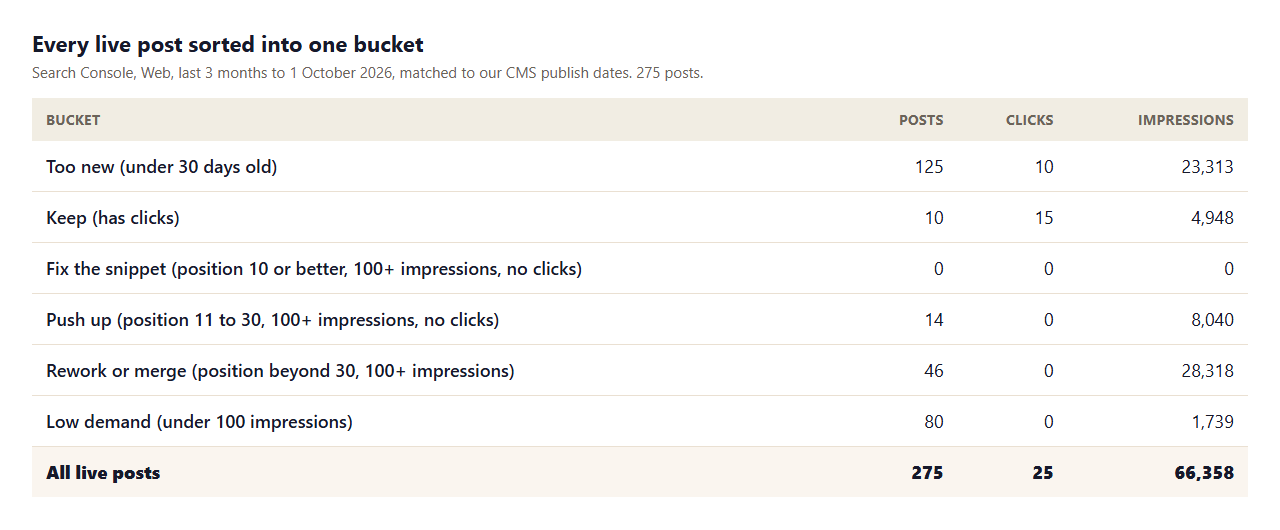
The rules, in order, were:
- Too new: published fewer than 30 days before the export.
- Keep: at least one click in the period.
- Low demand: no clicks and fewer than 100 impressions.
- Fix the snippet: no clicks, 100 or more impressions, average position 10 or better. The page ranks but nobody clicks, which points at the title or description.
- Push up: no clicks, 100 or more impressions, average position 11 to 30. The page is close enough to reach page one with better content.
- Rework or merge: no clicks, 100 or more impressions, average position beyond 30. The page is being shown, but too far down to be seen.
What the Buckets Told Us
Three results stood out.
The snippet bucket was empty. Not one of the older posts ranked in the top ten on average, drew 100 or more impressions and still got no clicks. A common reaction to low clicks is to rewrite titles and descriptions. For us that would have been wasted effort, because the problem was position and not presentation.
Most impressions were on pages nobody could see. The 46 posts in the "rework or merge" bucket carried 28,318 impressions, 43 percent of the site's total, at an average position beyond 30 and with no clicks at all. 42 of them were in our Local SEO category. Impressions that far down are real but nearly worthless, and a dashboard that only shows impression totals hides that.
A small group was within reach. The 14 posts in "push up" held 8,040 impressions, about 12 percent of the total, at positions 11 to 30. These are the pages where adding depth, internal links and updated sources has the best chance of showing up in results.
At the other end, the 80 "low demand" posts had 1,739 impressions between them, around 2.6 percent of the total. 14 of our live posts had no row in the report at all, which means Google had shown them no impressions during the period.
Run the Same Sort in a Spreadsheet
You do not need special software. A spreadsheet is enough for a site of a few hundred pages.
- Export the Pages report. In Search Console, open Performance, choose Web search, set the date range to the last three months, switch to the Pages tab and export it. You get one row per URL with clicks, impressions, CTR and position.
- Add your own columns. List every live URL from your CMS or sitemap with its publish date and category, then look up each URL in the export. URLs that are missing from the export had no impressions, so give them zero.
- Work out each page's age. Subtract the publish date from the export date, in days.
- Apply the rules with one formula. With age in column D, clicks in E, impressions in F and position in G, a formula like this puts every page in a bucket:
=IF(D2<30,"Too new",IF(E2>0,"Keep",IF(F2<100,"Low demand",IF(G2<=10,"Fix the snippet",IF(G2<=30,"Push up","Rework or merge"))))) - Count and total. Build a small summary table with the number of pages, clicks and impressions in each bucket. If the totals do not match your site totals, a lookup has gone wrong.
- Read the pages, not just the numbers. For the buckets you plan to act on, open the actual pages and the live results for their main keyword before you decide anything.
The order of the tests matters. Putting age first stops new pages from being judged, and putting clicks second protects anything that is already working. The impression and position tests then apply only to pages that need a closer look.
What Google Says About Removing and Refreshing Content
An audit makes deletion tempting, so it is worth knowing where Google stands. In its page on creating helpful, reliable, people-first content, updated on 5 October 2026, Google lists questions that point to content made for search engines first. Two of them bear directly on an audit. One asks whether you are changing the date of pages to make them seem fresh when the content has not substantially changed. The other asks whether you are adding lots of new content or removing lots of older content primarily because you believe it will help your rankings by making the site seem fresh. For that second one Google's answer is that it will not.
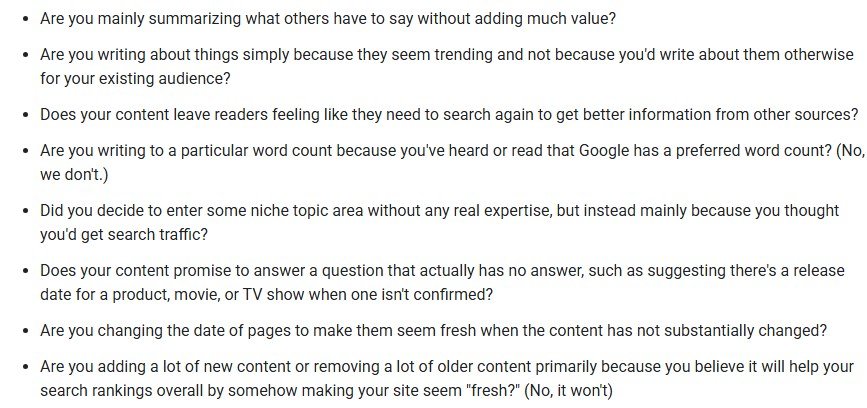
That does not mean weak pages must stay forever. It means the reason for any change should be the reader. Update a page because its facts are stale, merge two posts because they answer the same question, and remove a page because it serves no one. Do not do any of these because a spreadsheet shows a low click count.
A Decision for Each Bucket
The infographic below sums up what each bucket calls for. Here is the reasoning behind each row.
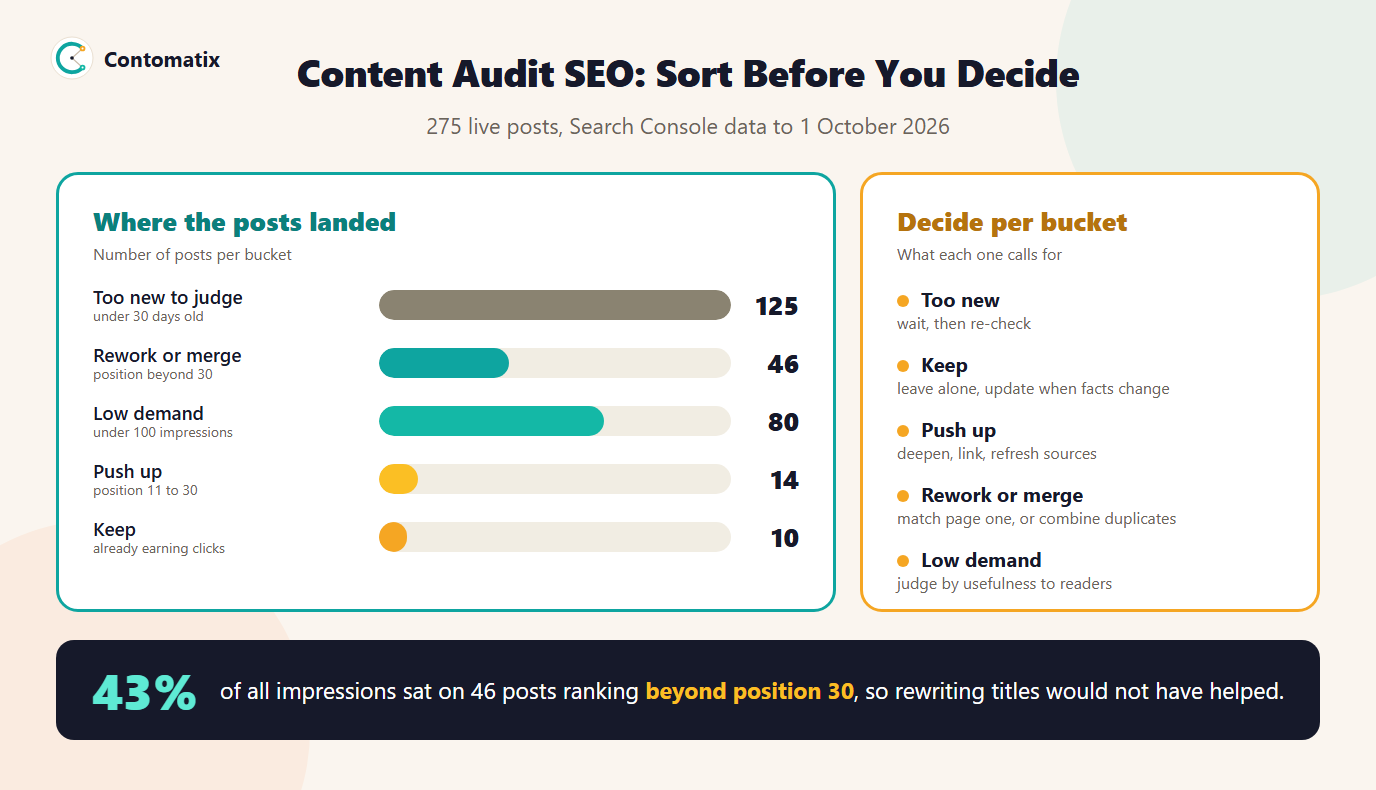
- Too new: leave it, and put a date in your calendar to run the same sort again once the posts are old enough.
- Keep: do not touch it for the sake of activity. Update it when a fact, price or rule changes.
- Push up: compare the page with what is ranking on page one for its main keyword. Add what the leaders cover and you do not, link to it from related posts and refresh any dated sources.
- Rework or merge: first check whether two of your own posts target the same search. If so, combine the best material into one and redirect the other. If not, read page one and decide whether your page is even the right format for that query.
- Low demand: check whether the keyword has real search demand. If it does not, ask whether the page still helps the readers who land on it, and decide on that basis. Our keyword mapping tool can show where several keywords point at one page.
- Fix the snippet: rewrite the title and description to match what searchers want. We had no pages here, but it is the cheapest change when you do.
We have not yet applied these decisions to the site, so we cannot report what happened after them. The plan is to re-run the same sort after 90 days and compare each bucket's counts.
What This Audit Cannot Tell You
- It reflects three months of one data source. We did not combine it with analytics, conversions or backlink data. A page with no clicks may still have links or readers from other channels.
- Average position is blunt. A page can rank well for one query and badly for another, and the average hides that. For the pages that matter most, open the queries behind them.
- The thresholds are ours. Thirty days and 100 impressions are practical cut-offs, not rules from Google. A larger or older site might choose different ones.
- The sample is small and young. 25 clicks across 275 posts is too few to draw conclusions about which kind of content works. The value here is in the sorting method.
Key Takeaways
- Sort before you decide: set aside new pages, then bucket the rest by clicks, impressions and position.
- In our audit, 125 of 275 posts were too new to judge, and no older post needed a snippet rewrite.
- 43 percent of our impressions sat on 46 posts beyond position 30, so impression totals alone are misleading.
- Google says removing older content or changing dates to look fresh will not help rankings, so change pages for readers.
- Re-run the same sort on a schedule and compare bucket counts.
If you would like this kind of audit run on your own site, with a clear action for every page, Contomatix can do it. Get in touch and we will scope it.
Frequently Asked Questions
What is a content audit in SEO?
It is a review of the pages you have already published, done to decide whether each one should be kept, improved, merged with another page or removed. The decisions are based on performance data and on whether the page is useful to readers.
How often should I run a content audit?
Run one at least once or twice a year, and sooner after a large traffic change. On a young site that is publishing quickly, a quarterly pass is more useful because new pages move through the buckets fast.
What data do I need for a content audit?
At minimum, the Pages report from Search Console with clicks, impressions and position, plus your publish dates. Adding analytics, conversions and backlink counts gives a fuller picture.
Should I delete pages that get no traffic?
Not automatically. Google's helpful content guidance says removing a lot of older content primarily to help rankings will not work. Remove a page when it is unhelpful or serves no one, and consider a merge or redirect when another page covers the same topic.
How old should a page be before I judge it?
There is no official figure. We set aside posts under 30 days old because that is too little time to judge them, and a longer window is safer for competitive topics.
What does average position mean in Search Console?
For each query, Search Console counts the topmost position your page held, then averages those values. Because it mixes many queries, it shows roughly where a page lives and not its exact rank.
What is the difference between a content audit and a technical SEO audit?
A technical audit checks crawling, indexing and site health. A content audit checks whether each page earns its place and what to do with it. They overlap, and many teams run the technical review first.
Is word count a good audit signal?
No. Google says it has no preferred word count. A short page can be exactly right for its query, so judge pages by usefulness and performance instead of length.
What should I do with pages that have impressions but no clicks?
Check their average position first. If it is 10 or better, test a new title and description. If it is between 11 and 30, improve the content and internal links. If it is beyond 30, rework the page or merge it with a related one.