Last updated: October 2026
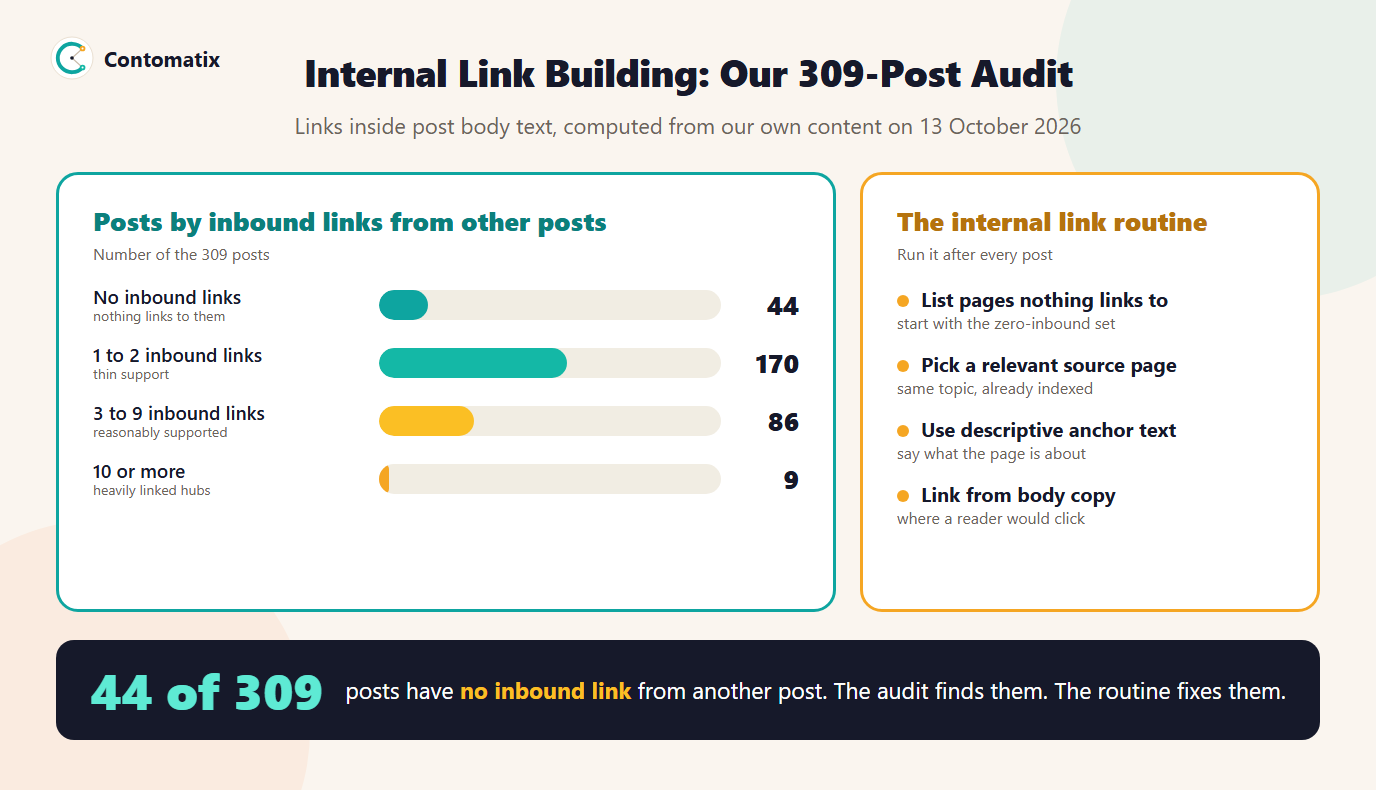
We audited the internal links across our own 309 blog posts and found that 44 of them have no link pointing to them from any other post, while one post collects links from 91. That uneven spread is what internal link building is meant to fix: deliberately adding links between your own pages so that search engines and readers can find the pages that matter.
This guide shows how the audit works, what the numbers mean and the routine we now run after each post. It also links to our internal link checker if you want to test a page of your own.
What Internal Link Building Is
Internal link building is the practice of linking from one page on your site to another, on purpose, with a clear reason. Google's documentation says it uses links to discover new pages and as a signal when judging relevance. Links in the body of a page also tell readers where to go next. A page with no links pointing to it can be hard for a crawler to find and gives a reader no route to it.
How We Audited It
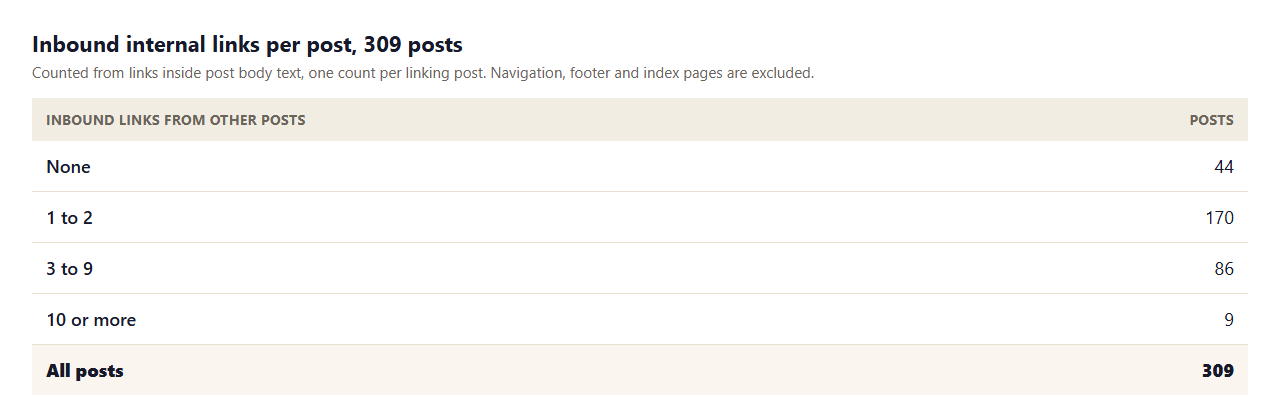
We took the body text of every post on this site, 309 in total, extracted each link and counted, for every post, how many other posts link to it. We counted links inside the article body only. Navigation menus, the footer and the blog index are excluded, because those are the same for every page and say nothing about relevance. Counts are one per linking post, so five links from the same article count once.
What the Numbers Show
- 44 posts have no inbound link from another post, which is 14 percent of the site. They are still in the sitemap and the blog index, but no article points to them.
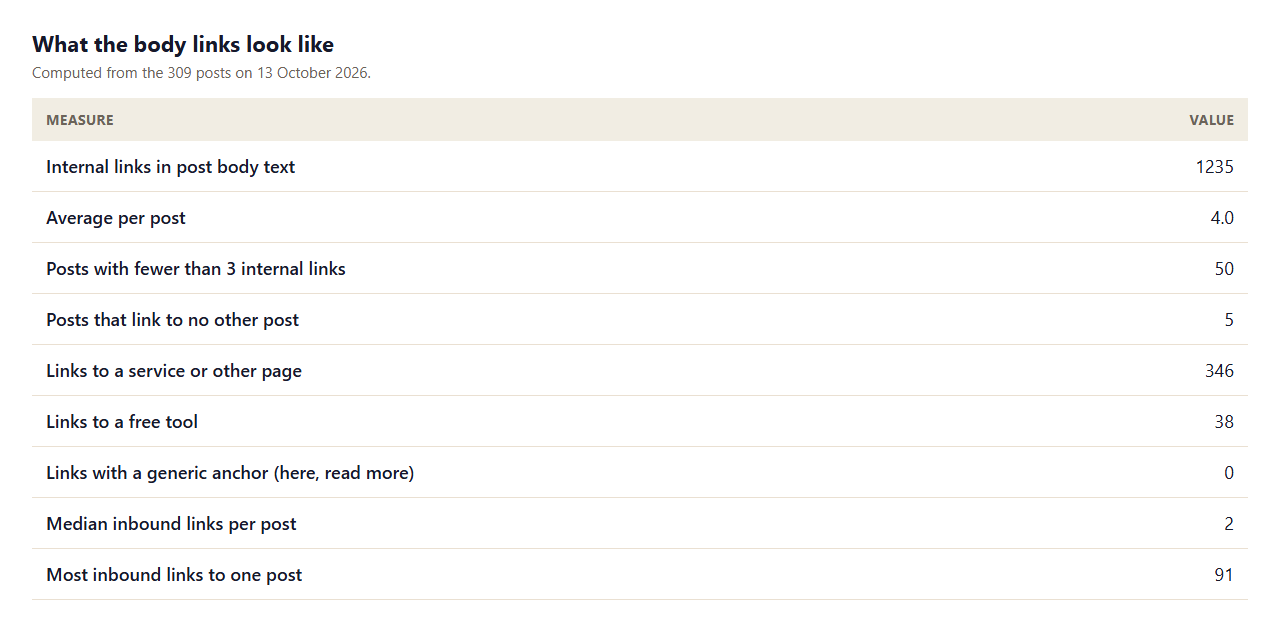
- The median post has 2 inbound links. A typical post is supported, but only thinly.
- One post receives links from 91 others, which is 29 percent of all posts. It is a hub we link to again and again. That is not wrong, but it means the other posts are competing for the remainder.
- 50 posts contain fewer than 3 internal links in their body, and 5 link to no other post at all.
- Anchors are descriptive. 0 of 1235 internal links use a generic anchor such as here or read more.
Why Pages With No Inbound Links Matter
A page without an internal link can still be indexed if it is in your sitemap, so this is not a guarantee of exclusion. The cost is quieter. Crawlers have fewer paths to it, readers have no contextual route to it, and you give search engines no signal about how it relates to your other pages. For a site that publishes often, new posts tend to link back to older ones and rarely the other way round, which is how older pages end up unsupported.
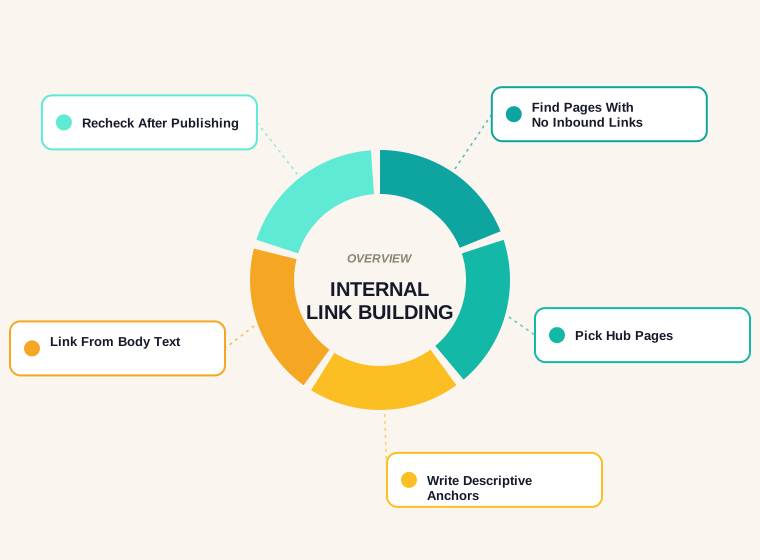
Step 1: Find the Pages Nothing Links To
Build the list from your own content or a crawl. For each page, count the pages that link to it from their body text. Sort ascending and start at zero. A crawler will list this as pages with no or few inlinks. Exclude pages you do not want found, such as thank-you pages and filtered views.
Step 2: Choose Relevant Source Pages
For each unsupported page, find two or three existing pages on the same topic that are already indexed and read. Linking from a closely related page is better than linking from a high-traffic page on an unrelated subject. Our content audit guide explains how to group pages by topic, which makes this step quick.
Step 3: Write Descriptive Anchor Text
Google's link best practices ask for anchor text that is descriptive and concise, saying what the destination is about. Use a short phrase that fits the sentence, such as the topic name, not here or this page. Vary the wording naturally and do not stuff the same exact phrase every time.
Step 4: Link From Body Copy and Use Real Links
Place the link where a reader would want to click, inside the paragraph that discusses the subject. Use a real anchor element with an href. Google says it can only reliably crawl links that are a elements with an href attribute, so a clickable element built with script alone may not be followed. Our guide to sitemaps covers what the sitemap does in addition.
Step 5: Add the Link When You Publish
The cheapest moment to build internal links is at publication. Before a post goes live, list the two or three older posts it should link to and the two or three older posts that should link to it, and add both. This is the routine that stops the zero-inbound set from growing.
Common Internal Linking Mistakes
- Linking only to the hub. Every post points to one big guide, and the rest go unsupported.
- Generic anchors. Here and read more tell search engines nothing.
- Links hidden in navigation only. Menu links are the same everywhere and carry little context.
- Linking to unrelated pages. Relevance matters more than the count.
- Never going back. New posts link out, and old posts are never updated.
Anchor Text: Weak and Strong Examples
Anchor text is the one part of an internal link you fully control. Compare the following pairs for a link to a guide on checking a sitemap.
- Weak: "To learn more, click here." The anchor says nothing about the destination.
- Better: "Our guide to sitemaps explains what each tag does." The anchor names the topic and fits the sentence.
- Weak: "Read more about SEO." Too broad to describe anything.
- Better: "Check your robots.txt rules before you submit the sitemap." Specific and natural.
Avoid repeating one exact-match phrase for every link to the same page. Natural variation, such as the full topic name in one place and a shorter form in another, reads better and carries the same meaning.
How to Prioritise Which Pages to Fix First
With 44 unsupported posts, you cannot fix everything at once. Score each page on three simple questions and work down the list.
- Business value. Does the page lead to a service, a tool or a conversion? Fix those first.
- Existing visibility. Does it already earn impressions in Search Console? A page at position 11 to 20 with a link or two added is the cheapest improvement you can make.
- Topical fit. Is there an obvious related page to link from? If not, the page may be better merged or retired.
Hub Pages and Topic Clusters
A hub page, or pillar, covers a broad topic and links to detailed pages on its sub-topics, and each of those links back to the hub. This is the structure behind the one post in our audit that receives links from 91 others. A hub works when the detail pages also link to each other where it helps the reader. If every spoke only points at the hub, you get a star with no connections between the points, and the spokes remain thinly supported. Plan the cluster so that each page has at least one link in from a sibling and one link out to a sibling.
Worked Example: Fixing One Unsupported Post
Take a post with no inbound links on a narrow topic. First, list three posts that mention the same subject, which a site search or a keyword search of your content will find. Second, read each and choose the paragraph where the topic comes up naturally. Third, add one sentence with a descriptive link, rather than appending a "related posts" list at the end. Fourth, open the unsupported post and add two links out to related pages if it has none. Fifth, record the change and recount inbound links after the next publish. This takes about ten minutes per post, so a batch of ten is a morning's work.
Internal Links Versus External Links
Internal links connect your own pages and are fully in your control. External links, or backlinks, come from other sites and are earned. They serve different purposes, so do not treat one as a replacement for the other. Strong internal linking helps search engines and readers use the pages you already have, and it can make the value of the links you do earn flow to the pages that matter. Our backlinks guide covers the external side.
A Quarterly Maintenance Checklist
- Recount inbound links for every post and list those with none.
- Check that links in important pages still point to live URLs, not redirects or removed pages.
- Look for pages that link to the hub but not to each other.
- Review the anchor text on your ten most important pages.
- Add links from the newest posts to relevant older posts, and from older posts to the new ones.
- Confirm that links are real anchor elements with an href, not script-driven buttons.
Click Depth and Why It Matters
Click depth is the number of clicks it takes to reach a page from the homepage. A page one or two clicks deep is easy for a visitor and a crawler to reach. A page buried six clicks down, reachable only through paginated archives, is slow to be found and tends to be crawled less often. On a site with hundreds of posts, a flat structure helps: link the important pages from the homepage or a hub, and link new posts from a category or topic page as well as from the blog index. If your blog index is paginated, make sure older posts have a second route in through contextual links.
How Many Links Is Too Many?
Google does not set a fixed limit on internal links per page. The practical limit is the reader: a paragraph that is more link than text is hard to read, and a page with hundreds of links dilutes each one. As a working rule, add a link where it helps a reader take a useful next step, and stop there. In our audit the average post carries 4.0 internal links in its body, which for articles of this length is comfortable.
Who Should Own Internal Linking?
Internal links are easiest to maintain when someone owns them. On a small team, give the job to the person who publishes: the publishing checklist includes adding links in and out, and a monthly recount catches what slipped through. On larger sites, assign each topic cluster an editor who keeps its links healthy and signs off new pages that join it. Without an owner, new content links backwards and old content is never updated, which is exactly the pattern our audit found.
Limits of This Audit
- We counted links in post body text, not links produced by templates or the blog index.
- It covers posts only. Service pages and tools have their own link patterns.
- Inbound link count measures support, not quality, and a page with many links can still be a weak page.
- The numbers are a snapshot on 13 October 2026 and change with every publish.
Key Takeaways
- Audit for pages with no inbound body links first, then add relevant links from related pages.
- Use descriptive anchors and real href links in the body copy.
- Do not funnel every link to one hub page.
- Add inbound and outbound links at publication, so the gap does not return.
- Recount after each batch of posts.
Need a link audit for your own site? Get in touch and we will map your pages and gaps.
Frequently Asked Questions
What is internal link building?
It is the practice of adding links between pages on your own site, on purpose, so that crawlers and readers can find your important pages and understand how they relate.
How many internal links should a page have?
There is no fixed number. Link where it helps the reader. On our site, 50 of 309 posts had fewer than 3 internal links in the body, which we treat as a prompt to review them.
What is an orphan page?
A page that no other page on the site links to. It may still be in the sitemap, but crawlers and readers have no path to it from your content.
Does internal linking help SEO?
Google says it uses links to discover pages and to understand relevance, so clear internal links help it find and interpret your content. They are one signal among many.
What is good anchor text for an internal link?
A short, descriptive phrase that says what the destination page is about, written to fit the sentence. Avoid here, click here and read more.
Should every post link to the same pillar page?
Linking to a pillar page is useful, but if every post links only there, the rest of your content gets little support. Add links between related posts as well.
Do nofollow internal links matter?
Internal links are normally left followed. Marking your own pages nofollow gives a signal that you do not want them treated as links, which is rarely what you intend.
How do I find pages with no internal links?
Crawl the site, or extract links from your content, and count the inbound links to each page. Sort the list from zero upward.
How often should I audit internal links?
Run a quick count after each batch of new posts, and a full review each quarter on a site that publishes often.