Last updated: September 2026
Most website SEO audit deliverables are a 60-page PDF produced by a crawler, handed over without a priority order. Nobody fixes anything, because nobody can tell which of the 340 "issues" actually costs money.
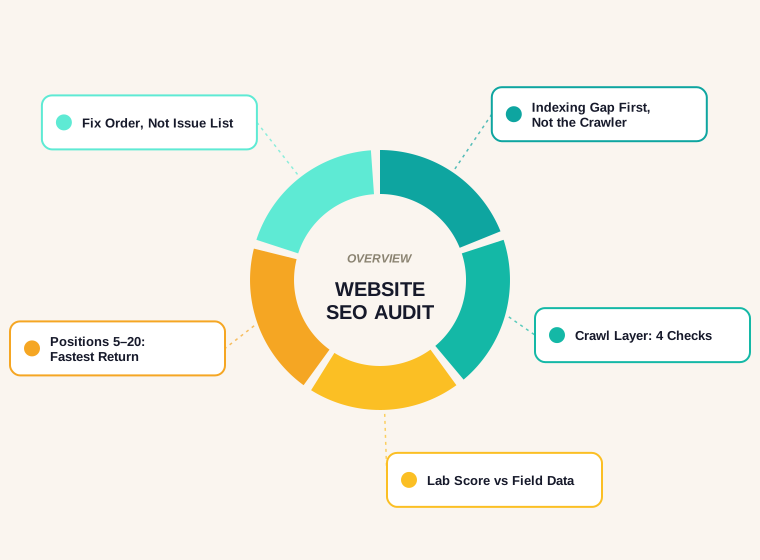
This is the audit we run instead: six layers, in the order that matters, using tools that cost nothing. It takes an afternoon on a small site, and it ends with a list short enough to act on.
What a Website SEO Audit Is Actually For
An audit answers three questions in sequence. Skipping the order is why most audits waste time.
- Can Google reach and index the pages that matter? Nothing else counts until this is true.
- Do those pages deserve to rank for what they target? Content, intent match and internal links.
- Is anything actively pushing them down? Speed, duplication, broken signals, self-competition.
A crawler answers part of question three brilliantly and almost nothing of questions one and two. That is why the process below starts in Search Console and not in a crawler.
Layer 1: Indexing, Before Anything Else
Open Search Console's page indexing report and compare two numbers: how many pages you think you have, and how many Google has actually indexed.
The gap is the audit's first finding. Common causes, in the order we see them:
- Pages Google has crawled and chosen not to index. Usually thin, near-duplicate or templated pages.
- Pages excluded by a canonical pointing somewhere else, often unintentionally.
- Pages blocked in robots.txt that were never meant to be blocked.
- Pages nobody links to. If a page is not in the sitemap and no internal link points at it, it may simply never be found.
Fix the indexing gap first. Optimising a page Google has not indexed is decoration.
Layer 2: The Crawl Layer
Four files and settings decide whether a crawler can do its job. All four are quick to check and quick to break.
| Check | What good looks like | Common failure |
|---|---|---|
| robots.txt | Loads at the root, blocks only what should be blocked, names the sitemap | A staging Disallow: / that went live with the site |
| XML sitemap | Only indexable, canonical URLs; submitted in Search Console | 404s, redirects and noindexed URLs listed |
| Canonical tags | Each page points at itself unless it is genuinely a duplicate | Sitewide canonical pointing at the homepage |
| Redirects | One hop, 301, to a relevant page | Chains of three or more, or everything to the homepage |
If you need to rebuild either file, our free robots.txt generator and sitemap generator will produce a clean version in a minute. For international sites, the canonical check gets its own guide in canonical and hreflang.
Layer 3: Core Web Vitals and the Numbers That Matter
Speed is where audits go to die, because every tool reports a different number. Google publishes the thresholds, so use those and ignore the rest.
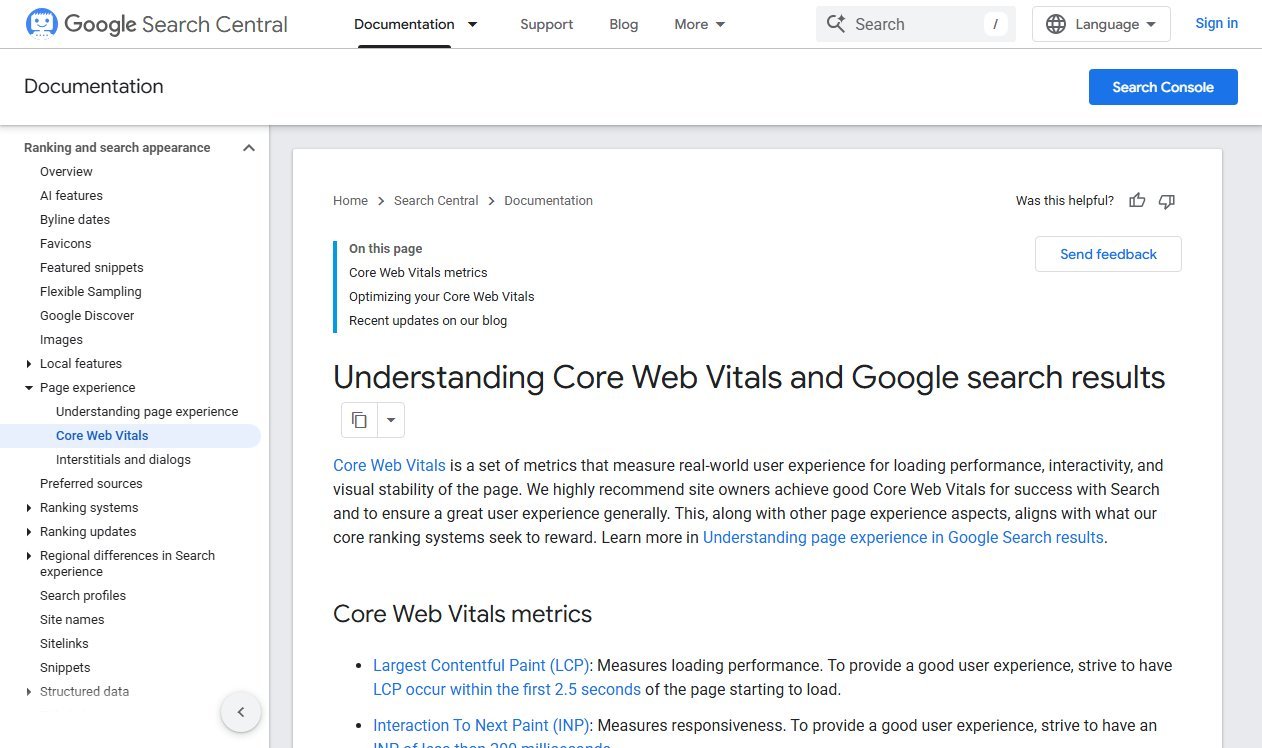
Per Google's guidance on Core Web Vitals and Search, the three metrics and their good thresholds are:
- LCP (Largest Contentful Paint) — 2.5 seconds or less. How long the main content takes to appear.
- INP (Interaction to Next Paint) — under 200 milliseconds. How quickly the page responds when someone taps or clicks.
- CLS (Cumulative Layout Shift) — under 0.1. How much the layout jumps while loading.
The detail most audits miss: these are measured at the 75th percentile of real visits. It is not enough for the page to be fast on your laptop; three quarters of real sessions have to hit the threshold.
Layer 4: Lab Data Is Not Field Data
PageSpeed Insights shows two different things on one page, and audits routinely confuse them. Here is our own homepage on desktop, audited on the day this guide was written.
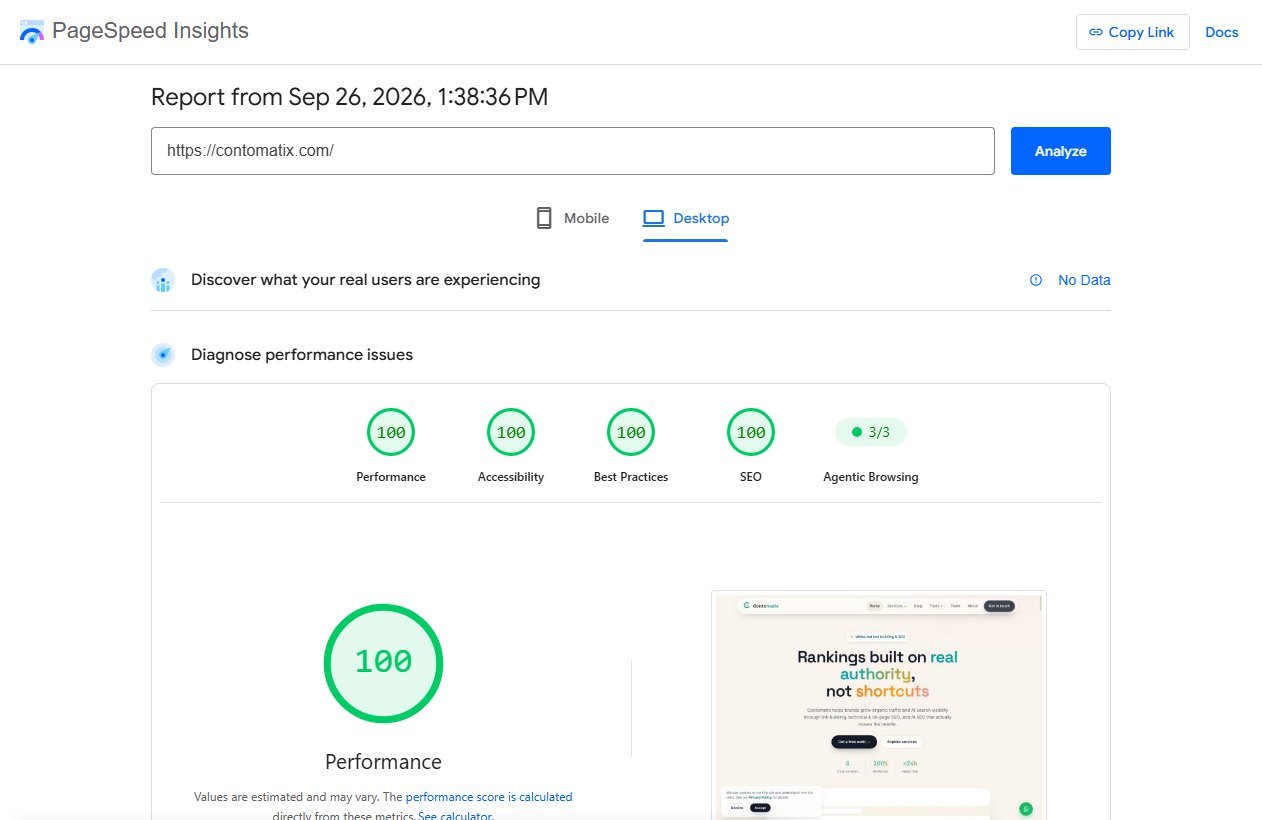
Two of those four hundreds were earned the same week, and the fixes were boring rather than clever: we removed a third-party script that loaded on every page while serving nothing, and converted the cover images to WebP. Those two changes moved mobile performance from 67 to 100 and best practices from 81 to 100. Most speed audits end with a list far longer than that and a site that is no faster.
The part of the report that is not perfect is the section at the top: "No Data". That is field data, and it comes from real Chrome users over a 28-day window. A site without enough of them simply has none, and no amount of optimisation changes that until traffic arrives.
Here is what that same section looks like on a site that does have the traffic.
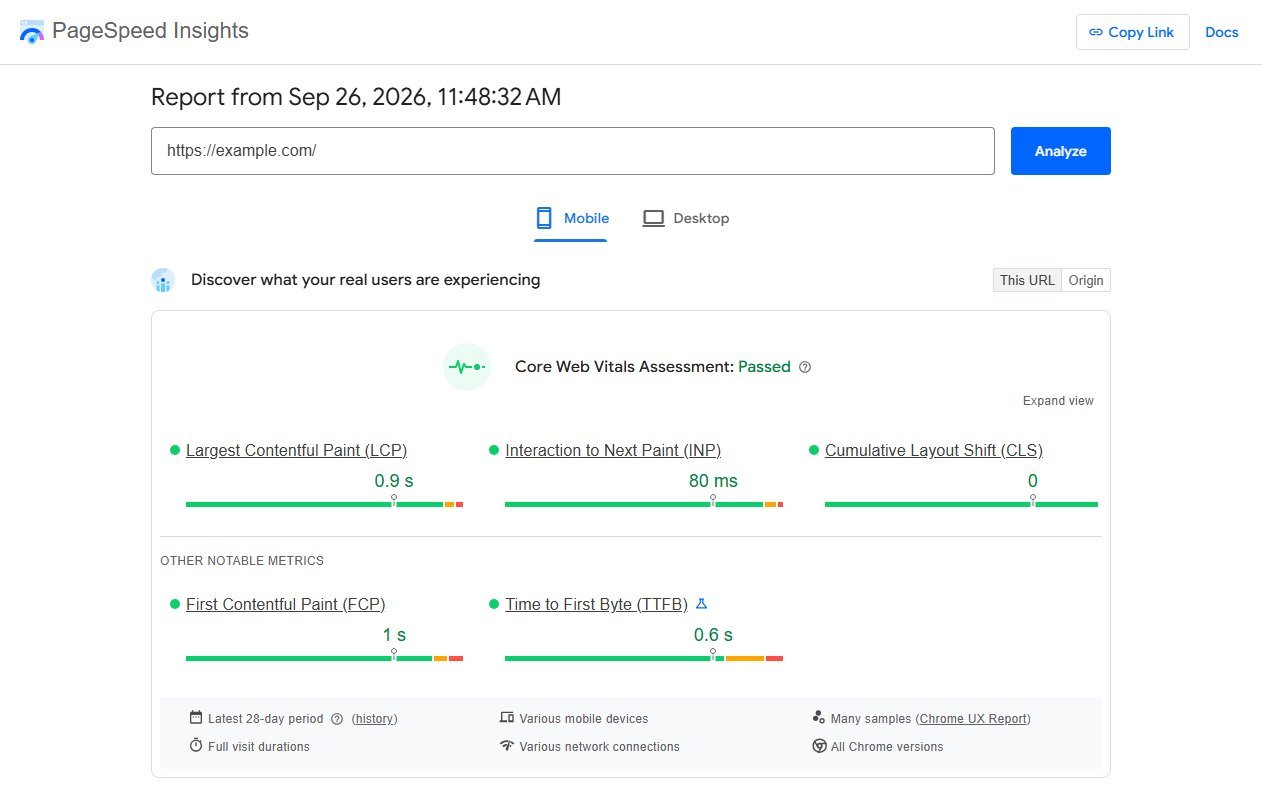
Field data is what Google actually uses. A green "Core Web Vitals Assessment: Passed" means three quarters of real visits met all three thresholds. The coloured circles below it are lab data, a single simulated load on a throttled connection — a diagnostic for finding what to fix, not a score to report as if it were a ranking.
So on a site without field data, treat speed as a fix-the-obvious job — oversized images, render-blocking scripts, third-party tags that earn nothing, missing dimensions on images — and spend the saved hours on layers 1, 5 and 6.
Layer 5: On-Page and Intent Match
This is where most of the recoverable traffic is, and it needs a human rather than a crawler.
- Title tags. Does each one contain the phrase the page targets, and would you click it against the current top ten?
- One H1 per page, describing the page rather than the brand.
- Intent match. Open the results page for your target keyword. If Google shows tools and your page is a guide, the page will not rank no matter how well written it is.
- Internal links. Every important page should be reachable in three clicks from the homepage and linked from at least two related pages.
- Cannibalisation. Two pages targeting the same phrase split the signals. Merge them, or make one clearly the primary.
Search Console's performance report finds most of this faster than a crawler: filter to queries in positions 5 to 20 and check whether the ranking URL is the page you intended. Our guide to free keyword research tools covers that export in detail.
Layer 6: Content and Off-Page, Briefly
Two checks, both quick.
Content. List every page that has had no clicks in six months. For each one, decide: improve it, merge it into a stronger page, or remove it. Doing nothing is also a decision, and it is usually the wrong one on a site carrying hundreds of thin pages.
Off-page. Count referring domains, not links, and check whether any of the links you rely on have disappeared. A full link audit is a separate job; in a site audit it is a sanity check, not a project.
Structured Data: Check It, Do Not Over-Invest
Schema markup earns its place in an audit for one reason: it can change how the result looks in search, and a result with a rating, a price or an FAQ attached takes more clicks than a plain one.
Three checks are enough.
- Is there any markup at all on the page types where it matters, usually articles, products, services and local business pages?
- Does it validate, with no missing required fields? Google’s search gallery lists which types are eligible for which appearance.
- Does it describe what is actually on the page? Markup that claims reviews or FAQs the visitor cannot see is a policy problem, not a shortcut.
What is not worth doing is marking up every entity on the site because a checklist said to. Invalid or invisible markup produces nothing, and the time is better spent on titles.
The One-Page Audit Checklist
Everything above, in the order to run it.
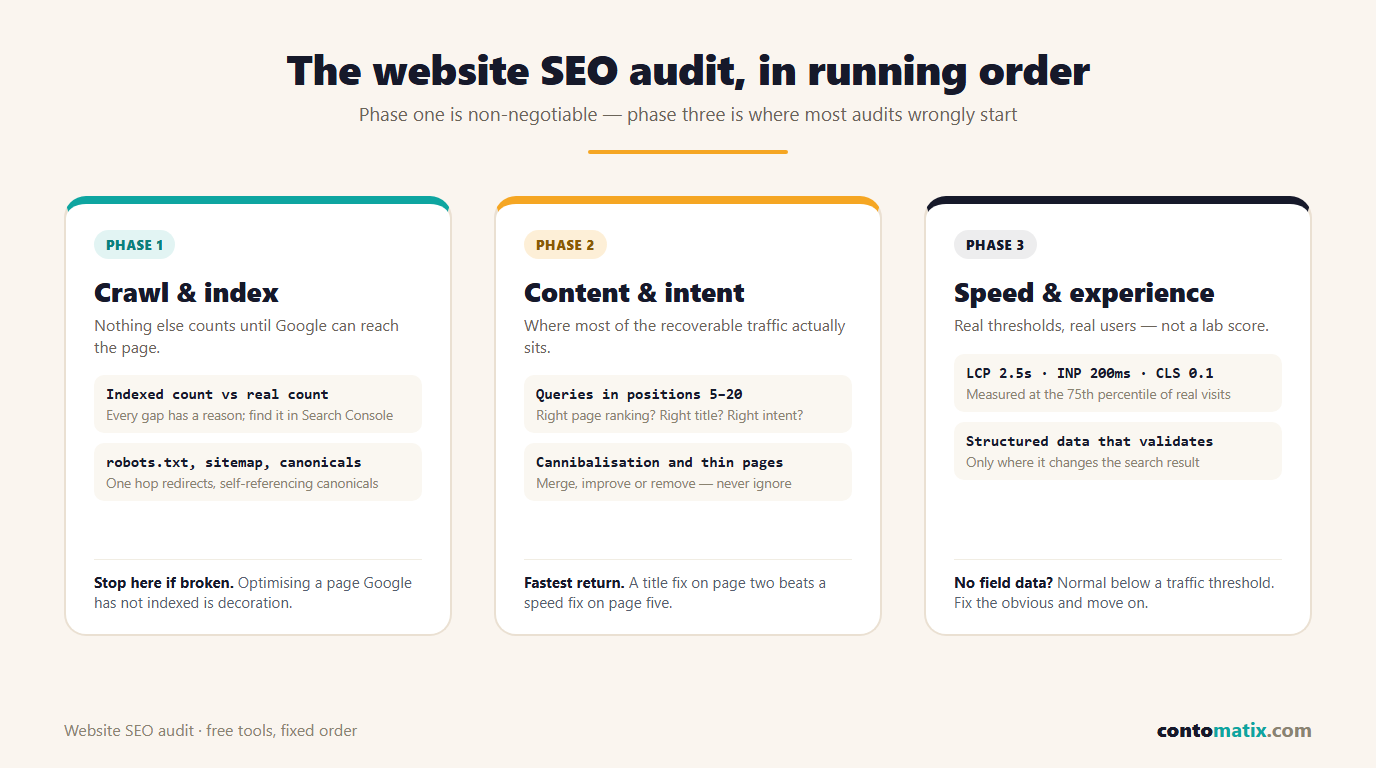
Work top to bottom and stop when you run out of time. An audit that finishes phase one properly beats one that skims all three.
What to Fix First
Rank every finding on two axes: how many sessions it affects, and how long it takes to fix. Then work the list in this order.
- Anything blocking indexing of a page that should rank. Minutes to fix, unlimited upside.
- Titles and intent mismatches on pages already in positions 5 to 20. Hours to fix, fastest visible return.
- Internal links to orphaned or under-linked money pages. Cheap and compounding.
- Cannibalisation between two pages you already own. One merge, one redirect, immediate clarity.
- Obvious speed wins such as unoptimised hero images.
- Everything else, which usually turns out to be optional.
What an Agency Audit Should Add
If you are paying for an audit rather than running one, the free version above is the baseline. A paid audit is worth the money only if it adds things you genuinely cannot do yourself.
- A crawl at scale, with every broken link, redirect chain and orphan page listed rather than sampled.
- Log file analysis, showing what Googlebot actually requested rather than what you assume it found.
- Competitor gap analysis: the queries where rivals rank and you do not, with the pages responsible.
- A prioritised roadmap with effort estimates, written so a developer can pick up a ticket without translation.
- Implementation, or at least a review after the fixes ship. An audit nobody implements is an expensive PDF.
Ask for the roadmap format before you buy. If the sample deliverable is a tool export with no ordering, you are paying for a licence someone else already owns.
How Often to Audit
A full pass twice a year is enough for most sites, with a short monthly check of three things: indexed page count, queries in positions 5 to 20, and any new errors in Search Console.
Audit out of cycle after a migration, a redesign, a CMS change or a sudden traffic drop. Those four events cause most of the indexing damage we are asked to diagnose.
The Three Reports Worth Exporting Every Month
An audit is a snapshot. What keeps a site healthy between audits is a small monthly habit, and three exports cover it.
- Page indexing. Google’s page indexing report shows which URLs are indexed and, more usefully, the reason each excluded URL was skipped. A rising “crawled, currently not indexed” count is an early warning about content quality.
- Performance, filtered to positions 5 to 20. These are the pages one improvement away from real traffic.
- Performance, compared year on year rather than month on month. Month-on-month comparisons mostly measure the calendar and make every seasonal dip look like a penalty.
Three exports, fifteen minutes, and the next audit starts with data instead of guesses.
Quick Recap
- A website SEO audit runs in layers: indexing, crawl, speed, on-page, content, off-page.
- Start in Search Console with the indexing gap, not in a crawler.
- Core Web Vitals thresholds are LCP 2.5s, INP 200ms and CLS 0.1, measured at the 75th percentile of real visits.
- Field data is what Google uses; lab scores are a diagnostic, and small sites often have no field data at all.
- Most recoverable traffic sits in titles, intent match and internal links on pages ranking 5 to 20.
- Prioritise by sessions affected against time to fix, and stop when the list stops paying.
- Full audit twice a year; monthly check of three numbers.
Frequently Asked Questions
What is a website SEO audit?
A structured review of whether search engines can crawl and index a site, whether its pages deserve to rank for what they target, and whether anything technical is holding them back. It ends with a prioritised list of fixes rather than a list of issues.
How long does an SEO audit take?
An afternoon for a small brochure site, one to two days for a few hundred pages, and a week or more for a large ecommerce catalogue. The reporting usually takes longer than the checking.
Can I do an SEO audit myself for free?
Yes. Search Console covers indexing, queries and Core Web Vitals, PageSpeed Insights covers lab performance, and a browser covers titles, headings and internal links. Paid crawlers save time on large sites but are not required.
What are the Core Web Vitals thresholds?
Largest Contentful Paint at 2.5 seconds or less, Interaction to Next Paint under 200 milliseconds, and Cumulative Layout Shift under 0.1, each measured at the 75th percentile of real user visits.
Why does PageSpeed Insights show "No Data" for my site?
Field data comes from real Chrome users over a 28-day window, and your site does not yet have enough of them for Google to report it. The lab score still works, and the field section fills in once traffic grows.
Is a low PageSpeed score a ranking problem?
Not directly. The score is a lab simulation. Google uses field Core Web Vitals as part of page experience, so a genuinely slow site on real devices is a problem, while a middling lab score on a fast site is not.
How often should a website be audited?
Twice a year for most sites, plus a short monthly check of indexed pages, striking-distance queries and new Search Console errors. Always audit after a migration or redesign.
What should I fix first after an audit?
Anything preventing indexing, then titles and intent mismatches on pages already ranking between positions 5 and 20, then internal links to important pages. Speed work comes after those unless the site is genuinely slow.
Do I need a paid tool for an SEO audit?
Only for scale. Crawling 50,000 URLs by hand is impractical, so a crawler pays for itself on large sites. On a site with fewer than a few hundred pages, the free stack covers everything that matters.
What is the difference between a technical audit and a content audit?
A technical audit asks whether pages can be crawled, indexed and rendered. A content audit asks whether the pages are worth ranking and whether any of them compete with each other. A full site audit includes both.