Last updated: October 2026
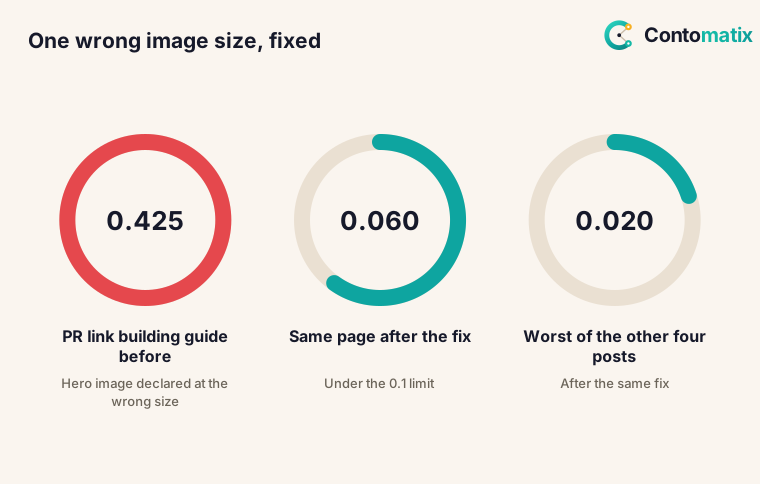
Core Web Vitals are three measurements of real-world page experience: how fast the main content loads (LCP), how quickly the page responds to input (INP) and how stable the layout is while it loads (CLS). Google's documentation asks for LCP within 2.5 seconds, INP under 200 milliseconds and CLS under 0.1. To see what that looks like in practice, we measured 13 of our own live pages three times each on 26 October 2026. Twelve were under the limit. One, a blog post published the day before, had a layout shift of 0.425, more than four times the limit, and the cause was a single wrong number in a template. After we fixed it and re-measured on 28 October, it fell to 0.060.
This guide gives you Google's thresholds, what 8 top-ranking guides say, our measurements, the bug we found, and a fix loop you can repeat on any site. For the wider technical picture, see our technical SEO guide and the free technical SEO audit tool.
Google Core Web Vitals: What They Are and What Google Says
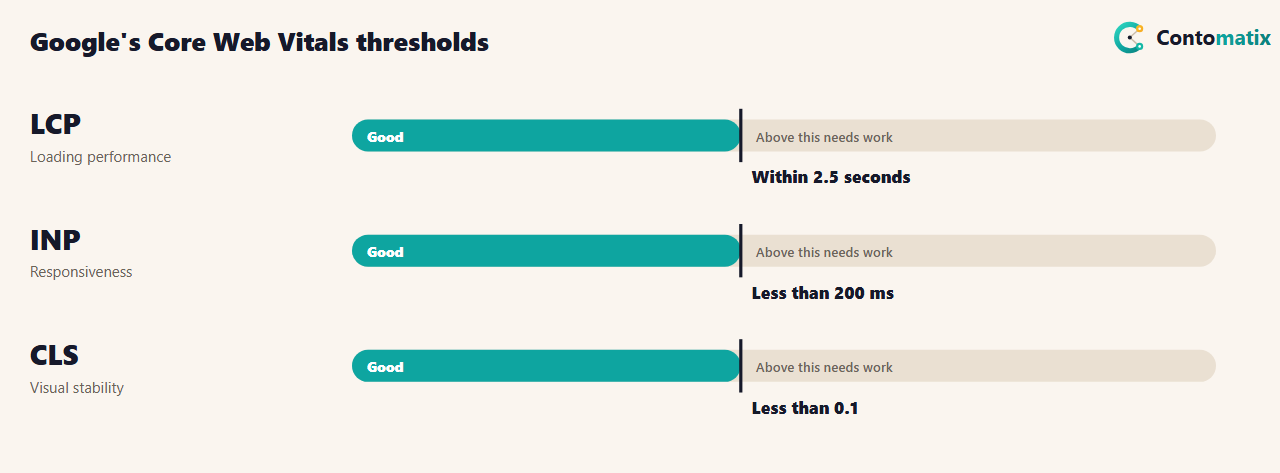
Google's page on Core Web Vitals describes them as a set of metrics that measure real-world user experience for loading performance, interactivity and visual stability. It says it highly recommends site owners achieve good Core Web Vitals for success with Search, and that this, along with other page experience aspects, aligns with what its core ranking systems seek to reward. The thresholds in the table are the "good" targets Google states. Note what the page does not do: it does not give a ranking weight or promise a ranking change. Treat Core Web Vitals as part of a good experience, not as a switch that moves a page up.
Core Web Vitals Optimization: What 8 Top Guides Cover
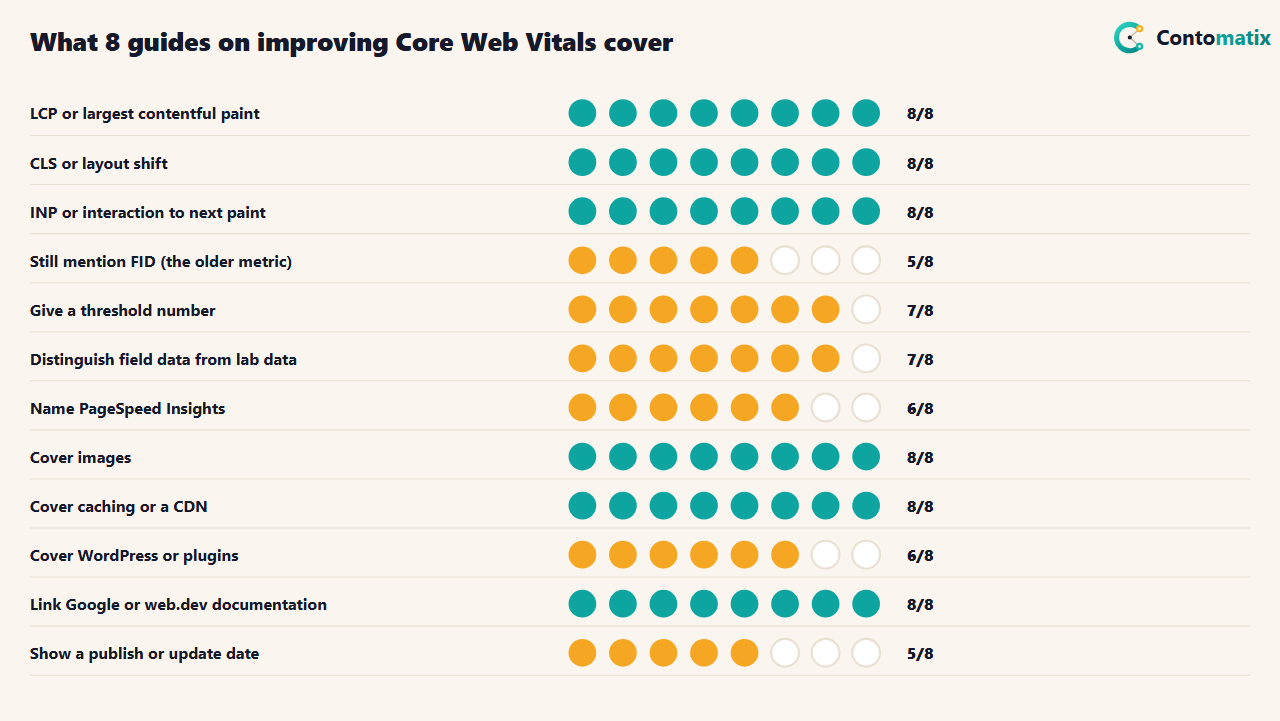
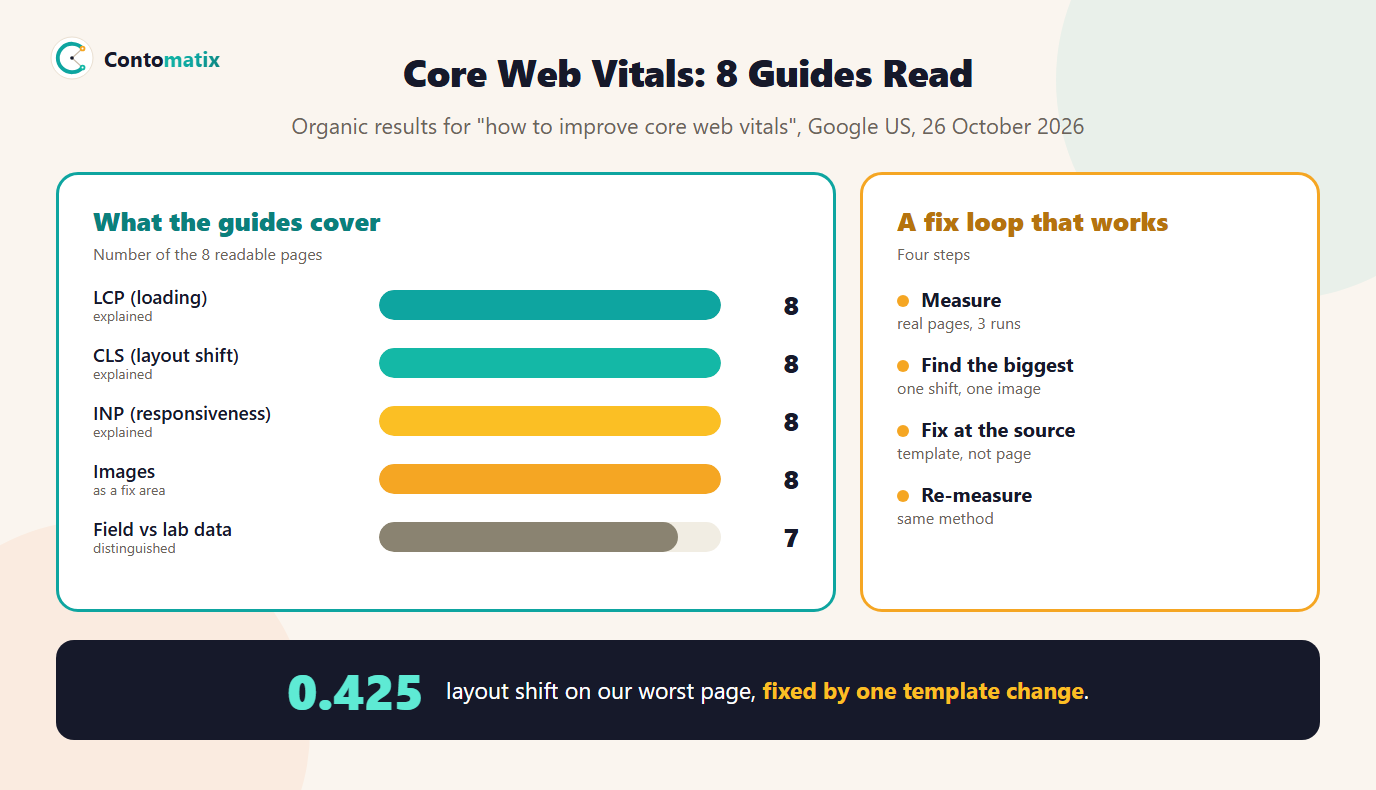
The guides cover the metrics well. LCP appears in 8 of 8, CLS in 8, INP in 8 and 7 give a threshold number. 5 of 8 still mention FID, the older responsiveness metric that INP replaced. 8 of 8 cover images, 8 cover caching or a CDN and 6 cover WordPress. 7 of 8 separate field data from lab data, which matters because a lab test and real visitors can tell different stories. 8 of 8 link to Google or web.dev documentation and 5 show a date. They run a median of 2,734 words.
What most do not show is a measured example on a real site with the numbers before and after. That is what the next section adds.
Core Web Vitals Issues We Found on Our Own Site
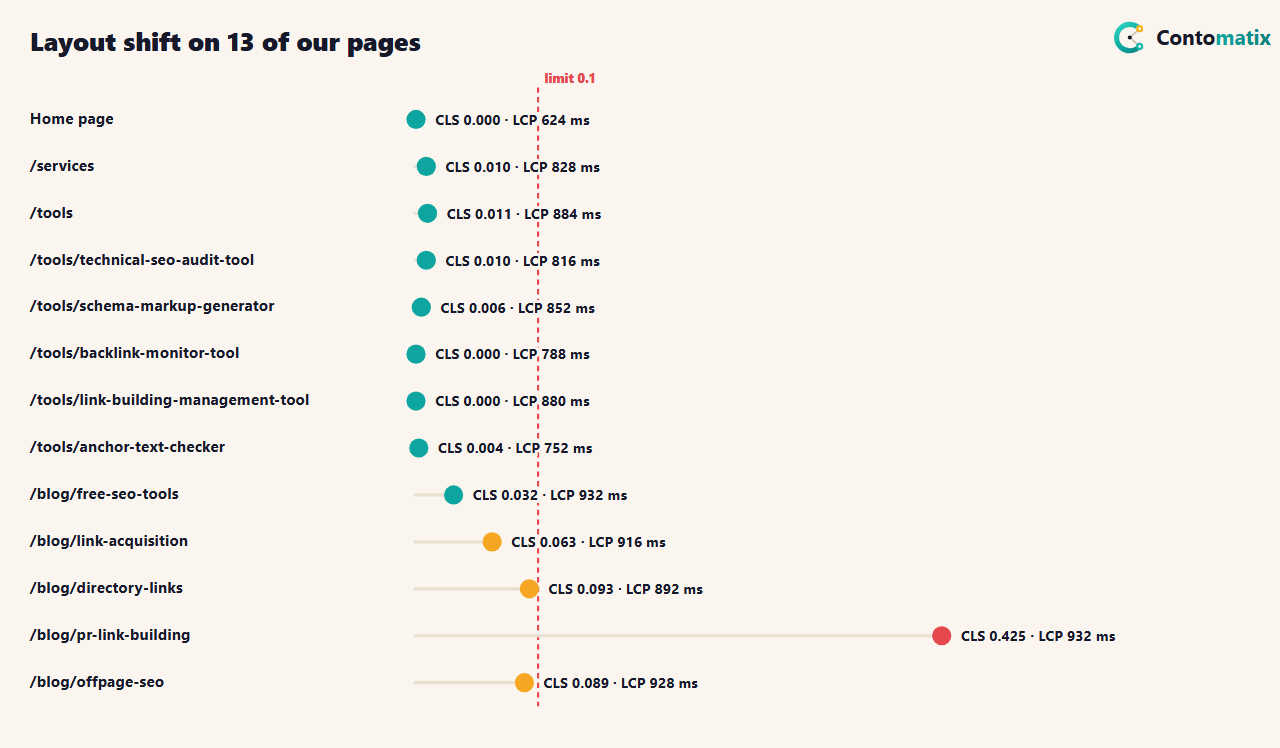
We ran each page three times in headless Chrome on a desktop connection with no throttling and took the median. This is a lab test, not field data, so it shows relative problems, not what every visitor sees. Results: the slowest LCP was 932 ms and the worst total blocking time was 9 ms, well inside Google's targets. For layout shift, 8 pages scored under 0.03, 4 blog posts scored between 0.03 and 0.1, and 1 page, our PR link building guide, scored 0.425.
No loading metric was a problem. The only failure was visual stability, and it appeared on blog posts, not tools or the home page. That narrowed the search to one template.
The Bug: A Wrong Size on a Hero Image
We logged the layout shift entries on the worst page. There was a single shift, about 0.9 seconds in, where the main container grew by 66 pixels as the hero diagram loaded. The template declared every hero diagram as 700 by 620 pixels, but the diagrams are SVG files with their own aspect ratios. The browser reserved space for a 700 by 620 image, then rearranged the page when the real image arrived. We checked the hero diagrams of all 347 posts that have one: 173 are 760 by 560, 90 are 700 by 620, and 84 use other ratios. Only 90 of 347, about 26 percent, matched the declared size, which explains why shifts of different sizes appeared on different posts.
The fix is small and sits in the template, not in each post: read each SVG's viewBox once and write the real width and height into the image tag. We deployed the change on 28 October 2026 and confirmed that the pages now declare the right size, for example 760 by 560 for the PR guide. Then we re-ran the same measurement on the live site.
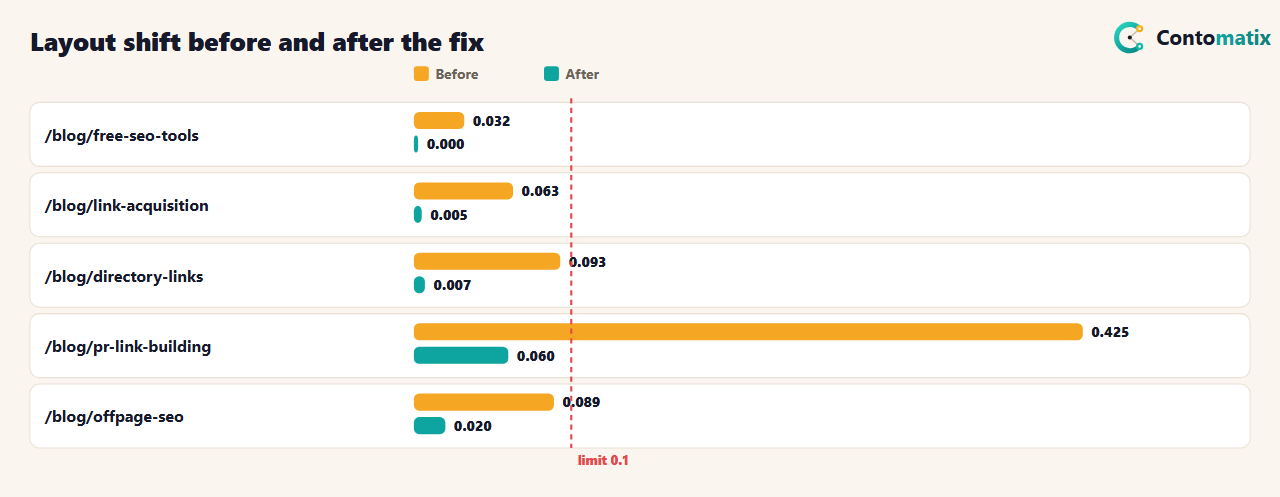
Result: the worst page fell from 0.425 to 0.060, and all 5 of the five blog posts improved, with none over the 0.1 limit. One shift of 0.060 remains on the PR guide, which we have not yet traced, so we do not claim a perfect score. LCP and blocking time moved around between the two runs by more than the CLS change did (the test machine was busier on the second day), so we treat those differences as noise, not as a regression or a gain.
How to Improve Core Web Vitals: A Fix Loop You Can Repeat
- Measure real pages, more than once. Use PageSpeed Insights for field data where your site has it, and a lab run for debugging. Take three runs and use the median.
- Find the biggest single problem. For CLS, log the shift entries and see which element moved. For LCP, find the LCP element. For INP, look for long tasks. One cause often explains most of the score.
- Fix it at the source. A template fix beats 300 page fixes. Reserve space with correct width and height, or use CSS aspect-ratio.
- Re-measure with the same method. Compare like with like, and note the date.
- Check Search Console. The Core Web Vitals report shows how your pages perform for real users and groups similar URLs, so one template fix can clear a whole group.
Keep a short log of each change: the date, the page or template, what you changed and the before and after numbers. After a few months the log shows you which fixes were worth the time, and it is the evidence you can show a client or a colleague when they ask why a score moved. It also protects you from a common trap, which is a new plugin or design change quietly undoing an earlier fix.
Improve Core Web Vitals by Metric: LCP, INP and CLS
- LCP (target 2.5 seconds). Make the largest element load first: compress and size the hero image, preload it if it is the LCP element, avoid lazy-loading it, serve it from a cache or CDN, and cut render-blocking CSS and scripts. On our blog posts the LCP element was an image, on tools it was a heading or paragraph.
- INP (target under 200 ms). Break up long JavaScript tasks, remove or defer scripts you do not need, and limit third-party code. Our worst total blocking time was 9 ms because the pages ship little script.
- CLS (target under 0.1). Give every image, embed and ad slot explicit width and height or an aspect ratio, reserve space for banners and late content, and avoid font swaps that change line breaks. Our whole problem was image dimensions that did not match the file.
How to Measure Core Web Vitals Without Being Misled
6 of 8 guides name PageSpeed Insights, and it is a good place to start, as long as you read it carefully. The top of the report shows field data when Google has enough real-user visits for your page or origin, and the lower part shows a lab run. Field data tells you how real visitors experienced the page over a rolling window. The lab run is one simulated load that is useful for finding causes. If the two disagree, trust field data for the question "is there a problem?" and the lab run for "what is causing it?". A new or low-traffic site may show no field data at all, in which case the Core Web Vitals report in Search Console may also be empty. That is not a failure. It means you should keep testing in the lab and wait for data to build.
4 of 8 guides distinguish lab tools such as Lighthouse from field sources, and 7 mention field data in some form. When you report results to a client, say which kind you used and when you measured, because a lab score changes with the test machine and the day.
A Worked Example: Fixing a Late-Loading Image
- Observe. The layout-shift log showed one entry, 0.425, at about 0.9 seconds, with the main container growing from 235 to 301 pixels.
- Identify. The only element that changes size at that moment is the hero diagram, an SVG whose tag said 700 by 620.
- Confirm. The SVG's viewBox was 760 by 560. A mismatch like that makes the browser change the image's height when the file arrives.
- Fix. Read the viewBox when the page is built and write that width and height into the image tag.
- Verify. Check the HTML for the right dimensions, then re-measure on the live site after deployment.
Total time to find the cause was minutes once we looked at the shift entry instead of guessing. The lesson applies to LCP and INP too: start from the evidence the browser gives you, not from a generic checklist.
Core Web Vitals for WordPress and Plugin Sites
6 of 8 guides cover WordPress, and the pattern is common: many plugins each add their own CSS and JavaScript, images upload at full size, and the theme decides the markup. The levers are the same as anywhere else. Serve correctly sized images with width and height, keep the number of plugins that load on every page small, defer scripts you do not need above the fold, and use caching. If your CMS generates image tags, check what dimensions it writes, because a wrong declared size is exactly what produced our shift.
Third-Party Scripts
7 of 8 guides mention JavaScript or third-party scripts. Analytics, chat widgets, cookie banners and embeds can each add blocking time or move content. Our pages load little script, which is why total blocking time stayed under 10 ms. Audit what loads on a page, remove what you do not use, and load the rest after the main content. If a script has to load early, give its container a fixed size so nothing moves when it arrives.
Common Core Web Vitals Mistakes
- Trusting one number from one run. Results vary. Use medians and note whether it is lab or field.
- Fixing page by page. If the same problem appears across a template, fix the template.
- Setting image sizes by guess. A declared size that does not match the file causes shift. Read the real dimensions.
- Chasing a perfect score. Google's targets are thresholds for "good". Beyond them, spend time on content.
- Ignoring field data. A site with few visitors may have no field data yet. Keep testing in the lab and check Search Console as traffic grows.
- Quoting Core Web Vitals as a guaranteed ranking boost. Google says they align with what its ranking systems seek to reward, not that a score change moves rankings by a set amount.
How We Read the Data
- Guide data comes from the organic results for "how to improve core web vitals" on Google US, 26 October 2026. 8 were listed and all returned a readable page. A topic counts once per page when its term appears in the text.
- Google's thresholds come from its Core Web Vitals page in Search Central, read the same day.
- Our measurements used headless Chrome on one desktop machine with no network or CPU throttling, against the live site, three runs per page. They are lab results. LCP came from the LCP performance entry, CLS from layout-shift entries without recent input, and TBT is the sum of long-task time over 50 ms.
- The hero-image analysis counts the SVG viewBox ratios of the diagrams used by our 347 posts that have one.
Key Takeaways
- Google's good targets are LCP within 2.5 seconds, INP under 200 ms and CLS under 0.1.
- On 13 of our own pages, loading and responsiveness were fine; the one failure was a layout shift of 0.425.
- The cause was a template that declared a wrong size for 257 of 347 hero diagrams. After the fix, the worst page fell from 0.425 to 0.060 and all five blog posts we re-measured improved.
- Fix problems at the source and re-measure with the same method.
- Do not promise a ranking change from a better score.
Frequently Asked Questions
What is Core Web Vitals?
They are three measurements of page experience: LCP for loading, INP for responsiveness and CLS for visual stability.
What are good Core Web Vitals scores?
Google says to aim for LCP within 2.5 seconds, INP under 200 milliseconds and CLS under 0.1.
Do Core Web Vitals affect SEO and rankings?
Google says good Core Web Vitals align with what its core ranking systems seek to reward and recommends them for success in Search, but it does not give a fixed ranking effect.
How do I improve LCP?
Make the largest element load first: size and compress the hero image, avoid lazy-loading it, use caching or a CDN and reduce render-blocking resources.
How do I fix layout shift?
Give images, embeds and ads explicit width and height or an aspect ratio, and make sure the declared size matches the real file.
How do I measure Core Web Vitals?
Use PageSpeed Insights and the Core Web Vitals report in Search Console for real-user data, and a lab test for debugging.
What replaced FID?
Interaction to Next Paint (INP) replaced First Input Delay as the responsiveness metric.
Why is my lab score different from Search Console?
A lab test is one simulated load. Search Console shows real visitors over time, so the two can differ.
What is the quickest fix for a poor CLS?
Find the element that moved, usually an image or late-loading block, and reserve its space with the correct dimensions. See our technical SEO audit tool for other checks.


