Last updated: October 2026
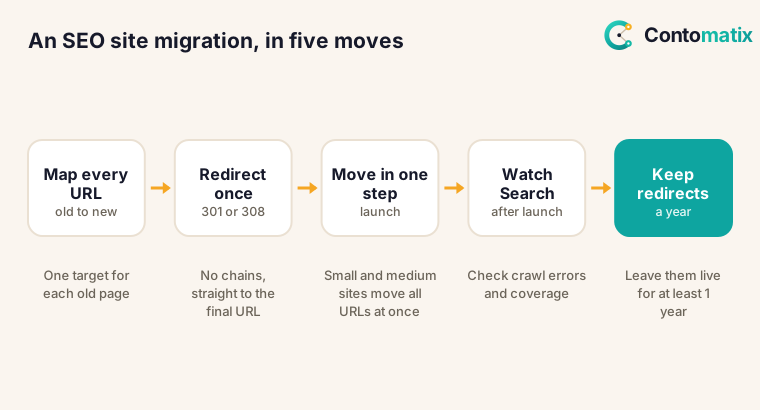
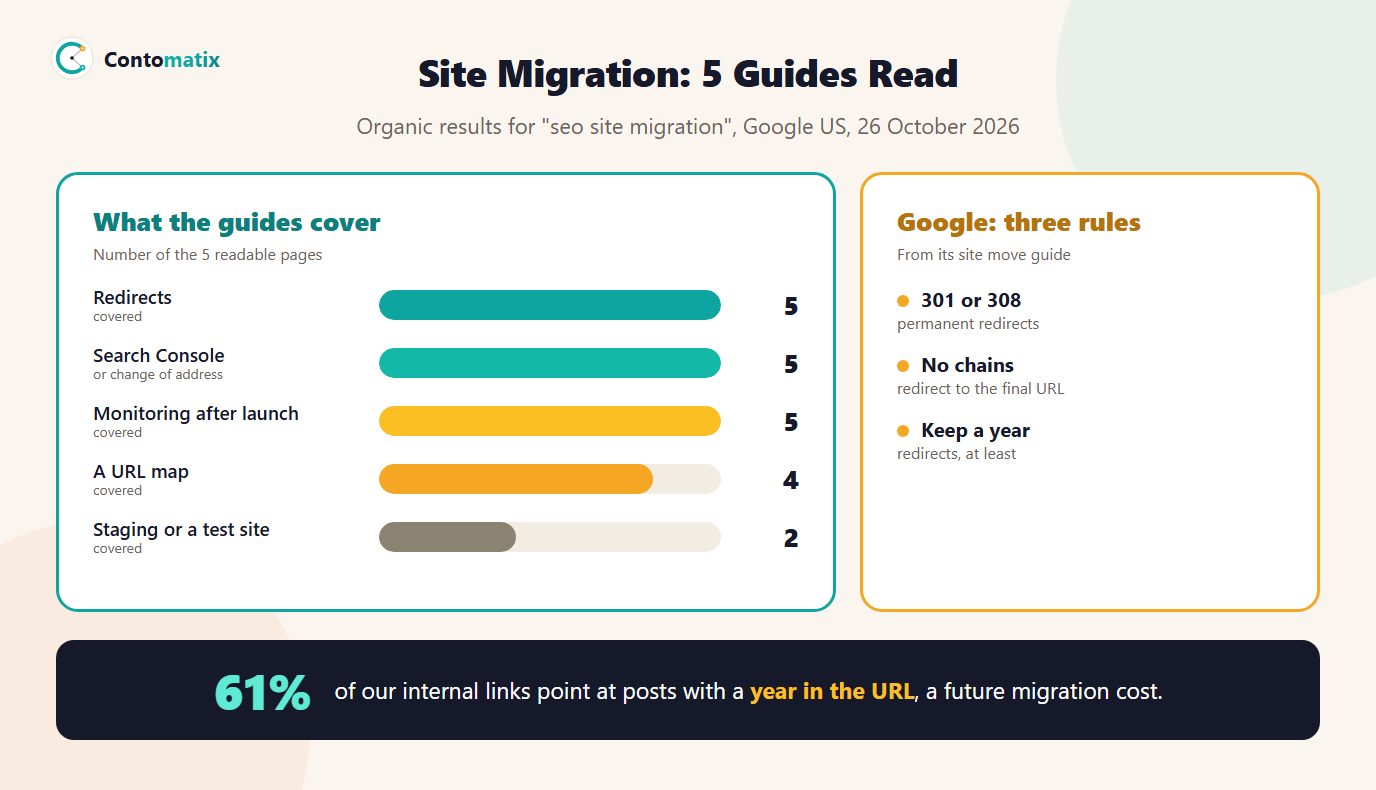
An SEO site migration is any move that changes how search engines reach your content: a new domain, HTTP to HTTPS, a new URL structure or a new platform. Google's own guidance on site moves with URL changes gives clear rules: use server-side permanent redirects such as 301 or 308, avoid redirect chains, move small and medium sites all at once, change one thing at a time, and keep the redirects for as long as possible, generally at least one year. We read 5 ranking pages for the topic on 26 October 2026, and all 5 cover redirects, but 0 mention hreflang and only 2 link to Google's guidance.
This guide turns Google's rules into a before, during and after checklist, compares them with what the ranking pages say, and shows from our own data why a URL plan matters: 239 of our 347 posts have a year in the URL, and 785 of our 1285 internal blog links point at them. For the tools, see the redirect mapper, the sitemap URL extractor and our guide to creating a sitemap.
What Is Site Migration in SEO?
Google's guide lists examples of site moves with URL changes: a change from HTTP to HTTPS, a domain name change, and changes to the URL structure. Moves without URL changes, such as switching hosts, are simpler because the addresses stay the same. The rules below apply when URLs change, which is where most ranking losses happen. 4 of 5 ranking pages also treat a domain change as the main case.
SEO Site Migration: What 5 Ranking Pages Cover
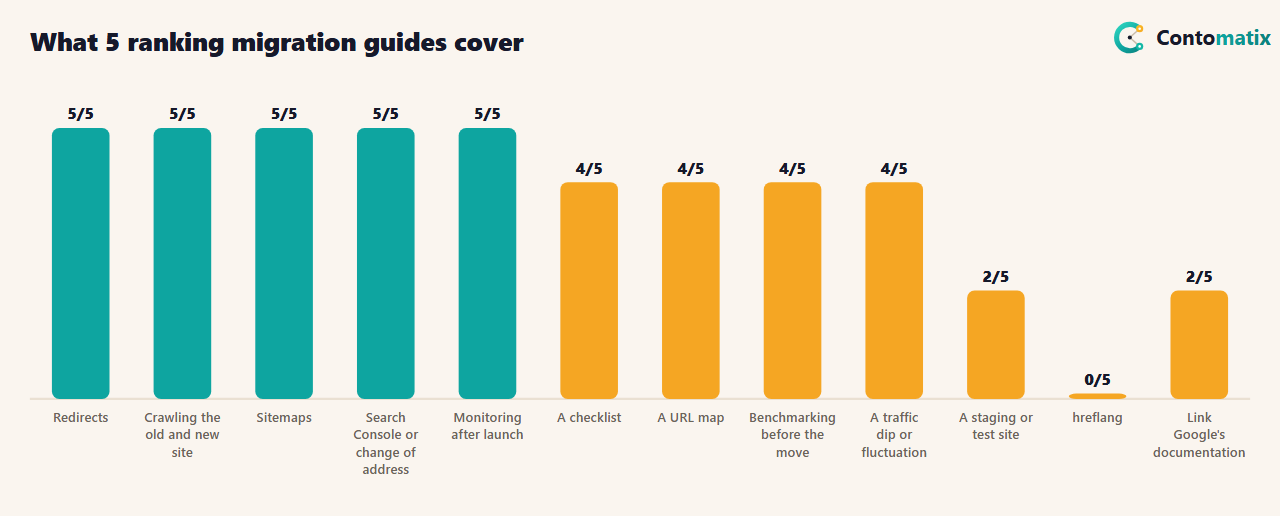
The pages agree on the core: redirects, crawling both versions, sitemaps, Search Console and monitoring each appear in 5 of 5. 4 of 5 explain a URL map, 4 say to benchmark before the move and 4 warn of a temporary traffic dip. 2 of 5 mention a staging site, 4 cover backlinks and 5 name tools. Two of the eight listed pages blocked our request and one was a forum thread, so we do not count them. The 5 readable pages run a median of 3,924 words, and 1 shows a date.
What is thin is the primary source: 2 of 5 link to Google's documentation and 0 name its policies. That matters because Google's guide has specific, checkable rules, which we set out next.
Site Migration Guide: Google's Site Move Rules
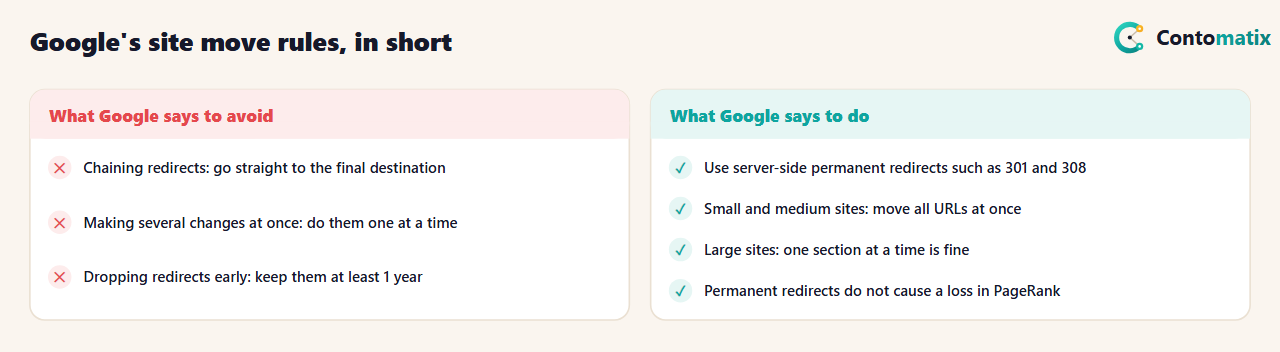
The rules in the table are quotations and close paraphrases from Google's guide. Three deserve emphasis. First, Google recommends server-side permanent redirects, and says that 301 and other permanent redirects do not cause a loss in PageRank, so a correct redirect is not a ranking cost. Second, it says to avoid chaining redirects: Googlebot can follow up to 10 hops, but you should redirect straight to the final destination, because chains add latency and not every browser supports long ones. Third, it asks you to keep the redirects for as long as possible, generally at least one year, so that Google can transfer signals to the new URLs, including reassigning links on other sites. A redirect that you remove after a few weeks undoes the benefit.
SEO Site Migration Checklist: Before, During and After
Before the move
- Benchmark. Record organic traffic, top pages, indexed pages and rankings for your main keywords. 4 of 5 guides recommend it.
- List every URL. Use your CMS, your sitemap and Search Console's list of linked pages. The sitemap URL extractor pulls a clean list from your current sitemap.
- Map old to new. Decide where each old URL redirects. Google suggests tools such as a database or URL rewrite rules for common patterns. The redirect mapper matches URLs, flags weak matches and exports Apache or Nginx rules.
- Build on staging. Test redirects, canonical tags and robots rules before launch. Check canonicals with the canonical tag checker and robots rules with the robots.txt tester.
- Set up Search Console. Verify both the old and the new site, including HTTP and HTTPS and www variants where relevant, and make sure verification survives the move.
- Prepare the new sitemap. It should list only the new URLs. Validate it with the sitemap validator.
During the move
- Change one thing at a time. Google's example: move to a new domain, then change the layout, not both at once.
- Turn on server-side 301 or 308 redirects from each old URL to its mapped new URL, straight to the final destination.
- Move small and medium sites all at once; large sites can move in sections.
- Update internal links and canonicals so each new URL has a self-referencing canonical and links point to new URLs, not through redirects.
- Submit the new sitemap.
After the move
- Monitor both sites. Watch traffic, crawl errors and the Sitemaps report in Search Console for both.
- Crawl the old URLs. Check that each one reaches its target in one hop with a permanent status. See our guide to robots.txt blocks if crawling is blocked.
- Update external links and profiles you control, such as social profiles, directories and citations. See directory links.
- Re-upload any disavow file for the new site, if you had one. Our disavow guide explains when to use it.
- Keep the redirects at least one year, and longer if old URLs still get links or visits.
What Our Own URLs Say About Migration Risk
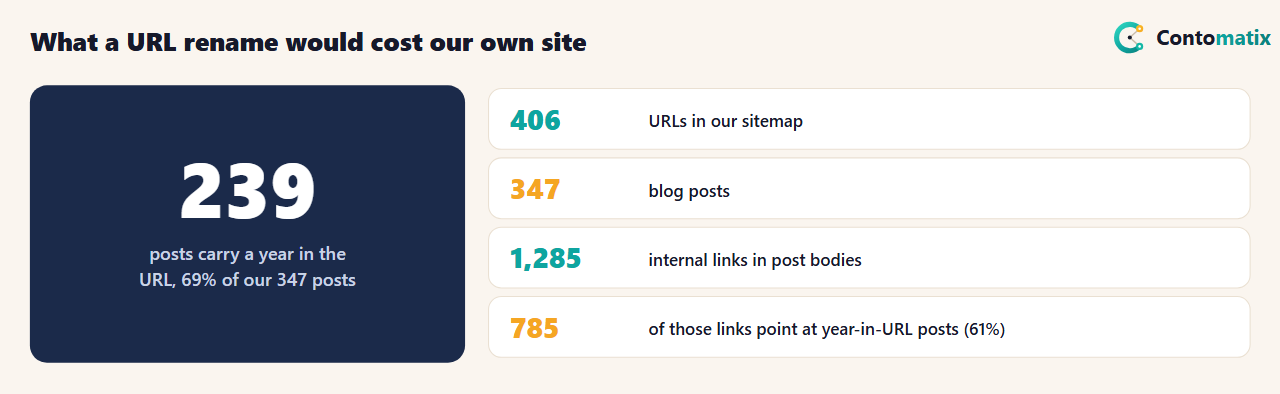
We checked our own data on 26 October 2026. 239 of our 347 blog posts (69%) have a year in the URL, such as 2026. Of the 1285 internal links inside post bodies, 785 (61%) point at those posts, and all 239 of them are linked from at least one other post. We maintain 1 redirect rule today. If we renamed those URLs to remove the year, we would need 239 redirects, we would need to update up to 785 internal links so they do not pass through redirects, and we would need to keep all of it for a year or more.
The lesson is not that years in URLs are wrong, but that URL choices are migration debt. Every URL that other pages link to becomes an item on a future redirect map, so choose URLs you can live with, and do not rename without a reason. We have no plan to rename ours.
How to Build the URL Map for a Site Migration
4 of 5 guides mention a URL map, and Google's guide gives the method. Start with a full list of old URLs, then decide where each should redirect. Google's guide suggests getting URLs from several sources: the URLs that get the most traffic, the pages with internal and external links shown in Search Console, and a listing from your content management system. Together they cover pages that rank, pages that earn links and pages nobody checks.
- Group by pattern. If the move is a clean rule, such as a domain change that keeps paths, one wildcard server-side redirect handles it, as Google's guide notes.
- Handle exceptions by hand. Pages that merge, split or disappear need individual decisions. A page with no equivalent should redirect to the closest relevant page, not to the home page.
- Prioritise by value. Check your top pages by traffic and by links first. Losing a redirect on a page that earns links costs more than on a page nobody visits.
- Review the weak matches. The redirect mapper flags low-confidence matches so you can check them.
- Keep the map. It is your audit trail after launch and your to-do list for cleaning up chains later.
How to Test Redirects After a Site Migration
- Sample before launch. Test a few URLs from every pattern on staging and confirm that each reaches the right page in a single hop with a permanent status.
- Crawl the full list after launch. A crawler that follows redirects shows chains, loops and wrong targets. 5 of 5 guides name tools for this.
- Check the status code. Use 301 or 308. Temporary redirects tell search engines the old URL may return.
- Check internal links. Links inside your site should point straight to the new URLs so users and crawlers do not pass through redirects every time.
- Check canonical tags and sitemaps. Each new page should have a self-referencing canonical, and the sitemap should list new URLs only.
- Read the Search Console reports for both properties, including the Sitemaps report that shows how many submitted URLs are indexed.
Special Cases
- HTTP to HTTPS. Google's guide lists it as a site move. Get the certificate configured first, redirect HTTP URLs to the HTTPS versions and verify the HTTPS variants in Search Console.
- Domain change. 4 of 5 guides discuss it. Move one thing at a time, redirect old URLs to the same paths on the new domain where possible, and update links and profiles you control.
- New platform with the same URLs. If addresses do not change, the risk is lower, but check canonicals, robots rules, redirects, structured data and page speed on the new platform before launch.
- Merging sites. Map each old page to the most relevant new page and expect a longer review period, because you are changing content as well as URLs.
Site Migration Checklist: An Example Timeline
Google gives no fixed schedule, so this is our own planning template, not a promise of results.
- Weeks 1 to 2: benchmark, list URLs, decide scope.
- Weeks 3 to 4: build the URL map, prepare staging, set up Search Console.
- Week 5: test redirects and canonicals, validate the new sitemap, brief everyone on the launch plan.
- Launch day: switch on redirects, submit the sitemap, crawl the old URLs, check key pages by hand.
- Weeks 1 to 4 after: monitor daily at first, fix errors, update links you control.
- Months 2 to 12: review monthly and keep the redirects in place for at least a year.
Common Site Migration Mistakes
- Redirecting everything to the home page. Map each old URL to its closest new page. Google's guide asks for a mapping of old to new URLs.
- Redirect chains. Redirect old URLs straight to the final URL, and fix internal links so they skip redirects.
- Changing too much at once. Domain, platform and design together make problems hard to trace.
- Blocking the new site by mistake. Staging noindex tags or robots rules sometimes reach production. Test before and after launch.
- Removing redirects early. Keep them at least a year.
- Not watching Search Console. A spike in not-found errors after a move is a sign of a missing redirect.
- Forgetting hreflang. 0 of 5 guides mention it. If you have language or country versions, update the annotations to the new URLs. See our hreflang generator.
What to Expect After a Move
4 of 5 guides warn of a temporary dip or fluctuation. Google's guide says that for small and medium sites, moving all URLs at once helps its algorithms detect the move and update its index faster. We found no promise of a timeline in the guide, so do not trust a fixed number of weeks from any source. Measure against your benchmark, look at the Sitemaps report and the indexing reports for both versions, and investigate any page that does not appear in the new location.
How We Read the Data
- Page data comes from the organic results for "seo site migration" on Google US, 26 October 2026. 8 were listed; 5 returned a readable page (two blocked our request and one was a forum thread). A topic counts once per page when its term appears in the text.
- Google's rules come from its guide on site moves with URL changes, read in English on the same day.
- Our own counts come from our blog data, the redirect rules in our site config and our sitemap on 26 October 2026.
Key Takeaways
- Use server-side 301 or 308 redirects to the final URL, with no chains, and keep them at least a year.
- Permanent redirects do not cause a loss in PageRank, according to Google.
- Map every URL, change one thing at a time and watch Search Console on both sites.
- Only 2 of 5 ranking pages link Google's guide, so read it yourself.
- URLs that other pages link to are migration debt: 61% of our internal links point at year-in-URL posts.
Frequently Asked Questions
What is site migration in SEO?
It is a move that changes how search engines reach your content, such as a domain change, HTTP to HTTPS, a new URL structure or a platform change.
Which redirect should I use in a site migration?
Google recommends server-side permanent redirects such as 301 and 308 from each old URL to its new URL.
Do 301 redirects lose PageRank?
Google's site move guide says 301 and other permanent redirects don't cause a loss in PageRank.
How long should I keep redirects after a migration?
Google says to keep them for as long as possible, generally at least 1 year, so it can transfer signals to the new URLs.
Should I avoid redirect chains?
Yes. Googlebot can follow up to 10 hops, but Google advises redirecting to the final destination directly.
Should I move my site all at once?
Google recommends moving all URLs at once for small or medium sites. Large sites can move one section at a time.
Will my traffic drop after a migration?
It can dip temporarily. Four of the five guides we read warn of this. Benchmark first and compare against it.
What tools help with a site migration?
A redirect mapper, a sitemap URL extractor, a sitemap validator, a robots.txt tester and a canonical tag checker, plus Search Console for monitoring.
Do I need a staging site?
It is wise to test redirects, canonicals and robots rules before launch. Two of the five guides mention staging.


