Last updated: October 2026
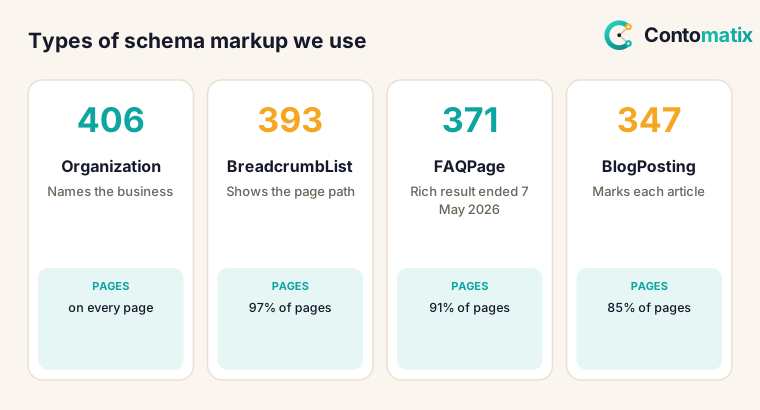
Schema markup is structured data, usually written as JSON-LD, that labels the things on a page so search engines can understand them: an organization, an article, a product, a question and answer. To show you what real use looks like, we scanned the JSON-LD on all 406 URLs in our live sitemap on 26 October 2026. Every page carries Organization markup, 393 carry BreadcrumbList and 371 carry FAQPage. The last number needs a warning: Google's documentation says the FAQ rich result stopped appearing in Search from 7 May 2026.
This guide covers the main types of schema markup, what 8 top-ranking guides say, what we found on our own site, which types Google has dropped, and how to choose. To create and check markup, use our free schema markup generator and schema markup validator. For the wider technical picture, see our technical SEO guide.
What Is Schema Markup and How Google Reads It
Google's introduction to structured data says it uses structured data to understand the content on a page and to show it in a richer appearance called a rich result. It says all three formats, JSON-LD, microdata and RDFa, are equally fine for Google as long as the markup is valid and implemented per the feature's documentation, and recommends the one that is easiest for you to implement and maintain, which in most cases is JSON-LD. 7 of 8 ranking pages recommend JSON-LD and 6 mention microdata or RDFa. On our site, every page uses JSON-LD and none uses microdata.
Types of Schema Markup: What 8 Top Guides Say
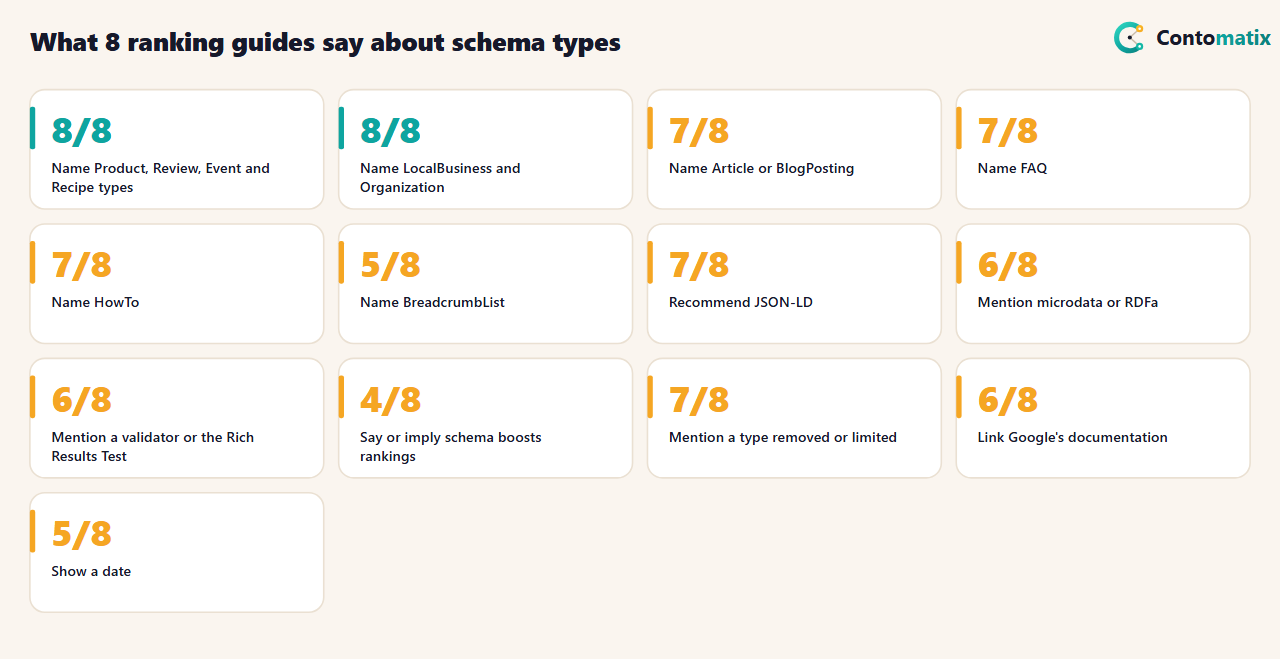
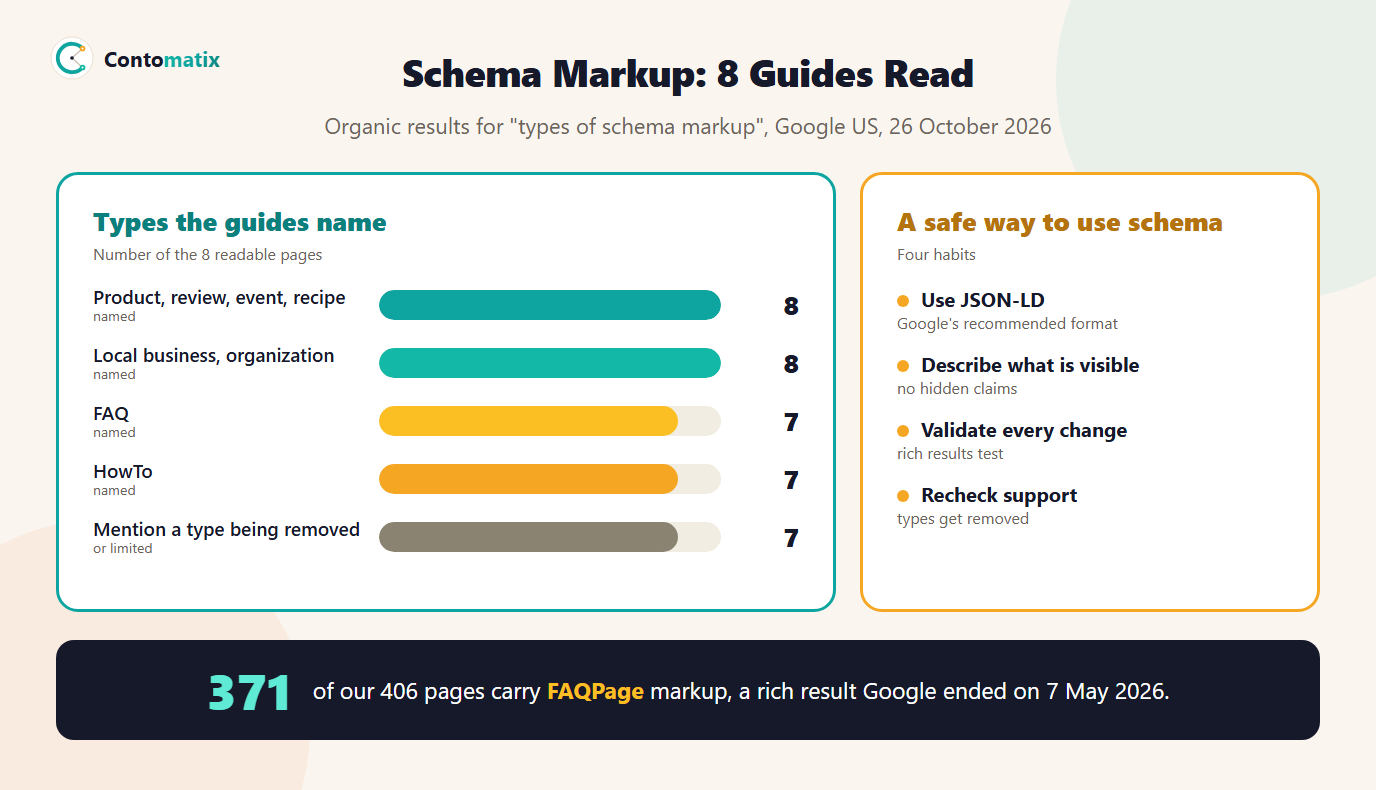
The guides name the same types: Product, Review, Event, Recipe, LocalBusiness and Organization in all 8, Article or BlogPosting in 7, FAQ in 7 and HowTo in 7. 7 of 8 mention that some types have been removed or limited, which shows how fast this area changes. 6 point to a validator or the Rich Results Test and 6 link to Google's documentation. Worth noting: 4 of 8 say or imply that schema improves rankings. We found no support for that in the Google pages we read. Google describes structured data as a way to understand content and show rich results, which is not the same thing. They run a median of 3,239 words and 5 show a date.
What We Found on Our Own 406 Pages
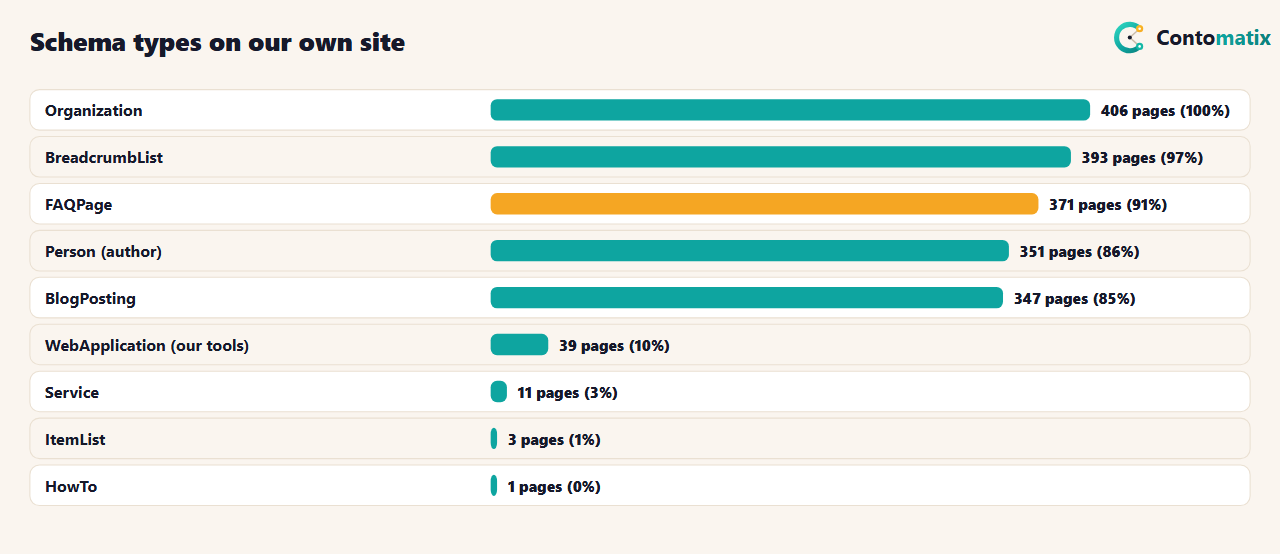
Our markup follows our page types. Every one of the 406 pages has Organization (our publisher information). 347 blog posts carry BlogPosting with a Person author (351 pages), 393 pages have a BreadcrumbList, our 39 tool pages use WebApplication, 11 service pages use Service and the home page adds WebSite with a search action. 371 pages carry FAQPage: 322 of our 347 blog posts and every tool page. We also checked that every JSON-LD block parses. One page, our schema generator, only appeared to fail, because it contains the text of a script tag inside its own code, not a real block.
This is a small, specific picture of one site, not a benchmark. It does show the pattern most small sites will follow: a handful of types, matched to the kind of page.
Schema Markup Types and When to Use Them
- Organization. Name, logo, URL and profiles for your business. Put it on every page or on your home and about pages. 8 of 8 guides cover it.
- LocalBusiness. For a business with a location or service area: address, hours, phone. 8 of 8 cover it. It pairs with an accurate Business Profile.
- Article and BlogPosting. For posts and news: headline, author, dates, image. We use BlogPosting on all 347 posts.
- Person. Authors and team members. We use it for every author.
- BreadcrumbList. The path to the page. 5 of 8 guides name it, and it helps show a clear site structure.
- Product and Review. For items for sale and genuine reviews. Only mark up what is visible on the page, and never invent ratings.
- Event and Recipe. For events and recipes, with the properties Google documents for each.
- VideoObject. For pages with an embedded video; 6 of 8 guides cover it.
- WebApplication or SoftwareApplication. For tools and apps. We use WebApplication on our free tools.
- FAQPage and HowTo. See the next section before you add them.
Types Google Has Dropped
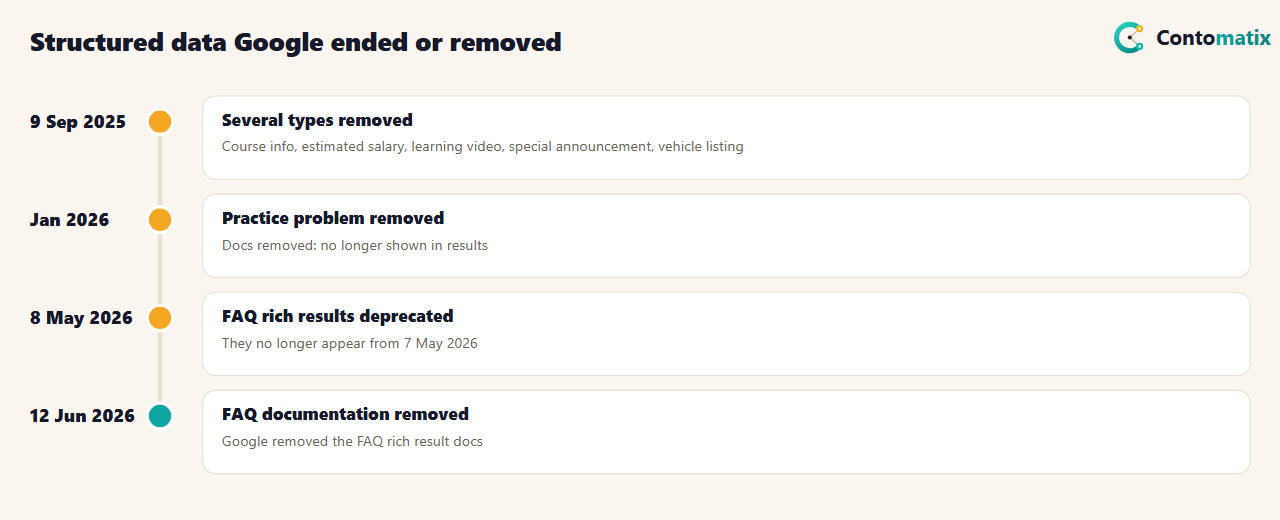
Google's documentation changelog, which we read on 26 October 2026, records several structured data features ending. On 9 September 2025 it removed documentation for course info, estimated salary, learning video, special announcement and vehicle listing, saying these types are no longer shown in Search results. In January 2026 it removed the practice problem type for the same reason. On 8 May 2026 it added a deprecation notice saying the FAQ rich result would no longer appear in Google Search starting 7 May 2026, and on 12 June 2026 it removed the FAQ documentation, stating that the FAQ rich result is no longer shown.
What this means for you: FAQPage markup is still valid structured data, but the expected benefit, an expandable question list in the results, is gone. We did not find a Google statement that such markup now harms a page, and we have left ours in place for now. We no longer count on a rich result from it, and we write FAQs because readers want them. If you were adding FAQ markup only for the rich result, you can stop. We did not find a changelog entry for HowTo in the pages we read, so check Google's current documentation before relying on it.
Schema Markup SEO: How to Choose Types for Your Site
- Start from your page types. A blog needs Article and Person; a shop needs Product and Review; a local business needs LocalBusiness.
- Check Google's gallery. The structured data search gallery lists the features Google supports. If a type is not there, it will not produce a rich result.
- Use JSON-LD. It sits in one block, separate from your HTML, and is easiest to maintain.
- Match what is visible. Markup must describe content users can see. Do not mark up things that are not on the page.
- Generate and validate. Build the block with the schema markup generator and run it through the schema markup validator, then test with Google's Rich Results Test.
- Put it in the template. One template change covers every page of that type.
- Recheck every few months. Support changes, as the changelog shows.
Schema Markup Example: BlogPosting With an Author
Here is the shape of the block we use on a blog post, simplified. Replace each value with your own and keep it matched to what is visible on the page.
{
  "@context": "https://schema.org",
  "@type": "BlogPosting",
  "headline": "Your post title",
  "datePublished": "2026-10-26",
  "author": { "@type": "Person", "name": "Author Name" },
  "publisher": { "@type": "Organization", "name": "Your Brand" },
  "image": "https://example.com/images/cover.png"
}
Notice what it contains: only facts a reader can see on the page, a clear type, and an author and publisher that match the byline and the site. That is the test for any markup you write: if a person visiting the page could not confirm it, leave it out.
Schema Markup in WordPress: Plugins or Hand-Written Markup
6 of 8 guides mention plugins. For WordPress and similar systems, a reputable SEO plugin can output Organization, Article and Breadcrumb markup with little effort, and that is a good default. The risks are duplicates (two plugins writing the same type), wrong defaults (an author or logo that does not match your site) and types you do not need. Check the output of any plugin with a validator, and read the page source to see what is actually emitted. If you maintain your own templates, as we do, write the markup in one place so every page of a type gets the same, correct block. Our generator can produce a first version that you adapt.
Website Schema Markup for Different Kinds of Sites
- Local business. LocalBusiness with address, phone and hours, matching your Google Business Profile exactly. Mismatches confuse people more than they help. See local SEO for small business.
- Online shop. Product with price, availability and genuine reviews, plus BreadcrumbList for categories.
- Publisher or blog. Article or BlogPosting with an author Person, and Organization for the site.
- Software or tools. WebApplication or SoftwareApplication with a name, category and offer. Our 39 tool pages use WebApplication.
- Agency or service business. Organization, Service and BreadcrumbList, with profiles in the sameAs list.
A Maintenance Routine
- Quarterly: read Google's documentation changelog for structured data changes.
- After template changes: validate one page of each type.
- Monthly: check the Enhancements reports in Search Console for errors and warnings.
- Yearly: list the types you use and ask what each one does for you. If the answer is nothing, decide whether to keep it for other systems or remove it.
The FAQ change is a good example of why. Our own site built FAQPage markup into 371 pages, and the rich result it was meant to produce stopped appearing on 7 May 2026. Markup that you maintain deliberately is easier to adjust than markup you added once and forgot.
Questions to Ask Before You Add a New Type
- Does Google list a feature for this type in its search gallery? If not, markup will not produce a rich result, though it may still describe the page for other systems.
- Can a visitor see everything the markup claims? If not, remove the claim.
- Will this markup need to change when the page changes, such as prices or dates? If so, generate it from the same data as the page.
- Who will check it after the next template change? Assign an owner.
- What would we do if Google stopped supporting it? For FAQ markup, we are keeping the visible questions and treating the markup as optional.
These questions take five minutes and prevent the two most common problems: markup that says more than the page does, and markup nobody remembers to maintain. They also keep your effort focused on the types that matter for your kind of site, instead of adding every type a guide mentions. If you are unsure, start with the three that fit almost every site: Organization on your home page, BreadcrumbList on inner pages and Article or BlogPosting on posts, then add more only when a clear reason appears.
Common Schema Markup Mistakes
- Expecting a ranking boost. 4 of 8 guides imply one, but Google describes structured data as helping it understand content and show rich results.
- Marking up invisible content. Ratings or FAQs that users cannot see break Google's guidelines.
- Fake or self-serving reviews. Mark up only genuine reviews.
- Copying markup from another site. Wrong names, URLs and logos cause errors.
- Leaving removed types in place and counting on them. FAQ markup no longer brings a rich result.
- Never validating. A missing comma breaks a whole block. We parsed all 406 of ours to check.
How We Read the Data
- Guide data comes from the organic results for "types of schema markup" on Google US, 26 October 2026. All 8 listed results returned a readable page. A topic counts once per page when its term appears in the text, which can include passing mentions.
- Google statements come from its structured data introduction and its documentation changelog, read the same day.
- Our counts come from fetching every URL in our live sitemap on 26 October 2026 and parsing each JSON-LD block. They describe one site.
Key Takeaways
- Use JSON-LD and match the types to your page types.
- On our 406 pages, Organization appears on all, BreadcrumbList on 393, FAQPage on 371 and BlogPosting on 347.
- Google ended FAQ rich results from 7 May 2026 and removed several other structured data features.
- Do not expect schema to boost rankings, and validate every change.
- Recheck Google's documentation, because support changes.
Frequently Asked Questions
What are the main types of schema markup?
Common types include Organization, LocalBusiness, Article, Person, BreadcrumbList, Product, Review, Event, Recipe, VideoObject and WebApplication.
Which schema format should I use?
Google says JSON-LD, microdata and RDFa are all fine, and recommends the one easiest to implement and maintain, which is usually JSON-LD.
Why is schema markup important, and does it improve rankings?
It helps Google understand your content and can make pages eligible for rich results. We found no statement in the pages we read that it directly boosts rankings.
Does FAQ schema still work?
Google says the FAQ rich result no longer appears in Search from 7 May 2026. The markup remains valid, but do not expect a rich result.
Is FAQ schema harmful now?
We found no Google statement saying so. Keep the visible FAQ for readers and treat the markup as optional.
How do I add schema markup?
Write a JSON-LD block, place it in the head or body, and test it. You can build one with our schema markup generator.
How do I test schema markup?
Use a validator and Google's Rich Results Test, and check the Enhancements reports in Search Console for errors.
Do I need schema on every page?
No. Use the types that fit each page. We put Organization on all pages and other types where they match the content.
Which schema types did Google remove?
Its changelog lists course info, estimated salary, learning video, special announcement, vehicle listing, practice problem and the FAQ rich result.


