Last updated: October 2026
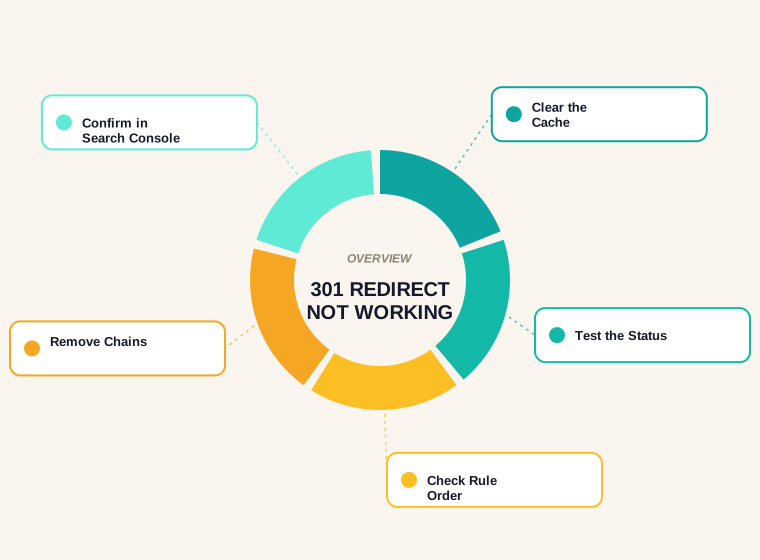
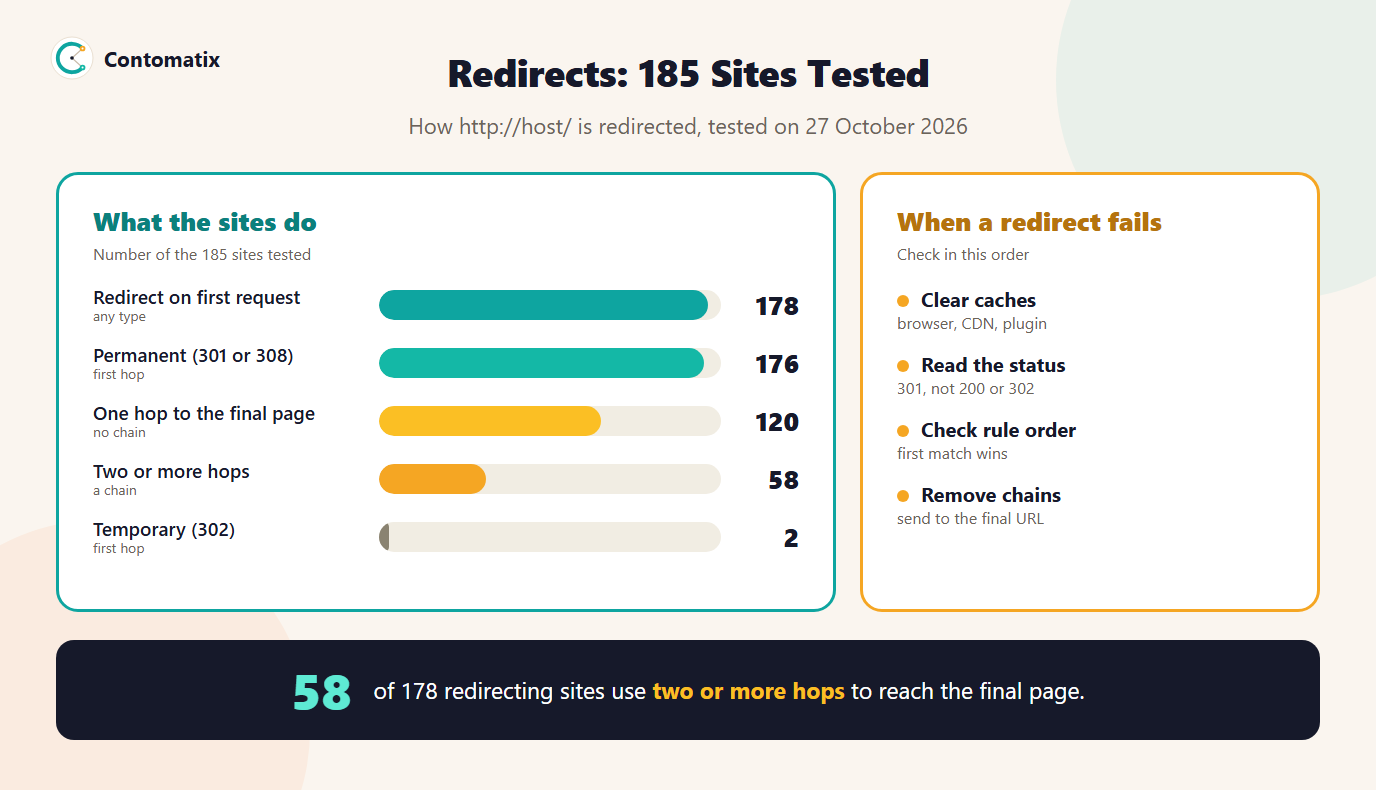
A 301 redirect that is not working usually fails for a small number of reasons: a cached copy, a rule that never matches, a rule that is overridden, a loop or chain, or a redirect that returns the wrong status. Searchers clearly hit this often: of the 9 results for "301 redirect not working", 5 are forum or Q&A threads. To see what redirects look like in practice, we tested 185 sites on 27 October 2026. 178 redirected on the first request, 176 of them with a permanent status, but 58 needed two or more hops to reach the final page.
This guide gives you the usual causes in the order to check them, the redirect types and what Google does with each, our test data, example rules and how to confirm the fix. For moving a whole site, see our SEO site migration checklist and the redirect mapper.
301 Redirect Not Working: The Usual Causes
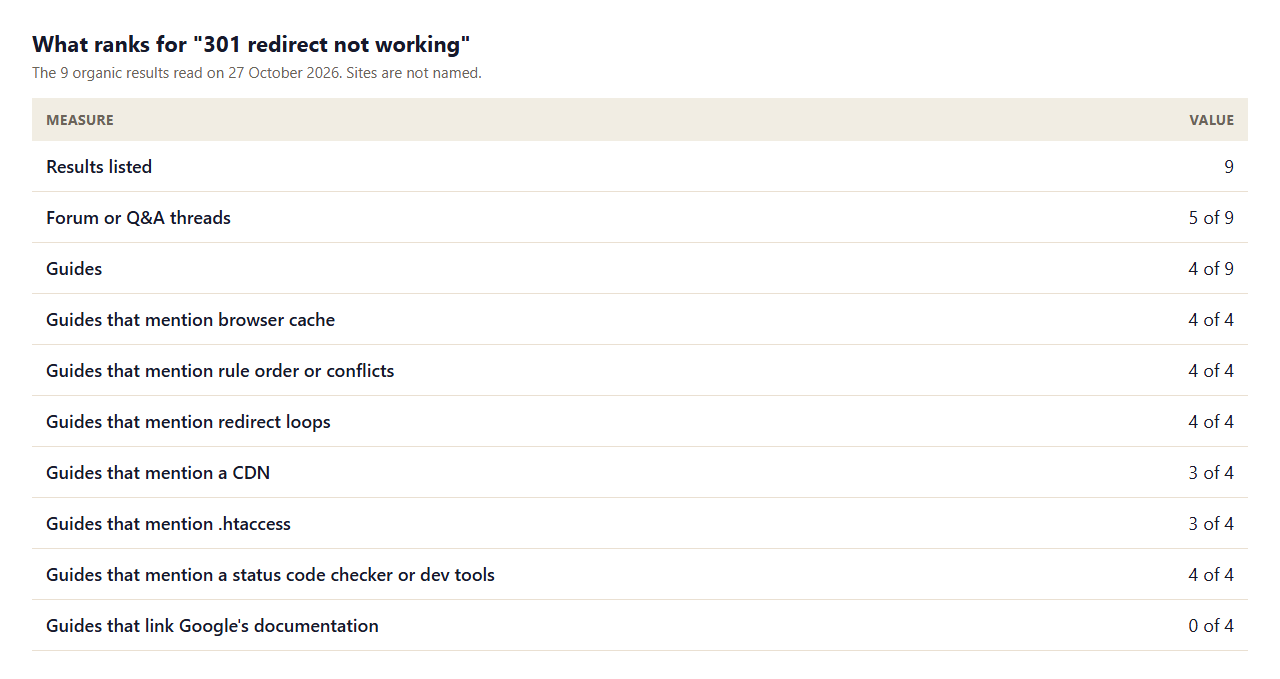
We read the 4 guides among the 9 results. They share a checklist. 4 of 4 say to clear the browser cache or test in a private window, because browsers cache 301 responses. 4 of 4 point to rule order or conflicts. 4 cover redirect loops, 4 cover chains, 4 cover 301 versus 302, 4 cover http and https, 3 mention a CDN, 3 mention .htaccess and 3 mention WordPress or plugins. 4 of 4 suggest a status code checker or developer tools. None link to Google's documentation, and the 5 forum threads are blocked to our crawler, so we have not counted them.
In the order we check them:
- Caches. Clear the browser cache or use a private window. Then check any CDN, caching plugin or server cache in front of the site.
- The real status. Request the old URL and read the status code. If it is 200, the rule did not match; if 302, it is the wrong type; if 301 but the wrong destination, the target is wrong.
- Rule order. In Apache and Nginx, an earlier rule or a catch-all can override your rule. Put specific rules first.
- Loops and chains. Follow the redirect until it ends. If it never ends, there is a loop. If it takes several steps, there is a chain.
- Conflicts. A plugin, the host's own settings and your server config can all redirect the same URL. Disable one at a time.
- Exact URL. Trailing slashes, uppercase letters, http versus https and www versus non-www can all stop a rule from matching.
Redirect 301: What the Redirect Does and What Google Says
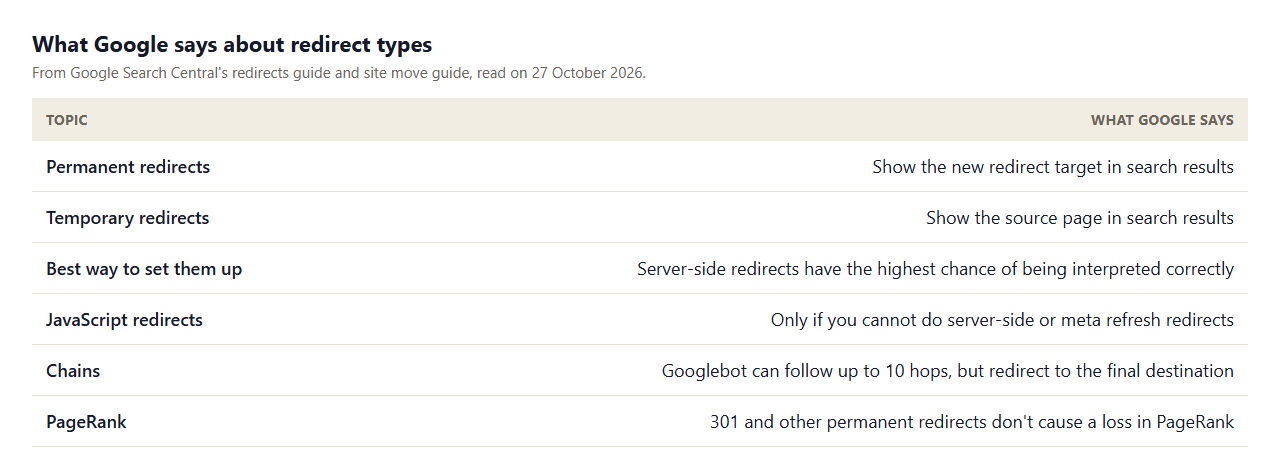
Google's redirects guide says that users generally cannot tell the types apart, but Google Search uses certain types as a signal about which URL should be canonical. A permanent redirect, such as 301 or 308, tells it to show the new target in search results. A temporary redirect, such as 302, 303 or 307, tells it to keep showing the source page. It lists server-side redirects first, because a server-side redirect has the highest chance of being interpreted correctly, and says to use JavaScript redirects only if you cannot do server-side or meta refresh redirects. Its site move guide adds that 301 and other permanent redirects don't cause a loss in PageRank.
301 vs 302 Redirect: Which One to Use
- Use 301 or 308 when the move is permanent: a new URL, a new domain, a merged page. Google then shows the new URL.
- Use 302, 303 or 307 when the redirect is temporary: a page down for maintenance, a short promotion, a test. Google keeps the source page.
- Do not use a temporary redirect for a permanent move. The old URL may stay in results. Of the 178 sites that redirected http on the first request, 2 used a 302.
- 308 and 301 are both permanent. 16 sites in our test used 308 and 160 used 301.
What 185 Sites Do When You Visit the http Version
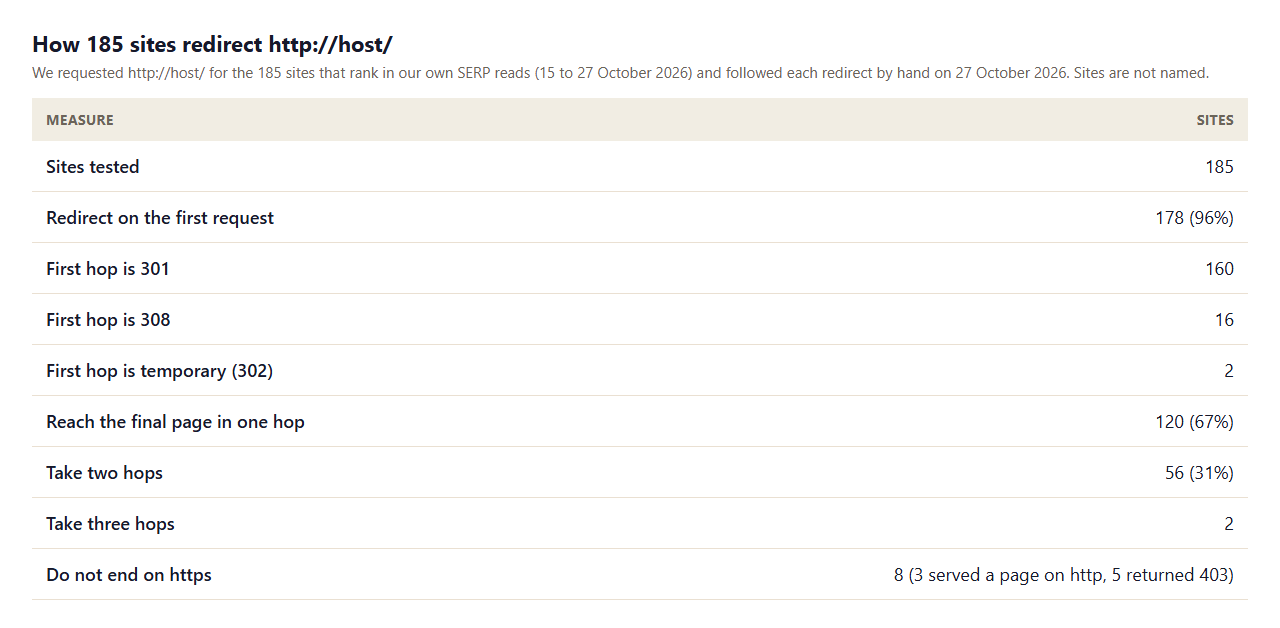
Here is the data. We requested http://host/ for the 185 sites behind the ranking pages in our own SERP reads and followed each redirect by hand. 178 (96%) redirected immediately. Of those, 160 used 301, 16 used 308 and 2 used 302. A single hop reached the final page for 120 (67%), two hops for 56 (31%) and three for 2. The commonest two-hop pattern was http to https, then non-www to www: 50 sites did that, and 25 more did both changes in a single hop. Eight sites did not end on https: 3 served the home page over plain http, and 5 returned a 403 to our request.
The lesson is that a redirect can be "working" and still be wasteful. Googlebot can follow up to 10 hops, so a two-hop chain will not break, but Google advises redirecting to the final destination directly, and each hop adds latency for users. Our own site showed the same pattern: http://contomatix.com/ reaches https in one 301 hop, but http://www.contomatix.com/ takes two hops, first to https on www and then to the non-www address. That is not broken, but it is a chain we could shorten, and your own site may have one too.
Check for 301 Redirect: How to Test One
- Use a status checker or curl. Request the old URL without following redirects and read the status and the Location header.
- Use browser developer tools. Open the Network tab, tick "preserve log" and load the old URL to see each hop.
- Test in a private window so cached redirects do not hide the real result.
- Test with and without www, with and without a trailing slash, and on http and https.
- Use URL inspection in Search Console to see how Google sees the URL. See how to set up Google Search Console.
- Crawl a list of old URLs after a move to find chains and wrong targets in bulk.
301 Redirect Example: Apache and Nginx
These are common patterns. Replace the paths and domain with your own, and test before you rely on them. On Apache, one way is a simple directive in .htaccess:
Redirect 301 /old-page https://example.com/new-pageOr a rewrite rule, which gives you more control:
RewriteEngine On
RewriteRule ^old-page/?$ https://example.com/new-page [R=301,L]
On Nginx, inside a server block:
location = /old-page {
  return 301 https://example.com/new-page;
}
Point the redirect at the final URL, not at another redirect. If you have many redirects, generate the rules from a map with the redirect mapper, which exports Apache and Nginx rules.
WordPress 301 Redirect: Plugins and Conflicts
3 of 4 guides cover WordPress. On WordPress, redirects can come from a redirect plugin, an SEO plugin, a caching plugin, the theme, the host and the server file, so the same URL can be handled in several places. If a redirect does not work, check which layer is answering: disable the redirect plugin, clear every cache, and test again. Keep one place for redirects, and record each redirect you add so the next person can find it.
301 Redirect Backlink: Do Links Still Count?
When other sites link to an old URL and you redirect it to a new one, the link is not lost. Google's site move guide says permanent redirects do not cause a loss in PageRank, and it asks you to keep redirects for as long as possible, generally at least one year, so that it can transfer signals to the new URLs, including reassigning links on other sites. For links you control, such as profiles and listings, update them to point at the new URL. To find which old URLs have links, use the Links report in Search Console, and to track new links use the backlink monitor tool.
Redirect Loops and "Too Many Redirects"
All 4 guides cover loops. A loop happens when A redirects to B and B redirects back to A, directly or through other URLs, and the browser gives up with a "too many redirects" error. Common sources are a force-https rule fighting a CDN setting, a www rule fighting a non-www rule, and a plugin and a server rule redirecting the same URL differently. To find one, follow the redirect step by step and note where it comes back to a URL you have already seen. Then decide which rule is correct and remove or fix the other. Do not add more redirects to escape a loop, because that only lengthens it.
HTTPS and www Redirects: One Hop Is Enough
The most common chain in our test combined two ordinary rules: http to https, then non-www to www (or the reverse). Each rule is correct on its own, but together they create two hops. The fix is to send each variant straight to the one canonical version. If your canonical address is https://example.com/, then http://example.com/, http://www.example.com/ and https://www.example.com/ should each redirect once to https://example.com/. In practice that means writing the www rule so that it sends to the final https address, not to an intermediate one. 120 of the 178 sites we tested already do this for the home page. The other 58 could shorten theirs, and so could we.
How to Fix a Redirect Chain
- List the chain. Write down each URL and status code from the first request to the final page.
- Find the final URL. That is the address you want every earlier URL to go to.
- Edit the first rule so it points at the final URL, and remove any rule in the middle that is no longer needed.
- Update internal links so your own pages link to the final URL and users never meet the redirect.
- Test again in a private window, and check the sitemap lists final URLs only. Use the sitemap validator for that.
- Record the change and the date, so you know which rules exist and why.
Fixing a chain is a small job with a small benefit for each URL, but the benefit repeats for every visit and every crawl, and the habit of pointing redirects at final URLs prevents the loops and conflicts that cause "not working" in the first place.
Common Redirect Mistakes
- Testing only in your own browser. A cached redirect can hide a problem, or hide a fix.
- Redirecting to a page that redirects again. 33% of the sites we tested used two or more hops for the home page.
- Using 302 for a permanent move.
- Redirecting everything to the home page. Send each URL to its closest equivalent.
- Leaving the redirect plugin and a server rule both on. They can conflict.
- Removing redirects early. Google suggests keeping them at least a year.
How We Read the Data
- The result list comes from Google US for "301 redirect not working" on 27 October 2026. 9 results were listed; we read the 4 guides. The 5 forum or Q&A threads were blocked to our crawler or too short to read.
- The redirect test requested http://host/ for the 185 sites behind the pages in our own SERP reads (excluding Google, reddit, LinkedIn, Quora and our own site), without following redirects automatically, and followed each Location header by hand up to 8 hops. It tests the home page only, from one location, and describes those sites, not the web.
- Google statements come from its redirects guide and its site move guide, read on 26 and 27 October 2026.
- Our own site was tested the same way on 27 October 2026.
Key Takeaways
- Check caches, the real status code, rule order, loops and conflicts, in that order.
- Use 301 or 308 for permanent moves. Google shows the new target for permanent redirects and the source page for temporary ones.
- Of 185 sites tested, 178 redirected http; 58 of them needed two or more hops.
- Permanent redirects do not cause a loss in PageRank, according to Google, and should be kept at least a year.
- Test in a private window and read the status code, not just what the browser shows.
Frequently Asked Questions
Why is my 301 redirect not working?
Common causes are a cached copy, a rule that does not match, a rule overridden by another, a loop or chain, or the wrong status code. Check them in that order.
How do I check for a 301 redirect?
Request the old URL without following redirects and read the status code and Location header, or use browser developer tools with preserve log on.
What is the difference between a 301 and a 302 redirect?
A 301 is permanent and Google shows the new target. A 302 is temporary and Google keeps showing the source page.
Do 301 redirects lose PageRank?
Google's site move guide says 301 and other permanent redirects don't cause a loss in PageRank.
How many redirects in a row are too many?
Googlebot can follow up to 10 hops, but Google advises redirecting to the final destination directly because chains add latency.
How long should I keep a 301 redirect?
Google says as long as possible, generally at least one year.
Why does my redirect work in one browser but not another?
A cached redirect or a plugin or CDN serving a stale response is the usual cause. Test in a private window and read the status code.
Is a JavaScript redirect as good as a 301?
No. Google says to use JavaScript redirects only if you cannot use server-side or meta refresh redirects.
How do I create many 301 redirects at once?
Build a map of old to new URLs and export rules for your server. Our redirect mapper exports Apache and Nginx rules.


