Last updated: October 2026
To index backlinks means to get the page that links to you into Google's index, because a link only counts once Google has found the page it sits on. We read the 5 guides that rank on Google US for the term and checked 12 of our own new pages. 5 of 5 guides recommend the URL Inspection tool, yet Google's documentation says you cannot request indexing for URLs you do not manage. And 11 of our 12 new pages were already in Google within one to three days with no tricks at all.
Below you will find what indexing a backlink means, how to check whether a linking page is indexed, what the ranking guides recommend, what Google actually allows, the real reasons a backlink page may not be indexed, what you can do, and what to avoid. It follows on from our guide to checking the backlinks of a website.
What It Means to Index Backlinks
A backlink is a link from another site to yours. For Google to use that link, it must first crawl the page the link sits on, then decide to keep that page in its index. If the linking page is never crawled, or is crawled and dropped, the link is effectively invisible. That is why people search for indexing backlinks, a link indexing service or a free indexing tool: they want to make sure the pages that link to them are known to Google.
The key detail is who controls the page. You control your own pages and can ask Google to recrawl them. You do not control a page on someone else's site, so your options are indirect.
How to Check Whether a Backlink Page Is Indexed
- Search for the exact URL. Type
site:followed by the full URL into Google. If the page appears, it is in the index. It is a quick proxy, not the official report. - Check the Links report. In Search Console, Links shows the sites and pages Google knows link to you. A link missing here may not be discovered yet.
- Confirm the link itself. Open the page and check that your link is there, and what attribute it carries. The dofollow link checker shows it per link.
- Look for blockers. View the source for a
noindexrobots meta tag, check the robots.txt of the site and look for an X-Robots-Tag header.
What the Ranking Guides Recommend
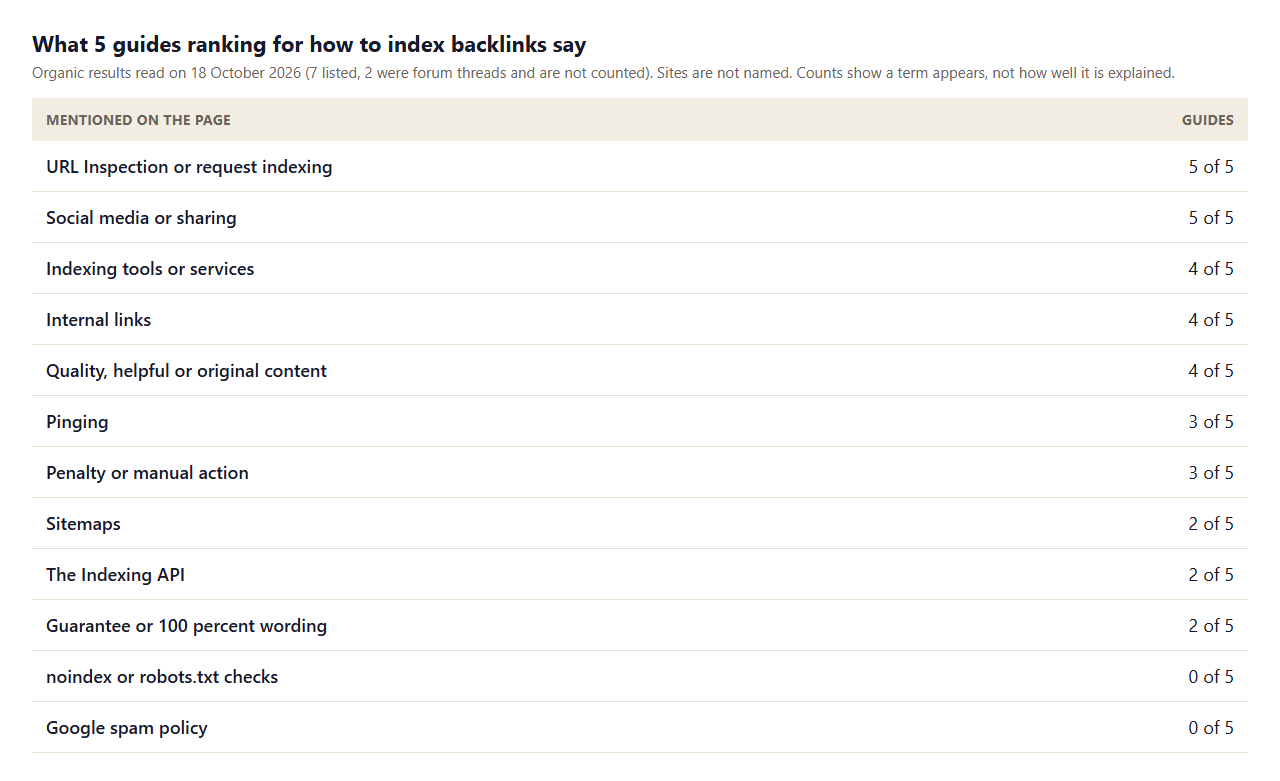
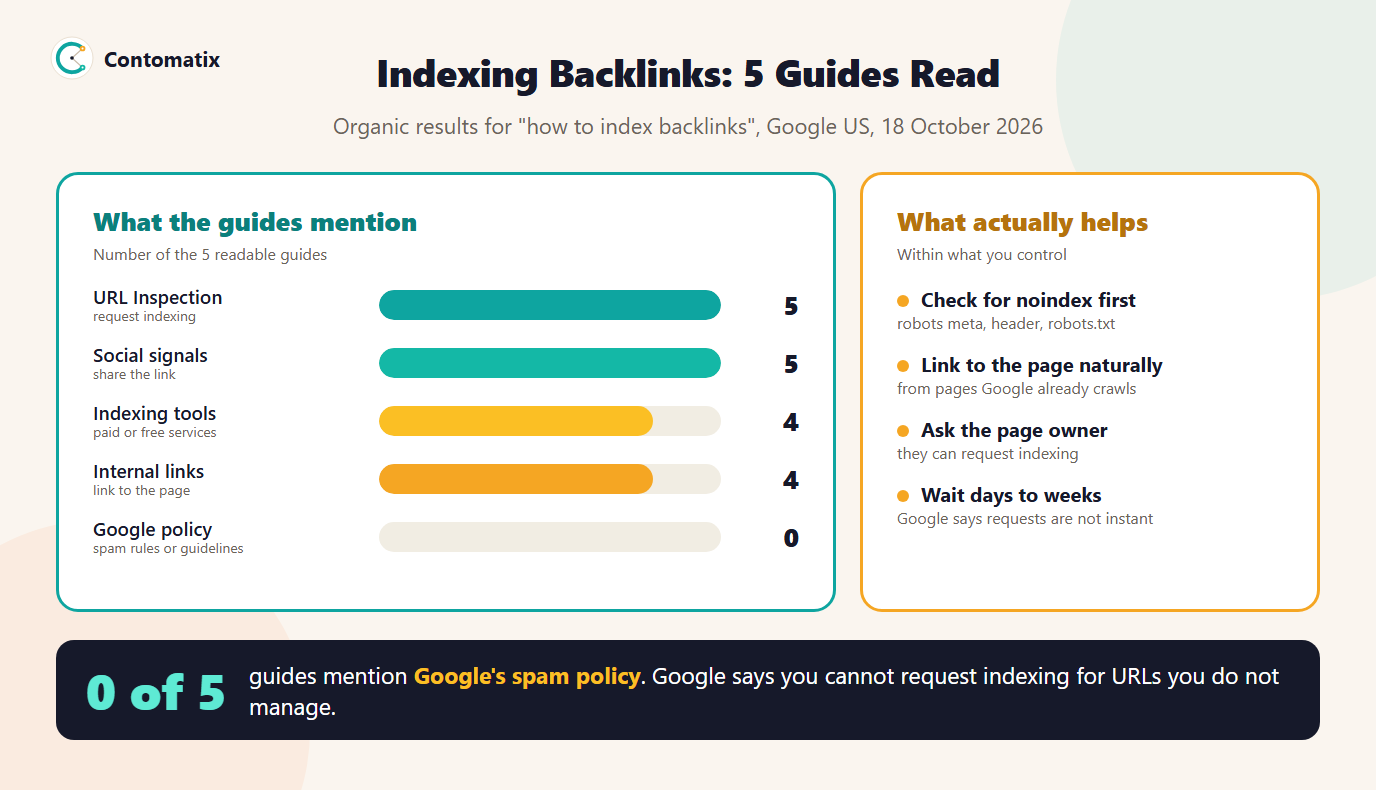
- URL Inspection is everywhere. 5 of 5 mention URL Inspection or requesting indexing, which works for your own pages.
- Tools and services are common. 4 of 5 name indexing tools or services, and 2 use guarantee-style wording.
- Older tactics persist. 5 of 5 suggest sharing the link on social media and 3 mention pinging.
- The Indexing API appears. 2 of 5 mention it, though Google documents it as limited to job posting and livestream video pages.
- The basics are missing. None of the guides tell you to check for
noindexor robots.txt blocks first, and none mention Google's spam policy.
What Google Says You Can and Cannot Do
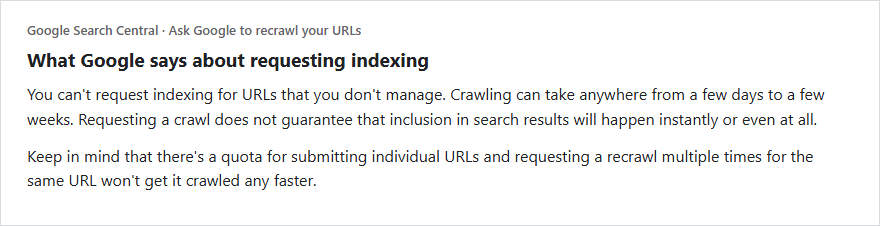
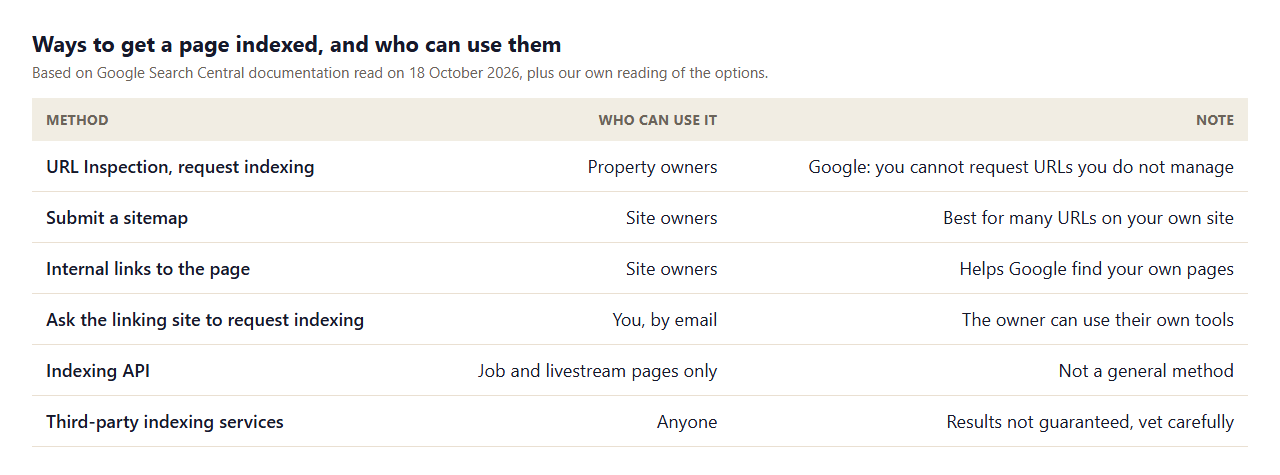
Google's documentation on recrawling is direct. You can request a crawl of individual URLs with the URL Inspection tool if you own or fully manage the Search Console property. You cannot request indexing for URLs you do not manage, which includes the page where your backlink lives. Crawling can take a few days to a few weeks, a request does not guarantee inclusion and repeating it for the same URL will not speed it up. For many URLs on your own site, submit a sitemap. The Indexing API is for pages with job postings or livestream videos.
What We Measured on Our Own New Pages
To get a sense of how fast a small site's new pages are found, we checked the 12 pages we published between 15 and 17 October 2026 with a site: search for each exact URL on 18 October. 11 of 12 were already in Google's index, including all four published on 17 October. One page, published on 16 October, was not found yet.
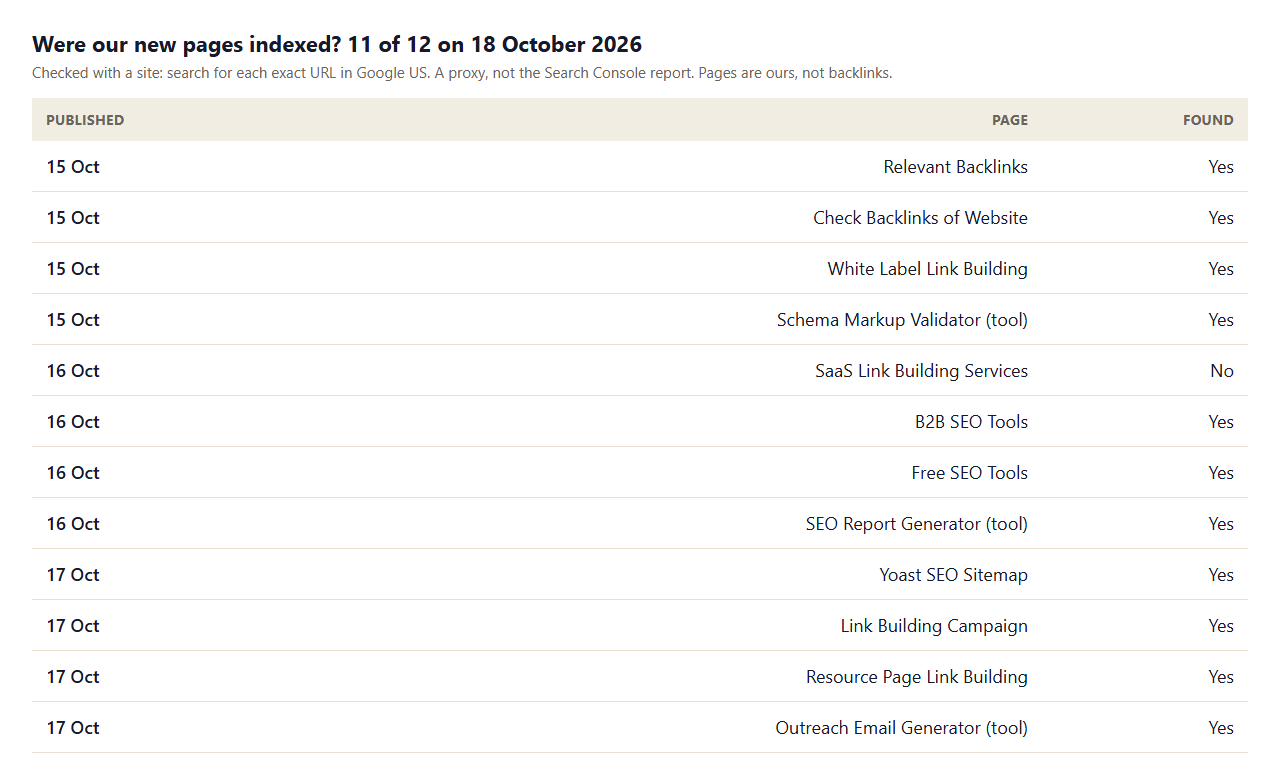
This is a sample about our own pages, not backlinks, and a site: search is a proxy rather than the Search Console report. It still shows two useful things: a normal, crawlable page on a site Google already visits can be found within days, and a page can lag without anything being wrong. If a page is missing after a few weeks, then you diagnose.
How Google Finds the Page a Backlink Sits On
Google discovers pages mostly by following links from pages it already knows, and by reading sitemaps that site owners submit. A new article on a busy site is usually found quickly because the site's homepage, category pages and feeds link to it and are crawled often. A page on a small or rarely visited site may wait longer, and a page with no internal links at all may wait the longest. This is why a backlink from the middle of an established, regularly updated site tends to be seen sooner than a link on a stray page that nothing else points to.
It also explains why the best indexing "strategy" for backlinks is to choose good linking pages in the first place. Before you invest in a link, look at how the site is structured: is the page linked from a category or the homepage, is the site publishing regularly, and are other pages from the same section in Google's index? If the answer is yes, you rarely need to do anything more.
A Realistic Timeline and a Simple Tracking Sheet
Treat indexing as a process with checkpoints, not a switch. When a backlink goes live, record the date, the linking page, your target page and the link attribute. After one week, search for the exact page URL to see whether it is indexed. After two to four weeks, check again and look in the Links report in Search Console. If the page is still missing after a month, open it and check for blockers, then message the owner once with a specific request. Anything beyond that is time better spent earning another link.
Keep the sheet simple: link URL, target URL, date live, anchor, attribute, indexed at one week, indexed at four weeks, notes. Over a few months it shows you which kinds of sites get indexed fast and which do not, and that is knowledge you can use to choose better targets. It also gives you a record to show a client or a manager, which matters more than a long list of indexing attempts.
Why a Backlink Page May Not Be Indexed
- It is blocked. A
noindextag, an X-Robots-Tag header or a robots.txt rule can keep it out. - It is new or orphaned. A page that nothing links to may not be found quickly, especially on a site Google visits rarely.
- It is low value. Thin, duplicate or spammy pages may be crawled and not kept.
- Its canonical points elsewhere. Google may index the canonical version instead.
- It is deep in the site. Pages many clicks from the homepage get less attention.
- The site is untrusted. If the linking site itself is weak, its pages may be crawled less often, which is also a sign the link has little value.
What You Can Do to Help a Backlink Page Get Indexed
- Check the blockers first. If the page has
noindex, no method will index it. Ask the owner to fix it or accept the link has no value. - Ask the page owner. They can request indexing in their own Search Console, and may link to the page from a better-crawled page of theirs.
- Be patient. Google says crawling takes a few days to a few weeks. Check again after two to four weeks.
- Make your own side easy to find. Keep your site crawlable and submit a sitemap so Google reaches the destination page when it follows the link.
- Earn better links. Links on pages that are already indexed and visited, such as established articles, solve the problem for you. See our guide to relevant backlinks.
- Track and decide. If a link has not been found after a month, ask whether it was worth having.
Link Indexing Services and Free Indexing Tools
4 of 5 guides name indexing services. Some use the Indexing API, some ping Google and some build extra links to the page. Google's documentation says the Indexing API is for job and livestream pages, that requests are not guaranteed and that automated programs that create links are a form of link spam. Before you pay for a service, ask what exactly it does, whether it creates new links and what happens if the page is still not indexed. No service can make Google keep a page it has decided is not valuable.
The cleanest free tools are the ones Google gives you: URL Inspection for your own pages and sitemaps for your own site. For a quick look at what is on a page, use our SEO page audit and check its robots meta tag.
Mistakes to Avoid When Indexing Backlinks
- Building links to the linking page. Creating extra links to push a page into the index can become link spam.
- Resubmitting repeatedly. Google says repeat requests for the same URL do not speed things up.
- Paying for guarantees. 2 of 5 guides use guarantee wording, and no one can guarantee inclusion.
- Ignoring the blockers. A noindex tag makes every other step pointless.
- Chasing every link. Weak links are not worth the effort.
Indexed Does Not Mean Valuable
Getting a backlink page indexed is a minimum, not a goal. A link on an indexed page that nobody reads, on a site with no topical connection to yours, still does very little. If you find yourself spending hours on indexing, step back and ask whether the link deserves the effort. A handful of links on relevant, established pages that Google already visits will do more for your pages than a long list of links that needed help to be found. Measure the outcome you care about, such as impressions and clicks for the target page in Search Console, and let that decide where to spend your time.
How We Read the Pages
- We read the 7 organic results for one query on one day (Google US, 18 October 2026). Five were guides we could read, and two were forum threads that we did not count.
- Counts show whether a page mentions a term, not how well it explains it.
- The indexing check covers 12 of our own pages with a
site:search on 18 October 2026. It is a small sample and a proxy. - Google's statements come from its Search Central recrawl and Indexing API documentation, read on 18 October 2026.
- Results in other countries or at other times will differ, so check your own pages.
Key Takeaways
- A backlink counts only once Google has crawled and kept the page it sits on.
- Google says you cannot request indexing for URLs you do not manage, so help indirectly.
- Check for
noindexand robots.txt blocks first. None of the 5 guides do. - Crawling takes a few days to a few weeks. 11 of our 12 new pages were found within one to three days.
- Be cautious with indexing services and never build links just to get a page crawled.
Frequently Asked Questions
How do I index backlinks?
Check that the linking page is not blocked, ask its owner to request indexing or link to it from a crawled page, and give Google days to weeks. You cannot request indexing for pages you do not manage.
Can I use URL Inspection to index a backlink?
Only for pages in your own Search Console property. Google says you cannot request indexing for URLs that you do not manage.
How long does it take for a backlink to be indexed?
Google says crawling can take anywhere from a few days to a few weeks. Inclusion is not guaranteed.
How do I check if a backlink is indexed?
Search for the exact page with a site: query, check the Links report in Search Console and open the page to confirm the link and its attribute.
Do link indexing services work?
Results vary and nothing is guaranteed. Ask what the service does, whether it creates extra links and what happens if the page is still not indexed.
Is there a free indexing tool for backlinks?
Google's own tools, URL Inspection and sitemaps, are free but only for your own site. For other people's pages you can only ask the owner.
Why is my backlink not showing in Search Console?
The page may not be crawled yet, may be blocked by noindex or robots.txt, or may be low value. Wait a few weeks and check the page for blockers.
Does a backlink help if the page is not indexed?
A link on a page Google has not crawled cannot be used. That is why indexed pages matter, and why links on established pages are worth more.
Can the Indexing API index my backlinks?
No. Google documents the Indexing API for job posting and livestream video pages only.


