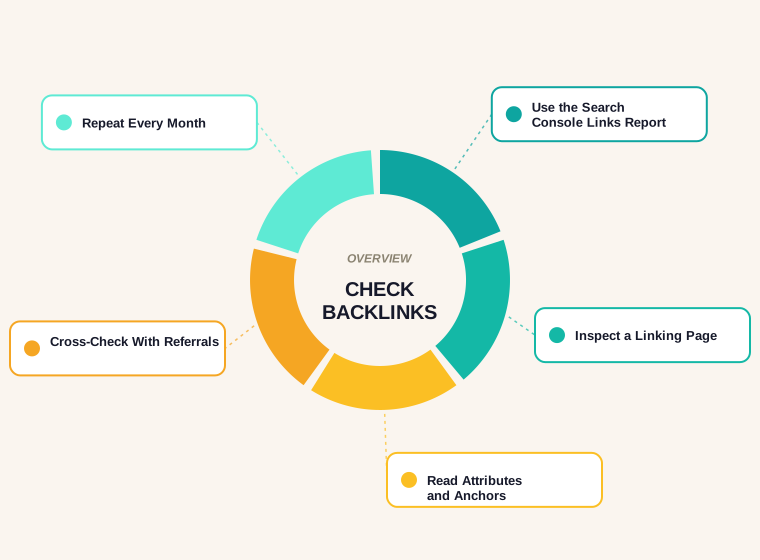
Last updated: October 2026
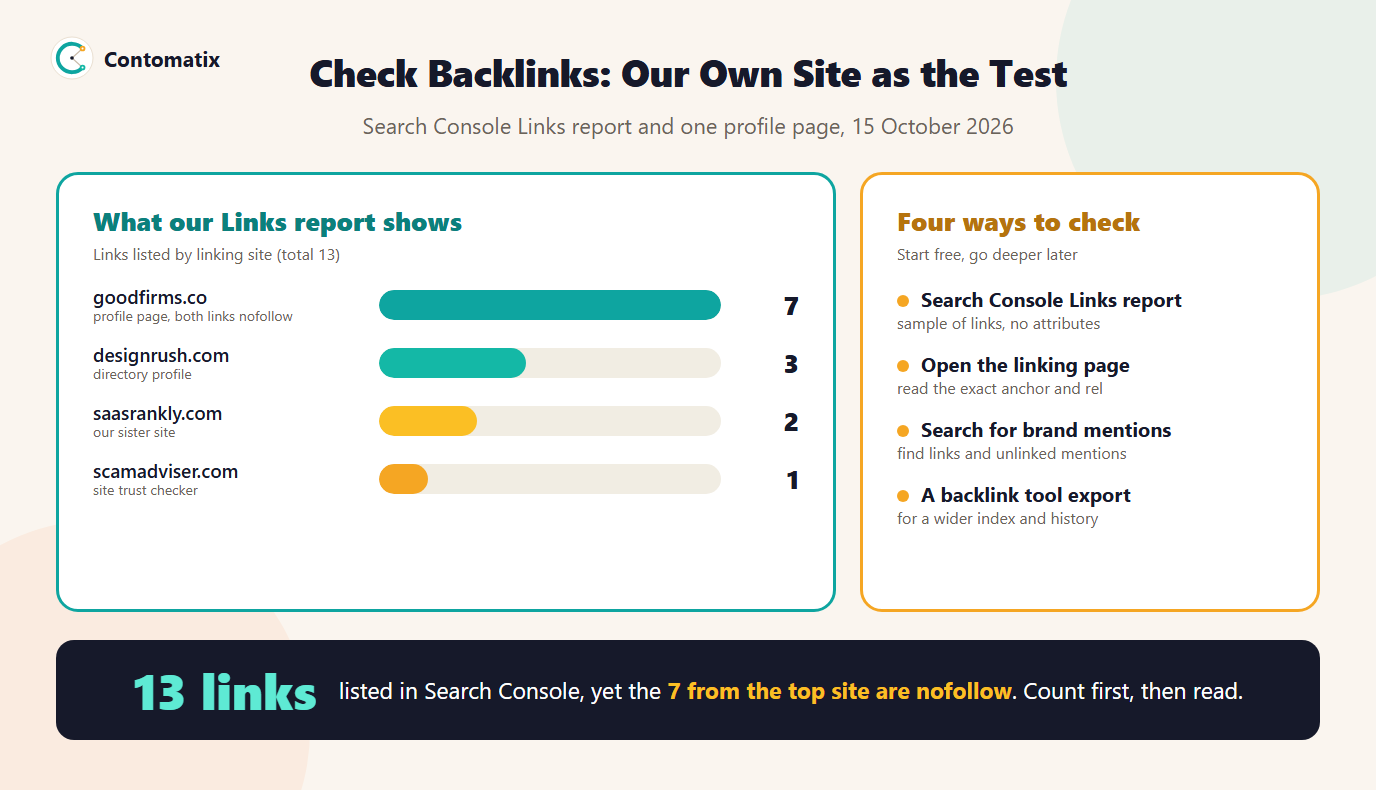
To check backlinks of a website you open the links report in Search Console, read the linking pages and then confirm how each link is marked. We did exactly that on our own site. Search Console lists 13 external links from 4 sites, and 7 of them come from one directory. When we opened that profile page, both links to us were nofollow. The headline number says one thing, the page says another.
This guide shows four free ways to find backlinks to a website, how to read what you find and a monthly routine that takes about twenty minutes. It uses the same data we used for our own site, so you can see the numbers behind each step. If you want the report layout afterwards, our backlinks report guide covers it.
Method 1: Search Console Links Report
Search Console is the only source that comes straight from Google, and it is free. This is how to find backlinks for a website you own. Open Links in the left menu. The report has four lists for external links and four for internal links: top linked pages, top linking sites, top linking text and, for internal links, the same by page.
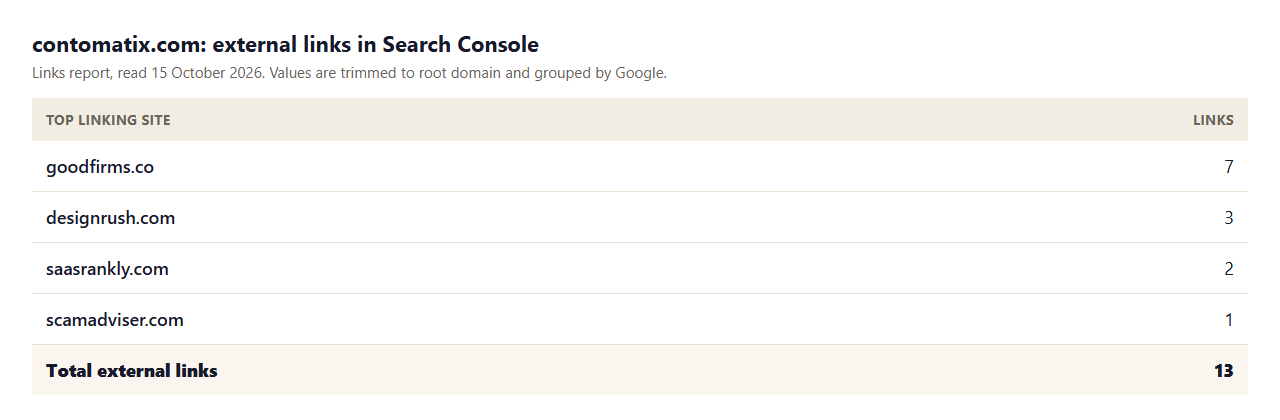
- Total external links: 13. This is the count of links from outside the property that Google knows about.
- Top linked pages: the homepage with 11 links and one tool page with 2. Most sites find the homepage collects most links, which is normal.
- Top linking sites: goodfirms.co with 7, designrush.com with 3, saasrankly.com with 2 and scamadviser.com with 1. Google trims values to the root domain and groups them.
- Top linking text: "visit website", "contomatix", "llms txt generator" and "visit". Two of the four are generic button text from directory profiles.
Two limits matter. First, Google describes the report as a sample, not a complete list, so treat your total as at least this many. Second, the report does not show whether a link is nofollow, sponsored or ugc, so a high count does not tell you how much each link is worth.
Method 2: Open the Linking Page and Read the Link
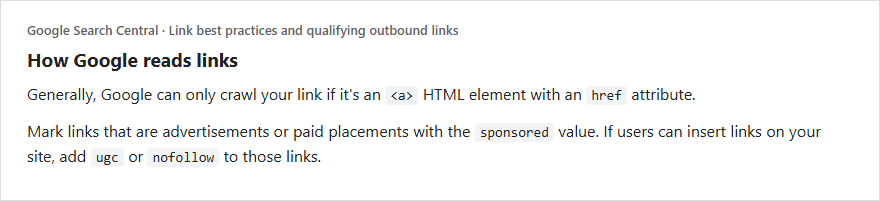
Search Console tells you which site links to you. The page itself tells you how. Open a linking page, find your link and view its HTML. You are looking for the anchor text, the destination and the rel attribute.
We did this for the largest linking site. The GoodFirms profile page contains two links to our homepage. Both carry rel="nofollow noopener" and open in a new tab. They were pasted into our dofollow link checker, which reports the result below.
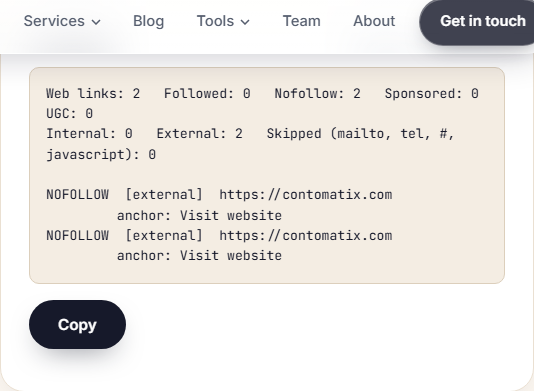
That changes how we read the report. The 7 links from the top site do not pass what a followed editorial link would. They still have value as a listing that people can click, but the real count of followed links from that site is zero. The same check works for any linking page, which is the practical answer to how to check if my website has backlinks that count: open the linking page and read the link.
Method 3: Search for Your Brand and Domain
Here is how to search for backlinks without any tool. The old link: search operator no longer returns backlinks, so a plain search is the way to discover mentions. Search for your domain and your brand name and exclude your own site with -site:yourdomain.com. Results show pages that mention you, with or without a link.
- A result that links to you confirms a backlink you may not know about.
- A result that names you without a link is an unlinked mention, which is one of the easiest links to earn by asking the publisher.
- Searching for your brand on forums and Q&A sites finds user-generated links, which are normally nofollow or ugc.
Method 4: Use a Backlink Checker for a Wider Index
Third-party backlink tools crawl their own index of the web, so they often list links that Search Console has not. Free tiers show a limited number of links, and paid plans show history and new or lost links. Two cautions apply: their totals differ from each other and from Google's, and none of them is Google's own view. Use a tool to widen the list, not to settle an argument about the exact number. A backlink profile checker or a backlinks finder is only as good as its index, and a backlinks counter shows that index, not the web. Our backlink analysis tools guide compares the options.
Free Versus Paid Backlink Checkers
A free checker is enough for a small site that wants to know who links to it and whether links are lost. Paid plans earn their price when you need history, alerts when a link disappears, competitor comparisons and exports for reporting. Before paying, run the free methods above for a month. If you already know your top linking sites, your attributes and your unlinked mentions, you will know exactly what a paid tool would add. Many small sites find that Search Console plus a monthly page check answers every question they actually have.
What About Google Analytics?
A common question is how to check backlinks in Google Analytics. Analytics does not list backlinks. Its acquisition reports show referral traffic, which is visits that arrived from another site. That is useful as a cross-check: a backlink that sends clicks appears as a referral, while a backlink nobody clicks does not. Use it to find your most valuable links, not to find all of them.
How to Read What You Find
- Count domains, not only links. We have 13 links, but 4 linking sites. One site sending seven links is one relationship.
- Check the attribute. Followed, nofollow, sponsored and ugc are all normal. Google treats them as hints, so a healthy profile has a mix.
- Read the anchor. Descriptive anchors help readers and search engines. Generic button text such as "visit website" is common on directories and says little.
- Look at the linking page. Is it relevant to your topic, indexed and a page a person would read? A link buried in a footer of thousands of pages is weaker than one in an article.
- Look at the destination. Our links point mostly at the homepage. That leaves our guides and services without external links, which is a content and outreach gap, not a technical one.
Quality Signals You Can Check by Hand
When you open a linking page, five quick questions tell you more than a tool score. Is the page about a topic close to yours? Is the page itself indexed, which you can test with a search for a sentence from it in quotes? Does the link sit inside the body text, where a reader would see it, or in a footer or sidebar shared by every page? How many other outbound links does the page carry, because a page with hundreds of them is a list, not an endorsement? And does the site look like something a person would use, with real articles and a recent update? A link that passes all five is the kind worth asking for more of. A link that fails most of them is probably harmless, but it is not worth your time.
A 20-Minute Monthly Routine
Think of this routine as a simple backlinks health check you can repeat.
- Open the Links report and note the total, the top linking sites and any new site.
- Open each new linking page and check the attribute and anchor.
- Search your brand with
-site:and list new mentions. - Check the status of your top linked pages. A linked page that now returns 404 loses the link's value, which our broken backlinks guide explains how to fix.
- Record the numbers in a sheet and compare with last month.
Which Method Answers Which Question
- "Does Google know about this link?" Search Console. If a link is not there, it may be new, blocked or not yet processed.
- "Is this link followed?" The linking page's HTML, or a checker that reads it.
- "Who mentions us without linking?" A brand search with the
-site:operator. - "Which links actually send visitors?" Referral traffic in Analytics.
- "How did our profile change over time?" A backlink tool with history, or your own monthly log.
How to Find Backlinks to Website Pages One at a Time
For a single page, use the Links report in a different way. Open Top linked pages, select the page and Search Console shows the sites that link to it. In our report, the homepage collects 11 of 13 links, while the other linked page, a free tool, has 2. None of our guides appears in the list, which tells us where outreach should focus next. If a page you care about is missing from Top linked pages, it has no external links that Google has processed yet.
Reading Anchor Text Across Your Links
Look at the top linking text as a set. Ours is "visit website", our brand name, the name of one tool and "visit". That is a very natural profile for a young site: brand and button text, with no keyword-stuffed anchors. If most of your anchors were exact-match commercial phrases, Google's link spam guidance on links with optimized anchor text would be the thing to review. A healthy mix is mostly brand, URL and descriptive text, with only an occasional keyword-based anchor placed by an editor.
What to Do With What You Find
- Reclaim unlinked mentions. Write a short, polite note to the publisher with the exact URL you would like linked.
- Fix dead destinations. If a link points to a URL that now errors, redirect it to the closest working page.
- Point links where they help. If every link lands on the homepage, add internal links from the homepage to the pages you want to rank, so the authority is shared.
- Note generic anchors. When you have a say in the wording, ask for a descriptive anchor.
- Do not chase every nofollow link away. They send visitors and build recognition, and they are a normal part of a profile.
Checking Backlinks for Clients or Several Sites
If you check links for clients, give every site the same monthly routine so the numbers are comparable. Record the total, the number of linking sites, new and lost sites, and the three most important linked pages. Keep the source consistent: use Search Console for one column and one tool for another, and never mix them in one number. Our backlinks benchmark guide explains how to judge whether the number is enough for your niche.
Common Mistakes When You Check Backlinks
- Treating the total as a score. A big number of low-value or nofollow links is not the same as authority.
- Comparing totals across tools. Each tool has its own crawl, so numbers will not match.
- Ignoring broken targets. A backlink to a page that no longer works helps nobody.
- Panic about every odd link. Google says it works to ignore spam links. Disavowing is for serious, specific cases.
- Checking once. Links are gained and lost every month.
Limits of This Check
- Search Console's Links report is a sample, so our 13 is a minimum.
- We opened one linking page in full. The other linking sites blocked our fetch or were not opened, so their attributes are not stated.
- One site, one day. Your numbers will differ.
- Attributes can change if a publisher edits a page.
Key Takeaways
- Start with the Search Console Links report, then open the linking pages.
- Always read the rel attribute and the anchor text, because the count alone says little.
- Search for brand mentions to find links and unlinked mentions.
- Use Analytics referrals to see which links send visits.
- Repeat monthly and compare.
Need a backlink profile reviewed by a person? Get in touch and we will audit it and suggest next steps.
Frequently Asked Questions
How do I check backlinks of a website for free?
Open the Links report in Search Console for your own site, then open the linking pages to read each link. Add brand searches with -site: and, for a wider list, a free backlink checker.
How can I check my backlinks on google?
Use Search Console. It lists total external links, top linking sites, top linked pages and top linking text, taken from Google's own data. It is a sample, not a full list.
Can I check backlinks in Google Analytics?
Not directly. Analytics shows referral traffic, which tells you which sites send visits. It does not list every backlink.
How do I find backlinks of a competitor's website?
You cannot use Search Console for sites you do not own. Backlink tools with their own index can show a competitor's links. Our guide on finding competitor backlinks explains the process.
How do I check how many backlinks a website has?
There is no single true number. Search Console gives a sample, and every tool has its own index. Use one source consistently and track change over time.
How do I know if a backlink is dofollow?
Open the linking page and check the link's rel attribute. A link with no nofollow, sponsored or ugc value is followed. Our dofollow link checker works as a do follow backlink checker for pasted HTML and lists this for every link.
How do I check if my site has backlinks from a specific website?
Open the Links report, choose Top linking sites and look for the domain. If it is not listed, search that site for your brand name with a site: search.
Why does my backlink checker show different numbers from Search Console?
Each tool crawls the web differently and keeps its own index. Search Console reflects what Google knows and shows a sample, so totals rarely match.
How often should I check my backlinks?
Monthly is a good rhythm for most sites. Check more often after a campaign, a migration or a URL change.