Last updated: October 2026
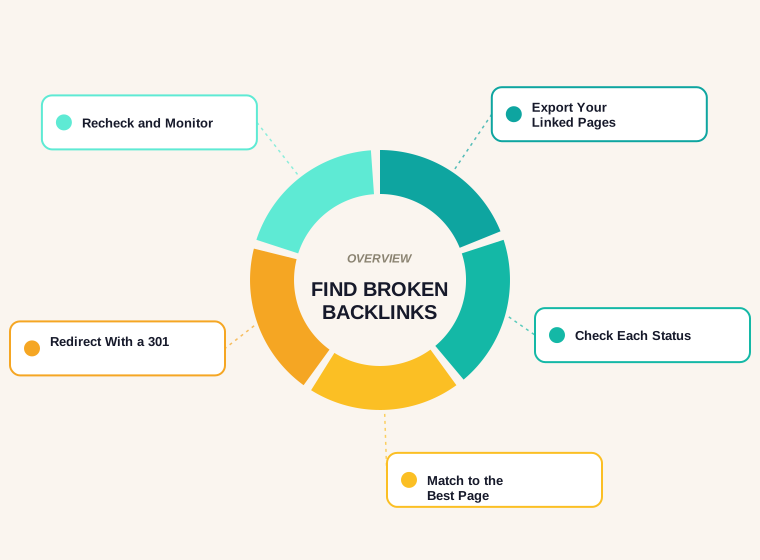
A broken backlink is a link from another website that points to a page on your site which no longer works. To find broken backlinks you list the pages that earn links, check each one's status code and fix the ones that return an error. We ran the same status check on our own side of the web: of 927 unique external links in our posts, 2 were really broken. That small, real result is a useful lens, and this guide covers both directions: links pointing to you that land on a dead page, and your own links that point to dead pages elsewhere.
The method is simple enough to repeat each quarter. It uses Search Console, a status check and a redirect map. If you want to build the redirect map in bulk, our redirect mapper does it in the browser.
What a Broken Backlink Is, and Why It Costs You
Someone links to a page on your site. Later you delete the page, change its URL or break it during a migration. The link now leads visitors to an error page, and the link's value does not reach any live page. The visitor is lost, and the effort of earning the link is wasted.
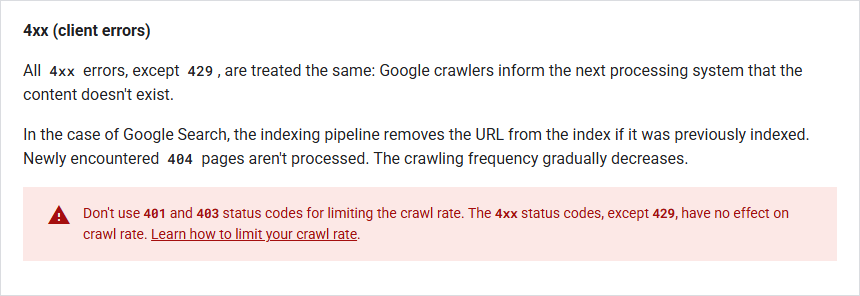
Google's crawling documentation explains what happens on its side. All 4xx errors, apart from 429, are treated the same way: crawlers tell the next system that the content does not exist, and a previously indexed URL is removed from the index. Newly encountered 404 pages are not processed, and crawl frequency gradually decreases.
For the same documentation, a 301 redirect is the other half of the answer: Google follows it and uses it as a strong signal that the redirect target should be processed. A broken backlink with a correct 301 behind it sends visitors and signals to a live page.
Step 1: List the Pages That Earn Links
In Search Console, open the Links report. It lists your top linked pages, top linking sites and top linking text. Export the linked pages. Google describes the report as a sample, not a full list, so treat it as the minimum. If you also use a backlink tool, export its list of target URLs and add them. Our backlinks report guide explains how to read the data you get. On our own site, 11 of the 13 external links listed in the Links report point at the homepage, as covered in how many backlinks you need, which is a quick check: a homepage is rarely broken.
Step 2: Check the Status of Every Linked Page
For each linked URL, request the page and read the final status code. You are looking for 404 (not found) and 410 (gone), plus 5xx errors and soft 404s, where a page returns 200 but shows an error or an empty template. Search Console's Page indexing report lists pages it found as not found, which is a second source. Do not forget URL variants. A link to the version without a trailing slash, or with a tracking parameter, may fail even if the clean URL works.
Step 3: Match Each Broken URL to Its Best Replacement
For every broken URL, ask what a visitor wanted when they clicked. If the page was moved, the replacement is its new address. If it was merged into a broader guide, point it there. If it was removed and nothing replaces it, return a 404 or 410 and consider whether the link is worth asking the linking site to remove or update. Avoid sending every dead URL to the homepage. A redirect should lead to the page that actually continues the topic. Our canonical and hreflang guide covers how redirect targets and canonicals should agree.
Step 4: Redirect With a 301 and Fix Internal Links
Add a 301 redirect from each broken URL to its match. Use a permanent redirect because the move is permanent. Keep redirects to a single hop, because chains waste crawling and slow users. Then update your own internal links so they point straight at the final URL and do not rely on the redirect. Finally, if the linking site is friendly and the link is valuable, you can ask them to update it, but do not depend on this.
Step 5: Recheck and Monitor
After the change, request the old URL again and confirm it returns a 301 to a 200 page. Add the fixed URLs to a running log. Repeat the whole process each quarter, and after every migration, redesign or URL change. Many broken backlinks appear during exactly those events.
The Other Direction: Broken Links Pointing Out
The same status check works for outbound links, and it is worth running because broken outbound links hurt readers. We checked every unique external link in the body of all our posts, 927 in total.
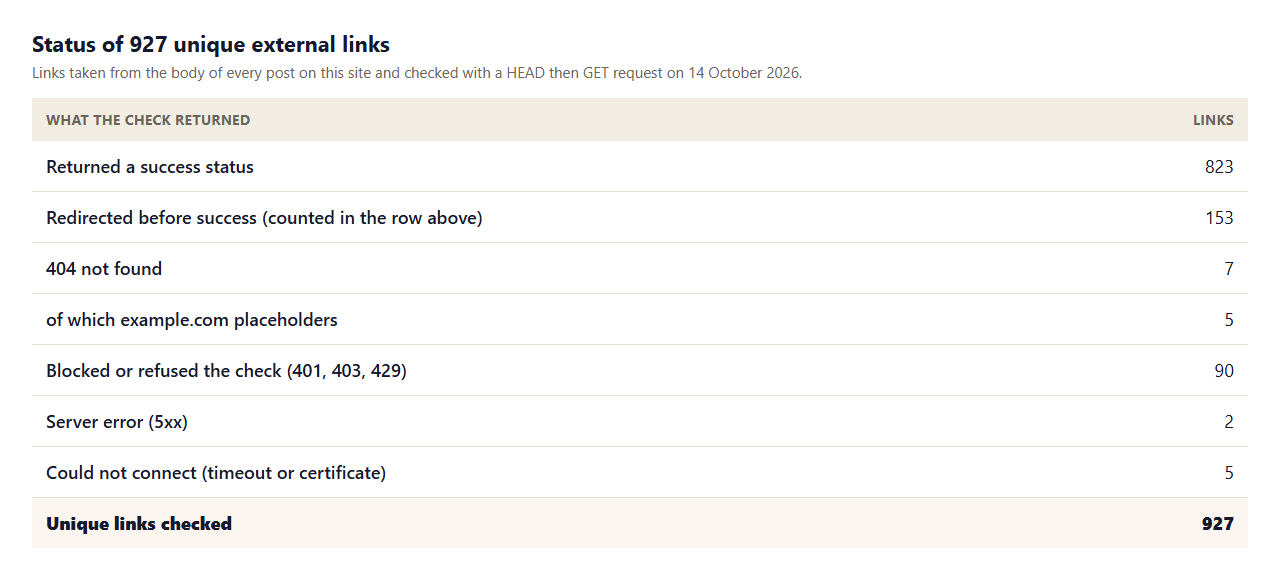
- 823 of 927 returned a success status, and 153 of the links redirected before they did, which is normal for http to https and www changes.
- 7 returned 404, but 5 of those were example.com addresses used as placeholders in hreflang examples, not real links. That leaves 2 genuinely broken links, a government rule page that had moved and the home page of a business site that no longer served pages.
- 90 refused the check with a 401, 403 or 429, which is how many sites treat automated requests. These are unverified, not broken.
- 7 could not be reached because of server errors, timeouts or certificate problems, and are worth a manual look.
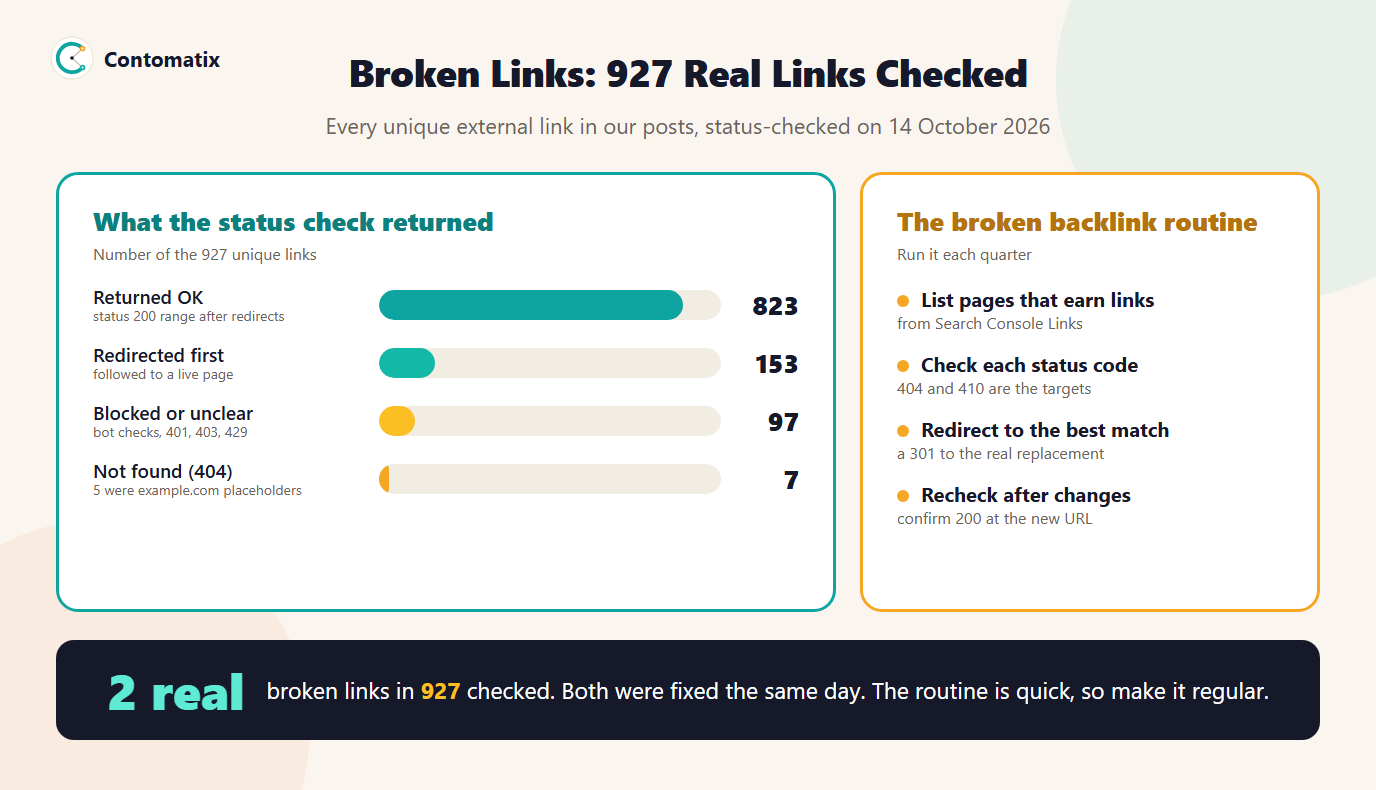
We repaired both real ones the same day: one pointed to the replacement page on the same government site, and the other had its link removed. Two broken links in 927 is a healthy result, but only a check could tell us so.
Which Broken Backlinks to Fix First
If the list is long, rank the broken URLs by what they are worth. Start with pages that have the most linking sites, because each fix restores the most value. Then take links from relevant, trusted sites over links from directories and scrapers. Finally, weigh the traffic: a link that sent visitors in the past is more worth saving than one nobody has clicked. Ten well-chosen redirects usually recover most of the benefit, and the long tail of low-value links can wait for the next review.
A Worked Redirect Map
A redirect map is a two-column list of old URL and new URL. Keep it in a spreadsheet and review it before it goes live. A small example for a service business might look like this.
/services/ac-repair-denverto/services/air-conditioning-repair, because the two pages were merged./blog/2019-hvac-tipsto/blog/hvac-maintenance-checklist, because the guide was rewritten under a new address./about-us.htmlto/about, because the site changed its URL pattern.
Each row is a deliberate match, not a catch-all. Check the final column for pages that are themselves redirects, and fix the chain so the old URL points straight at the live page.
When a Page Is Really Gone
Not every broken backlink should be redirected. If a page was removed because the product, service or topic no longer exists, and no page on your site continues it, a 404 or 410 is the honest answer. Forcing a redirect to an unrelated page can confuse readers and gives search engines a poor signal. In that case, make the 404 page useful: explain that the page has gone, offer search and link to your main sections. If the backlink is from a valuable site, consider recreating a short page on the topic, so the link has something relevant to land on.
Preventing Broken Backlinks in the First Place
- Keep URLs stable. Choose clean, permanent URLs and avoid dates and file extensions that you may want to change.
- Plan redirects before a migration. Export all indexed and linked URLs, map them and test the redirects on a staging copy.
- Check before you delete. Before removing a page, look for links and traffic. If it has either, redirect or keep it.
- Review after launch. Watch the Page indexing report and server logs for new 404s in the first weeks.
Reporting the Result
Record the number of broken URLs found, how many had external links, how many were redirected and how many were left as a 404 with the reason. Add the date of the check and the date of the next one. A simple log like this shows the work and makes the next review fast, and it fits neatly into the monthly report described in our local SEO reporting guide.
Soft 404s: The Broken Pages That Return 200
A soft 404 is a page that looks like an error to a visitor but returns a success status to a crawler. Typical causes are an empty template after a product is removed, a search results page with no results and a redirect that lands on an unrelated page. Google's documentation says Search Console shows a soft 404 when the content suggests an error, such as an empty page or an error message. To find them, open the Page indexing report and look for the soft 404 reason, and sample linked pages by eye as well as by status code. A broken backlink can hide behind a 200 for months, because the usual status check says everything is fine.
When you find one, decide the same way as for a normal 404: redirect it to the true replacement, restore the content or return a proper 404 or 410 status so that crawlers and visitors get a clear answer.
Tools and Data Sources
- Search Console Links report. Top linked pages, linking sites and anchor text, free and first-party.
- Search Console Page indexing report. URLs Google found that returned not found.
- A crawler. Finds broken internal and outbound links across a site and exports status codes.
- Server logs. Show real requests to URLs that return 404, including those from external referrers.
- A backlink tool export. Lists target URLs from a wider index, which you can check in bulk.
Common Mistakes
- Redirecting everything to the homepage. It loses the match between the link and the content.
- Using a 302 for a permanent move. Use a 301 so the signal is clear.
- Creating redirect chains. Each hop adds delay and risk.
- Ignoring soft 404s. A 200 page that says not found still fails the visitor.
- Only checking once. URLs change with every migration and redesign.
Limits of This Check
- It covers links in our own post bodies, not every link on the site.
- A page that returns 200 may still be wrong or empty, and the check cannot read meaning.
- 97 links could not be verified automatically.
- Search Console's Links report is a sample, so the list of linked pages you export is a minimum.
Key Takeaways
- List the pages that earn links, check each status code and fix any that return an error.
- Use a single-hop 301 to the page that actually replaces the old one.
- Update your internal links so they do not rely on the redirect.
- Run the same check on your outbound links, and treat blocked results as unverified.
- Repeat each quarter and after any URL change.
Need broken backlinks and redirects mapped for a migration or an old site? Get in touch and we will audit it.
Frequently Asked Questions
What is a broken backlink?
A link from another website that points to a page on your site which now returns an error such as 404, so the visitor and the link's value are lost.
How do I find broken backlinks for free?
Export your top linked pages from the Search Console Links report, then check each URL's status code. Pages returning 404 or 410 are broken backlinks to fix.
Should I redirect broken backlink URLs to the homepage?
No. Redirect to the page that replaces the old one. A redirect to an unrelated page does not continue the topic the link was written for.
Is a 301 redirect better than a 302 for this?
Yes, when the move is permanent. Google follows a 301 and uses it as a strong signal that the target should be processed, while a 302 is a weaker signal.
What does Google do with a 404 page?
Google treats 4xx errors as content that does not exist. A previously indexed URL is removed from the index, newly found 404 pages are not processed and crawling frequency decreases.
How often should I check for broken backlinks?
Once a quarter, and after any migration, redesign or URL change, which are when most backlinks break.
What is the difference between a broken backlink and a broken outbound link?
A broken backlink is another site's link to a dead page on your site. A broken outbound link is your link to a dead page elsewhere. Both are worth fixing, for different reasons.
Why do some links return 403 in a link checker?
Many sites refuse automated requests, so a checker sees 403 or 429 even though the page works in a browser. Check those manually before calling them broken.
Can I ask the linking site to update a broken link?
You can, and for valuable links it is worth a short, polite email with the new URL. Do not rely on it, and set up the redirect regardless.