Last updated: September 2026
Almost every broken international site we audit has the same two tags fighting each other. The canonical hreflang conflict is not exotic, it is not hard to fix, and it quietly wipes out the entire multilingual setup while every tag looks perfectly valid in the page source.
This guide covers what each tag is actually for, the rule that breaks most implementations, the codes people get wrong, and how to generate and test a set that works.
Canonical and Hreflang Do Completely Different Jobs
They look similar, they sit next to each other in the <head>, and they are not interchangeable.
- Canonical answers "which URL is the real version of this page?" It is a deduplication signal, used when the same content is reachable at several URLs.
- Hreflang answers "which version of this page should a searcher in another language or country see?" It is a targeting signal between pages that are genuinely different.
A French translation is not a duplicate of the English page. It is a separate page for a separate audience, which is why it needs its own canonical and a hreflang set that links it to its siblings.
What Google Says About Localized Versions
You do not have to guess at the rules. They are documented.
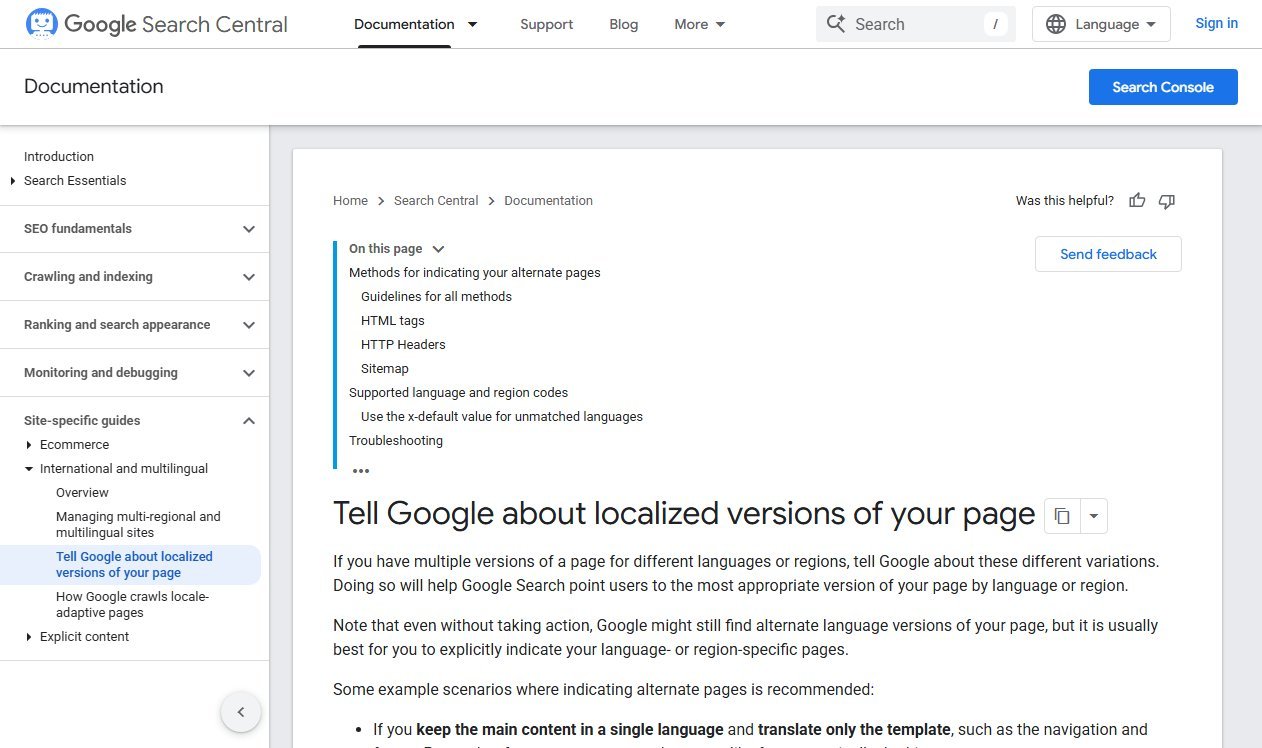
Google's documentation on telling Google about localized versions of your page sets out three rules that matter more than the rest:
- Each version must list itself as well as every other version. The self-referencing hreflang is not optional decoration.
- The links must be reciprocal. Google states that if two pages do not both point to each other, the tags are ignored.
- URLs must be fully qualified, including https, not relative paths.
Google also says the three implementation methods are equivalent from its perspective, which settles a debate that still fills forum threads.
The Rule That Breaks Most Implementations
Here is the failure we see most often, and it is almost always the same mistake.
A site has an English page and a Spanish translation. Someone, worried about duplicate content, sets the canonical on the Spanish page to the English URL. Every hreflang tag on the site is still valid. The whole set stops working anyway.
The reason is simple: a canonical pointing at another page tells Google "do not index this URL, index that one instead". Once the Spanish page is consolidated into the English page, there is nothing left for hreflang to target.
The fix, every time: each language version canonicalises to itself, and the hreflang set does the cross-linking. Cross-language canonicals are the single most common reason an otherwise correct international setup produces nothing.
Three Ways to Add Hreflang
Google accepts all three and treats them equally. Pick based on how your site is built, not on which one sounds more technical.
| Method | Best for | Watch out for |
|---|---|---|
HTML <link> tags in the head | Most sites, and anything under a few thousand URLs | Page weight on large sets; every version needs the full set |
| HTTP headers | Non-HTML files such as PDFs | Needs server configuration; harder to audit |
| XML sitemap entries | Large sites, and teams who cannot edit templates | Easy to leave stale when URLs change |
One practical rule: do not mix methods for the same set of pages. Two sources of truth is how a set drifts out of sync, and a partially contradictory set is worse than none.
Generate the Tags Without Hand-Writing Them
Hreflang sets are repetitive, and repetitive hand-typing is where typos come from. Our free hreflang generator takes a list of language and URL pairs and produces the complete reciprocal set.
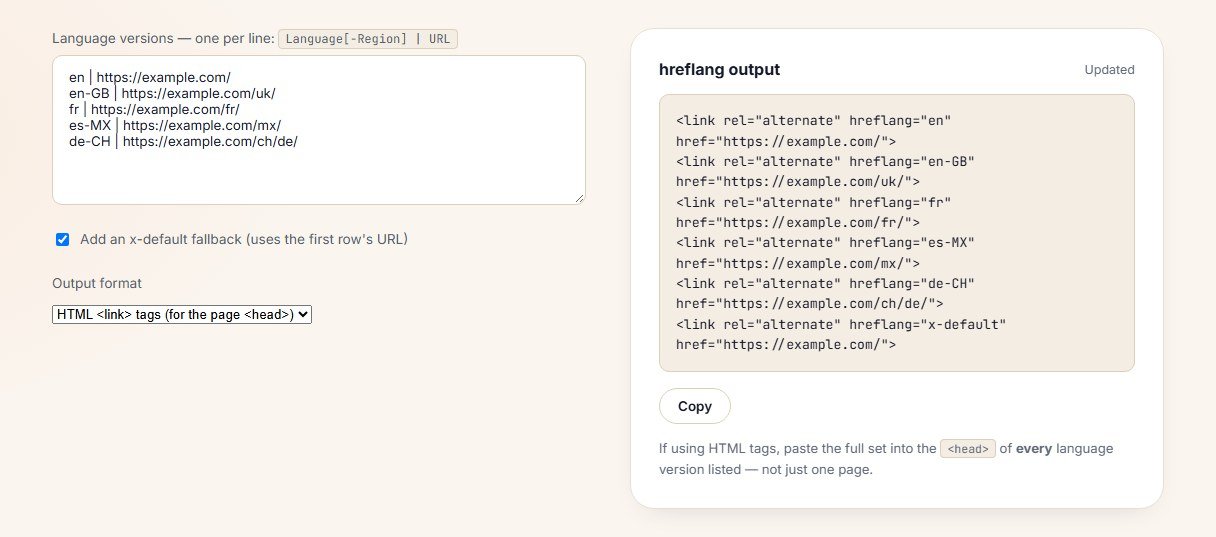
That last point is the one people miss. The generated block is identical on all five pages. If the Spanish page carries only its own tag, the set is not reciprocal and Google will ignore it.
Hreflang in an XML Sitemap
For large sites, sitemap annotations are usually the sane choice: the markup lives in one file, nobody has to touch a template, and the whole set can be regenerated by a script.
The structure is one <url> entry per page, each listing every version including itself:
<url>
  <loc>https://example.com/</loc>
  <xhtml:link rel="alternate" hreflang="en" href="https://example.com/"/>
  <xhtml:link rel="alternate" hreflang="fr" href="https://example.com/fr/"/>
  <xhtml:link rel="alternate" hreflang="x-default" href="https://example.com/"/>
</url>
Three things go wrong with this method in practice. The xhtml namespace is left out of the opening urlset tag, so the annotations are silently invalid. The set is generated once and never regenerated after a URL change. Or a page appears in the sitemap with annotations while the same page carries a conflicting set in its head.
If you are building or rebuilding the file itself, our free sitemap generator produces a clean base you can add annotations to.
Language and Region Codes People Get Wrong
Google accepts ISO 639-1 language codes and ISO 3166-1 Alpha 2 region codes, and it is stricter than most people expect.
- You cannot use a region on its own. The first code is always the language.
hreflang="us"is not a thing;en-USis. - UK is not a valid region code. The code for the United Kingdom is
GB, so British English isen-GB. - EU and UN are reserved and Google ignores that part of the annotation.
- Region groupings are not supported.
es-419, widely used for Latin American Spanish elsewhere, is not valid here. - Script subtags work where they matter, such as
zh-Hansfor Simplified Chinese.
A single invalid code does not usually break the whole set, but it does mean the page it belongs to is never targeted, which looks identical to "hreflang does not work" from the outside.
What x-default Is Actually For
x-default handles searchers whose language settings match none of your versions. Google describes it as working best with a language selector page, or with a default version for everyone you have not explicitly targeted.
Two sane patterns:
- Point x-default at a language selector if you have one. This is the cleanest option for a site that genuinely serves many markets.
- Point x-default at your main version, usually the English or headquarters page, if you do not.
What you should not do is leave it out and hope. Without x-default, an unmatched searcher gets whichever version Google guesses, and the guess is based on signals you do not control.
The Five Canonical Hreflang Failure Patterns
Almost every broken set we audit fits one of these.
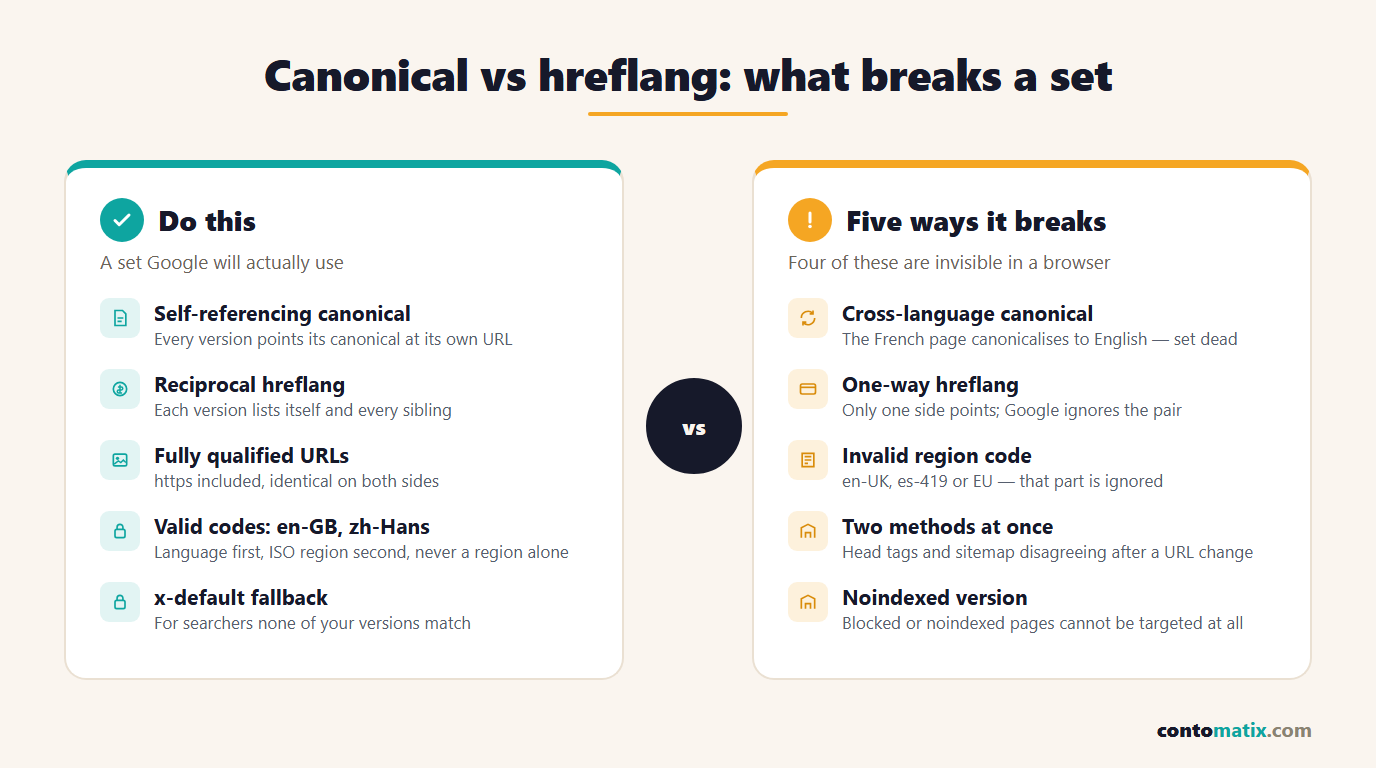
The pattern worth memorising is the first one. If the canonical and the hreflang disagree about which URL matters, the canonical wins and the hreflang is wasted.
How to Test a Set Before You Ship It
- View source on two versions, not one. Check that the English page lists Spanish and the Spanish page lists English, with identical URLs on both sides.
- Check the canonical on each version. It must point at that version's own URL.
- Use the URL Inspection tool in Search Console on each version and confirm Google has selected the URL you expect as canonical, not a sibling.
- Compare the URLs character by character. A trailing slash on one side and not the other is a mismatch, and so is http on one side and https on the other.
- Re-test after any URL change. Hreflang sets rot silently when a page is renamed and only one side is updated.
If you are running a bigger international programme rather than a single fix, our guide to hiring an international SEO consultant covers what that work should include.
Redirects, Country Selectors and Locale-Adaptive Pages
Hreflang assumes one URL per version. Two common setups break that assumption.
Automatic redirects by IP address. If a visitor from France is bounced to the French page whether they asked for it or not, Googlebot gets bounced too, and it usually crawls from a single region. The result is that most of your versions are never seen. Offer a suggestion banner instead of a forced redirect, and keep every version reachable at its own URL.
Serving different content at the same URL. Google calls these locale-adaptive pages, and its guidance is to use separate URLs for each locale where you can, because one URL cannot carry a hreflang set that distinguishes between versions that do not have addresses of their own.
A country selector page is the exception that works well: give it a URL, point x-default at it, and let it link out to every version.
When You Do Not Need Hreflang at All
Plenty of sites add this complexity without needing it.
- One language, one country. Nothing to target. Skip it.
- Identical English pages for the US and UK with no real differences. If the only change is a currency symbol, consider whether two pages are worth maintaining at all.
- Machine-translated pages nobody has reviewed. Targeting a market with poor translations does more damage than being absent from it.
Hreflang is a targeting tool, not a ranking tool. It does not make a page rank higher in its own market; it stops the wrong version being shown to the wrong person.
What Hreflang Cannot Fix
Every few months a client asks us to add hreflang to solve a problem it has nothing to do with. It is worth being clear about the limits.
- It will not rank a weak page. If the German page has no links, thin content and no local relevance, correct annotations simply mean the right weak page is shown to the right person.
- It will not merge duplicate content in the same language. Two near-identical English pages are a canonical problem, not an hreflang one.
- It will not override a strong user signal. Someone searching in English from Madrid may still be shown the English page, because language preference generally outweighs location.
- It will not fix an indexing problem. A version blocked by robots.txt or marked noindex cannot be targeted at all, and the rest of the set carries on without it.
Get the pages right first, then use hreflang to route people to the correct one. That order matters more than any tag.
Quick Recap
- Canonical says which URL is the real one; hreflang says which version to show to whom.
- Every language version must canonicalise to itself. Cross-language canonicals kill the hreflang set.
- Hreflang must be reciprocal and self-referencing, with fully qualified URLs.
- HTML tags, HTTP headers and sitemap entries are equivalent, so pick one and do not mix them.
- Use
GBnotUK, never a region code alone, and skip unsupported groupings such ases-419. - Add x-default for searchers your versions do not cover.
- Test both sides of every pair, then re-test whenever a URL changes.
Frequently Asked Questions
Can a page have both a canonical and hreflang tags?
Yes, and it should. The canonical points at the page's own URL, and the hreflang set lists that page plus every other language version. Problems start only when the canonical points at a different language version.
Should the canonical point to the English version on translated pages?
No. That tells Google not to index the translated page at all, which removes it from results in its own market and makes the hreflang set pointless. Each version canonicalises to itself.
Does hreflang have to be reciprocal?
Yes. Google states that if two pages do not both point to each other, the annotations are ignored. Every version needs the full set, including a tag for itself.
Is hreflang a ranking factor?
Not in the sense of boosting a page. It decides which version of a page is served to a given searcher, which usually improves engagement and conversion rather than position.
What is x-default used for?
It is the fallback for searchers whose language and region match none of your versions. It is commonly pointed at a language selector page or at your main version.
Is it en-GB or en-UK?
en-GB. UK is not a valid ISO 3166-1 Alpha 2 region code, and Google ignores the region part of an annotation that uses it.
Can I use hreflang for the same language in different countries?
Yes. en-US, en-GB and en-AU are a normal and useful set, provided the pages genuinely differ in price, stock, contact details or spelling. Duplicate pages with no real differences are not worth maintaining.
Which hreflang method should I use?
HTML link tags for most sites, sitemap entries for very large sets or where templates cannot be edited, and HTTP headers for non-HTML files. Do not use more than one method for the same pages.
How long does hreflang take to take effect?
Every version has to be recrawled before the relationship is understood, so expect days to weeks depending on how often the site is crawled. There is no way to force it beyond requesting indexing.
How do I check whether my hreflang is working?
Inspect both pages in a pair, confirm the tags and canonicals on each side, then use Search Console's URL Inspection tool to see which URL Google selected as canonical for each version.