Last updated: October 2026
A canonical URL is the address of the version of a page that Google treats as the main one when several URLs show the same or very similar content. You can suggest it with a rel="canonical" tag, and the next question is whether that tag should hold a relative or an absolute URL. Google says to use absolute paths. Its page on specifying a canonical URL says that, even though relative paths are supported, they can cause problems in the long run. We read 5 pages that rank for "canonical url" on 5 November 2026: all 5 explain duplicate content and give an example, but only 2 mention absolute URLs. Then we checked the HTML of 369 pages that rank in Google US. 353 carry a canonical tag, and 351 of those 353 (99.4%) are absolute.
This guide covers what a canonical URL means, what a non-canonical URL is, what Google says in its own words, relative versus absolute, our scan, and how to check yours. If you work on international sites, our guide to canonical and hreflang tags goes further, and our free canonical tag checker tests a page.
What Is a Canonical URL? (What Does Canonical URL Mean)
Google's page on canonicalization defines it this way: canonicalization is the process of selecting the representative, or canonical, URL of a piece of content, and a canonical URL is the URL Google chose as the most representative from a set of duplicate pages. In plain words, if the same page can be reached at more than one address, Google picks one to show in results. Your job is to tell it which one you prefer. 5 of 5 guides start from duplicate content, and so does Google.
Google lists several reasons duplicates appear: region variants, device variants, protocol variants (HTTP and HTTPS), site functions such as sorting and filtering, and accidental variants such as a demo site left open to crawlers. It adds that some duplicate content on a site is normal and is not a violation of its spam policies.
What Is a Non-Canonical URL?
A non-canonical URL is any other version of a page that is not the one chosen as the main one. If example.com/shoes and example.com/shoes?sort=price show the same list, one is the canonical URL and the other is non-canonical. Google groups the pages into a cluster and picks one. The non-canonical versions are not penalised, but they are usually left out of results in favour of the canonical one. 3 of 5 guides mention URL parameters as a common source.
What Google Says About Canonical URLs
Google has two pages on this, and the facts below come from them. The first, What is URL canonicalization, was last updated on 20 August 2026. The second, How to specify a canonical URL, was last updated on 10 July 2026.
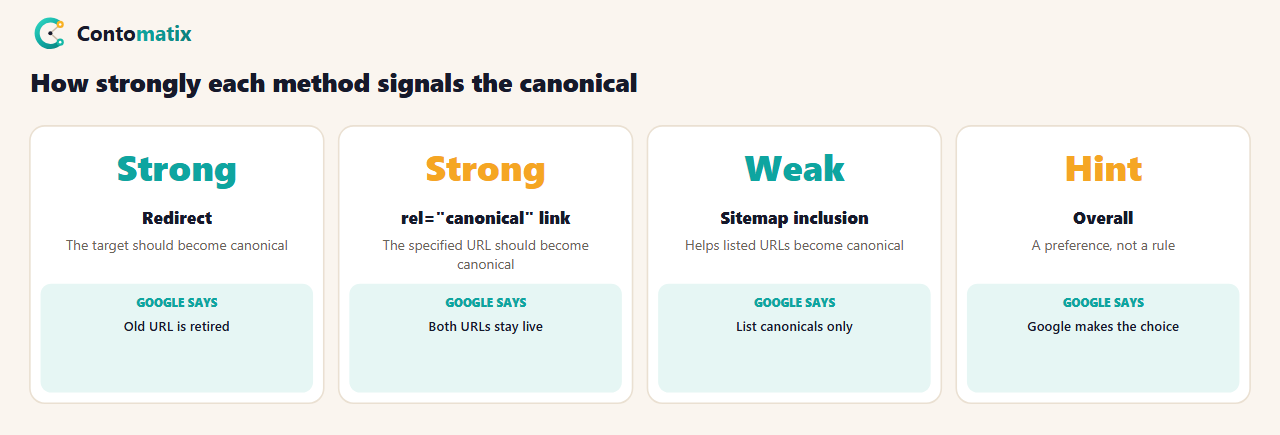
- It is a hint, not a rule. Google says indicating a canonical preference is a hint, and the URL it picks can differ from your choice.
- Several factors count. The page lists whether the page is served over HTTP or HTTPS, redirects, the presence of the URL in a sitemap, and rel="canonical" link annotations.
- Redirects are a strong signal that the target should become canonical.
- The rel="canonical" link is also a strong signal that the specified URL should become canonical.
- A sitemap is a weak signal that helps the listed URLs become canonical.
- Do not use robots.txt for canonicalization.
- Do add a self-referential canonical on the canonical page itself.
- Do not send mixed signals: do not give one URL in a sitemap and a different one in a rel="canonical" tag for the same page.
Canonical URL Example
This is the standard form. It sits in the head of the page, and the URL is complete, with the protocol and domain:
<link rel="canonical" href="https://www.example.com/dresses/green-dresses">
5 of 5 guides show an example, and it looks the same each time. Google's own example puts the tag on the duplicate pages and recommends adding the same self-referential tag to the canonical page itself. Google also says the tag is only accepted if it appears in the head section of the HTML, so make sure at least the head is valid HTML.
Relative or Absolute Canonical URL?
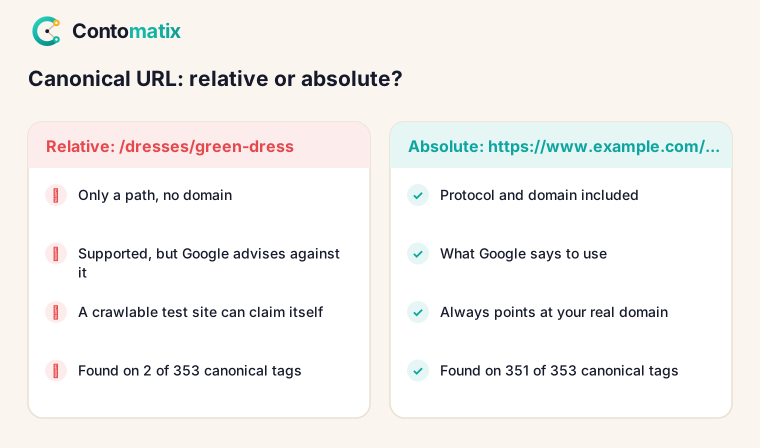
Use absolute. An absolute URL includes the protocol and domain: https://www.example.com/page. A relative URL is only a path: /page. Google's page says: "Use absolute paths rather than relative paths with the rel="canonical" link element." It then explains: even though relative paths are supported by Google, they can cause problems in the long run, for example if you unintentionally allow your testing site to be crawled, and so Google does not recommend them. The picture is easy to follow. If a test copy of your site is reachable and its pages carry relative canonicals, each test page ends up pointing to itself on the test domain, which tells Google that the test page is its own canonical. An absolute canonical keeps pointing to your real domain.
2 of 5 guides mention absolute URLs and 2 mention relative ones, so the advice is thin in the top results. Our scan, below, shows how almost everyone behaves.
What 5 Ranking Guides Say About Canonical URLs
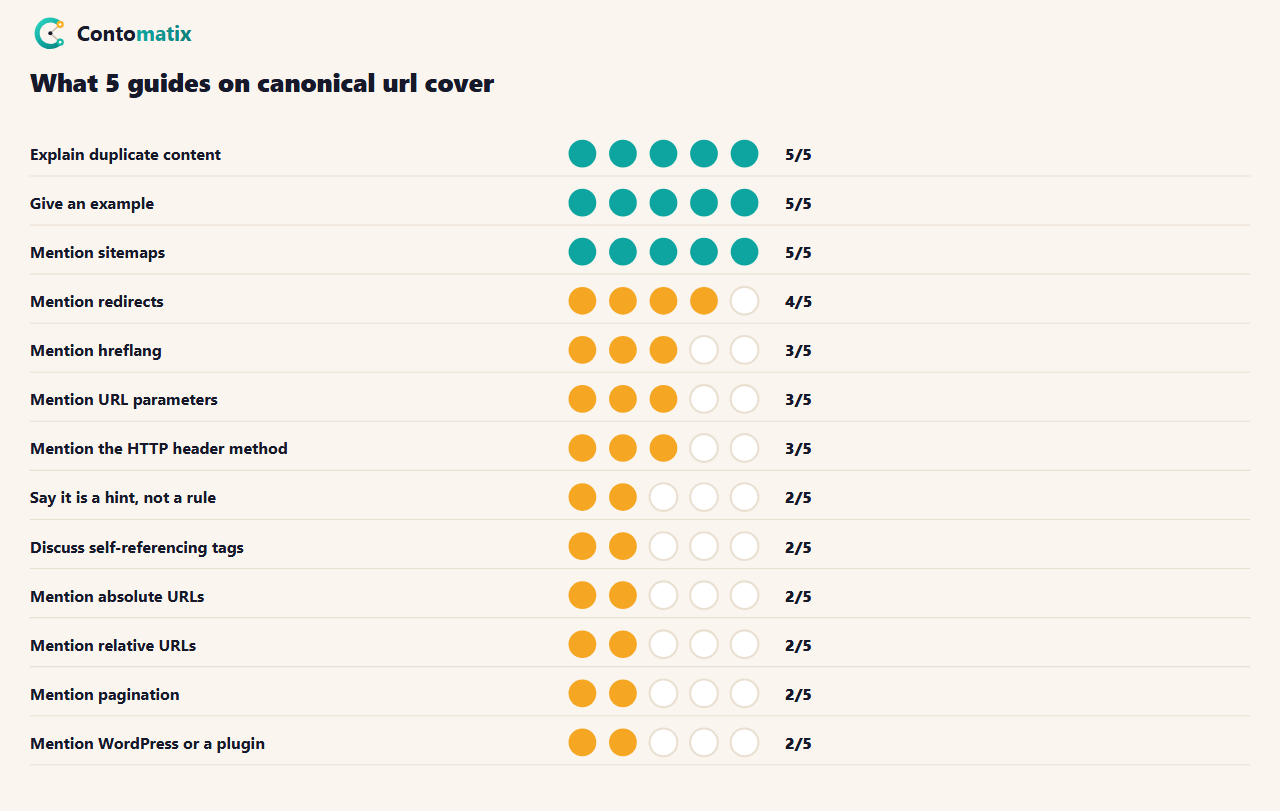
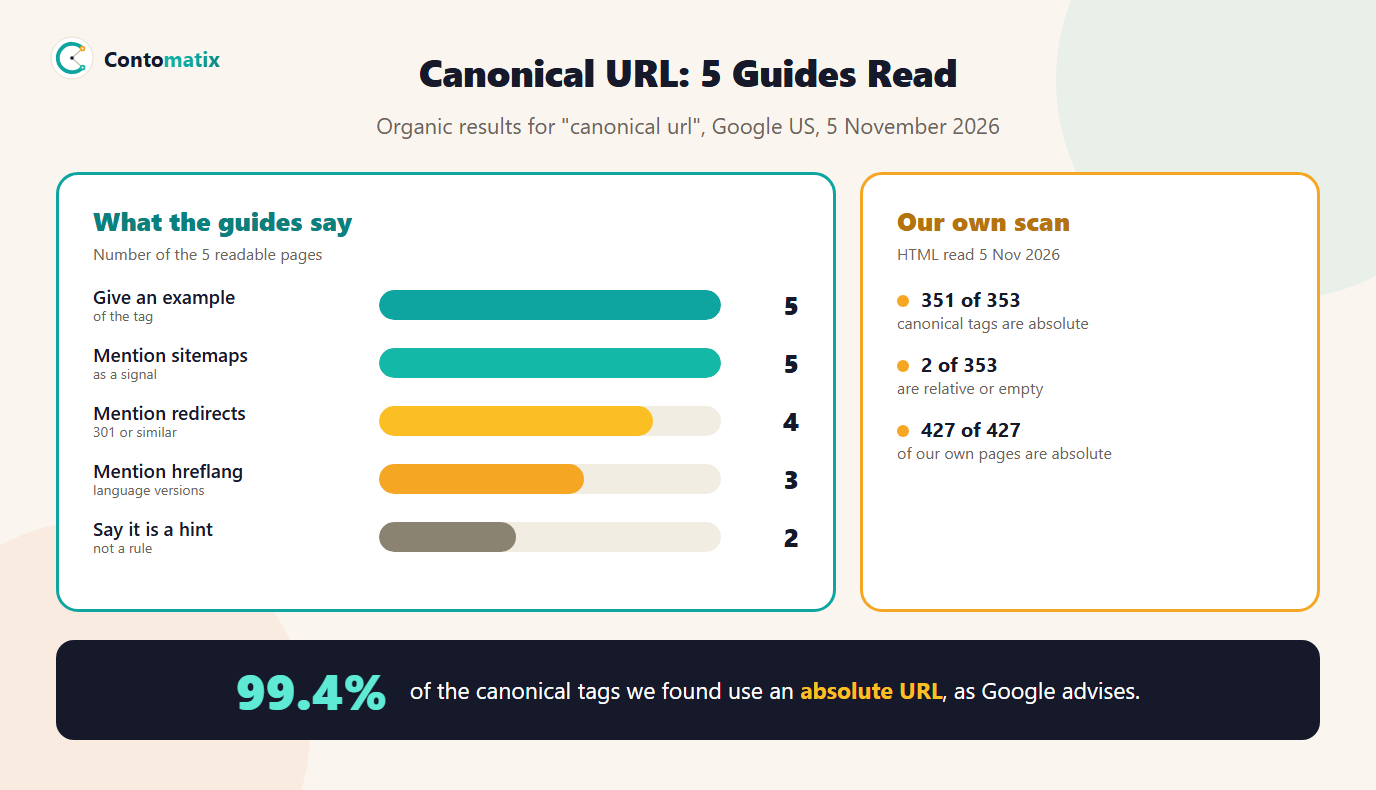
The median guide has about 1,221 words. 5 mention sitemaps, 4 mention redirects, and 3 mention hreflang. Only 2 say outright that it is a hint, even though that is the first thing Google says. 2 discuss self-referencing tags, 1 mention the trailing slash and 2 mention pagination. The guides agree on what a canonical URL is, and they split on the details.
We Scanned 369 Ranking Pages: How Many Use Absolute Canonicals?
Our research for earlier guides saved Google US results for 50 searches. We took every unique URL, added today's, and read the HTML of each, looking for a canonical link tag. We reached 369 pages out of 404. 353 of them (95.7%) carry a canonical tag.
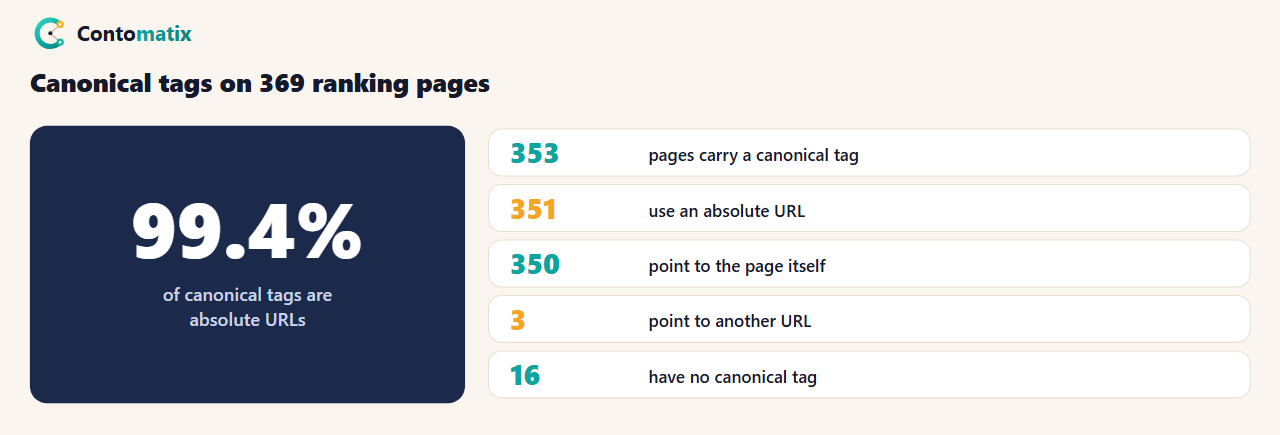
Of the 353 with a tag, 351 (99.4%) use an absolute URL. The other 2 are not: one has an empty value and one has a path only. 350 point to the page itself, which is the self-referential form Google recommends, and 3 point to a different URL. 5 pages have more than one canonical tag, which can send mixed signals. 6 send a canonical in the HTTP header as well or instead, and 16 have no canonical tag at all.
That is a scan of pages that rank for SEO topics, so it is not a sample of the whole web, and it does not show that absolute canonicals rank better. It shows what sites that care about search do: they use the absolute form.
Our Own Site: 427 Pages, All Absolute and Self-Referencing
We checked our own site on 3 November 2026 by reading the sitemap and every page in it. All 427 pages that returned a normal response have a canonical tag, all 427 are absolute, and all 427 point to the page itself. The one place we point a canonical at another URL is on purpose: filtered blog lists, such as a category view, carry a canonical to the main blog page and a noindex tag. Our site audits flagged those, and they are intentional.
Canonical URL and SEO: When to Use One
- URL parameters. Sorting, filtering and tracking parameters make many addresses for one page. 3 of 5 guides mention them.
- HTTP and HTTPS, or www and non-www. Google lists protocol variants among the causes of duplicates. A redirect is the stronger fix here.
- The same content on several URLs in a shop or blog, such as a product in more than one category.
- Syndicated content. 1 of 5 guides mention cross-domain use. We did not test it, and like every canonical signal it is only a hint.
- Every indexable page. A self-referential tag on each page is the default we use.
Self-Referencing Canonical Tags
A self-referencing canonical points to the page's own URL. Google recommends adding one to the canonical page itself. It protects you when someone links to your page with a tracking parameter, because the parameter version then points back to the clean URL. 350 of the 353 pages we scanned do this, and so do all 427 of ours.
Non-Canonical URL in a Sitemap
List only canonical URLs in your sitemap. Google says sitemap inclusion is a weak signal that helps the listed URLs become canonical, and warns against specifying one URL in a sitemap and a different one in a rel="canonical" tag for the same page. If your sitemap lists a non-canonical URL, you are sending two answers. Our free sitemap validator checks the file for problems, and 5 of 5 guides mention sitemaps as a signal.
Canonical URL vs 301 Redirect
Both are strong signals, but they do different jobs. A redirect sends visitors and crawlers to another URL, so the old one stops being used. A canonical tag keeps both URLs reachable and suggests which one to show. Use a redirect when the old URL should disappear, for example after a move, and a canonical when both need to stay live, for example a filtered list. Google says to use permanent redirects to tell it that a redirected URL is a worse version than the target. Our 301 vs 302 redirect guide explains which code to use.
Canonical URL and Hreflang
3 of 5 guides mention hreflang. Google's page says that rel="canonical" annotations with hreflang, lang, media and type attributes are not used for canonicalization. In practice, each language version should carry a canonical to itself, and the versions are linked with hreflang. Do not point the French page's canonical at the English page. Our hreflang generator builds the tags, and the canonical and hreflang guide covers the traps.
HTML Tag or HTTP Header?
Google supports both. The HTML link element goes in the head. The HTTP header is a Link header with rel="canonical", and it works for non-HTML files such as PDFs. Google recommends choosing one: using both at the same time is more error prone, because you might give one URL in the header and a different one in the element. 3 of 5 guides mention the header, and in our scan 6 of 369 pages send one.
Canonical URL Check: How to Check Yours
- View the source. Press Ctrl+U on the page and search for canonical. The href is your declared canonical. Check that it is absolute and that it matches the page.
- Use a checker. Our canonical tag checker reads the tag from pasted HTML and flags problems such as several tags or a missing value.
- Inspect the URL in Search Console. Google's help page tells you to inspect the indexed version and look at the Google-selected canonical field. It also shows a user-declared canonical if your page declares one. If the two differ, Google chose another page. Our guide to setting up Google Search Console covers the tool.
- Compare the sitemap. Make sure the URL in the sitemap matches the canonical.
- Crawl the site. A crawl lists canonicals for every page, so you can spot empty, relative and conflicting ones. We did that for our 427 pages.
Canonical URL in WordPress
2 of 5 guides mention WordPress or a plugin such as Yoast or Rank Math. Many themes and plugins add a self-referencing canonical automatically. We did not test individual plugins, so view the source of your own pages and check that the tag is present once, absolute and correct. A duplicate tag from a theme and a plugin is one cause of the multiple-tag cases we found: 5 of 353.
Common Canonical URL Mistakes
- Using a relative URL. Google recommends against it.
- Several canonical tags on one page. We found 5 such pages in our scan.
- Different signals for the same page. A sitemap URL that disagrees with the canonical tag.
- Using robots.txt to manage duplicates. Google says not to. Use our robots.txt tester only for what it is for: crawl control.
- Pointing every page to the home page. That asks Google to treat different pages as one.
- Putting the tag outside the head. Google only accepts it in the head section.
- Using noindex to pick a canonical. Google does not recommend it within a single site, because it blocks the page from search completely.
Frequently Asked Questions
What is a canonical URL?
The URL of the version of a page that Google treats as the main one when several URLs show the same or very similar content. You suggest it with a rel="canonical" tag, a redirect or a sitemap, and Google makes the final choice.
Should a canonical URL be relative or absolute?
Absolute. Google says to use absolute paths with the rel="canonical" link element, because relative paths can cause problems in the long run. In our scan, 351 of 353 canonical tags are absolute.
What is a non-canonical URL?
Any other version of a page that is not the chosen main one, such as the same page with a tracking or sorting parameter. Google clusters the duplicates and picks one to show.
Is a canonical tag a directive?
No. Google says indicating a canonical preference is a hint, not a rule, and the URL it picks can differ from your choice.
Should every page have a canonical tag?
Google recommends a self-referential canonical on the canonical page itself. 353 of the 369 ranking pages we scanned have one, and so do all 427 of our own.
Should non-canonical URLs be in my sitemap?
No. List only the URLs you want as canonical. Google says sitemap inclusion is a weak signal, and the sitemap and the tag should never name different URLs for the same page.
What is the difference between a canonical tag and a 301 redirect?
A redirect sends users and crawlers to another URL, so the old one stops being used. A canonical tag keeps both reachable and suggests which one to show. Google calls both strong signals.
How do I check the canonical URL of a page?
View the page source and search for canonical, use a canonical tag checker, or inspect the URL in Search Console and compare the Google-selected canonical with the user-declared one.
Can I use a canonical tag across different domains?
1 of the 5 guides we read mention it for syndicated content. We did not test it, and Google says every canonical signal is only a hint.
Want your canonical tags, sitemap and redirects checked together? Talk to us and we will review them against your Search Console data.


