Last updated: October 2026
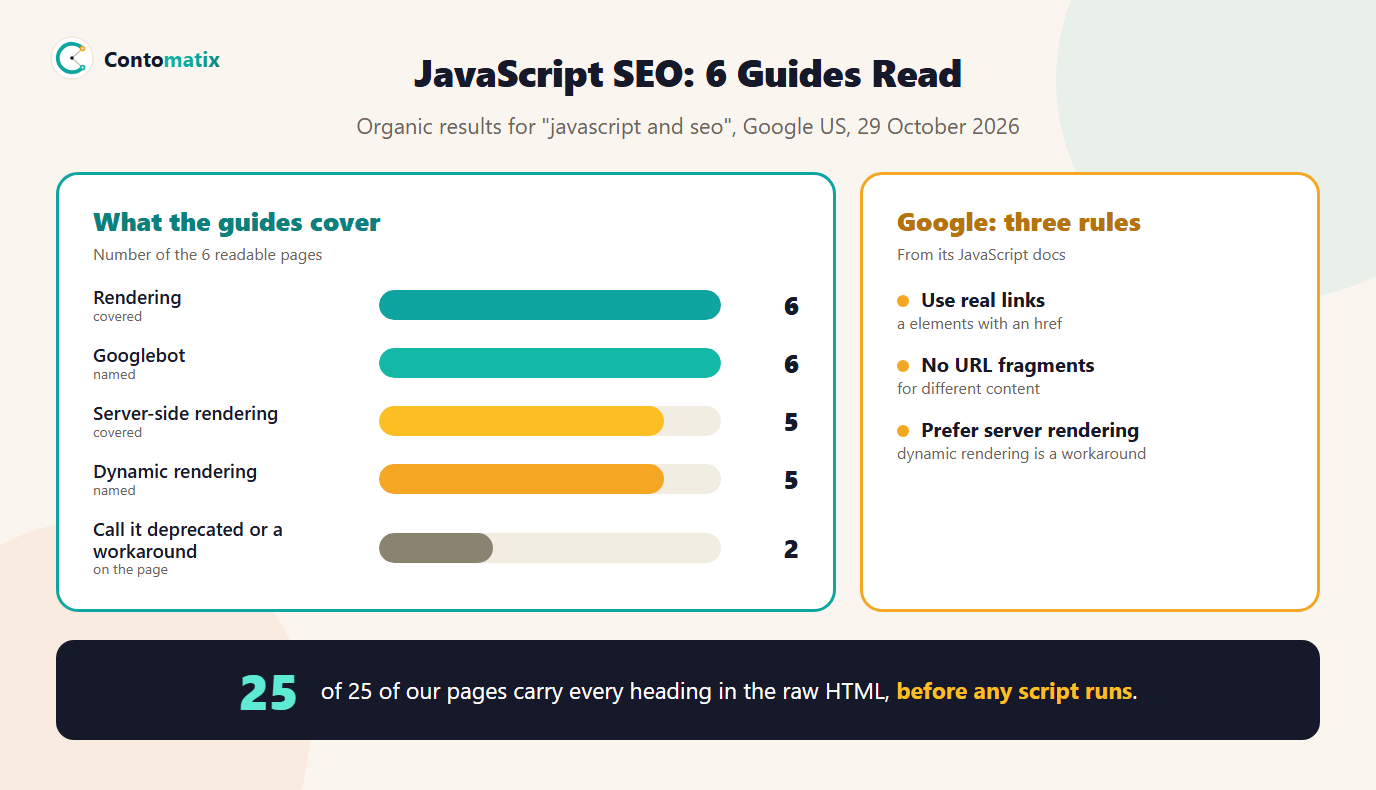
JavaScript and SEO come down to one question: does Google see your content and links after your scripts run, and does it see them quickly? Google's documentation says it does run JavaScript with an evergreen version of Chromium, but with limits, and that server-side or pre-rendering is still a great idea. We read 6 pages that rank for the topic on 29 October 2026. All 6 cover rendering and Googlebot, 5 cover server-side rendering and 5 name dynamic rendering, but only 2 say it is deprecated or a workaround, which is how Google describes it.
This guide explains how Google processes JavaScript, what links and content it can use, which fixes Google recommends and how to audit a page. It also shows a test we ran on 25 of our own pages, comparing the raw HTML with the rendered page. For related technical checks, see our guides to improving Core Web Vitals and types of schema markup.
JavaScript and SEO: How Google Processes Your Pages
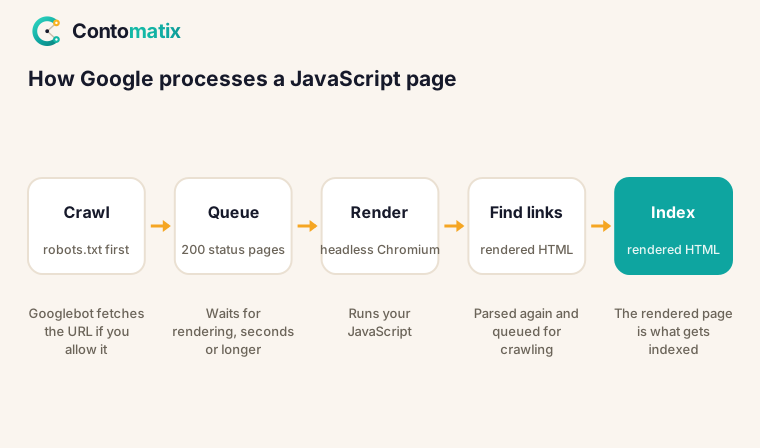
Google's JavaScript SEO basics page says Google processes JavaScript web apps in three phases: crawling, rendering and indexing. Googlebot queues pages for both crawling and rendering. When it fetches a URL, it first checks whether you allow crawling by reading robots.txt. Then it parses the response for links in the href attribute of HTML links and adds them to the crawl queue.
Rendering is the step that matters for JavaScript. Googlebot queues all pages with a 200 HTTP status code for rendering, unless a robots meta tag or header tells Google not to index the page. The page may stay in that queue for a few seconds, but Google says it can take longer. When resources allow, a headless Chromium renders the page and runs the JavaScript. Googlebot then parses the rendered HTML for links again and also uses the rendered HTML to index the page. If the status code is not 200, such as a 404, rendering might be skipped.
4 of 6 guides mention the rendering queue and 4 name the Web Rendering Service or Chromium. The practical point is that content which exists only after JavaScript runs is indexed later than content in the HTML, and a bot that does not run JavaScript will never see it.
What Ranking Guides Cover on JavaScript SEO
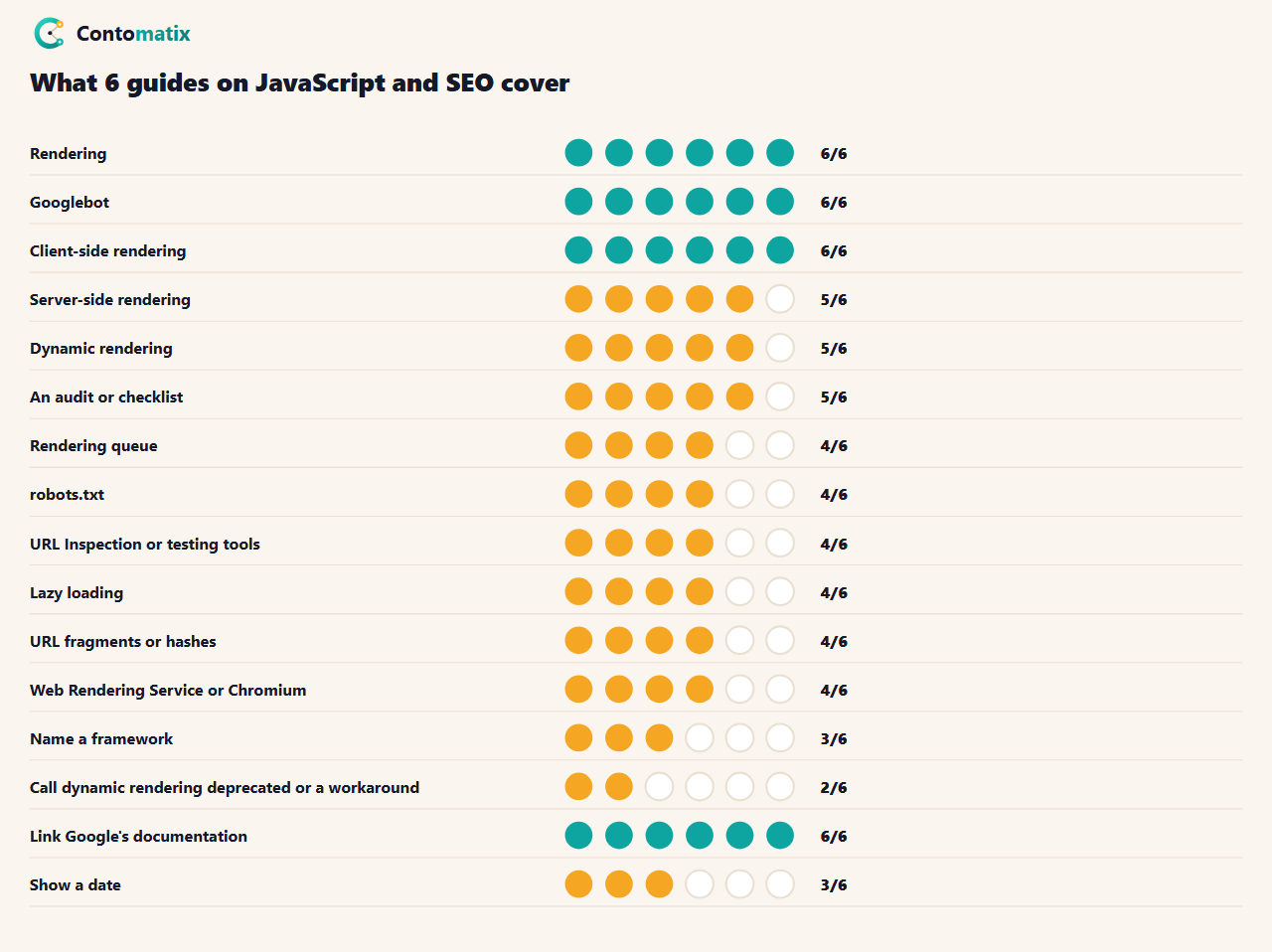
The median guide has about 2,240 words. 5 of 6 include an audit or checklist, 4 mention a testing tool such as URL Inspection and 3 name a framework. Only 3 show a date, which matters in this topic because the advice has changed: Google now describes dynamic rendering as a workaround, not a long-term solution.
SEO JavaScript Links: What Google Can Follow
Google says it can discover your links only if they are a HTML elements with an href attribute. Its page on crawlable links shows a link that uses javascript:goTo in the href as an example that does not work, next to a normal anchor with a real path that does. A button with an onclick handler, a span that acts like a link and a link whose destination is built only when clicked are all invisible to link discovery.
JavaScript is allowed to create links. The JavaScript SEO basics page says it is fine to use JavaScript to inject links into the DOM, as long as they follow the crawlable-link practices. So the question is never "does this link come from JavaScript", it is "is the finished markup an anchor with an href". If you build a single-page app, Google's guidance is to use the History API instead of URL fragments, and to avoid fragments for loading different page content. The troubleshooting page adds that the old fragment scheme has been deprecated since 2015, so you cannot rely on URL fragments to work with Googlebot. 4 of 6 guides discuss hashes or fragments.
Internal linking matters here too: a page that no crawlable link reaches is hard for Google to find. Our guide to SEO site migration shows why mapping every URL, and the links between them, comes first.
SEO Content in JavaScript: Dynamic Content and Lazy Loading
Content that is added after load, such as product lists, reviews or tabs, is "dynamic content". Google can index it if the rendered page contains it, but there are three common ways it goes missing. First, the script is blocked: Google says it will not render JavaScript from blocked files or on blocked pages, and 4 of 6 guides mention robots.txt. Test your rules with our robots.txt tester. Second, the content loads only after a user action, such as a click or a scroll, that Googlebot does not perform. Third, the content depends on a browser feature that is missing. Google recommends feature detection with polyfills or differential serving.
Lazy loading is fine when the content is in the page once it renders. 4 of 6 guides cover it. The safe rule is to put anything that should rank in the HTML or in content that loads on its own, not behind an interaction.
Dynamic Rendering: Why Google Calls It a Workaround
Dynamic rendering means serving a server-rendered version to bots and the client-side version to people. Google's page on it begins: dynamic rendering was a workaround and not a long-term solution for problems with JavaScript-generated content in search engines. It recommends server-side rendering, static rendering or hydration instead. It also notes that other search engines may choose to ignore JavaScript and will not see JavaScript-generated content. 5 of 6 guides name dynamic rendering, but 2 use the word deprecated or workaround, so a reader of the others could think it is still the standard answer.
SEO-Friendly JavaScript Framework: Server-Side Rendering, Static or Hydration
| Approach | What the bot gets | Use it when |
|---|---|---|
| Server-side rendering | Full HTML on each request | Content changes often or per user |
| Static rendering | Full HTML built ahead of time | Content changes rarely |
| Hydration | HTML first, script then makes it interactive | You need an app feel and crawlable content |
| Client-side only | An empty shell until script runs | Behind a login, where search does not matter |
6 of 6 guides explain client-side rendering and 5 explain server-side rendering. Which framework you pick matters less than whether it can send finished HTML for the pages that should rank. 3 of 6 guides name a framework; the useful question for any of them is "what is in the HTML response before scripts run?".
What We Found Testing 25 of Our Own Pages
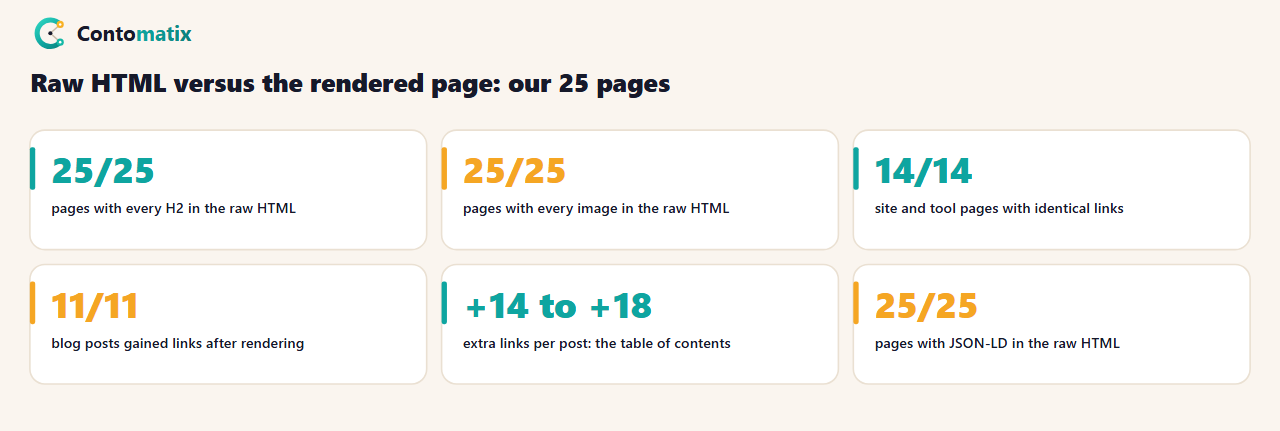
Our site is server-rendered, so we expected the raw HTML to hold everything. We fetched 25 live pages two ways on 29 October 2026: as raw HTML, which is what a crawler sees before running any script, and as a rendered page in headless Chrome. Headings, images and links count the same either way, so we compared those. Word counts differ because one counts all text in the HTML and the other counts text a visitor can see, so we did not use them.
- Headings and images: every H2 and every image was in the raw HTML on 25 of 25 pages.
- Links on site and tool pages: identical raw and rendered on 14 of 14 pages.
- Links on blog posts: all 11 posts had 14 to 18 more links after rendering. We traced one post: the extra links were all the anchors in the table of contents, which a small script builds from the headings.
- Structured data: JSON-LD was in the raw HTML on 25 of 25 pages, between 30,029 and 52,679 characters of HTML.
The finding: the only thing script adds on our pages is navigation within the page. Everything that should rank is in the HTML. A table of contents built by script is harmless, but the same pattern for body text or product links would be a risk.
Google SEO JavaScript: What Googlebot Does Not Do
Google's troubleshooting guide, Fix Search-related JavaScript problems, makes two points that explain many surprises. First, Googlebot and its Web Rendering Service continuously identify resources that do not contribute to essential page content and may not fetch them. Reporting and error requests are the example it gives. Second, client-side analytics may not give a full or accurate picture of Googlebot and rendering activity, so a script-based tracker is a poor way to check whether Google saw your page. Use the crawl stats report in Search Console and the URL Inspection Tool instead.
The same page says Google does run JavaScript but has differences and limitations you need to design around. That is why the safest pages do not depend on the rendering step for their main content.
JavaScript SEO Guide: Which Fix to Make First
- Is the main content in the raw HTML? If yes, you are in good shape. If not, ask for server-side rendering, static rendering or hydration for the pages that should rank.
- Are the links real anchors? Fix navigation and pagination that rely on clicks only.
- Are scripts and data files crawlable? Remove robots.txt rules that block them.
- Do missing pages return 404? Fix soft 404s in client-side routing.
- Is the canonical set in the HTML? Make the rendered value match.
Work through them in that order: the first fix changes what every crawler sees, the last only tidies the details.
JavaScript SEO Audit: How to Check a Page
- View the raw HTML. Use view-source or fetch the URL without scripts. Is the main content, the title and the links there?
- Compare with the rendered page. Google says to test how it crawls and renders a URL with the URL Inspection Tool in Search Console or the Rich Results Test. 4 of 6 guides mention such tools.
- Check links. Every navigation link should be an anchor with an href.
- Check robots.txt. Make sure scripts, styles and data the page needs are not blocked.
- Check status codes. A missing page should return a real 404, not a 200 page that says "not found". Google calls this a soft 404 in single-page apps.
- Monitor crawling. Google points to the crawl stats report in Search Console to watch Googlebot and Web Rendering Service activity. See our guide to setting up Search Console.
Our technical SEO audit tool covers the HTML-level checks.
JavaScript SEO Best Practices
- Send the important content in the HTML. Titles, headings, body text and main links should not depend on a script.
- Use anchors with hrefs for every link you want crawled.
- Use the History API, not URL fragments, for routing.
- Keep the canonical consistent. Google says not to use JavaScript to change the canonical to something other than the one in the original HTML, and that HTML is the best place to set it.
- Return honest status codes. Use 404 for missing pages and 401 for pages behind a login.
- Do not block needed files in robots.txt.
- Keep scripts light. Heavy scripts also hurt user experience, which our Core Web Vitals guide covers.
How to Make Your JavaScript SEO Friendly: Common Mistakes
- Treating "Google runs JavaScript" as "no problem". It does, but later and with limits, and other bots may not.
- Click-only navigation. Menus and filters built from buttons leave pages with no crawlable path.
- Soft 404s. A client-side router that shows an error message with a 200 status.
- Blocked resources. A rule that hides the very script that builds the page.
- Relying on dynamic rendering for the long term. Google calls it a workaround.
- Changing key tags after load. JavaScript can set a title and meta description, but conflicting values between the raw and rendered page make it harder to know which one counts.
Key Takeaways
- Google processes JavaScript in three phases, and rendering can happen after crawling, sometimes later than a few seconds.
- Links must be anchors with an href. Injecting them with script is fine, using onclick or javascript: links is not.
- Google calls dynamic rendering a workaround and recommends server-side rendering, static rendering or hydration.
- Only 2 of 6 ranking guides say that, so check the date and Google's own page before copying advice.
- On 25 of our own pages, every heading and image was in the raw HTML. Only a table of contents was built by script.
Frequently Asked Questions
Does Google run JavaScript?
Yes. Google says it processes JavaScript with an evergreen version of Chromium, but it can happen after the first crawl and has some limits.
What is JavaScript SEO?
It is making sure content and links created or changed by JavaScript can be crawled, rendered and indexed by search engines.
Is it bad to use JavaScript for SEO content?
Not by itself. Content that appears in the rendered page can be indexed, but content in the HTML is found sooner and by more bots.
Can Google follow JavaScript links?
Only if the finished markup is an anchor element with an href attribute. Links that use onclick or javascript: in the href are not crawlable.
What is dynamic rendering?
Serving a server-rendered page to bots and a client-side page to people. Google calls it a workaround, not a long-term solution.
How do I check what Google sees?
Use the URL Inspection Tool in Search Console or the Rich Results Test to see the rendered page, and compare it with the raw HTML.
Should I use server-side rendering?
Google recommends server-side rendering, static rendering or hydration for content that should rank, because the HTML arrives complete.
Are URL fragments okay for SPA routing?
No. Google says not to use fragments to load different page content and recommends the History API.
Does a script-built table of contents hurt SEO?
No. On our pages it only adds links within the page and the headings are already in the HTML.


