Last updated: October 2026
A Search Console impression is counted whenever a link to your site appears in the current page of Google results, whether or not the person scrolled to it. Over the last 90 days our own property recorded about 106,000 impressions and 77 clicks, a click-through rate of 0.1% at an average position of 43. That gap is the reason people ask what impressions actually mean. This guide explains the definition from Google's documentation and shows what our own numbers reveal, including why the table of queries shows only 65% of the impressions in the chart.
Below you will find Google's definition, what 4 ranking guides say, how average position works, what our own impressions and clicks look like by position, why the chart and the table disagree and what to do with the data. It is a companion to our guide to long tail low competition keywords.
What Google Says an Impression Is
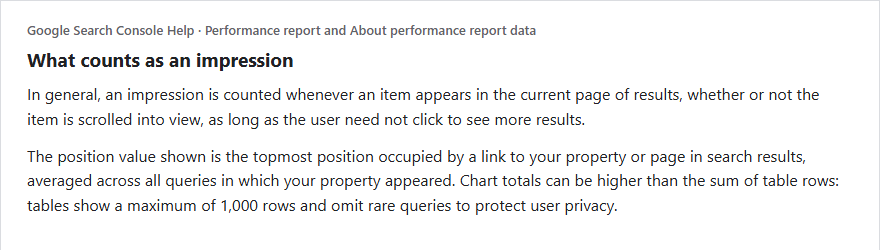
According to Google's help pages, in general an impression is counted whenever an item appears in the current page of results, whether or not it is scrolled into view, as long as the user does not need to click to see more results. Inside widgets that scroll or expand independently, such as a carousel or an expanding section, the item must typically be scrolled or expanded into view. Google also says the performance reports include appearances in AI Mode, where standard impression rules apply. This is the definition people search for as the Google Search Console impressions definition, and the key point is that an impression means your link was eligible to be seen on a results page, not that a person read it.
What the Ranking Guides Say, and Do Not Say
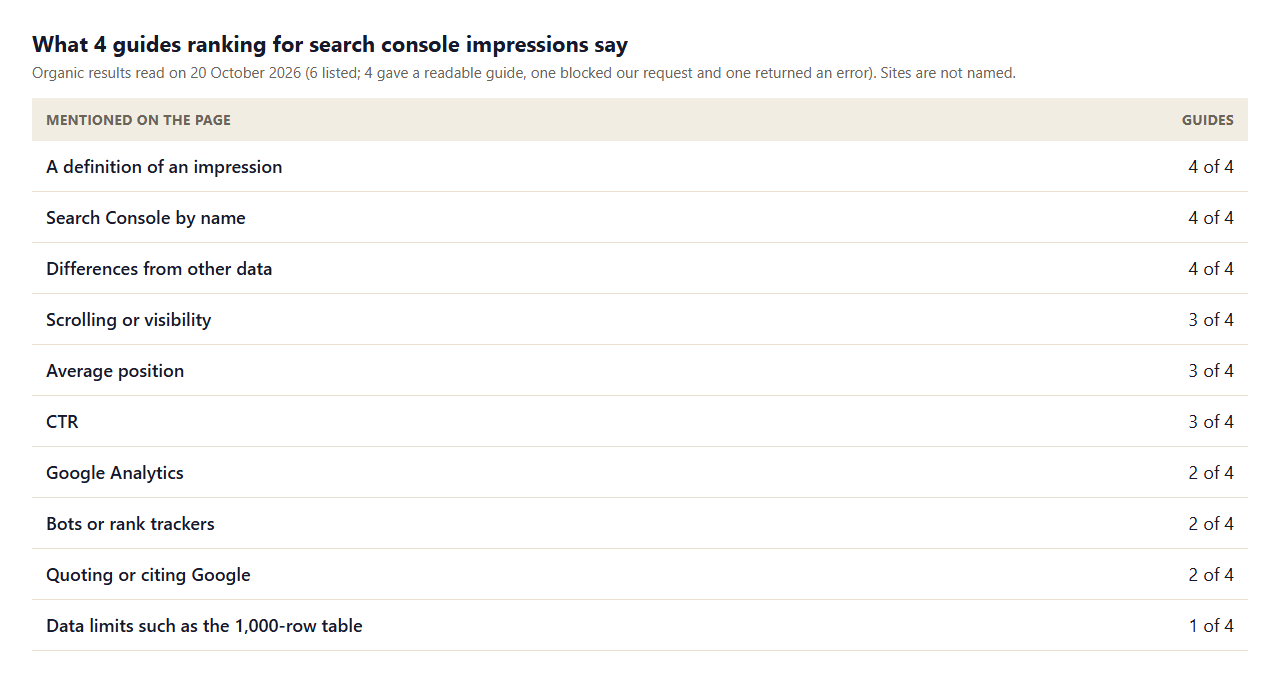
- All 4 define it. Every guide gives a definition and mentions that impressions differ from other data sources.
- Scrolling comes up. 3 of 4 discuss whether a result must be seen, which is where Google's wording on scrolled and expanded results matters.
- Google is rarely quoted. Only 2 of 4 cite Google's own documentation.
- Data limits are barely covered. Only 1 of 4 mention the limits on what the reports show, which is why many readers are surprised when the numbers do not add up.
- Few show real numbers. None show a real site's impressions alongside its clicks, which is what we do next.
Our Own Numbers: 106,000 Impressions and 77 Clicks
Our site is young, with mostly new pages, so its profile is a useful picture of what a new site's impressions look like. In the 90 days to 17 October 2026, the Performance chart shows about 106,000 impressions, 77 clicks, an average CTR of 0.1% and an average position of 43.
- Impressions grew fast. In an earlier export covering 20 July to 29 September, the first four weeks had 5,578 impressions and 14 clicks. The next four weeks had 34,739 impressions and 21 clicks. The following 16 days had 27,302 and 13. Impressions rose about six times while clicks barely rose, because new pages appeared in results far back.
- Position explains it. An average position of 43 sits around page five. Results there are counted as impressions but rarely clicked.
- CTR is simple arithmetic. Clicks divided by impressions is 77 ÷ 106,000, about 0.1%.
Why the Chart and the Table Disagree
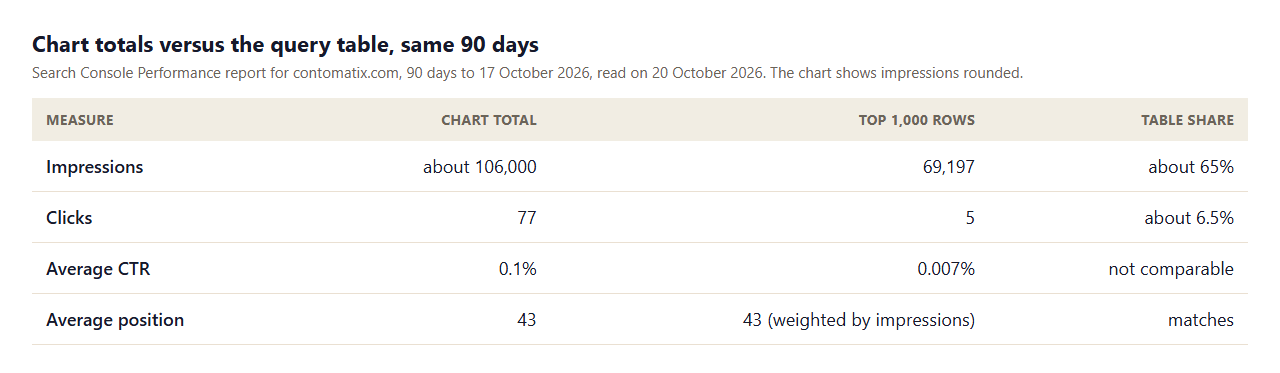
When we added up the 1,000 rows in the query table, they came to 69,197 impressions and 5 clicks. The chart said about 106,000 and 77. The table covers about 65% of the impressions but only about 6.5% of the clicks. This is not an error. Google explains that chart totals can be higher than the sum of table rows because tables show a maximum of 1,000 rows and omit rare queries to protect privacy. For a site like ours, whose traffic is spread over thousands of rare queries, most clicks come from queries the table hides. If you build a report from the table alone, you will undercount clicks. Always report the chart totals for totals, and use the table for patterns.
How Average Position Really Works
Google's help page describes the position shown in the Performance report as the topmost position occupied by a link to your property in the results, averaged across queries. If your site appears at positions 2, 4 and 6 for one query, that query counts as position 2. If it appears at 3, 5 and 9 for another, that counts as 3, and the average across the two is 2.5. Three practical consequences follow. A new batch of low-ranking queries can drag your average down even when your best pages improve. An average of 43 tells you little by itself because it mixes page-one and page-ten queries. And position is only shown for Google Search results, so it is best read by query or by page, not site-wide.
Impressions and Clicks by Position
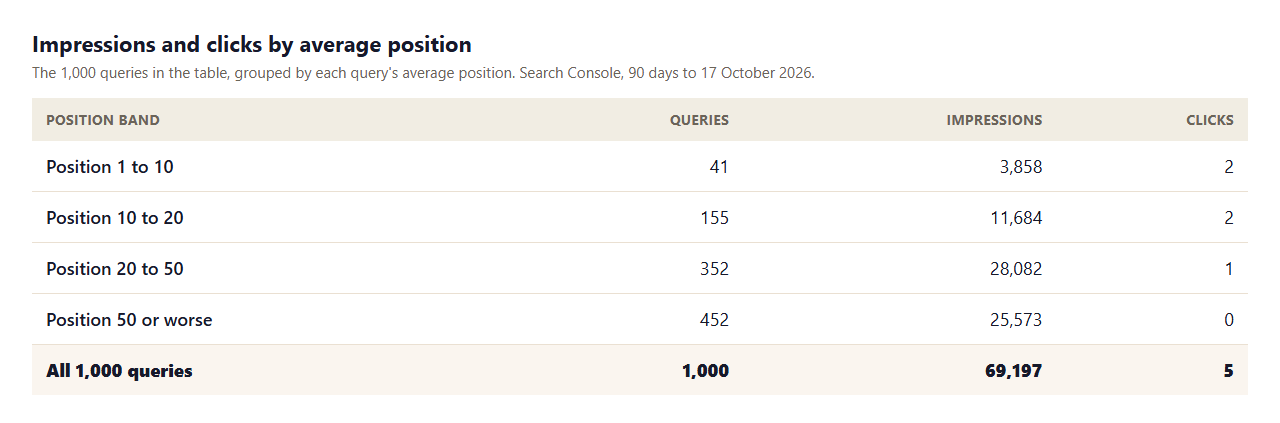
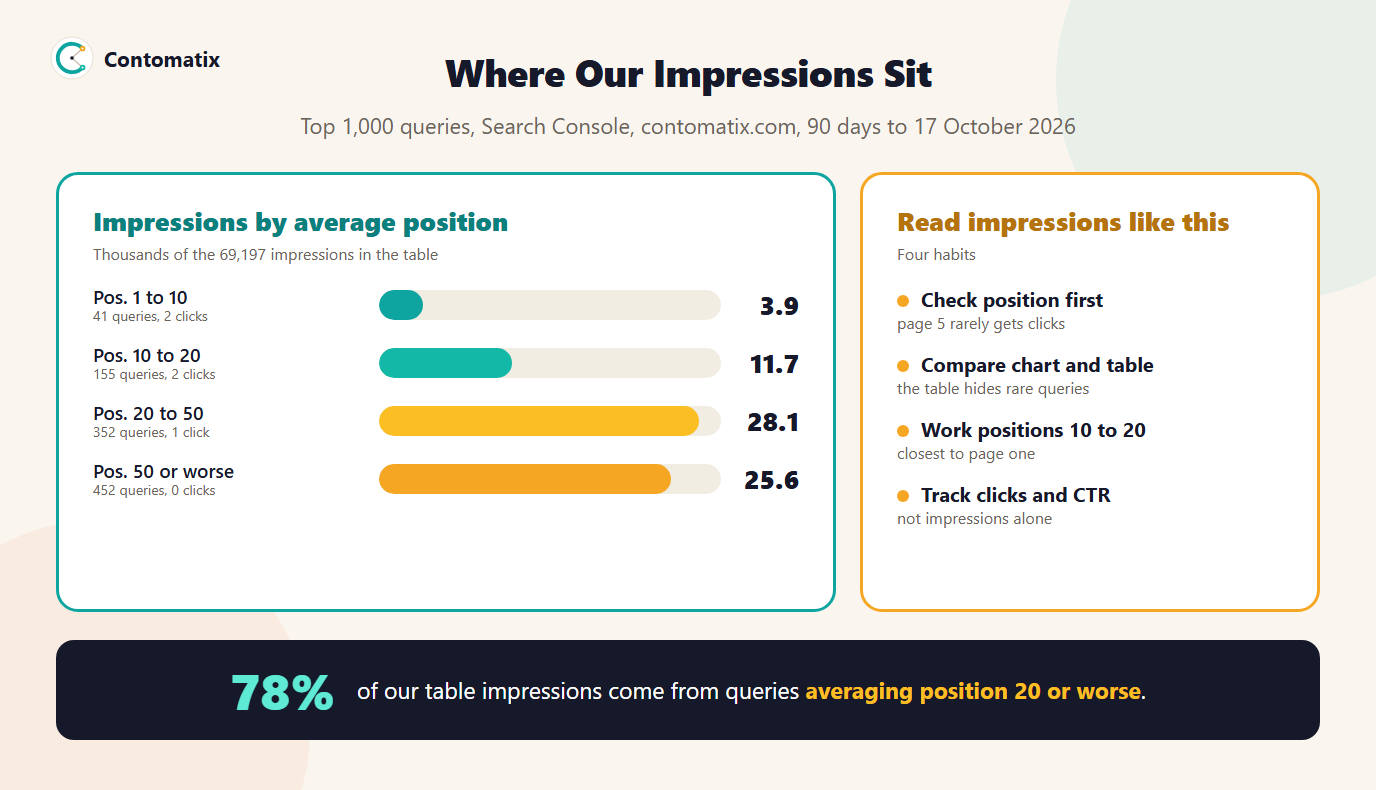
- Most impressions are far back. 78% of the table's impressions come from queries whose average position is 20 or worse, and 0 clicks came from those at position 50 or worse.
- Page one is small. Only 41 queries average in the top ten, with 3,858 impressions.
- The opportunity is in the middle. 155 queries average between positions 10 and 20, with 11,684 impressions. Moving some of these onto page one is the most realistic gain.
Impressions Versus Clicks, Sessions and Rankings
Impressions, clicks and sessions measure different moments. An impression is a result shown. A click is a visit started from Google, counted by Search Console. A session is a visit measured by your analytics tool after the page loads. They will not match exactly, because of differences in how each is counted, such as visitors who leave before the page loads or who block analytics scripts. 4 of 4 guides make the same point. Treat Search Console as the source for how you appear in Google and your analytics tool as the source for what visitors do on the site. Impressions are also not rankings: a high-impression query can be one you rank poorly for.
A Worked Example: Reading One Query
Take a real query from our own table: "moses lake search engine optimisation". It shows 294 impressions, 1 click and an average position of 6.6, which is one of the few queries on our property that has a click. Read it in order. The position is on page one, so the impressions are genuine exposure. One click from 294 impressions is a CTR of about 0.3%, which is low for a position in the top ten, and that points at the title and snippet, not the ranking. Compare that with a query such as "fort collins seo", which shows 429 impressions at an average position of 72. Its impressions are a result of appearing far back, and no title change would turn them into clicks. The same number of impressions can call for completely different actions, which is why position and CTR belong next to every impression count.
What a Healthy Pattern Looks Like for a New Site
New sites typically see impressions grow first, as Google discovers and tests pages, then positions improve slowly, then clicks follow. A healthy pattern has impressions rising month over month, the share of queries on page two and page one slowly growing and clicks starting to appear on queries with stable positions. An unhealthy pattern is impressions flat or falling while position worsens, which can point to pages being dropped from the index, or to new competing pages. Use a monthly snapshot of the numbers in this guide, rather than daily swings, to tell the difference. Daily charts can be noisy, and recent days are often incomplete while Google finishes processing.
A Monthly Impressions Checklist
- Record the chart totals: clicks, impressions, CTR and average position for the month and the one before.
- Count the queries in each position band: page one, 10 to 20, 20 to 50, 50 or worse.
- List the five queries between 10 and 20 with the most impressions, and the page that ranks for each.
- Note any page-one query with a CTR well below the rest, and rewrite its title.
- Write down what you changed, so the next month's numbers can be read against it.
What to Do With Impressions Data
- Sort by position, not just impressions. Add the position column and look at queries between 10 and 20 first.
- Improve the page that ranks. Check the title, the headings and the answer against the query, and add internal links from related pages.
- Watch CTR on page-one queries. A low CTR at a good position points to a weak title or snippet.
- Ignore noise at position 50 or worse. Those impressions are real, but they rarely turn into visits until the page moves.
- Report the chart totals. Use our SEO report generator to turn clicks, impressions, CTR and position into a monthly summary.
Impressions for Different Kinds of Results
Not every impression is a plain blue link. Google's documentation describes how impressions are counted for different result types, such as carousels, AMP pages, app install links, images and rich features. In many of these, the position and the impression are counted for the containing element, not for each item inside it. That matters if you track a page that appears in a carousel or an expanding section: the impression may require the item to be scrolled or expanded into view. You do not need to memorise the rules. The practical advice is to filter the Performance report by Search appearance when you want to see how a particular result type behaves, and to remember that a count for a rich result is not directly comparable with a count for a standard listing.
It also helps to compare like with like over time. If you add structured data or start to appear in a new result type, impressions can change for reasons unrelated to rankings. Note the date of any such change in your monthly record so that you do not mistake a change in how you appear for a change in how well you rank.
Common Impressions Mistakes
- Treating impressions as traffic. They show eligibility to be seen, not visits.
- Summing the table. The table omits rare queries and caps at 1,000 rows.
- Reading average position site-wide. It mixes strong and weak queries.
- Celebrating a spike. New pages can surge in impressions at poor positions and yield no clicks.
- Ignoring CTR at good positions. A page on page one with few clicks may need a better title.
How We Read the Data
- Our chart totals and the 1,000-row query table are from the Search Console Performance report for contomatix.com, 90 days to 17 October 2026, read on 20 October 2026. The chart shows impressions rounded to about 106,000.
- The weekly breakdown comes from a daily chart export covering 20 July to 29 September 2026.
- Position bands group each query by its average position, as reported. Percentages are our arithmetic.
- Google's definitions come from its Search Console Help pages, read on 20 October 2026.
- We read 4 readable guides on one day (Google US). Counts show a term appears, not how well it is explained.
- Our site is young, so its numbers should not be read as typical.
Key Takeaways
- An impression means your link appeared in the current page of results, whether or not it was scrolled into view.
- Our site had about 106,000 impressions and 77 clicks in 90 days, at average position 43.
- The query table showed 65% of impressions and about 6.5% of clicks, so use chart totals for totals.
- 78% of our table impressions are from queries averaging position 20 or worse.
- Work the queries at positions 10 to 20, and read clicks and CTR next to impressions.
Frequently Asked Questions
What is an impression in Google Search Console?
An impression is counted when a link to your site appears in the current page of results, whether or not the user scrolled to it, as long as no click is needed to see it.
Does an impression mean someone saw my result?
Not necessarily. It means the result appeared on the page. Inside carousels and expanding sections, the item must typically be scrolled or expanded into view.
Why do I have many impressions but few clicks?
Usually because of position. Our average position was 43, around page five, where results are counted but rarely clicked. Low CTR at a good position points to a weak title or snippet instead.
What does average position mean in Search Console?
It is the topmost position of your link for each query, averaged across queries. A query where you appear at 3, 5 and 9 counts as position 3.
Why do the chart and table totals differ?
Google says tables show a maximum of 1,000 rows and omit rare queries to protect privacy, so chart totals can be higher than the sum of table rows.
Do impressions affect SEO rankings?
No. Impressions report how often you appeared. They do not cause rankings, but they show where you appear and for which queries.
Are Search Console impressions the same as Google Analytics sessions?
No. An impression is a result shown and a session is a visit measured after the page loads. They count different things and will not match.
Do AI Mode appearances count as impressions?
Google's help pages say impressions in AI Mode follow standard impression rules and are included in the performance data.
How can I increase impressions that turn into clicks?
Improve pages ranking between positions 10 and 20, strengthen titles on page-one queries and add internal links, then track clicks and CTR alongside impressions.