Last updated: October 2026
A good SEO audit report template does one job: it turns a pile of crawler output into a short list of decisions, each with evidence, a priority and an owner. Most templates stop at the empty headings. This one comes with a filled-in sample, because the sample is where the judgement shows. We ran a crawl of our own site on 9 October 2026, wrote up what it found and, along the way, caught two findings that turned out to be false alarms.
Below you will find the report skeleton to copy, our real findings in that format, how to prioritise them, which checks Google's own documentation gives numbers for, and where reports usually go wrong. If you are still deciding how much work an audit needs, our guide to the cost of an SEO audit covers scope and price.
What an SEO Audit Report Should Contain
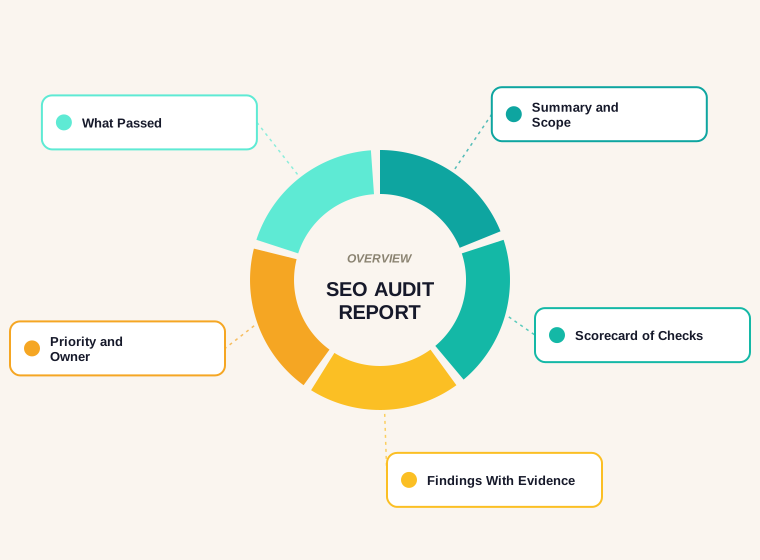
Whether you call it an SEO website audit report or a technical review, the readers are the same: someone who has to approve work and someone who has to do it. Both need the same seven things.
- Summary. Three to five sentences: what was checked, the headline result and the first thing to fix.
- Scope and method. The date, the URLs or sections covered, the tools and the limits of what was tested.
- Scorecard. One line per check with a pass, warning or fail so the reader sees the shape of the site at a glance.
- Findings. Each with evidence, affected URLs, impact, effort, suggested fix and owner.
- What passed. The checks that were clean, so nobody repeats them.
- Action plan. The findings in order, grouped into things to do now, next and later.
- Appendix. URL lists, raw exports and anything too long for the body.
The SEO Audit Report Template
Copy this skeleton into a document or spreadsheet. The finding table is the part to keep strict, because it is what turns observations into work.
SEO AUDIT REPORT: [site name]
Date: [crawl date]   Prepared by: [name]   Scope: [URLs / sections]

1. SUMMARY
   [What was checked. Headline result. First fix.]

2. SCOPE AND METHOD
   Crawl: [tool, number of URLs, date]
   Data: [Search Console range, analytics, other]
   Not covered: [what this audit did not test]

3. SCORECARD
   Crawlability   [pass / warn / fail]
   Indexing       [pass / warn / fail]
   On-page        [pass / warn / fail]
   Structured data[pass / warn / fail]
   Performance    [pass / warn / fail]

4. FINDINGS
   # | Priority | Finding | Evidence (URLs, counts) | Impact | Effort | Fix | Owner

5. WHAT PASSED
   [Checks with no issues]

6. ACTION PLAN
   Now / Next / Later

7. APPENDIX
   [URL lists, exports]
SEO Audit Report Sample: Our Own Site
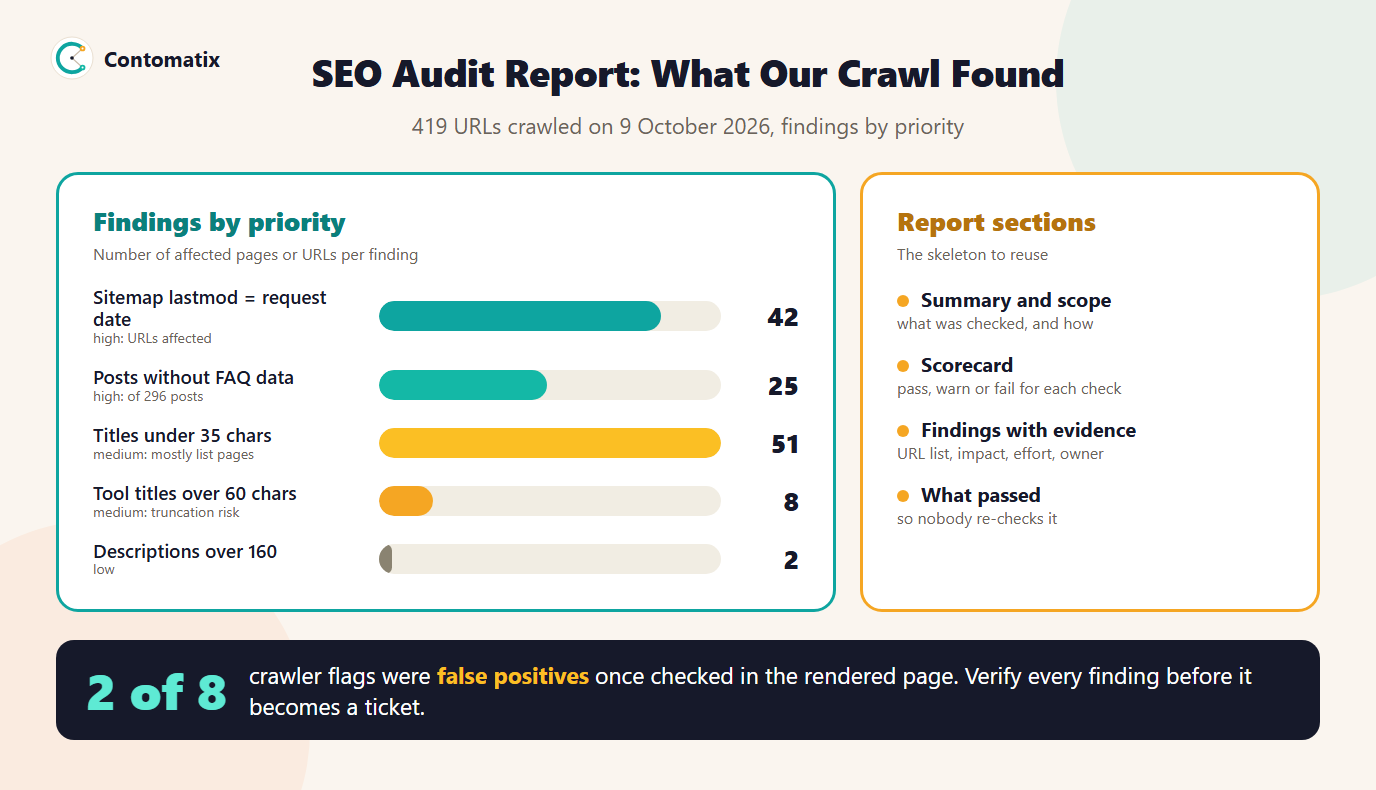
To show the template in use, here is the findings table from our own crawl. The crawl covered 419 URLs and every one returned a 200 status. The sitemap lists 337 of them. We judged findings by impact first and effort second.
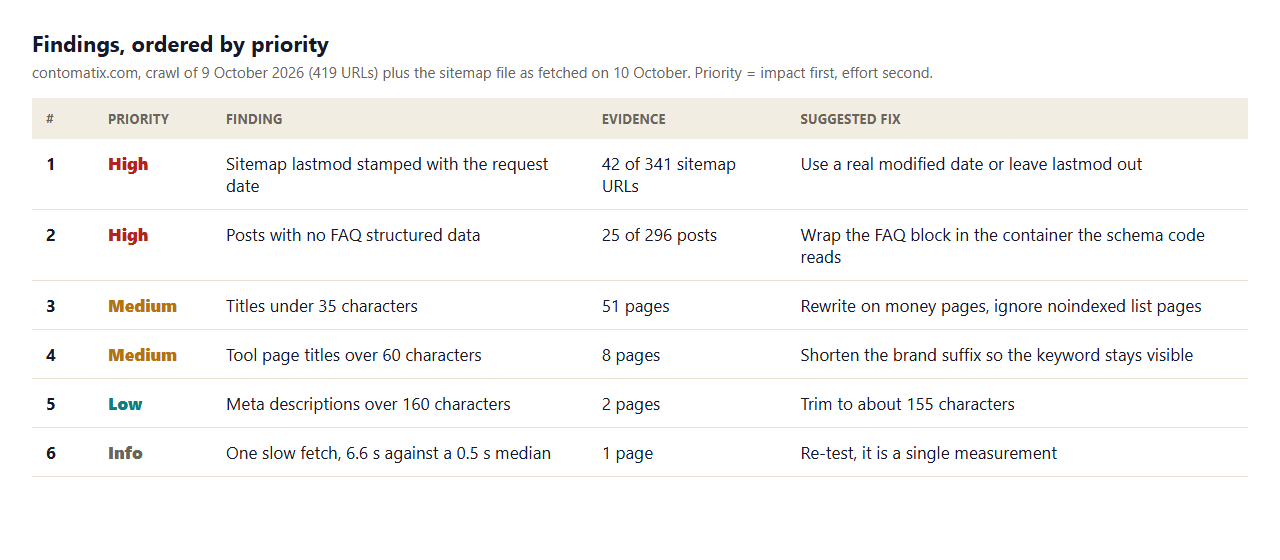
A few notes on how to read it.
- The two high items are about trust signals. Google says it uses a sitemap's
lastmodonly if it is consistently and verifiably accurate. On our site, 42 of 341 sitemap URLs (the static, service, location and team pages) were stamped with the date of the request, so the value changes daily whether or not a page changed. - Structured data is a template problem. 25 of 296 posts had no FAQ structured data, against 271 that did. They were mostly posts published on consecutive days, which pointed to one cause and not to 25 separate faults.
- The medium items need judgement. Of the 51 short titles, most sit on blog list pages that are marked noindex, so they are not worth rewriting. The 8 tool-page titles over 60 characters run to between 61 and 68 and risk being cut off in results.
- Low and info items stay on the list. They cost little to fix or re-test and they show the reader that the whole site was looked at.
A Scorecard Example
The scorecard is the one-page view a busy reader will actually look at. Here is ours for the same crawl, using only checks we ran.
- Crawlability: pass. All 419 URLs returned 200, and robots.txt allows crawling except for the admin area and points to the sitemap.
- Indexing: warning. Blog list URLs are noindexed or canonicalised on purpose, but the sitemap's
lastmodvalues for 42 non-post URLs are not trustworthy. - On-page: warning. 51 short titles, 8 long tool-page titles and 2 long descriptions.
- Structured data: warning. 25 posts have no FAQ markup while every post has article and breadcrumb markup.
- Performance: not measured. Field data was outside this crawl, so the scorecard says so instead of guessing.
Writing "not measured" is deliberate. A blank cell invites the reader to assume the best, and an honest gap tells them where the next audit should look.
Client Report or Internal Ticket List?
The same findings serve two readers. A client or manager wants the summary, the scorecard and the priorities in plain language, with the effect on the business stated. A developer or editor wants each finding as a ticket with the URL list, the fix and an acceptance test. Keep both from one source: the findings table. Send the summary to the first reader and export the rows as tickets for the second, so the numbers never drift apart.
What Passed
A report that lists only problems makes a site look worse than it is and invites people to re-check things that were fine. Ours recorded these as passes:
- All 419 URLs returned a 200 status, so there were no broken internal pages.
- None of the 2,841 images found was missing alt text or width and height attributes.
- No page loaded mixed content, and every page had a viewport tag, a language attribute and a social preview image.
- Every one of the 296 posts carried article and breadcrumb structured data.
Two False Positives We Caught
Our crawler raised two findings that did not survive a second look, and both are worth writing down because they are common.
- "Two H1 headings" on a tool page. The page contained the text of an H1 tag inside an example snippet, which a raw-HTML scan counted. In the rendered page there was exactly one H1.
- "Invalid JSON-LD" on another tool page. A script string in the page's own JavaScript contained the opening tag for a JSON-LD block, and the crawler tried to parse it. The page had four valid blocks.
The fix to the process is simple. Before a finding becomes a ticket, check it in the rendered page or in the relevant Google test, and mark it confirmed. Nothing else wastes a developer's goodwill faster than a ticket that turns out to be wrong.
How to Prioritise Findings
Use two questions in this order: how many pages or users does this affect, and how costly is it to fix. Then add a third that people forget: is there a single cause? Several findings that share one cause become one ticket.
- High: affects indexing, crawling or many pages and is cheap or moderate to fix.
- Medium: affects a meaningful slice of pages or a page type that earns traffic.
- Low: cosmetic or isolated, fix when you are in the file anyway.
- Info: a single measurement or a note to re-test.
Checks Google Gives Numbers For
Most audit checks are judgement calls, but a few have published thresholds worth putting in the scorecard. Google's Core Web Vitals guidance sets the "good" values as a Largest Contentful Paint of 2.5 seconds or less, an Interaction to Next Paint of 200 milliseconds or less and a Cumulative Layout Shift of 0.1 or less, measured at the 75th percentile of page loads and assessed separately for mobile and desktop. Our own crawl did not measure these, because they come from field data. Take them from Search Console's Core Web Vitals report or PageSpeed Insights and record the source.
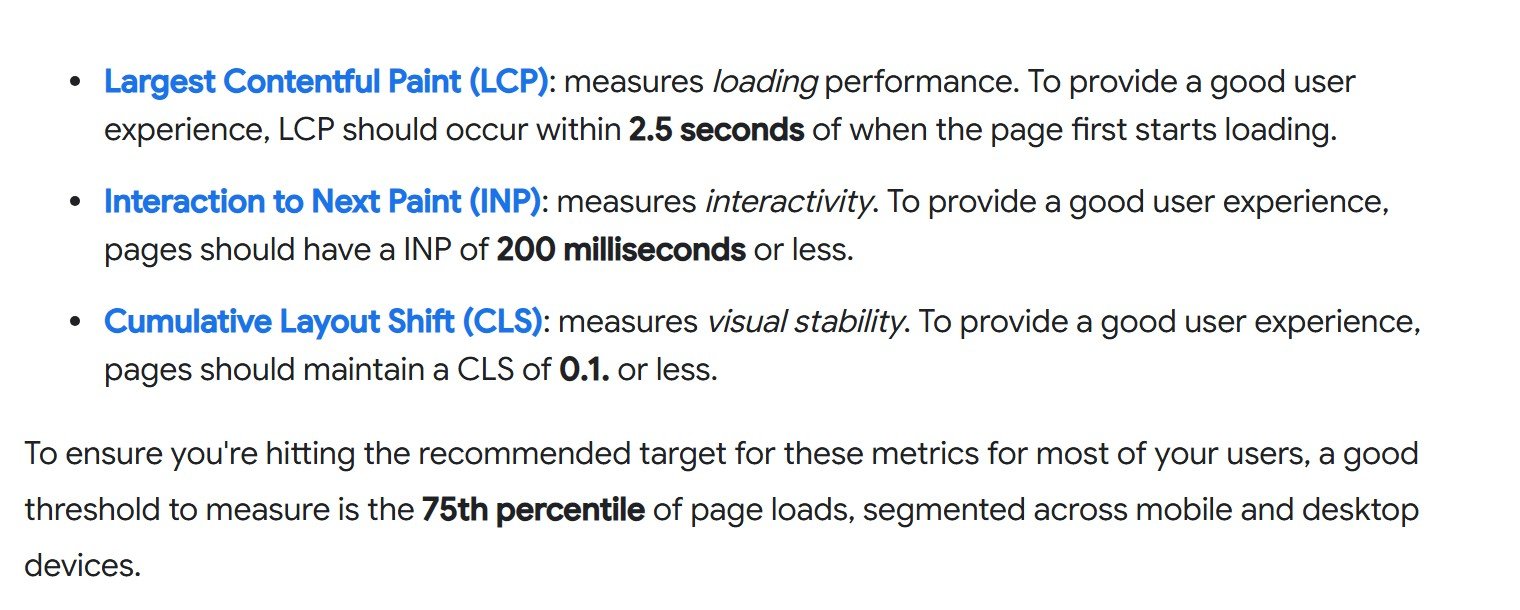
For indexing, use the reason names that Search Console reports so that your findings match what the team will see. The ones that usually matter in an audit are Discovered - currently not indexed, Crawled - currently not indexed, Duplicate without user-selected canonical, Soft 404 and Page with redirect. Google's Core Web Vitals article has the metric definitions in full.
SEO Audit Report PDF: Format and Delivery
Most clients want a PDF, and the format matters less than the habits around it. Write the report in a document or spreadsheet, keep the findings table to one page where you can, and export to PDF at the end. Keep the editable version too, because the action plan changes as work is done. Number every finding so that tickets, emails and the next report can refer to it without ambiguity.
Common Mistakes in Audit Reports
- Counting without segmenting. A raw total of thin pages or short titles means little until you split it by page type. Our segment-first audit method shows how.
- No evidence. "Titles are too long" is not a finding. "8 tool pages have titles of 61 to 68 characters" is.
- No owner. A fix that belongs to no one does not happen.
- Skipping what passed. It makes the site look worse and invites repeat work.
- Untested claims. Verify each flag before it leaves your desk.
Limits of This Sample
- It reflects one crawl on one day, run with our own script from one machine, so it is a snapshot and not a monitoring system.
- It covers on-page and indexability signals and the sitemap file. It does not include Core Web Vitals field data, backlinks or log files.
- We have not fixed every item in the table, and we do not claim any ranking effect from fixing them.
Key Takeaways
- A report is a list of decisions, each with evidence, a priority and an owner.
- Use seven sections: summary, scope, scorecard, findings, what passed, action plan and appendix.
- Our sample crawl of 419 URLs produced five real findings, one informational note and two false positives.
- Group findings that share a cause into one ticket, and record what passed.
- Use Google's Core Web Vitals thresholds and Search Console's reason names so your wording matches the tools.
- Verify every flag in the rendered page before it becomes a ticket.
If you would like an audit report like this for your own site, with a clear owner and priority on every finding, Contomatix can produce it. Get in touch and we will scope it.
Frequently Asked Questions
What should an SEO audit report include?
A summary, the scope and method, a scorecard, findings with evidence, priority and owner, a list of what passed, an action plan and an appendix with URL lists and exports.
Is there a free SEO audit report template?
Yes. The skeleton on this page can be copied into a document or spreadsheet. The part to keep strict is the findings table, with evidence, impact, effort, fix and owner for every item.
What does an SEO audit report sample look like?
A short summary followed by a table of findings ordered by priority. Our sample covers a crawl of 419 URLs and lists six items, from high-priority structured data and sitemap issues to a low-priority description length note.
How long should an SEO website audit report be?
As long as it needs to be to make the decisions clear, and no longer. A short summary and a findings table that fits one or two pages is more useful than a long export of every check.
How do I prioritise audit findings?
Rank by impact first, effort second, and group findings that share a single cause into one ticket. A fix that affects indexing or many pages and is cheap to do goes first.
What are the Core Web Vitals thresholds for a pass?
Google's guidance gives good values of 2.5 seconds or less for Largest Contentful Paint, 200 milliseconds or less for Interaction to Next Paint and 0.1 or less for Cumulative Layout Shift, at the 75th percentile and separately for mobile and desktop.
Can I give a client the audit as a PDF?
Yes. Write it in a document, export it to PDF and keep the editable version for the action plan. Number the findings so later reports can refer back to them.
Why did my crawler report errors that turned out to be wrong?
Crawlers that scan raw HTML can mistake example code or script strings for real elements. Confirm each flag in the rendered page, or in Google's own testing tools, before logging it as a finding.
How often should I run an SEO audit?
At least once or twice a year, and after a redesign, a migration or a large traffic change. On a site that publishes often, a lighter monthly crawl with the same checks catches regressions early.