Last updated: October 2026
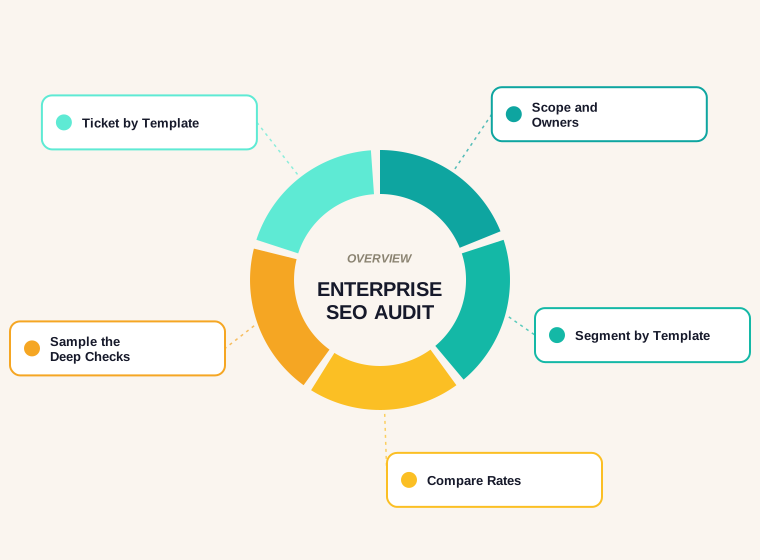
Our crawl flagged 89 thin pages. Not one of them was a blog post. That single fact is the best argument for how an enterprise SEO audit should work: before you count problems, split the site into the groups of pages that share a template, and judge each group on its own.
Contomatix is not an enterprise. The site we crawled has 419 URLs, which is small by any standard, so treat the numbers below as a worked example and the method as the part that scales. This guide explains what makes an enterprise audit different, shows the segment-first approach on real crawl data, describes a defect that only a group-level view caught, and lists the steps we would follow on a much larger site. If you run a smaller site, our website SEO audit checklist is the better starting point.
What an Enterprise SEO Audit Is, and What It Is Not
There is no official size at which a site becomes an enterprise. Agencies tend to use it for sites with thousands or millions of URLs, many contributors and several teams that each own part of the site. The size matters less than the situation: when no one person can look at every page, the audit stops being a checklist and becomes a sampling and prioritisation exercise.
That changes three things compared with a standard audit.
- The unit of analysis is the template, not the URL. Ten thousand product pages built from one template share one set of strengths and faults. You audit the template and measure how many URLs it affects.
- Ownership becomes part of the output. A fix to a page template belongs to a developer, a fix to editorial guidelines belongs to a content lead and a fix to a redirect map belongs to infrastructure. A finding without an owner rarely gets done.
- You cannot see everything, so you sample on purpose. Some checks, such as rendering a page and reading its field performance data, cost too much to run on every URL.
Why Raw Issue Counts Mislead at Scale
A crawler gives you totals: so many missing descriptions, so many short pages, so many titles under a certain length. On a large site those totals are huge and almost meaningless, because they mix pages that matter with pages that were never meant to rank.
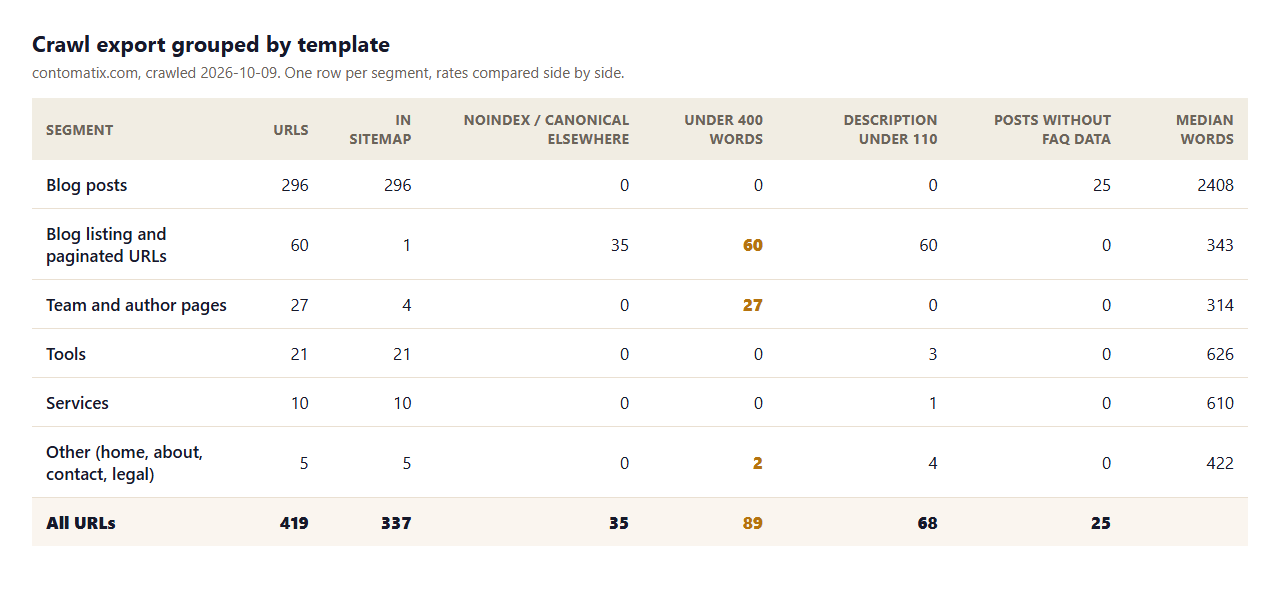
Our own crawl shows the effect in miniature. Across all 419 URLs the raw totals read 89 pages under 400 words and 68 meta descriptions under 110 characters. Read as a to-do list, that looks like a content problem. It is not one, and the next section shows why.
Our Test Crawl: 419 URLs Grouped by Template
We crawled the live site on 9 October 2026 with our own audit script, following the sitemap and every internal link it found. Every one of the 419 URLs returned a 200 status. Then, instead of reading the totals, we grouped each URL by the template that produced it and compared the groups.
| Segment | URLs | In sitemap | Noindex or canonical elsewhere | Under 400 words | Description under 110 chars | Median fetch (ms) |
|---|---|---|---|---|---|---|
| Blog posts | 296 | 296 | 0 | 0 | 0 | 551 |
| Blog listing and paginated URLs | 60 | 1 | 35 | 60 | 60 | 446 |
| Team and author pages | 27 | 4 | 0 | 27 | 0 | 451 |
| Tools | 21 | 21 | 0 | 0 | 3 | 386 |
| Services | 10 | 10 | 0 | 0 | 1 | 364 |
| Other (home, about, contact, legal) | 5 | 5 | 0 | 2 | 4 | 389 |
| All URLs | 419 | 337 | 35 | 89 | 68 |
"Noindex or canonical elsewhere" counts URLs that tell search engines to skip them or to treat another URL as the main version. Median fetch time is how long our crawler took to download the page, so it reflects our connection as well as the server and is only useful for comparing segments with each other.
What Segmenting Changed in Our Findings
With the groups side by side, the picture is very different from the totals.
- The 296 blog posts are clean on those two checks. None is under 400 words and none has a short description. The 89 thin pages are all elsewhere.
- 60 of the 89 non-post thin pages are blog listing URLs, the filtered and paginated versions of the blog index. Of those, 35 are marked noindex or point their canonical at another URL on purpose. A listing page is a list of links, so a low word count is how it is supposed to look.
- 27 of the thin pages are team and author pages, including their paginated archives. They are short because they list posts.
- Blog listing URLs supply 60 of the 68 short descriptions, because the listing template reuses one description. The other 8 are on tool, service and other pages.
Without grouping, the audit would have produced a long list of "thin content" tickets and sent someone off to expand pages that should stay short. With grouping, the content team had nothing to do and the useful question became different: is the listing template doing what we intend with its canonical and noindex rules?
A Defect Only a Group View Caught
The same crawl turned up something real. 25 of our 296 blog posts had no FAQ structured data, while the other 271 did. Looked at one URL at a time, that is 25 separate items on a list. Looked at by publish date, it is one event: 24 of the 25 were published on consecutive days from 1 to 8 October, three a day, and the other was published on 21 September.
The cause turned out to be a markup difference. The site generates FAQ structured data by reading the FAQ block from each post, and those posts wrapped their questions in a differently named container, so the code never found them. The questions are visible on the page for readers, which is why a visual review would never have caught it. At the time of the crawl the problem was still open.
This is the kind of defect that grows quietly at scale. A change in a publishing workflow, a CMS update or a new template variant affects everything produced afterwards, and the only way to see it is to compare cohorts: pages by template, by publish period or by author.
The Segment-First Method in Seven Steps
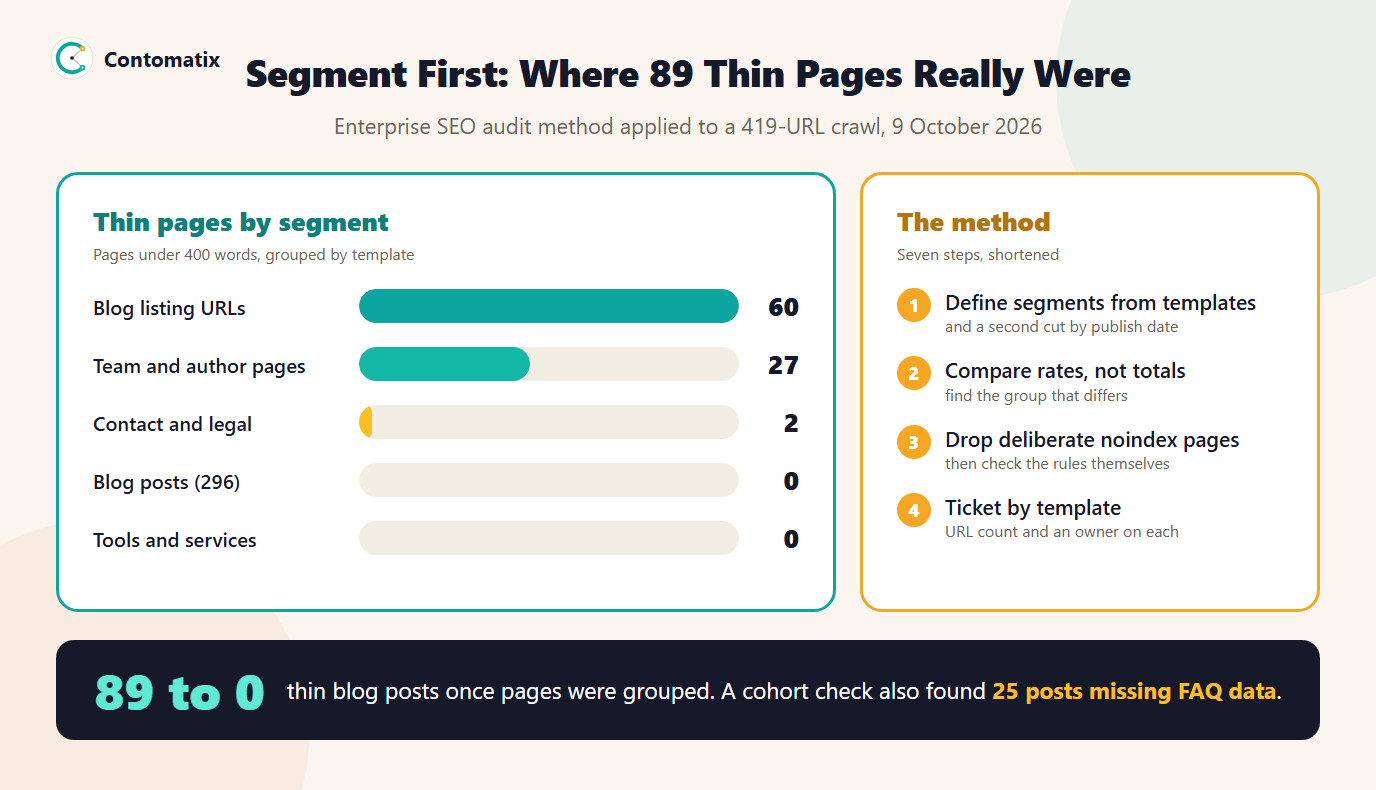
The infographic shows where our 89 thin pages sat and the core of the method. The full seven steps follow it.
- Agree scope and owners. List which teams control templates, content, redirects and infrastructure. Decide up front who receives each type of finding.
- Define segments from URL patterns. Folders, parameters and page types usually map to templates. Add a second cut by publish date or release, which is how we found the missing FAQ data.
- Crawl as much as you can. Export the results with one row per URL and a segment column, so every later step can filter by group.
- Compare rates, not totals. A defect on 3 percent of a segment is a different problem from one on 80 percent. Look for segments that differ sharply from their siblings.
- Remove deliberate exclusions first. Pages that are noindexed or canonicalised on purpose should not be counted as problems. Check that the rules themselves are right instead.
- Sample the expensive checks. Pick a fixed number of URLs per template to test for rendering, structured data and performance, and say how many you tested.
- Ticket by template and report per segment. Each ticket states the template, the number of URLs affected and the owner. After the fix, re-crawl and show the segment before and after.
What Google Says About Large Sites and Crawling
Google publishes a guide for owners of large sites, and its audience gives a rough sense of scale. The guide is aimed at sites with a million or more unique pages whose content changes about weekly, sites with ten thousand or more pages that change daily, and sites where a large share of URLs sit in the "Discovered, currently not indexed" status. Google calls these figures rough estimates rather than exact thresholds.
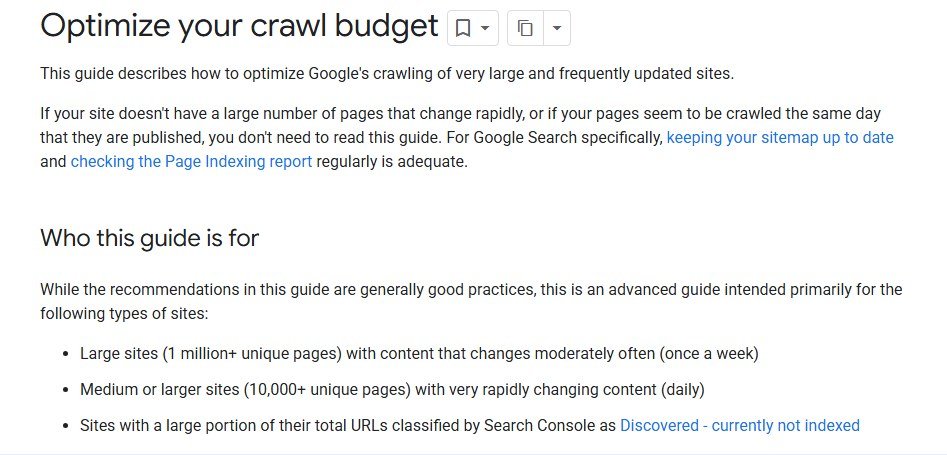
Several of Google's own limits explain why segmenting is necessary and not just convenient. The guide, Optimize your crawl budget, defines crawl capacity as the server time Google will spend on your site and crawl demand as how much it wants to crawl, which depends on size, update frequency, quality and relevance.
- Sitemaps have size limits. A single sitemap file is capped at 50,000 URLs or 50 MB uncompressed, so large sites split them and list the parts in a sitemap index. Splitting by segment is also useful for diagnosis.
- Search Console can filter by sitemap. The Page indexing report has a dropdown to filter results by a specific sitemap, which gives you an indexing view per segment if each segment has its own sitemap.
- The report cannot show everything. Example URL lists in the Page indexing report are limited to 1,000 rows, so on a large site you work from samples and segments, not complete lists.
- The Crawl Stats report is for advanced users. It shows total requests, download size, average response time and host status, and Google says sites with fewer than a thousand pages usually do not need it.
Data and Tools You Will Need
An enterprise audit rarely uses one tool. Plan for a crawler that can export one row per URL, Search Console for indexing and query data, an analytics source for traffic by segment, and server logs if you can get them. You will also need a spreadsheet or database where the segment column lives, because that column is what turns a crawl into an audit. A free sitemap validator helps when you split sitemaps by segment, since a malformed file in a sitemap index is easy to miss.
The Limits of This Example
Our crawl is a worked example, not a case study of an enterprise audit. It covers 419 URLs on one site, run from one machine, by our own script, and it checks on-page and indexability signals rather than rendering, performance or backlinks. We did not use server logs. The segment rules are our own and a different split might group some pages differently. What we can say is that the method changed what we concluded from the same data, and that it found a real defect the totals hid.
Key Takeaways
- Audit templates, not URLs. Group pages by what produced them before you count issues.
- In our crawl, 89 thin pages shrank to zero blog posts once the pages were segmented.
- Remove deliberate noindex and canonical pages from the issue list, then check the rules.
- Compare cohorts by template and by publish date to catch workflow defects.
- Google's large-site guidance uses rough thresholds of 10,000 and 1,000,000 pages, and its reports cap example lists, so sampling is built in.
- Write tickets per template with the URL count and an owner.
If your site is large enough that nobody can review it page by page, Contomatix can run this kind of segmented audit and turn the findings into owner-ready tickets. Get in touch and we will scope it.
Frequently Asked Questions
What is an enterprise SEO audit?
It is an SEO review of a very large or organisationally complex site, built around templates, sampling and ownership because the site is too big to check page by page. The main outputs are prioritised fixes tied to the templates and teams responsible.
How many pages does a site need to be "enterprise"?
There is no official number. Agencies use the term for sites with thousands to millions of URLs. Google's crawl budget guide uses rough estimates of 10,000 or more pages changing daily and 1 million or more changing weekly, and says they are not exact thresholds.
How is it different from a regular SEO audit?
A regular audit can inspect most pages directly. An enterprise audit groups pages by template, compares issue rates between groups, samples costly checks and assigns each finding to the team that owns the fix.
How long does an enterprise SEO audit take?
It depends on the size of the site, the access you have and how many teams are involved. The crawl itself can run in hours, while setting segments, validating findings and agreeing owners usually takes far longer than the crawl.
What tools do I need?
A crawler that exports one row per URL, Search Console, an analytics source and, where available, server logs. A spreadsheet or database with a segment column ties them together.
Does my site need to worry about crawl budget?
Probably not if it is small. Google's guide is aimed at very large sites and sites with many URLs stuck at "Discovered, currently not indexed". Google also says sites with fewer than about a thousand pages usually do not need the Crawl Stats report.
Why segment by template instead of fixing page by page?
Pages built from one template share their defects. Fixing the template repairs every page at once and stops the problem from returning, while page-by-page fixes leave the cause in place.
Should noindexed pages be counted as errors?
Not if the noindex is deliberate. Separate pages that are excluded on purpose from pages that should be indexed, then verify that the exclusion rules are correct.
How do I find defects that affect many pages at once?
Compare cohorts. Group pages by template, publish date, author or release and look for a group whose behaviour differs from its neighbours. In our crawl, grouping by publish date showed that every post from one run of days lacked FAQ structured data.


