Last updated: October 2026
Hreflang for Spanish breaks more often than almost any other language, for one specific reason: Spanish is spoken natively across more than twenty countries, and the code most sites reach for to cover that — es-419 — is not actually supported by Google. It is a real code, used by other platforms, built for exactly this situation. Google's own hreflang parser just does not accept it.
This guide covers what Google's documentation says word for word, the four-market worked example that handles most Spanish-speaking traffic correctly, the code for both the HTML and sitemap methods, and the mistakes that sit on top of the es-419 problem once that one is fixed.
Why Spanish Specifically Breaks So Often
Most languages on a site map cleanly to one or two markets — French mostly means France, German mostly means Germany and Austria. Spanish does not. It is an official or majority language in Spain, Mexico, Colombia, Argentina, Peru, Chile, and well over a dozen other countries, each with its own pricing conventions, product availability, and sometimes genuinely different vocabulary.
A site with real differences between markets — different prices in Mexican pesos versus Colombian pesos, different shipping terms, different regional phrasing — needs more than one Spanish hreflang tag. The instinct is to reach for a single code that covers "Spanish, Latin America" in one shot. That instinct is where the problem starts.
The es-419 Mistake
es-419 is a real, standards-based code. The 419 comes from UN M49, a numeric classification system the United Nations uses for geographic regions, and 419 specifically means "Latin America and the Caribbean." It shows up in browser language settings, in some CMS locale pickers, and in CLDR (the Unicode Consortium's locale data used by many software platforms) as a legitimate way to say "Spanish, as spoken across Latin America generally." For general software localization, it genuinely works — plenty of platforms resolve it correctly and show a Latin-America-flavored Spanish interface.
None of that makes it valid for hreflang specifically, and that distinction trips people up: a code can be a legitimate, working locale identifier in one system and simultaneously be invalid in another, narrower one. Hreflang is the narrower one. Google's own guidance on localized page versions states the limitation plainly:
"Only language codes listed in ISO 639-1 and region codes listed in ISO 3166-1 Alpha 2 are supported; other codes that aren't listed in those standards, such as es-419, aren't supported."
That is Google naming es-419 directly as an example of what does not work — not a vague warning, a specific callout. The reason is structural: the second half of an hreflang code has to be an ISO 3166-1 Alpha 2 country code, and 419 is a UN region number, not a country code at all. Google's hreflang parser checks against the ISO list and nothing else — it has no special-case handling for UN region codes, no matter how widely those codes are used elsewhere.
Here is the actual documentation page making that distinction, including the line naming es-419 as unsupported.
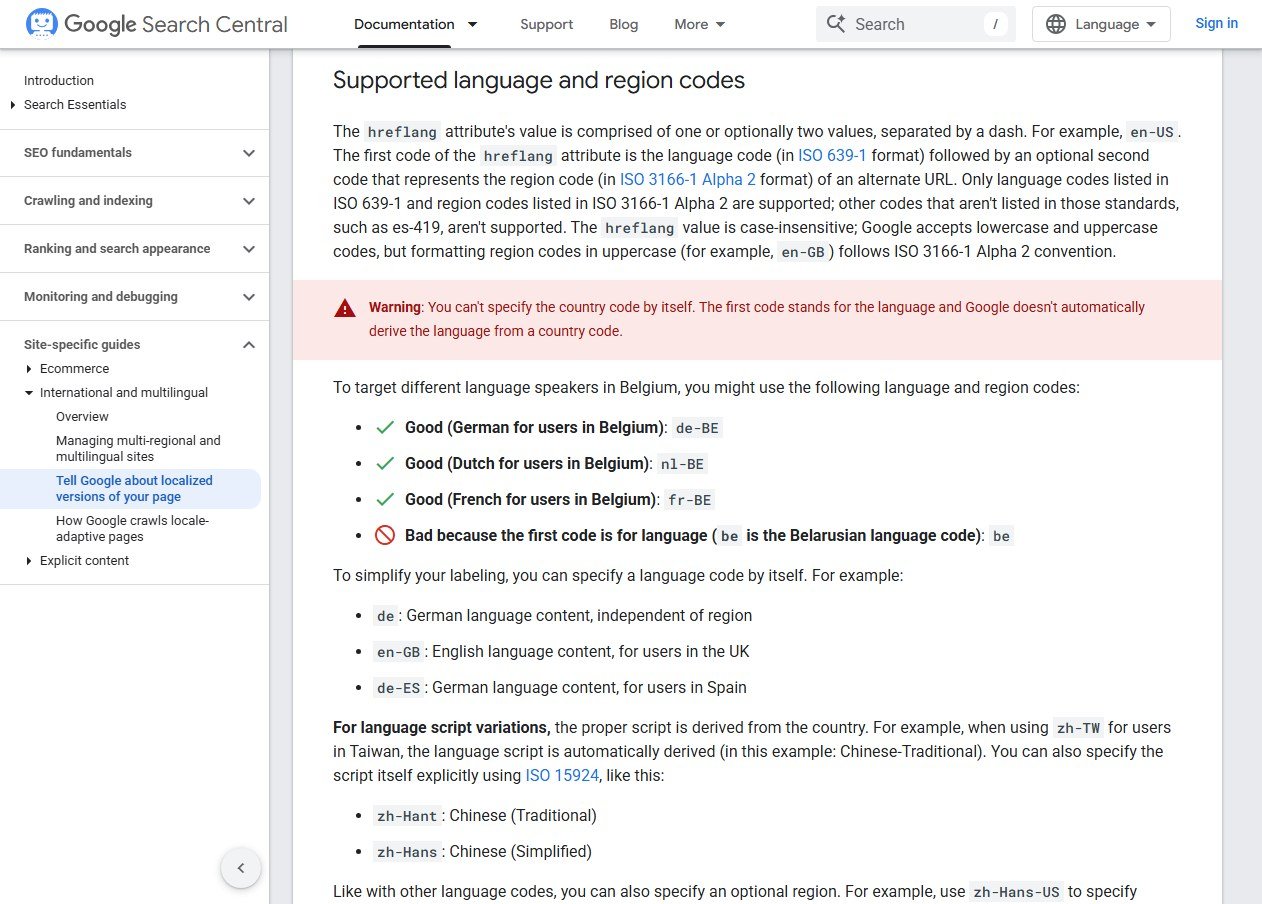
A tag using es-419 does not throw a visible error. It sits in the page's HTML looking correct, Search Console shows no complaint, and Google simply treats that version as if no hreflang were specified for it at all — the exact silent-failure pattern that makes hreflang bugs so easy to carry for months. If your Spanish pages also fight each other for the same rankings rather than splitting traffic by market the way hreflang should, that's often a sign the tags aren't being read at all — our guide to canonical and hreflang conflicts covers the related failure mode where a canonical tag undoes a correct hreflang set.
What to Use Instead
There is no single code for "Spanish, Latin America" that Google will honor, because Latin America is not a country. The fix is to stop trying to target the region in one tag and instead combine two things: a generic language code as a catch-all, plus specific country codes for the markets that are genuinely different.
- es — language only, no region. Targets any Spanish-speaking visitor who doesn't match a more specific tag below. This is your fallback, not your primary tag.
- es-MX, es-CO, es-AR, es-CL, es-PE — country-specific codes for Mexico, Colombia, Argentina, Chile, Peru, and so on, each using a real ISO 3166-1 Alpha 2 country code after the language.
- es-ES — Spain specifically, distinct from the generic es and from any Latin American market.
Google matches the most specific code first — a visitor in Mexico gets es-MX if it exists, and only falls back to plain es if it doesn't. You don't need a separate tag for every Spanish-speaking country on Earth; you only need one for each market where the content, pricing, or experience is genuinely different. Everywhere else, the generic es tag already covers it.
A Worked Example: Four Spanish Markets
Say a site has a generic Spanish page plus dedicated pages for Mexico, Colombia, and Spain, each with local pricing. Run through Contomatix's free hreflang generator, that's four rows in, HTML tags out:
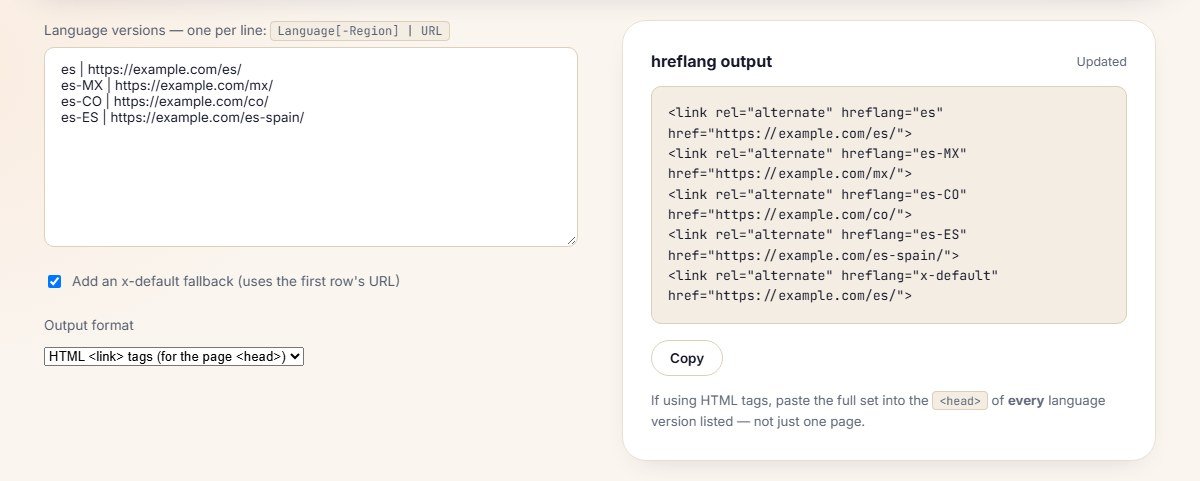
Notice what the tool does automatically: every one of the four pages gets the same five-tag block, including a tag pointing at itself. That self-reference is not an oversight — it's required. Skipping it is one of the most common manual mistakes, covered next.
The Code, Two Ways
Hreflang can live in the page's <head> as HTML link tags, or in the sitemap as XML annotations. Pick one method where you can. Google says you can combine them, but there is no benefit in Search and it is harder to manage, and two copies that drift out of sync become a conflict source, covered further down.
HTML, in the <head> of every one of the four pages:
<link rel="alternate" hreflang="es" href="https://example.com/es/">
<link rel="alternate" hreflang="es-MX" href="https://example.com/mx/">
<link rel="alternate" hreflang="es-CO" href="https://example.com/co/">
<link rel="alternate" hreflang="es-ES" href="https://example.com/es-spain/">
<link rel="alternate" hreflang="x-default" href="https://example.com/es/">
Or the sitemap version, which avoids editing four separate pages' HTML and is generally easier to maintain once you're past a handful of market pages — generate it from the same four rows by switching the tool's output format to XML.
Reciprocity: The Rule That Breaks Silently
Every version in a hreflang set must link to every other version, including itself. If the Mexico page lists Colombia but the Colombia page doesn't list Mexico back, Google's documentation is explicit that the whole set for that pair can be disregarded — not just the missing direction, potentially the entire relationship. This is the single most common way a hand-edited hreflang implementation fails after looking correct in a spot-check of one page.
It's also exactly why tools help here: a generator that builds the full reciprocal block from one list of markets can't accidentally produce a one-directional tag, where editing four separate page templates by hand very easily can.
The x-default Tag
x-default is a special, non-language value that marks the page shown to a visitor who doesn't match any listed language or region — someone browsing in German hitting a site that only has es, es-MX, and es-ES versions, for instance. It's optional, but recommended any time a site has more than one locale, since without it those unmatched visitors get Google's best guess rather than a page you chose.
Why This Code Works Everywhere Except Here
It's worth separating two different jobs that look similar but aren't. A browser's language setting, a CMS's locale picker, and an app's interface language are all solving "what language should the UI show in" — and for that job, es-419 is a reasonable, widely-supported answer, because the system just needs to pick a Spanish variant close enough to be understandable. Hreflang is solving a different problem: telling a search engine which specific URL to serve for a specific audience, and that requires checking against a fixed, narrow standard rather than making a best-effort guess.
This is also why copying a locale code from somewhere else in the stack — a CMS setting, a lang attribute already used elsewhere on the site, a value from an analytics or ads platform's audience targeting — is a common way es-419 ends up in hreflang tags in the first place. The code isn't wrong where it came from. It's wrong for this specific use.
The practical takeaway: don't assume a locale code is hreflang-safe just because it works correctly somewhere else on the same site or in the same tech stack. Hreflang has its own narrower rule set, and it's worth checking a code against that rule set specifically rather than assuming consistency across systems.
Mistakes That Have Nothing to Do With es-419
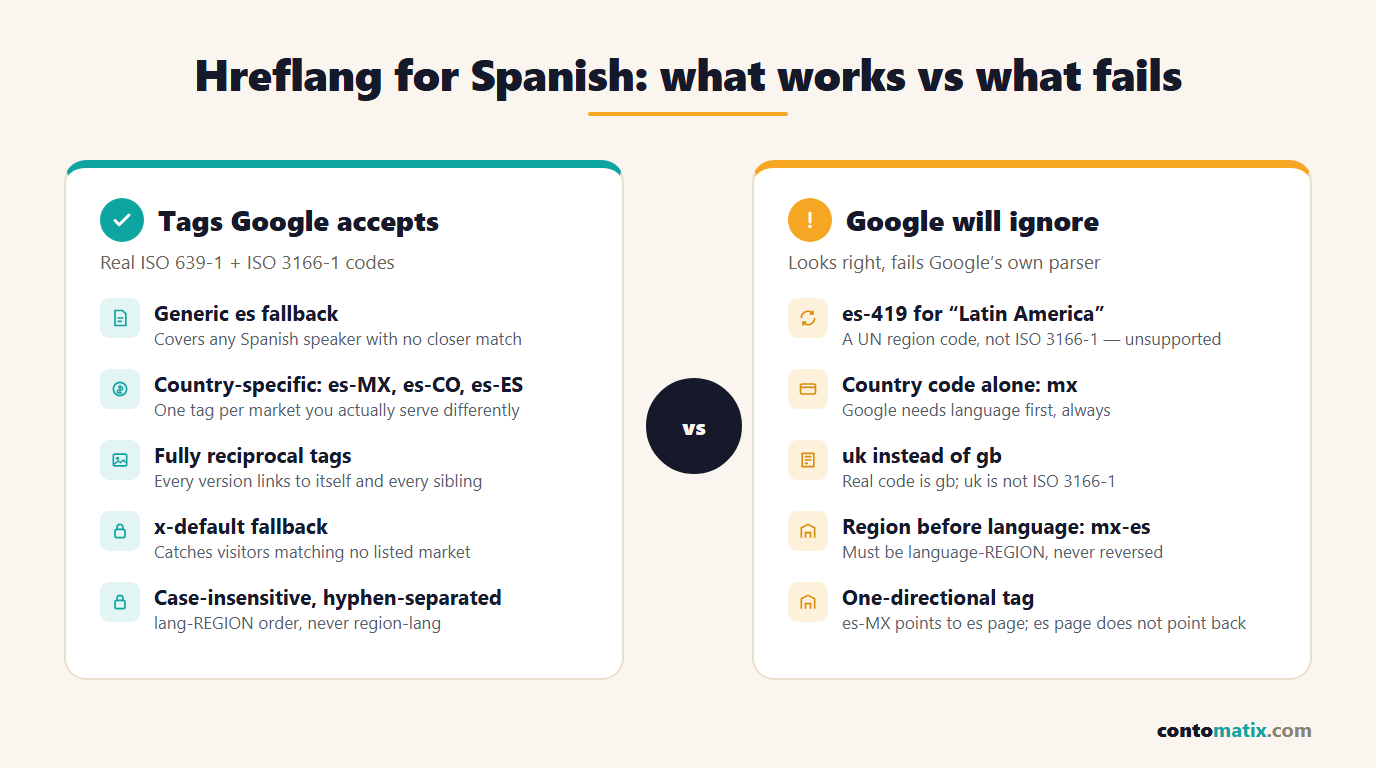
Once the region-code problem is handled, four more patterns cause most of the remaining Spanish hreflang failures.
- Country code with no language. A tag of just
mxis invalid outright — Google's documentation states the first code must be the language, and it does not derive language from a country code on its own. - Reversed order.
mx-esinstead ofes-MX— language always comes first, region second, never the other way around. - uk instead of gb. Not a Spanish-specific issue, but the same category of mistake: the everyday abbreviation for the United Kingdom is not its ISO 3166-1 code, which is gb.
- Running two methods that disagree. Google allows combining HTML tags, headers and sitemap annotations but says there is no benefit and it is harder to manage. Keep one source of truth; letting two copies drift out of sync after a URL change is a recurring source of conflicting signals.
Testing What You've Shipped
A hreflang tag with a typo or an unsupported code doesn't throw a browser error or break page rendering — it just gets silently ignored by Google, which is why testing matters more here than almost anywhere else in technical SEO.
- Check Search Console's International Targeting report (where available) for flagged hreflang errors across the whole site, not just one page.
- Use the URL Inspection tool on a specific page and look at how Google rendered it, which surfaces whether a tag was picked up at all.
- Re-generate the block from scratch with a tool whenever markets are added or removed, rather than hand-editing an existing set — this is exactly where reciprocity breaks.
- Re-check after any URL structure change. A redirected or renamed page with stale hreflang pointing at its old URL is functionally the same failure as never having set it up.
Quick Recap
- es-419 is a real UN M49 region code, but Google's hreflang parser only accepts ISO 3166-1 Alpha 2 country codes — es-419 is explicitly named as unsupported in Google's own documentation.
- Use a generic es tag as a catch-all, plus specific codes like es-MX, es-CO, and es-ES only for markets that are genuinely different.
- Every version in a set must reciprocally link to every other version, including itself, or Google may disregard the set.
- Country-only codes (mx), reversed order (mx-es), and uk-instead-of-gb are the next most common failures once es-419 is fixed.
- Pick one hreflang method where you can: Google allows combining HTML tags, headers and sitemap annotations, but says there is no benefit and it is harder to manage.
- Test with Search Console and URL Inspection after every change — hreflang errors don't show up as broken pages, they show up as silently ignored tags.
Frequently Asked Questions
Is es-419 wrong, or just unsupported by Google specifically?
It's a genuinely valid code elsewhere — it's used in CLDR locale data and recognized by some browsers and platforms. It is specifically Google's hreflang implementation that only accepts ISO 3166-1 Alpha 2 region codes, which rules it out there even though it's correct by other standards.
Can I target all of Latin America with one hreflang tag?
Not with a single code Google will honor. The closest equivalent is a generic language tag (es) as a fallback, since there's no ISO 3166-1 code that means "Latin America" as a region.
Do I need a separate hreflang tag for every Spanish-speaking country?
No. Only for markets where your content, pricing, or experience is genuinely different. Everywhere else, the generic es tag already covers those visitors.
What happens if I use es-419 anyway?
No error is thrown and nothing visibly breaks. Google simply disregards that tag, which means visitors it was meant to target get Google's default guess instead of the page you intended.
Should es-MX point back to the generic es page?
Yes — every page in the set, including the generic es version, needs to list and be listed by every other version. That includes the fallback.
Is hreflang case-sensitive?
No, Google accepts both cases, though the ISO 3166-1 convention is to write the region portion in uppercase, such as es-MX rather than es-mx.
What's the difference between es-ES and just es?
es-ES specifically targets Spanish speakers in Spain, while plain es has no region and targets any Spanish speaker not matched by a more specific tag. If a site has no Spain-specific content, the generic es tag already serves Spanish visitors in Spain adequately.
Does x-default need to be a Spanish page?
No, x-default is independent of language — it's whichever page you want shown to a visitor who doesn't match any of the listed language or region tags, which is often a language-selector page or a default market.
Can hreflang and canonical tags conflict?
They serve different purposes and can coexist, but a canonical tag pointing a translated page back to the original-language version effectively tells Google to ignore the translation, which undermines the hreflang set. Each language version should canonicalize to itself.
How do I check which hreflang codes my site is actually using?
View the page source and search for hreflang=, or check the sitemap's XML directly if that's the method in use. Google Search Console's URL Inspection tool also shows what Google detected, which is the more reliable check since it reflects what Google actually parsed.