Last updated: October 2026
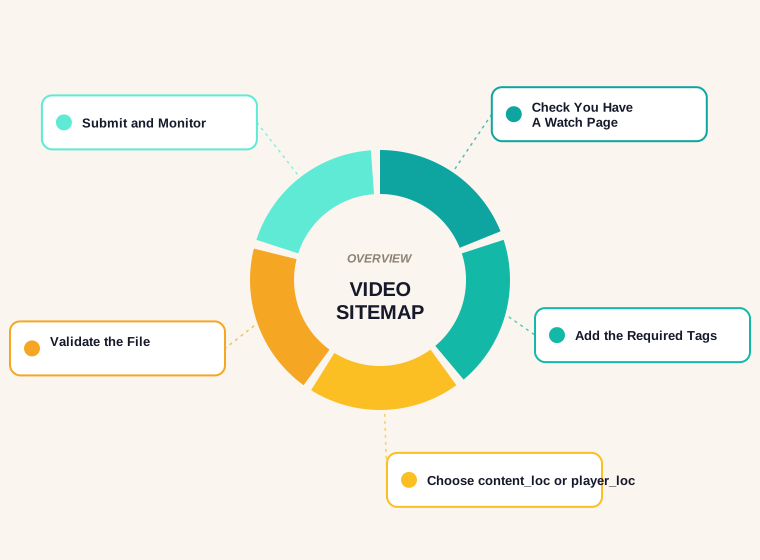
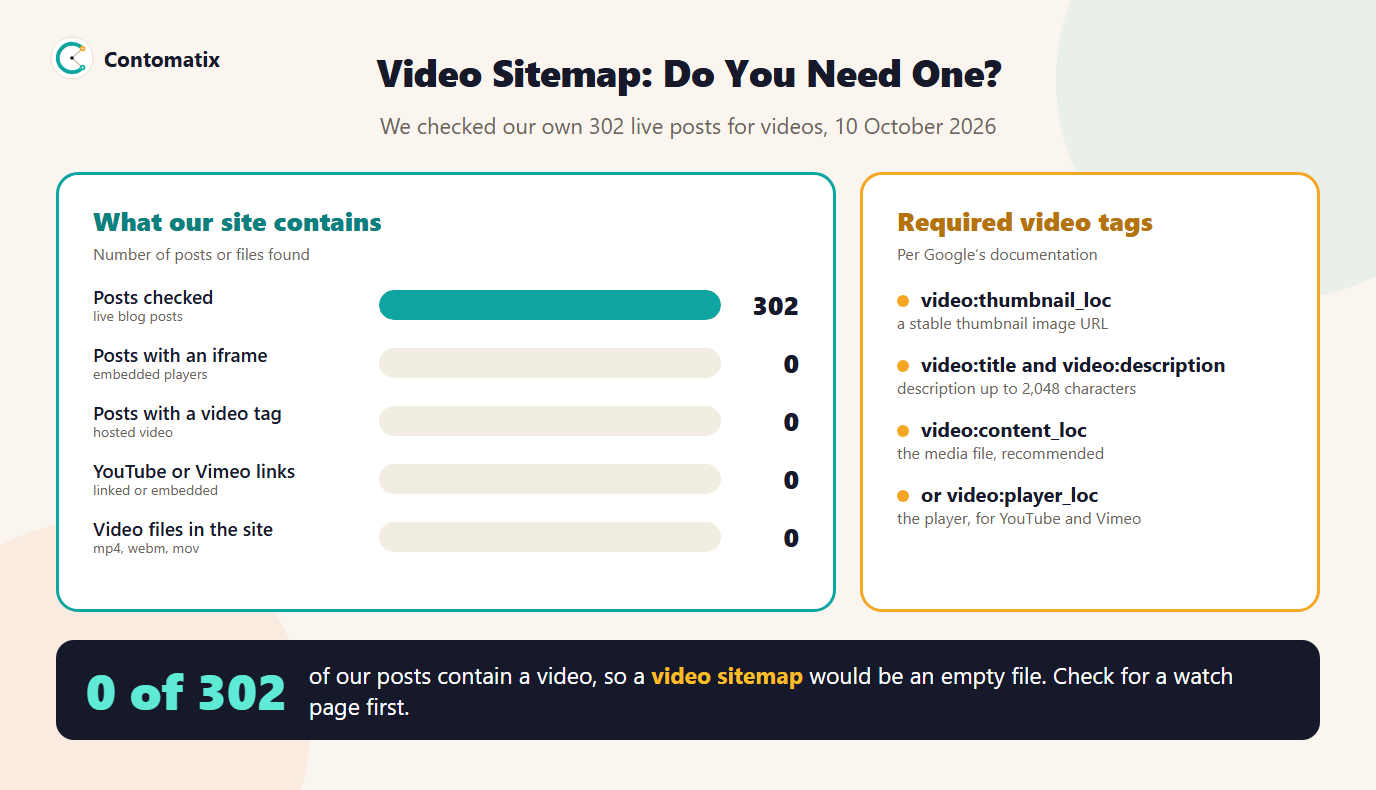
We scanned our 302 live posts for videos and found none: no embedded players, no video tags, no YouTube or Vimeo links and no video files. For us a video sitemap would be an empty file, and that is the most useful way to start this guide. A video sitemap is only worth building when you have videos on pages that Google can treat as watch pages. If you do, this page covers the tags, the limits, the choice between content and player URLs, and a sample file we validated.
If you came here for the image version, see our guide to the image sitemap. The file basics are the same for both.
What a Video Sitemap Is
A video sitemap is a sitemap file, or a section of one, that gives Google extra information about the videos on your pages: where the thumbnail is, what the video is called, what it covers and where the media file or player lives. It does not replace the page itself. Google's documentation says it recommends video sitemaps and also supports mRSS feeds as an alternative, and it does not say that either is required.
Do You Need a Video Sitemap?
Ask four questions before you build anything.
- Do you have videos at all? Our site fails this test, so the rest does not apply to us.
- Is each video embedded on a watch page? Google's video guidance says a watch page's main purpose is to show a single video, and that a blog post which embeds a video reviewing it is not a watch page. That matters, because many sites only embed videos inside articles.
- Is that watch page indexed and performing? Google says the watch page must be indexed and performing well in Search before its video can be considered for indexing, and that being indexed alone does not guarantee the video is.
- Does Google already find the video? A video in a standard embed on an indexed page may be found without a sitemap. A sitemap helps most for large libraries and for videos that are otherwise hard to discover.
If you answered no to any of the first three, fix that first. A sitemap cannot turn an ordinary article into a watch page.
Required Video Sitemap Tags
Google's video sitemap reference lists the tags that must be present for each video. You also use the standard sitemap loc tag for the page the video sits on.
<video:video>wraps everything for one video. You can nest several inside one page'sloc, one for each video on that page.<video:thumbnail_loc>is a URL for the thumbnail image.<video:title>is the title, with HTML entities escaped or wrapped in CDATA. Google recommends it matches the title shown on the page.<video:description>is the description, up to 2,048 characters. It must match the description on the page, though not word for word.<video:content_loc>or<video:player_loc>: you must give one of them.
The optional tags include duration, publication date, expiration date, rating, view count, family friendly, restriction, platform, requires subscription, uploader, live and tag. Their limits are worth knowing: duration runs from 1 to 28,800 seconds, which is eight hours; rating is 0.0 to 5.0; and a video can have up to 32 tags. Several older tags, including video:category, video:price and video:tvshow, are deprecated and should be left out.
content_loc or player_loc?
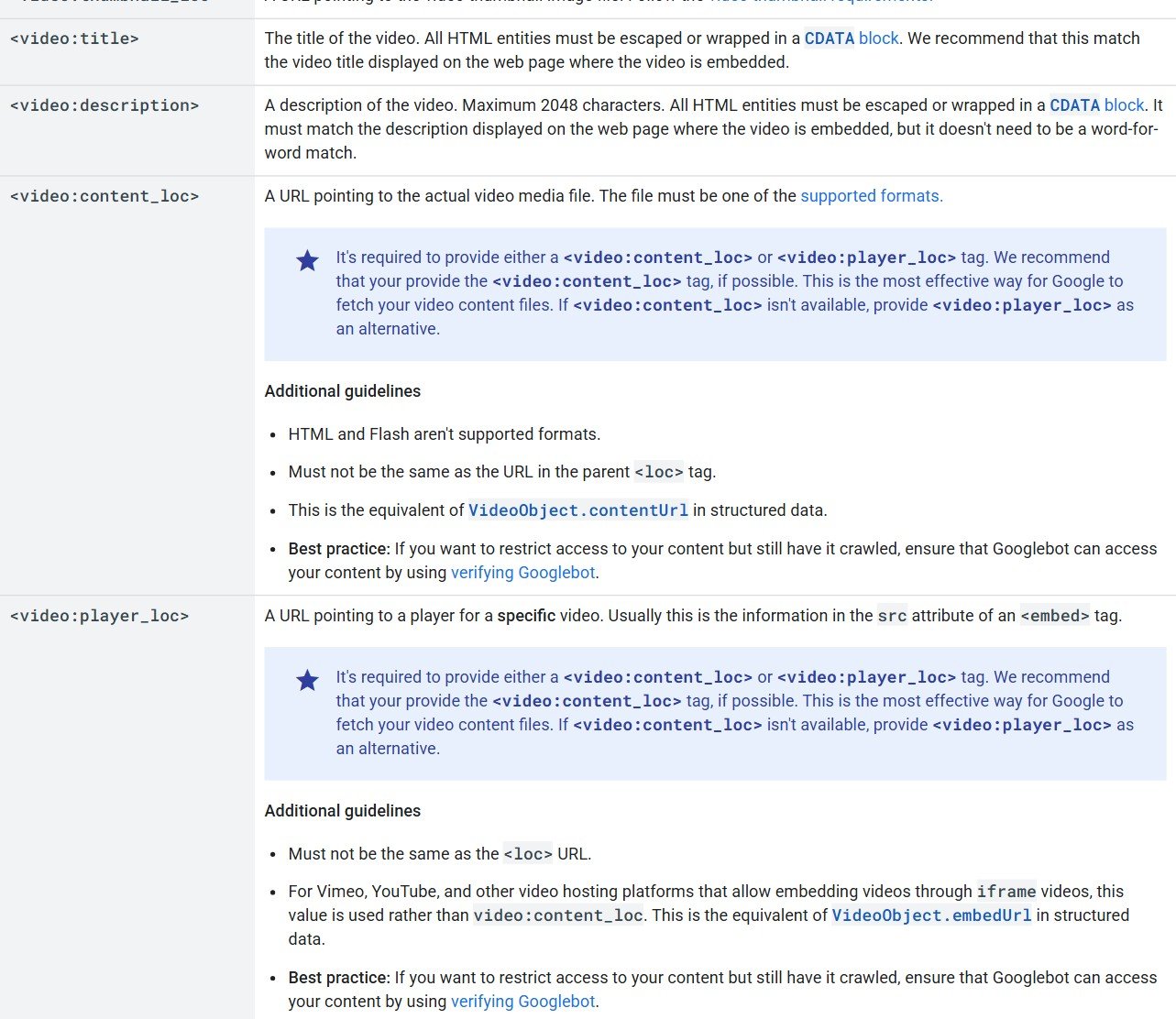
These two tags answer different questions. content_loc points at the actual media file, such as an MP4. player_loc points at a player for a specific video, which is how embeds from YouTube, Vimeo and similar platforms work. Google recommends content_loc when you have it, because it is the most effective way for Google to fetch the video file, and says to use player_loc otherwise.
Two rules apply to both. Neither value may be the same as the page's own loc, and HTML or Flash files are not supported media formats. If you host a video behind access controls, Google's guidance is to make sure Googlebot can still reach it, using Googlebot verification.
A Video Sitemap Example You Can Copy
This file lists two watch pages. The first points at a hosted MP4. The second uses a YouTube-style player URL with a placeholder ID. Replace the example addresses with your own.
<?xml version="1.0" encoding="UTF-8"?>
<urlset xmlns="http://www.sitemaps.org/schemas/sitemap/0.9"
        xmlns:video="http://www.google.com/schemas/sitemap-video/1.1">
  <url>
    <loc>https://example.com/videos/redirect-mapping-walkthrough</loc>
    <video:video>
      <video:thumbnail_loc>https://example.com/thumbs/redirect-mapping.jpg</video:thumbnail_loc>
      <video:title>Redirect mapping walkthrough</video:title>
      <video:description>A five-minute walkthrough of matching old URLs to new ones.</video:description>
      <video:content_loc>https://example.com/media/redirect-mapping.mp4</video:content_loc>
      <video:duration>312</video:duration>
    </video:video>
  </url>
  <url>
    <loc>https://example.com/videos/sitemap-basics</loc>
    <video:video>
      <video:thumbnail_loc>https://example.com/thumbs/sitemap-basics.jpg</video:thumbnail_loc>
      <video:title>Sitemap basics in three minutes</video:title>
      <video:description>What belongs in a sitemap and how to submit it.</video:description>
      <video:player_loc>https://www.youtube.com/embed/EXAMPLE_ID</video:player_loc>
      <video:duration>187</video:duration>
    </video:video>
  </url>
</urlset>
We Ran the Sample Through Our Tools
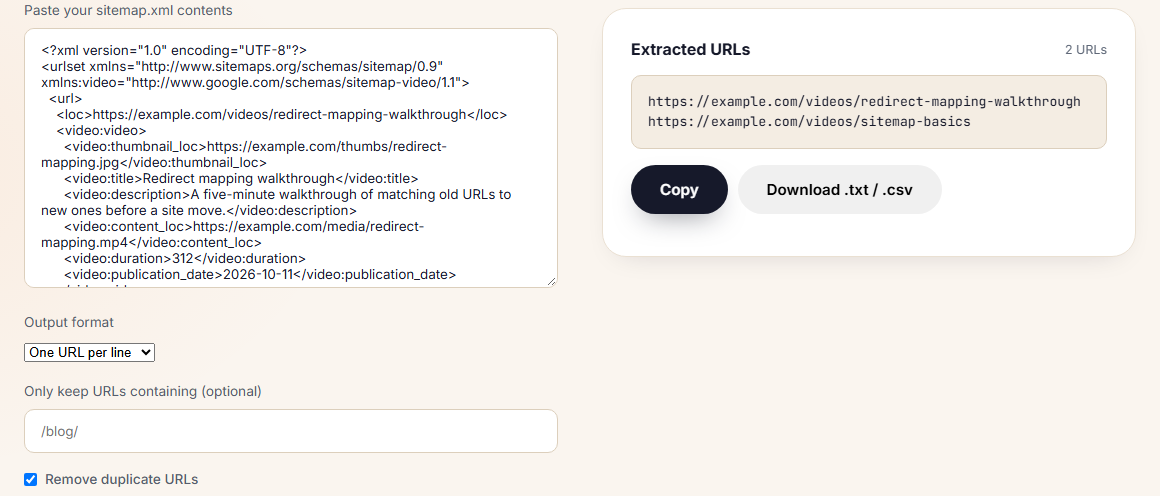
We pasted this file into our own tools. The sitemap validator reported no errors and found two unique URLs on one host. It checks the structure, URL rules and limits of the sitemap, and does not inspect the video tags themselves, so a typo inside a video:video block would not be caught. The sitemap URL extractor listed the two watch-page addresses, which is a quick way to check that every page in your video sitemap is one you want indexed.
YouTube Video Sitemap: What to Do With Embeds
If your videos live on YouTube and you embed them, the embedded player URL goes in player_loc, and the page you embed it on is the loc. The video still has to be on a page whose main job is to show it. Google's guidance also suggests describing the video with VideoObject structured data and keeping the thumbnail, name and description unique for each video, so use a different title and description for each page.
You can read the details in Google's documentation on video sitemaps and alternatives.
Video Sitemap or mRSS?
Google supports mRSS feeds as an alternative that can be submitted and tested like a sitemap. A platform that already produces an mRSS feed can submit it directly. For most sites, a video sitemap is simpler to write and check by hand. Choose whichever you can keep accurate, because a feed that drifts out of date is worse than none.
What Makes a Video Eligible in the First Place
A sitemap entry does not fix a page that fails the basics. Google's video guidance lists what a video needs: it must be embedded on an indexed watch page, it needs a valid thumbnail at a stable URL, it must be in a supported file type such as MP4, WebM or MOV, and it cannot be hidden behind other elements on the page. Data URLs are not supported, and a paywalled video needs paywall structured data. Check these before you spend time on the XML.
Video Sitemap or VideoObject Structured Data?
They are complementary, not rivals. Google recommends describing each video with VideoObject structured data on the watch page, using properties such as name, description, thumbnail URL, content URL and embed URL. The sitemap then tells Google where those pages and files are. Keep the two consistent: the title and description in the sitemap should match what the page and its markup say. If you can only do one, the structured data on the page is the more direct signal, and the sitemap is the way to hand over a large library in one file.
A 30-Minute Plan to Add One
- List your watch pages. One page per video, each with its own title and description. Drop any page that is really an article.
- Collect the assets. For each video: thumbnail URL, media file or player URL, duration and publication date.
- Write the file. Use the template above, one
urlblock per page with onevideo:videoinside it. - Validate. Run it through a validator and extract the page URLs to confirm each is indexable.
- Submit and watch. Add it in Search Console, check the Sitemaps report for processing errors and the video indexing report for indexed videos.
What to Do If You Have No Videos Yet
Do not create an empty or placeholder video sitemap. It adds a file to maintain and tells Google nothing. If you plan to add videos, design the pages first: one URL per video, a clear title and description, a good thumbnail and the player placed prominently. Add the sitemap when there is something real to list. That is where we stand: no videos, so no file, and a checklist ready for the day we publish one.
Common Video Sitemap Mistakes
- Listing pages that are not watch pages. Embedding a video in an article does not turn the article into a watch page.
- Reusing one title and description. Google asks for unique values for each video.
- An unstable thumbnail URL. If the thumbnail moves or disappears, the entry loses its image.
- Pointing content_loc at the page. It must be the media file, not the same URL as the page's
loc. - Using deprecated tags. They carry no weight, so leave them out.
- Letting the file go stale. Remove videos you have deleted and keep expiry dates accurate.
The Limits of This Test
- The scan covers our live blog posts on 10 October 2026, not every page of the site. Tool pages are built from templates that contain no video.
- The sample file uses example.com addresses and a placeholder video ID. It shows structure and was not submitted to Search Console.
- The validator confirms file structure only. Whether Google indexes a video depends on the watch page and the video itself.
Key Takeaways
- A video sitemap is optional and only useful when you have videos on watch pages.
- Our own 302 posts contain no videos, so we do not need one.
- The required tags are video, thumbnail_loc, title, description and either content_loc or player_loc.
- Descriptions can run to 2,048 characters, durations to 28,800 seconds, and each video can have up to 32 tags.
- Use player_loc for YouTube and Vimeo embeds, and content_loc for hosted files.
- Validate the file, and check that every listed page is one you want indexed.
If you are planning a video library and want it set up so Google can find it, Contomatix can help with the page structure and the sitemap. Get in touch and we will take a look.
Frequently Asked Questions
What is a video sitemap?
It is a sitemap, or a section of one, that gives Google details about the videos on your pages, such as the title, description, thumbnail and where the file or player is.
Do I need a video sitemap?
Not always. Google recommends video sitemaps and supports mRSS feeds as an alternative, but does not say either is required. You mainly need one when you have videos on indexed watch pages and want to help Google find them.
What are the required tags in a video sitemap?
video:video, video:thumbnail_loc, video:title and video:description, plus either video:content_loc or video:player_loc.
What is the difference between content_loc and player_loc?
content_loc points at the video media file. player_loc points at a player for a specific video, as with YouTube or Vimeo embeds. Google recommends content_loc when you can provide it.
How long can a video description be?
Up to 2,048 characters. It should match the description shown on the page, though not word for word.
Can I make a YouTube video sitemap?
Yes. For videos embedded from YouTube, put the embed player URL in player_loc, and list the page where the video is embedded as the loc.
Is a blog post with an embedded video a watch page?
No. Google says a watch page's main purpose is showing a single video, and a blog post that embeds a video reviewing it is not a watch page.
Which video sitemap tags are deprecated?
Google lists video:category, video:gallery_loc, video:price and video:tvshow, along with the autoplay and allow_embed attributes of player_loc, as deprecated.
How do I check my video sitemap for errors?
Validate the XML structure and URLs with a sitemap validator, then submit it in Search Console and check the Sitemaps report for processing errors.