Last updated: October 2026
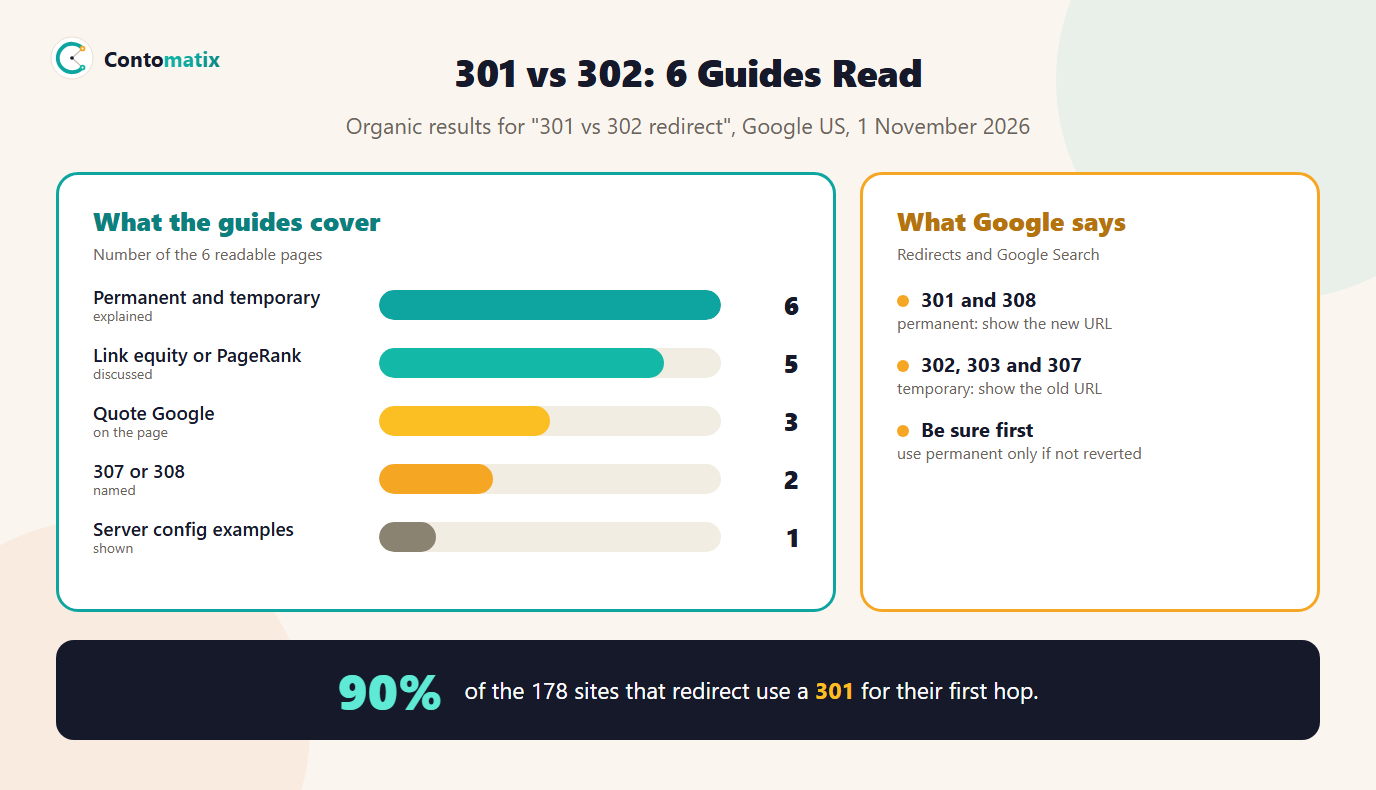
The difference between a 301 and a 302 redirect is how long the move is meant to last. A 301 says a page has moved permanently, and a 302 says it has moved temporarily. Google's page on redirects says permanent redirects show the new target in search results and temporary redirects show the source page. We read 6 pages that rank for "301 vs 302 redirect" on 1 November 2026: all 6 explain permanent and temporary, 5 discuss link equity or PageRank and only 3 quote Google. Then we looked at what 185 real sites do.
This guide covers the codes, what Google says in its own words, our scan of 185 sites, when to use each one, simple examples and how to check yours. If a redirect is not behaving, see our guide to 301 redirects not working, and for a full move see our SEO site migration guide.
301 vs 302 Redirect: The Short Answer
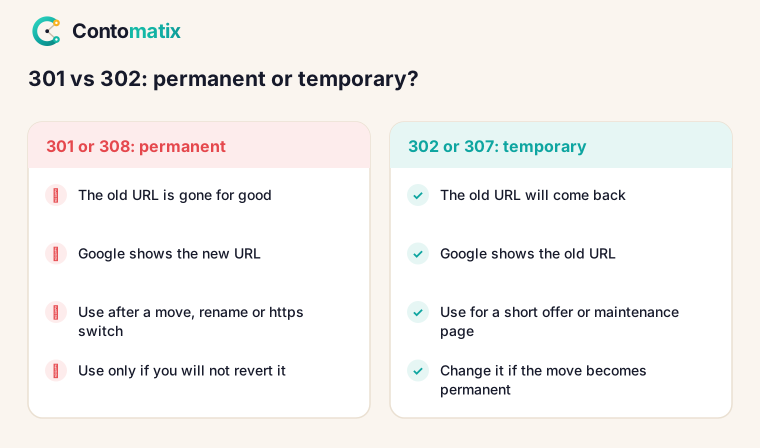
Use a 301 (or its newer twin 308) when the old URL is gone for good, such as after a site move, a rename or a switch from http to https. Use a 302 (or 307) when the old URL will come back, such as a temporary offer page or a short maintenance notice. Google's own wording is that you should use permanent redirects when you are sure the redirect will not be reverted. If you are not sure, a temporary redirect keeps the original URL in search results.
301 vs 302 vs 307 vs 308: What Each Code Means
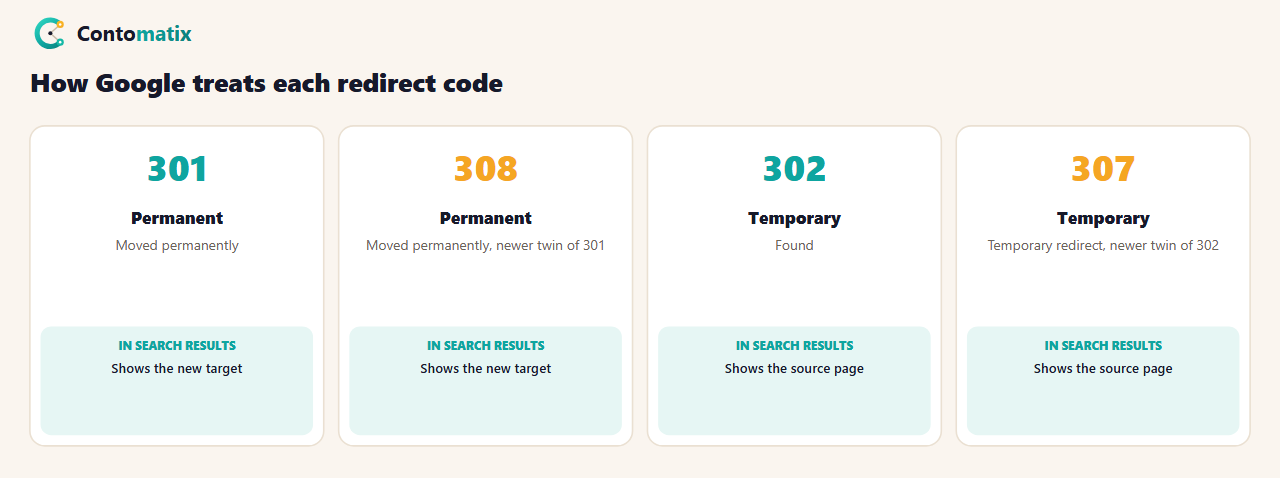
| Code | Name | Meaning |
|---|---|---|
| 301 | Moved permanently | Permanent. Show the new URL. |
| 308 | Moved permanently | Permanent, the newer equivalent of 301. |
| 302 | Found | Temporary. Keep the old URL. |
| 303 | See other | Temporary, usually after a form submission. |
| 307 | Temporary redirect | Temporary, the newer equivalent of 302. |
Only 2 of 6 ranking guides name 307 and 2 name 308, so "301 vs 302" misses half the picture. Google's table lists 301 and 308 as permanent and 302, 303 and 307 as temporary, and notes that visitors usually cannot tell the difference. The difference is for search engines, and for browsers that cache permanent redirects: 5 of 6 guides mention caching.
What Google Says About Permanent and Temporary Redirects
On its page Redirects and Google Search, Google explains that the choice depends on how long you expect the redirect to stay and which page you want Google Search to show. For permanent redirects, Googlebot follows the redirect and the indexing pipeline uses it as a signal that the target should be canonical. For temporary redirects, Googlebot follows the redirect but the indexing pipeline does not use it as a signal that the target should be canonical, although the target might still be indexed if other canonicalization signals are present.
Google adds a practical example: if a service is temporarily unavailable, set up a temporary redirect to send users to a page that explains what is happening, without changing the original URL in search results. And its site move guidance states that 301 and other permanent redirects do not cause a loss in PageRank. That settles a common worry about 301s. It does not say anything about whether a 302 passes ranking signals, so treat claims about that with caution. 5 of 6 ranking guides discuss link equity, but only 3 quote Google.
What 6 Ranking Guides Say About 301 vs 302
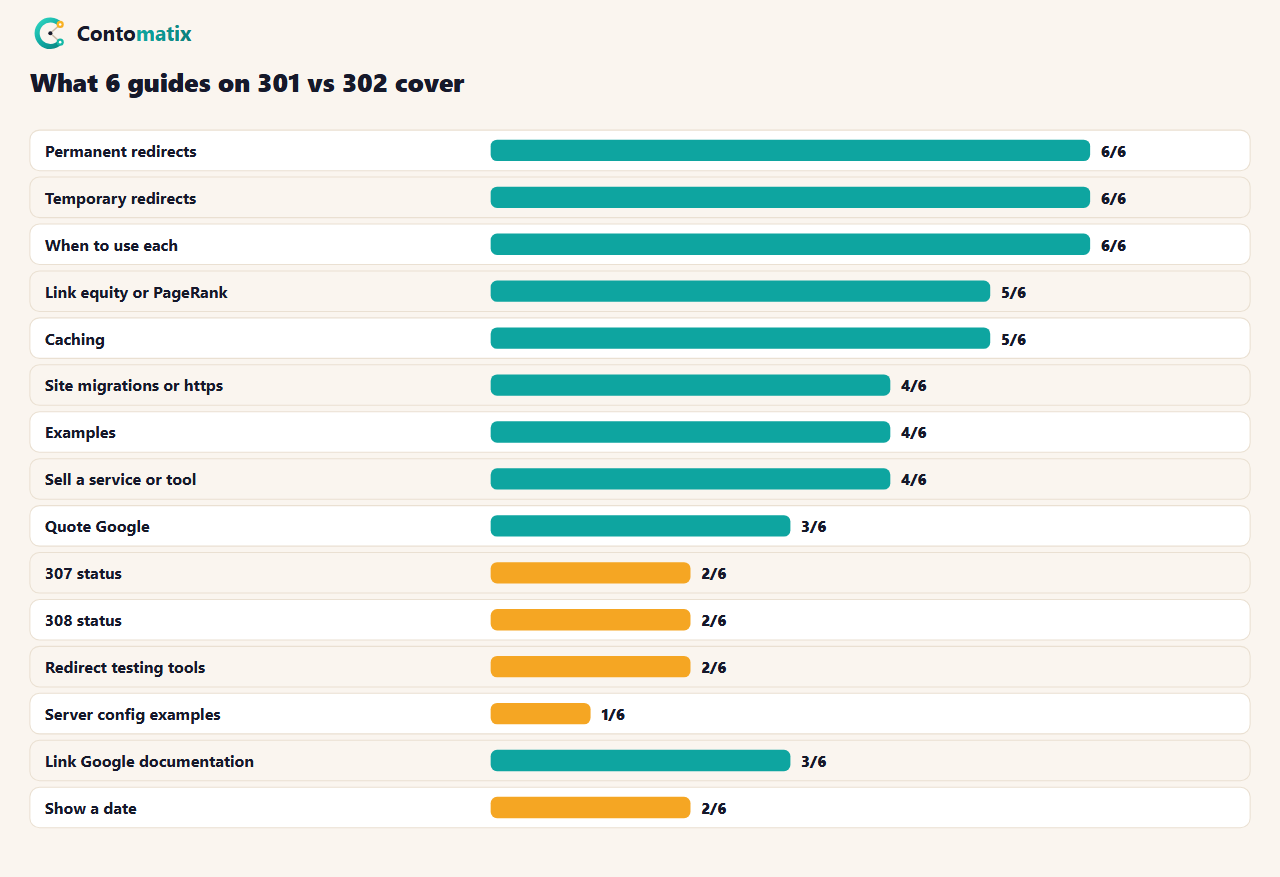
The median guide has about 1,046 words and 2 of 6 show a date. 4 of 6 also sell a service or a tool. 4 of 6 mention site migrations or https, which matches the most common real-world use, and 2 use words such as myth, misconception or "no longer". 1 show server configuration, which is why we include examples below.
What 185 Sites Actually Use: Our Redirect Scan
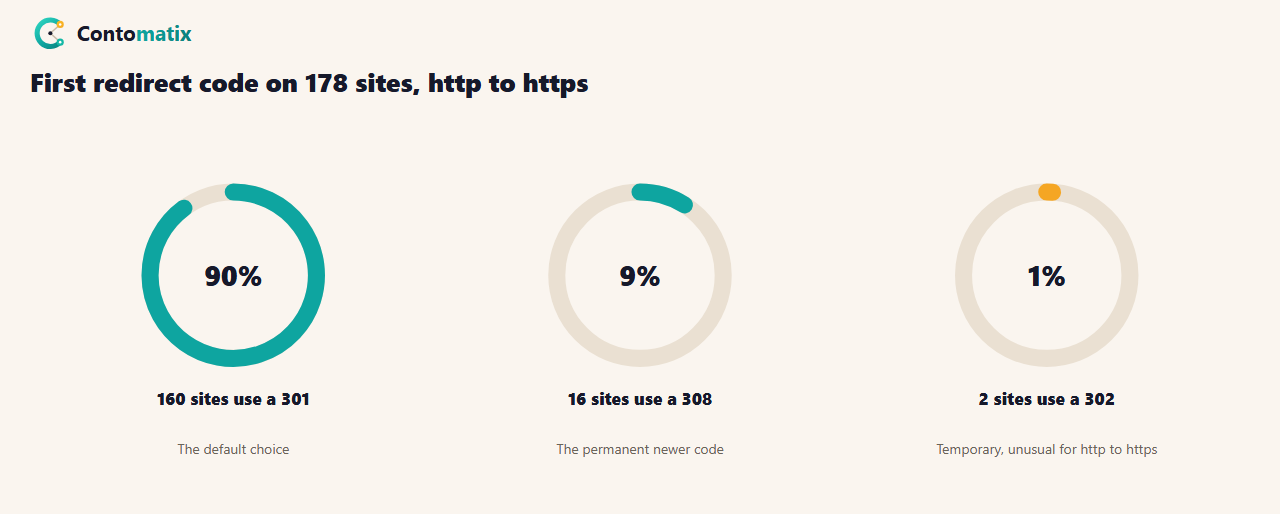
On 27 October 2026 we checked how 185 SEO-related sites redirect from http to https. 7 did not redirect at all. Of the 178 that did, the first redirect was a 301 on 160 (90%), a 308 on 16 (9%) and a 302 on 2. Counting every redirect in every chain, there were 211 301s, 21 308s, 4 302s and 2 307s.
6 sites used a temporary redirect (302 or 307) somewhere. Two of them used one as the very first hop from http to https, which is unusual for a move that is meant to be permanent. In the other four, a temporary redirect came after a permanent one, which can be intentional, for example to send visitors to a language or region version. We do not name the sites. The pattern is the useful part: almost everyone uses a permanent redirect for http to https, and the exceptions are worth checking for mistakes. Run the same check on your own site before you assume it is set up correctly.
When to Use a 301 and When to Use a 302
- Use a 301 or 308 for a domain change, a moved or renamed page, a merge of two pages, a switch to https and a choice between www and non-www.
- Use a 302 or 307 for a short promotion, a maintenance page, a test of a new page, or sending a visitor to a login or a region page.
- Use neither for a deleted page with no replacement. Return a 404 or 410 instead.
- Do not leave a 302 in place for years. If the move turns out to be permanent, change it to a 301 or 308.
301 vs 302 Redirect Example: How to Set Them Up
The code depends on your server. On Apache, in the .htaccess file:
Redirect 301 /old-page https://example.com/new-page
Redirect 302 /offer https://example.com/summer-offer
On nginx, in the server block:
return 301 https://example.com$request_uri;
In PHP, Google's page shows the same idea with headers: a permanent redirect sends 'HTTP/1.1 301 Moved Permanently' and a Location header, and a temporary one sends 'HTTP/1.1 302 Found'. If you use a platform such as WordPress or Shopify, use its redirect settings, because the platform may already have a built-in solution, as Google notes.
Our Own Redirects: A Test on 1 November 2026
We tested our own site the same way. http://contomatix.com/ redirects once with a 301 to https. https://www.contomatix.com/ also redirects once with a 301. A trailing-slash URL such as /blog/ redirects with a 301 to /blog. The one weak spot is http://www.contomatix.com/, which takes two 301 hops to reach the final address. Every redirect on our site is permanent, but the two-hop path is exactly the kind of chain our guide to 301 redirects not working warns about, and fixing it is on our list.
How to Check Which Redirect You Have
- Use a header checker or curl. The command curl -I followed by a URL shows the status code and the Location header.
- Use your browser's developer tools. Open the Network tab and reload the page.
- Test a list. Our free redirect mapper helps you plan a set of old-to-new redirects before you set them up.
- Check Search Console. The URL Inspection tool shows which URL Google considers canonical.
302 vs 301 Redirect for SEO: Common Mistakes
- A 302 used for a permanent move. Google then keeps showing the source page.
- A 301 used for something temporary. If you later revert it, the permanent signal is already out there, and browsers may have cached it.
- Chains. A permanent redirect followed by a temporary one, or several hops in a row, adds delay and confusion.
- JavaScript or meta refresh redirects where a server redirect is possible. Google lists server-side redirects as most likely to be interpreted correctly.
- Redirecting everything to the home page. Send each old URL to its closest match.
301 vs 302 in Common Situations
| Situation | Code | Why |
|---|---|---|
| Http to https | 301 or 308 | The https address is the one to keep |
| www to non-www, or the reverse | 301 or 308 | One preferred version, the other redirects |
| New domain | 301 or 308 | Google's site move guidance asks for permanent redirects |
| Two posts merged into one | 301 or 308 | The old URL will not return |
| Short promotion page | 302 or 307 | The original URL stays the main one |
| Maintenance or outage notice | 302 or 307 | Google's own example of a temporary redirect |
| Visitors sent to a region version | 302 or 307 | The same URL serves different visitors |
| Deleted page, no replacement | Neither | Return 404 or 410 |
307 and 308 in Practice
307 and 308 are the newer versions of 302 and 301. Under the HTTP standard they differ from the older codes in one technical way: they tell the browser to repeat the request with the same method, so a form sent with POST is not turned into a GET. For ordinary page redirects that makes no difference to visitors, and Google's table treats 308 as permanent like 301 and 307 as temporary like 302. In our scan, 21 of 238 redirects were 308s, so the newer permanent code is already in everyday use, mostly on the first step from http to https.
What to Check After You Change a Redirect
- Test the old URL and confirm the status code and the final address, with no extra hops.
- Test the new URL to be sure it returns 200 and not another redirect.
- Update internal links to point straight to the final URL, so visitors and crawlers skip the redirect.
- Watch Search Console. The Page indexing report lists "Page with redirect" among the pages that are not indexed: on 27 October 2026 we had one such page, which is expected for a redirecting URL.
- Keep the redirect. Google's site move advice is to keep permanent redirects for as long as possible, generally at least a year.
Fixing a Two-Hop Redirect: Our Plan
Our own http://www.contomatix.com/ path takes two 301 hops: first to the https www address and then to the final non-www address. The fix is a single rule that sends every variation straight to https://contomatix.com/ in one step. It is a hosting setting, so it needs a change in the server or domain configuration rather than in our pages. After we change it we will repeat the test above and report the result in this guide.
Is a 302 Ever the Better Choice?
Yes, when you want the original URL to keep its place. A temporary redirect leaves Google showing the source page, so if a product is out of stock for a week and you send visitors to a related page, a 302 keeps the product URL in results. The risk is forgetting it. A good habit is to write the date you expect to remove each temporary redirect and review the list monthly. Our monthly SEO report format has a technical section where that check fits. If you manage many redirects, keep them in one sheet with four columns: old URL, new URL, code and the date you will review it. A permanent redirect needs no end date, but a temporary one always should, and a sheet makes the difference visible to anyone who inherits the site.
Key Takeaways
- 301 and 308 are permanent and 302, 303 and 307 are temporary, according to Google's own table.
- Permanent redirects show the new URL in search results, and temporary ones show the old URL.
- Google says permanent redirects do not cause a loss in PageRank. It does not say the same about temporary ones.
- In our scan, 90% of redirecting sites use a 301 for http to https, 9% use a 308 and 2 use a 302.
- Pick the code by how long the move will last, and check your own site for chains.
Frequently Asked Questions
What is the difference between a 301 and a 302 redirect?
A 301 means the page has moved permanently and a 302 means it has moved temporarily. Google shows the new URL for a permanent redirect and the old URL for a temporary one.
Does a 301 redirect lose PageRank?
Google says 301 and other permanent redirects do not cause a loss in PageRank.
Is a 302 bad for SEO?
Not if the move really is temporary. It is a mistake when used for a permanent move, because Google keeps the source page in results.
What is a 307 redirect?
A temporary redirect, treated by Google like a 302. A 308 is the permanent equivalent of a 301.
Which redirect should I use for http to https?
A permanent one. In our scan of 185 sites, 160 used a 301 and 16 used a 308 as the first redirect.
Can I change a 302 to a 301 later?
Yes. If a temporary move becomes permanent, change the code so Google can treat the target as canonical.
How do I check a redirect code?
Use curl -I, your browser developer tools or a redirect checker, and look at the status line and the Location header.
Do browsers cache 301 redirects?
The HTTP standard makes a 301 cacheable by default, and ${D.cache} of ${D.ok} ranking guides mention caching, which is one reason to be sure before you use one.
Should I redirect a deleted page?
Only if there is a close replacement. Otherwise return a 404 or 410.


