Last updated: October 2026
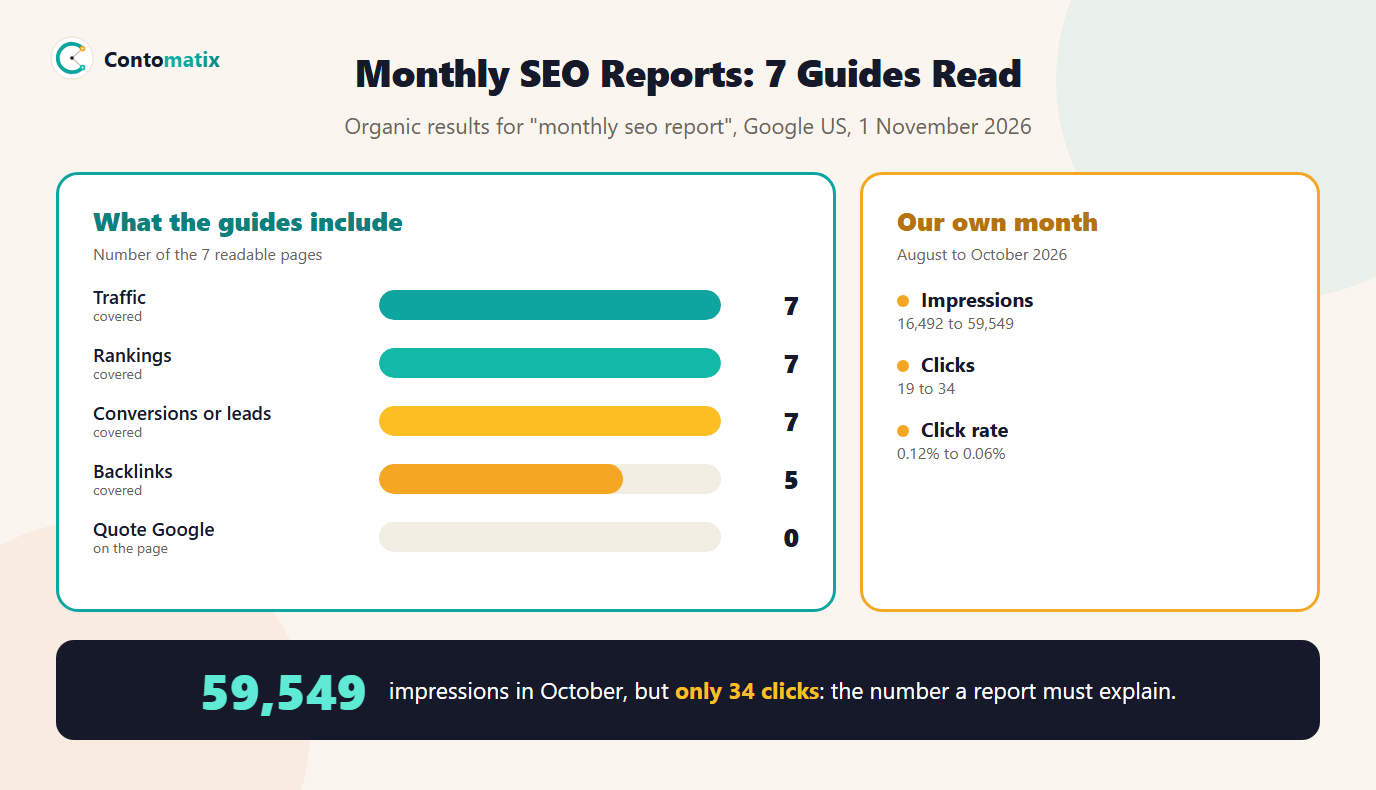
A monthly SEO report is a short document that shows what changed in a site's search performance over the last month, why it changed and what to do next. We read 7 pages that rank for it on 1 November 2026. All 7 cover traffic, rankings and conversions or leads, 5 cover backlinks and 5 include insights or next steps. Only 4 of 7 give a template and 4 an example, and none quotes Google about what the numbers mean.
This guide gives a seven-section format, shows our own report for August to October 2026 with real numbers, and explains what a report must do to be useful: turn numbers into a decision. If you want to build one automatically, use our free SEO report generator. For reports focused on one area, see our guides to the SEO audit report template, the backlinks report and local SEO reporting.
What Goes in a Monthly SEO Report? (What 7 Guides Say)
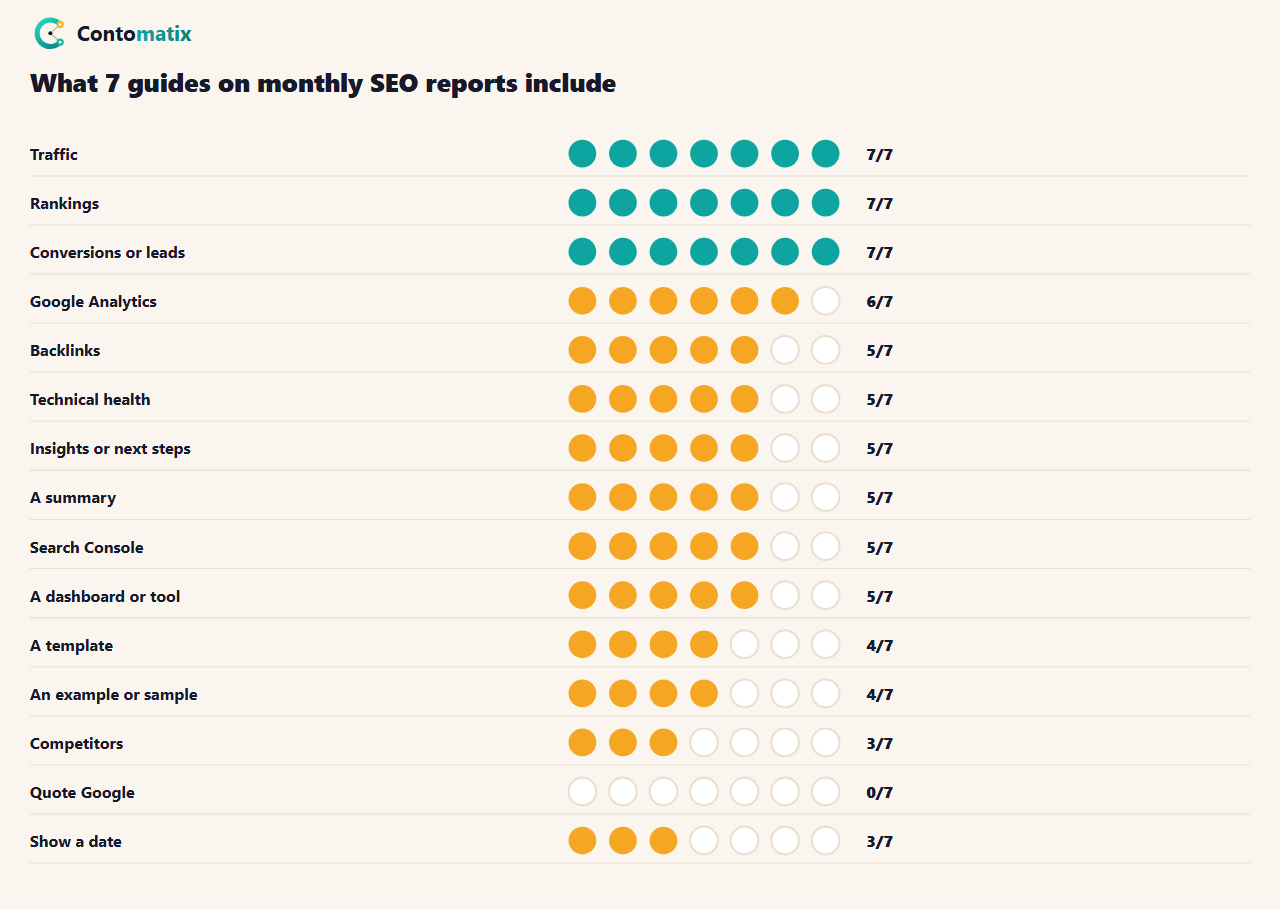
The median guide has about 1,786 words. 6 of 7 mention Google Analytics and 5 mention Search Console, 5 mention a dashboard or reporting tool and 3 mention competitors. Only 2 mention a PDF. Reading across them, the gap is not the list of metrics, which is nearly the same everywhere. It is the step after the numbers: 5 of 7 include insights or next steps, and the ones that do treat it as one section at the end. In our format it is the reason the report exists.
Monthly SEO Report Format: The Seven Sections
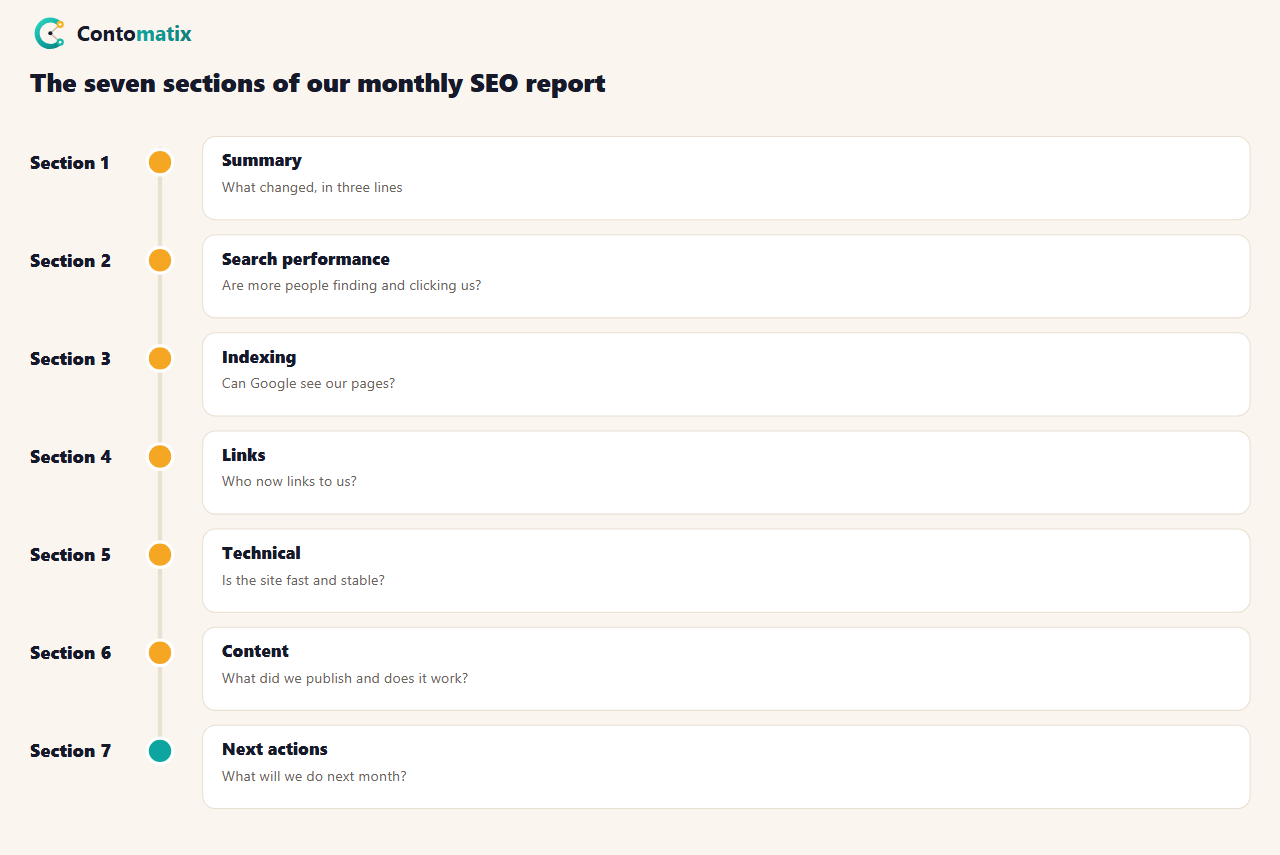
- Summary. Three lines: what changed, the biggest cause and the main action. Write it last, put it first.
- Search performance. Clicks, impressions, click rate and average position from Search Console, this month against last month.
- Indexing. How many pages are indexed and how many are not, and why.
- Links. New linking sites and where they point.
- Technical. Speed, layout stability and anything that broke.
- Content. What you published or updated, and how it performed.
- Next actions. Three to five tasks for next month, each tied to a number above.
A client report adds goals and conversions from analytics. An internal report can be shorter. Keep to one or two pages: a report nobody finishes reading changes nothing.
Where the Numbers Come From: What Google's Definitions Say
Most of section two comes from the Performance report in Search Console, so know what its terms mean. Google's Performance report help page defines clicks as the number of times a user clicked your site from Google Search results, impressions as how many times your site appeared in Search results, CTR as the click count divided by the impression count and average position as the average position of the topmost result from your site. That last definition matters: if two of your pages appear on one results page, only the higher one counts, and a page that appears at position 90 for many rare searches pulls the average down without telling you anything about your best pages. Read position as a trend, not a score.
Monthly SEO Report Example: Our Own August to October
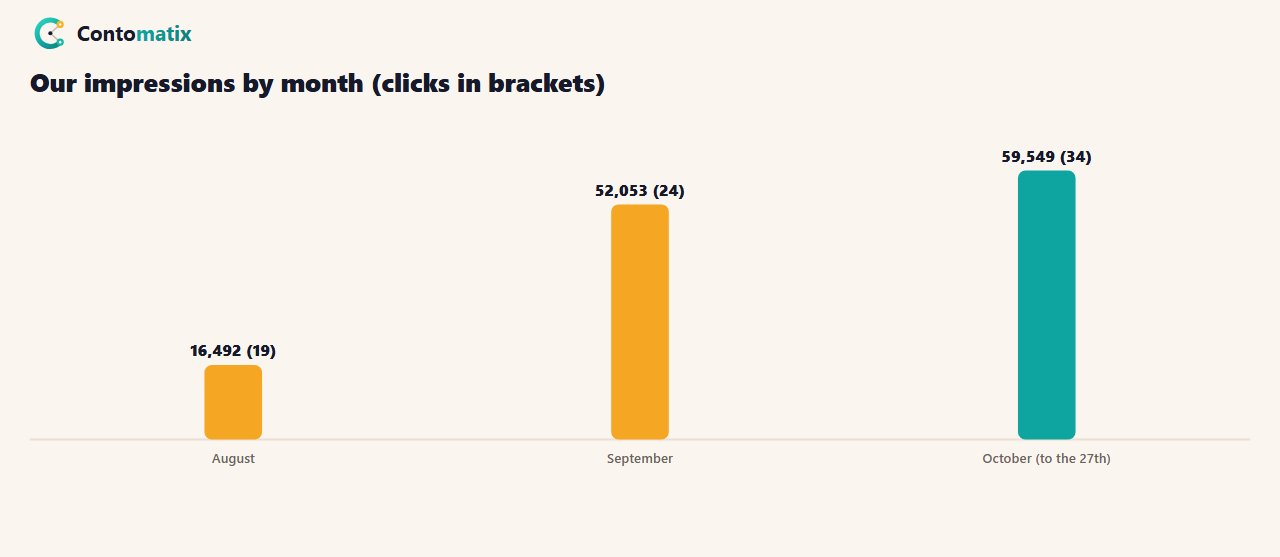
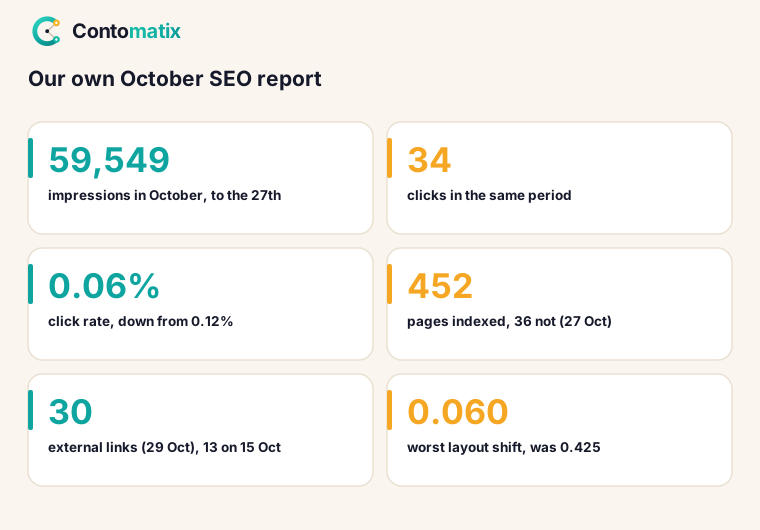
This is section two of our own report, built from the daily chart of the Search Console export of 28 October 2026, added up by month. October runs to the 27th.
- Impressions: 16,492 in August, 52,053 in September and 59,549 in October.
- Clicks: 19, 24 and 34.
- Click rate: 0.12%, 0.05% and 0.06%.
- Average position (our weighted calculation from the daily chart, which can differ from Search Console's own figure): 64.6, 34.5 and 49.5.
The other sections, on 27 to 29 October 2026: indexing, 452 pages indexed and 36 not, each with a reason in the Page indexing report. Links, 13 external links on 15 October and 30 on 29 October. Technical, the worst layout shift on a blog post fell from 0.425 to 0.060 after we fixed one wrong image size, which we describe in our Core Web Vitals guide. Content, 84 posts dated October 2026 and 41 free tools on the site.
What the Numbers Hid: Reading the Report
A summary of those figures would say "impressions are up 261%". That is true and nearly useless. Impressions went from 16,492 to 59,549, a rise of about 3.6 times, while clicks went from 19 to 34, a rise of about 1.8 times, and the click rate fell from 0.12% to 0.06%. Our pages were being shown far more often, mostly at positions far down the results where almost no one clicks. The decision that followed was not "publish more", it was "build links and fix the pages already close to page one", which is why we changed our plan in late October. A report that only said impressions rose would have led to the opposite decision.
This is the test of any monthly report: after reading it, can someone say what to do differently next month?
Monthly SEO Report Template: The Fields to Copy
| Field | This month | Last month | Change | What it means |
|---|---|---|---|---|
| Clicks | ||||
| Impressions | ||||
| Click rate | ||||
| Pages on page one | ||||
| Pages indexed | ||||
| External links | ||||
| Worst layout shift | ||||
| Pages published |
The last column is the one most templates leave out. Fill it in with one short sentence per row. 4 of 7 guides offer a template and 2 offer a PDF; a simple table like this one does the job in a spreadsheet.
SEO Monthly Report Generator, Dashboards and Tools
5 of 7 guides mention a dashboard or reporting tool. Tools save time on collecting numbers, and they cannot write the "what it means" column for you. Connect Search Console and analytics to a dashboard if you report to many clients, or use our free SEO report generator to turn your numbers into a formatted report in the browser. Whatever you use, check the first report by hand against Search Console so you know the figures match.
Client Report or Internal Report?
- Client report: start with the summary, use plain language, show business results (leads, sales) next to search numbers and end with next actions. 7 of 7 guides cover conversions or leads.
- Internal report: keep it short and technical, list every issue found and who owns the fix.
- Agency report: add the work done last month, so clients see effort and results together.
Common Monthly SEO Report Mistakes
- Reporting only the good numbers. A flat or falling number with an explanation builds more trust than a hidden one.
- Using rankings as the headline. Position is an average and moves with how many rare searches you appear for.
- Comparing partial months. Compare like with like, such as the same number of days.
- No next actions. A report without actions is a log, not a report.
- Too many pages. If it takes more than ten minutes to read, shorten it.
How to Write the Summary and Next Actions
The summary is three sentences: what changed, the likely reason and the one decision. Here is the summary for our own numbers, written the way we would send it: "Impressions rose from 16,492 in August to 59,549 in October, but clicks rose only from 19 to 34. Most impressions sit far down the results, so more posts will not help. Next month we focus on links to our best pages and on pages already near page one." Then list three to five actions, each starting with a verb and naming the page or number it touches, such as "Add internal links to the five pages at position 8 to 20" or "Fix the one layout shift above 0.1". If an action cannot be tied to a number in the report, it probably does not belong there.
How We Built This Report in Search Console
- Open the Performance report for the Search results and set the date range to the last 3 months.
- Click Export and download the CSV. The file includes a daily chart, pages and queries.
- Add the daily chart up by month in a spreadsheet: clicks and impressions are sums, and the click rate is clicks divided by impressions.
- Open the Page indexing report for the indexed and not-indexed counts, and the Links report for the external link total.
- Paste each number into the template next to last month's, and write the "what it means" sentence.
The whole job takes about thirty minutes once the sheet exists. Our guide to Search Console impressions explains why a number such as impressions can rise without more visitors, and our guide to setting up Search Console covers getting the data in the first place.
Month on Month or Year on Year?
Compare with last month to see what your actions did, and with the same month last year to separate your work from the season. A site with less than a year of data cannot do the second, so say so in the report instead of guessing. Whichever you use, compare the same number of days: our October figures run to the 27th, so we compare them to rates and ratios, not to a full month's total.
Metrics to Leave Out of the Report
- Total keywords tracked. It rises when you track more, whether or not you gained anything.
- Third-party authority scores. They are estimates from tools, not numbers Google gives you.
- Impressions on their own. As our own months show, they can climb while clicks barely move.
- Every query. Show the ten that matter and link to the rest.
Weekly Checks Between Reports
A monthly report is for decisions, not for watching. Between reports, look at Search Console once a week for new errors, a sudden fall in clicks or a drop in indexed pages. If something looks wrong, fix it then; do not wait for the report. Keep a simple log of what you changed and on which date, so next month's report can connect each change to a result instead of guessing.
What to Do When the Numbers Fall
A drop is not a failure of the report, it is the reason for it. Check three things in order. First, whether the drop is real: compare the same number of days and look at the daily chart for one bad day. Second, whether it is limited to one page or one group of searches, which points to a change on those pages. Third, whether something broke, such as pages dropping out of the index or a redirect rule. Write what you found, even if the answer is "we do not know yet", and say when you will look again.
Monthly SEO Report Format for a Local Business
A local business can keep the same seven sections and swap in local numbers: calls, direction requests and reviews from the Google Business Profile in place of some link metrics. Our guide to local SEO reporting covers those blocks in detail, so use this page for the general structure and that one for the local extras.
A Checklist Before You Send the Report
- Every number comes from the same date range as last month's, or the difference is stated.
- The summary is three sentences and says what to do.
- Each next action names a page or a number.
- Anything that fell has a sentence of explanation.
- The report is short enough to read in ten minutes.
Add a line for manual actions and security issues, as explained in what is a Google penalty.
Key Takeaways
- A monthly SEO report shows what changed, why and what to do next, in seven short sections.
- All 7 ranking guides cover traffic, rankings and conversions, but only 5 include next steps and none quotes Google.
- Our own impressions rose about 3.6 times from August to October while clicks rose about 1.8 times, so the report pointed to links and pages near page one, not more posts.
- Read average position as a trend, because Google counts only the topmost result per search.
- Always fill in the "what it means" column.
Frequently Asked Questions
What is a monthly SEO report?
A short document that shows what changed in a site's search performance over the month, why, and what to do next.
What should a monthly SEO report include?
A summary, search performance, indexing, links, technical health, content and next actions.
How long should a monthly SEO report be?
One or two pages. If it takes more than about ten minutes to read, shorten it.
Where do I get the numbers?
Mostly from Search Console, plus analytics for conversions and a links report for backlinks.
What does average position mean in Search Console?
Google defines it as the average position of the topmost result from your site, so it is a trend measure, not a rank for one page.
Do I need a monthly SEO report template or PDF?
No. A simple table in a spreadsheet works. Add a column that explains what each number means.
Can I generate a monthly SEO report automatically?
You can collect the numbers automatically with a dashboard or our report generator, but someone should still write the explanation.
How is a client report different from an internal one?
A client report is shorter and starts with the summary and business results. An internal report lists every issue and its owner.
Why did your impressions rise but clicks barely move?
Our pages were shown more often, mostly at positions far down the results, where few people click. We responded by working on links and on pages near page one.