Last updated: October 2026
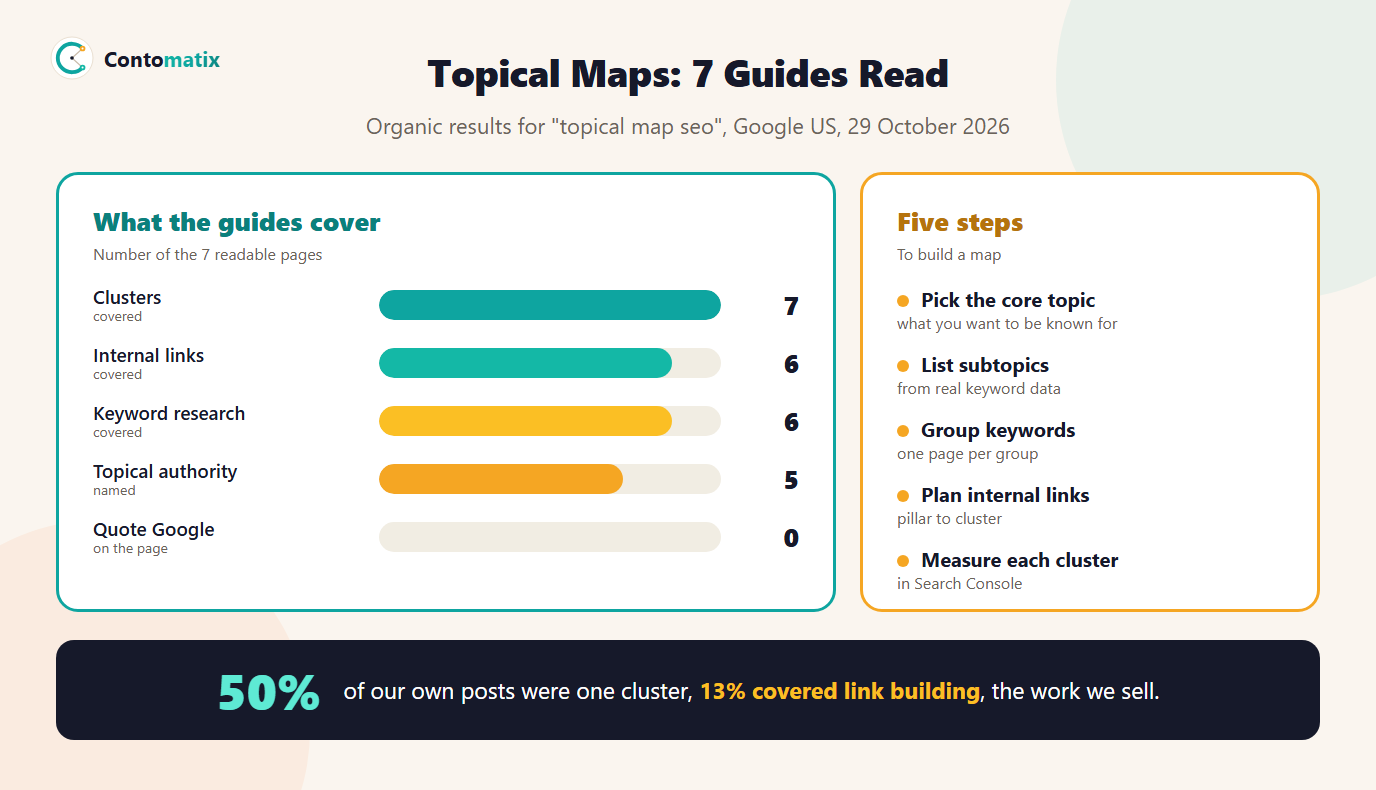
A topical map is a plan that lists every page a site needs to cover one subject properly, grouped into a main page and supporting pages, with the links between them. We read 7 pages that rank for topical map SEO on 29 October 2026. All 7 explain clusters and 6 cover internal links, but 7 of 7 are selling a service or a tool and none of them quote Google. Five of them talk about topical authority, so it is worth being precise about what is and is not known.
This guide explains what a topical map is, what Google says (and does not say), five steps to build one with a real example, and what happened when we sorted our own 353 posts into clusters and checked each against Search Console. The result changed how we plan content. To group your keyword list quickly, use our free keyword grouping tool.
What Is a Topical Map in SEO?
A topical map, sometimes called a topical content map or SEO topical map, has three parts. A core topic: the subject you want the site to be known for. Subtopics: the questions, services, tools and comparisons readers raise about it. And structure: which subtopics become pages, which one page is the main "pillar" and how the pages link to each other. Think of it as the table of contents of a book you have not written yet. 3 of 7 guides use the word pillar and all 7 use cluster.
Topical Map SEO: What 7 Ranking Pages Say
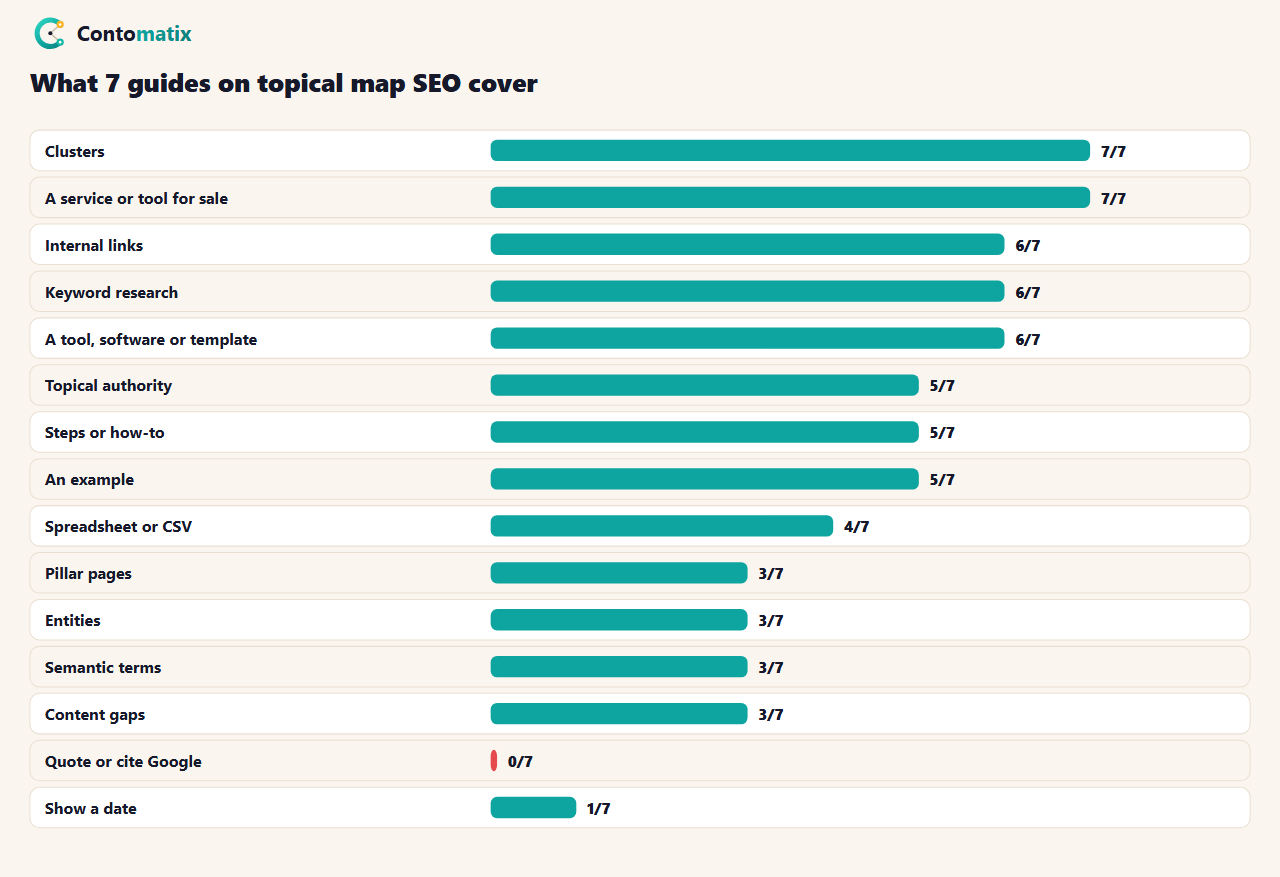
The median guide has about 1,766 words. 6 of 7 mention a tool, software or template, 4 mention a spreadsheet or CSV and 5 give an example. Only 1 show a date. The notable gap is evidence: 0 of 7 cite a Google statement. That does not mean the idea is wrong, but it means the advice is mostly method, not documentation.
Topical Authority Map: What Google Says and Does Not Say
5 of 7 guides use the phrase topical authority, so we checked Google's own pages. We read Google's guide to creating helpful content and its spam policies on 29 October 2026. Neither uses the word topical. The helpful content guide does ask "expertise questions", such as whether content shows clear sourcing, evidence of expertise and background about the author or the site. So the honest summary is this: Google does not document a "topical authority" score, but it does ask whether a site shows real expertise. A map is a way to show that expertise by covering a subject completely and consistently. Treat it as a planning method, not a ranking switch.
How to Create a Topical Map: Five Steps
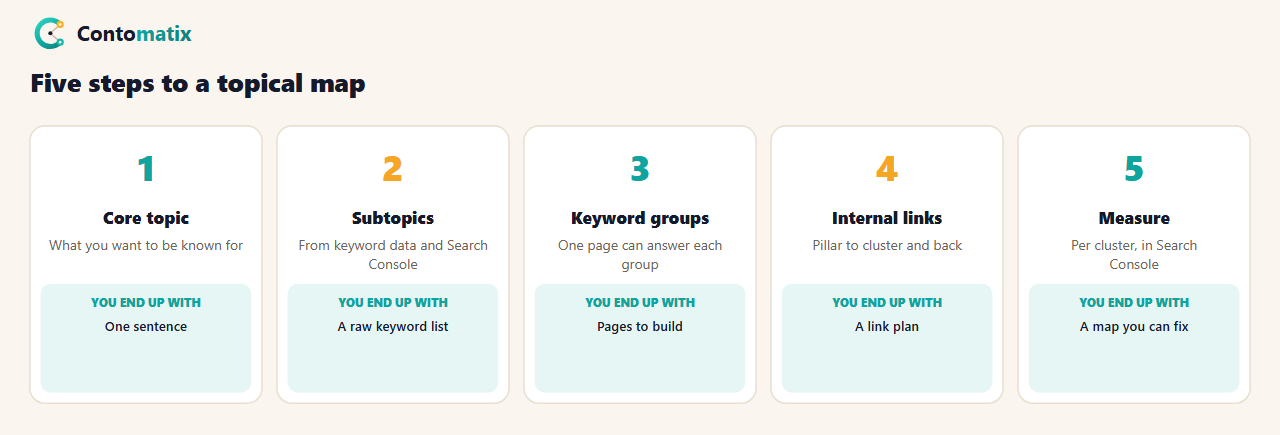
- Pick the core topic. Choose what you want to be known for, which is not always what you have written most about. Ours is link building and technical SEO.
- List subtopics from keyword data. Pull related terms from a keyword tool, People Also Ask and your own Search Console queries. Keep only terms you can answer well.
- Group keywords into pages. Keywords that one page can answer belong together. Paste the list into the keyword grouping tool, then check the primary keyword of each group in Google before you commit.
- Plan internal links. The pillar links to every cluster page, and each cluster page links back and to its closest sibling.
- Measure each cluster. Check impressions, clicks and average position per cluster in Search Console, not per page.
How to Complete a Topical Map SEO: A Worked Example
Here is a real map we built on 29 October 2026 for the topic "blogger outreach". We pulled every related term with a keyword difficulty of 15 or less and a US volume of 30 or more from the Ahrefs mirror we use, then grouped them by hand, in the way our grouping tool does by shared words. The result is one pillar and five clusters, 20 keywords and 3,120 combined monthly searches.
| Group | Keywords | Combined volume |
|---|---|---|
| Pillar: blogger outreach | 1 | 800 |
| Services | 3 | 700 |
| Software and tools | 5 | 500 |
| Campaigns and strategy | 6 | 540 |
| Email and templates | 2 | 220 |
| Link building angle | 3 | 360 |
| Total | 20 | 3,120 |
Each cluster becomes a page or section. The pillar page, "blogger outreach", covers the whole subject and links to the five clusters. The "Services" group has the most volume (700), led by "blogger outreach agency", which is a commercial query and may deserve its own page. "Email and templates" is small (220) but links naturally to our outreach email generator. That is the other benefit of a map: it shows where a tool or a data point fits.
Two checks before building from a map like this. First, search the primary keyword of each cluster and read the top results: if the same pages rank for two clusters, merge them into one page. Second, count the effort honestly. Five clusters plus a pillar is six strong pages, and it is better to publish those six well than twenty thin ones. The "Campaigns and strategy" cluster, for example, has six keywords, but they are close enough that one long page with six headings is likely to serve all of them.
Topical Content Map: How to Plan Internal Links
- Pillar to cluster: link from the pillar to each cluster page with descriptive anchor text.
- Cluster to pillar: every cluster page links back to the pillar, so the group is connected both ways.
- Sibling links: link between clusters only where it helps a reader, such as templates to software.
- Do not link everything to everything. A page with a hundred links gives readers no path.
Internal links are also how crawlers find pages. Google's Search Console showed 10,704 internal links on our site on 29 October 2026, which is plenty. The problem we found was not the number of links, it was what they pointed at.
Our Own Topical Map: 353 Posts Sorted Into Clusters
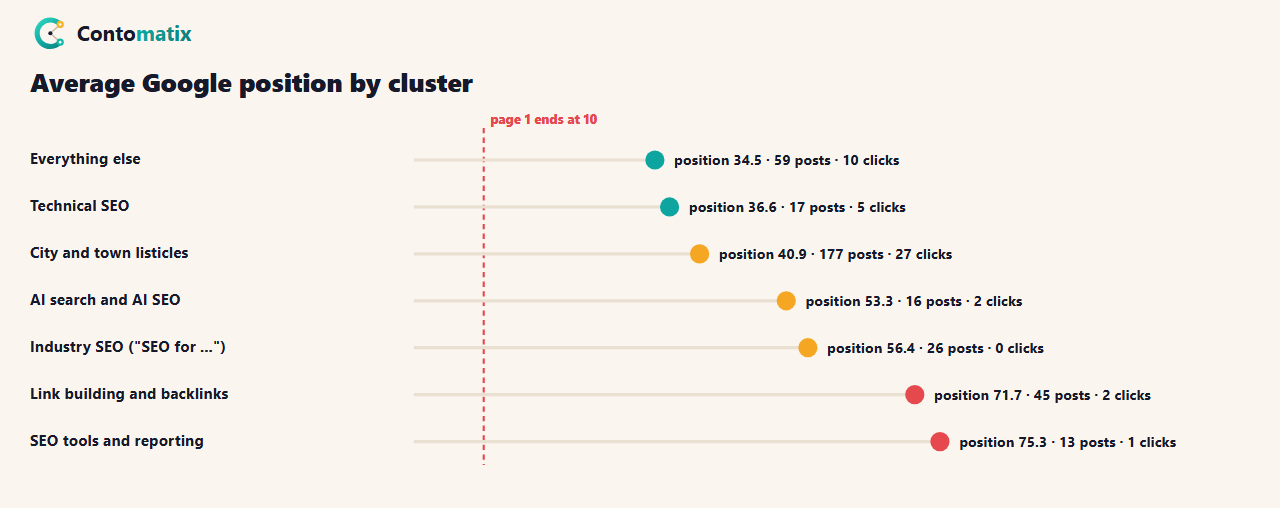
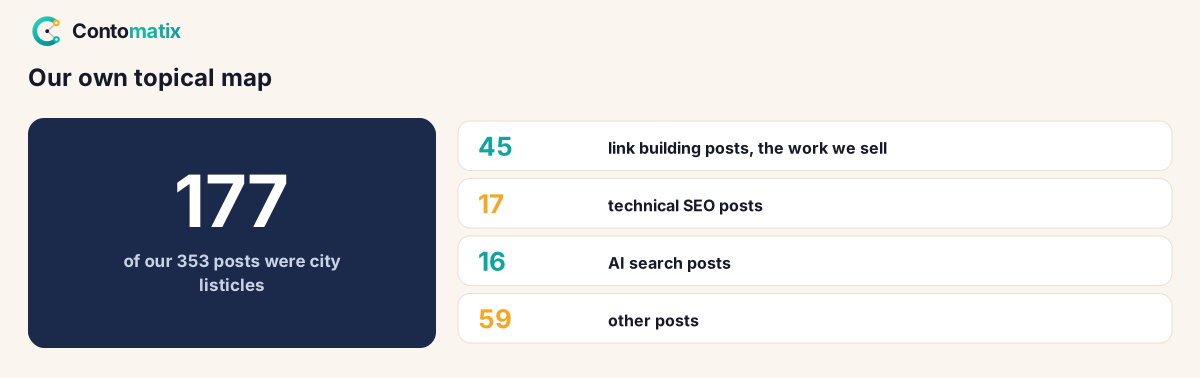
We sorted all 353 posts in our blog data into seven clusters using rules on the slug (for example, "link" or "backlink" for link building) and joined each to its 3-month Search Console numbers. The sorting is rough and some posts could sit in two clusters, but the shape is clear.
- City and town listicles: 177 posts, 50% of everything, with 96,536 impressions (80% of the 121,374 the blog earned), 27 clicks and an average position of 40.9.
- Link building and backlinks: 45 posts (13%), 8,431 impressions, 2 clicks, average position 71.7. This is the work we sell.
- Technical SEO: 17 posts, 5 clicks, average position 36.6.
- AI search and AI SEO: 16 posts, average position 53.3.
- Industry SEO ("SEO for ..."): 26 posts, 0 clicks, average position 56.4.
- SEO tools and reporting: 13 posts, average position 75.3.
What Our Topical Map Taught Us
The map was lopsided. Half our posts sat in one cluster, and it was not the one we sell. A reader or a search engine looking at the site would have concluded we are a directory of local agency lists. Only 13% of posts covered link building.
Volume did not mean value. The largest cluster earned 80% of impressions but a tiny share of clicks, so a cluster can look healthy in impressions and still deliver almost nothing.
The core clusters were new and thin. Technical SEO had 17 posts and AI search had 16. We have since stopped writing new city listicles and moved to the clusters we want to be known for. Our Core Web Vitals, site migration and JavaScript SEO guides are part of that technical cluster.
SEO Topical Map Tools and Templates
- A spreadsheet. 4 of 7 guides use one. Columns: keyword, volume, group, page URL, status.
- Keyword grouping. Our keyword grouping tool sorts a list by shared words and exports CSV.
- Keyword mapping. The keyword mapping tool matches groups to existing URLs and flags gaps.
- Briefs. Turn each page into a plan with the content brief generator.
SEO Topical Map Template: The Columns to Track
A topical map does not need special software. This is the sheet we use, with one row for each keyword group, not each keyword:
| Column | What goes in it | Example |
|---|---|---|
| Cluster | The subtopic the page belongs to | Software and tools |
| Primary keyword | The one keyword the page targets | blogger outreach software |
| Supporting keywords | Terms for headings and FAQs | platform, best tools |
| Combined volume | Added up across the group | 500 |
| Intent | Informational, commercial or transactional | Commercial |
| URL and status | Existing page, planned or gap | Gap |
| Links to and from | Pillar and nearest sibling | Pillar, email templates |
The "URL and status" column is the most useful: filter it for gaps and you have a publishing plan, filter it for existing pages and you can see where two pages may be fighting for one keyword. For finding and checking the keywords themselves, our guide to long-tail low-competition keywords explains the method, and our content brief template turns each row into a writing plan.
Topical Map vs Keyword Map vs Content Calendar
- Keyword map: matches keywords to URLs, usually pages that already exist. It answers "which page owns this keyword?"
- Topical map: plans the whole subject, including pages that do not exist yet. It answers "what should this site cover, and how does it fit together?"
- Content calendar: puts the planned pages in order and on dates. It answers "what do we publish next?"
You need all three, in that order of thinking: the topical map decides what exists, the keyword map stops two pages sharing a keyword and the calendar schedules the work.
How to Check Your Own Clusters in Search Console
- Open the Performance report and set the date range to the last 3 months.
- Add a Page filter and choose "URL matches regex". Enter a pattern that matches one cluster, such as link-building|backlink.
- Note the clicks, impressions and average position, then change the pattern for the next cluster.
- Put the results in your sheet next to the post counts. A cluster with many posts and a poor average position needs better pages, not more of them.
This is the same check we ran on 353 posts, done by hand for a smaller site. Our guide to Search Console impressions explains what the numbers mean before you act on them.
When a Topical Map Is Not Worth It
A site with ten pages on one service does not need a formal map: a list of the questions customers ask is enough. A map pays off when a site publishes regularly on a wide subject and has started to lose track of what it covers. It also pays off after a pivot, as ours did, because it shows how far the content has drifted from the business. If you can describe your site's core topic in one sentence and most of your pages fit under it, you are already close to a good map.
Common Topical Map Mistakes
- Mapping what you have, not what you want. Start with the topic you sell.
- Too many near-duplicate pages. Several pages for one keyword group compete with each other. Check cannibalization before you build.
- Clusters with no pillar. Supporting pages with nothing to support.
- Skipping measurement. If you do not check clusters in Search Console, you will not notice a lopsided map. See our guide to setting up Search Console.
- Treating "topical authority" as a promise. Google does not document it.
Key Takeaways
- A topical map is a plan of pages grouped around a core topic, with a pillar and cluster pages linked together.
- Google's helpful content guide and spam policies do not use the word topical, though the former asks about expertise.
- Build one in five steps: core topic, subtopics, keyword groups, internal links, measurement.
- Our own map was lopsided: 50% of 353 posts in one cluster, 13% on the work we sell.
- Measure by cluster, not by page, and check the shape of the whole map regularly.
Frequently Asked Questions
What is a topical map?
A plan of the pages a site needs to cover a subject, grouped into a main page and supporting pages, with the links between them.
What is a topical map in SEO used for?
It helps you decide what to publish, avoid duplicate pages, plan internal links and spot gaps in coverage.
What is topical authority?
A term SEO writers use for how completely a site covers a subject. Google does not document it as a ranking score, though it asks whether content shows expertise.
How do I create a topical map?
Pick a core topic, list subtopics from keyword data, group keywords into pages, plan internal links and measure each cluster.
How many pages does a topical map need?
It depends on the subject. Our blogger outreach example has one pillar and five clusters, with 19 supporting keywords.
Do I need a tool to build a topical map?
No. A spreadsheet is enough. A keyword grouping tool speeds up step three.
What is the difference between a pillar page and a cluster page?
A pillar covers the whole subject and links to each cluster. A cluster page goes deep on one subtopic and links back to the pillar.
Can a topical map hurt my site?
A badly planned one can, by creating near-duplicate pages that compete with each other. Check each new page against existing ones first.
How do I measure a topical map?
Group your pages by cluster and compare impressions, clicks and average position per cluster in Search Console.


