Last updated: October 2026
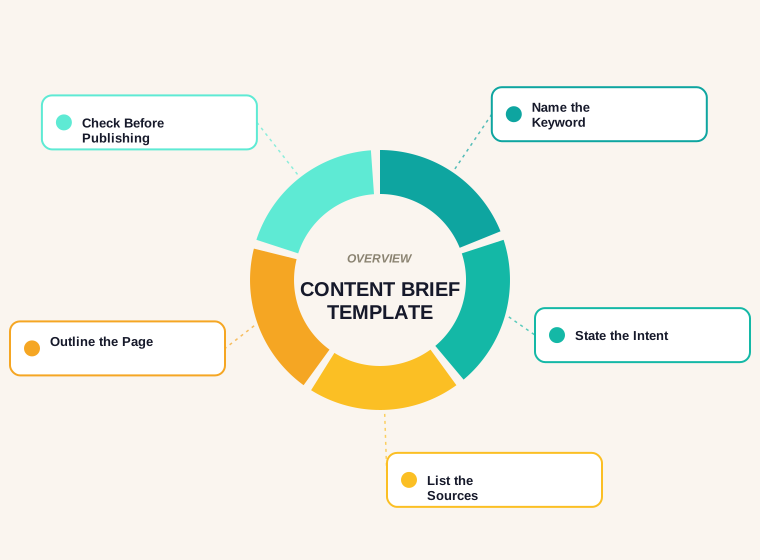
A content brief is a short document that tells a writer what a page must achieve and contain: the keyword, the reader's intent, the outline, the sources and the rules. We read 5 pages that rank for "content brief template" on 27 October 2026. All 5 list an audience, goal, target keyword, outline and sources, but 4 of 5 mention length, 0 link to Google's documentation and only 2 show a date. To give you a benchmark the templates do not, we also analysed 218 ranking pages from our own SERP reads in October 2026: the median is 2,421 words, and 72 of them run past 3,000.
This guide gives you the 12 fields we fill in before we write any post, a worked example from our own work, what the data says about length and dates, and advice on blog briefs, AI and tools. To turn the fields into a document in a minute, use our free content brief generator.
What Is a Content Brief? (Content Brief Meaning)
The content brief meaning is simple: it is the plan that sits between keyword research and a draft. Without one, a writer guesses the angle, the length and what to cover, and an editor finds the problems after the work is done. A good brief fixes those choices first. It is not a draft, and it is not a list of keywords to stuff in. It is a set of decisions: who the page is for, what question it answers, what evidence it will use and what a reviewer will check.
Content Brief Template: The 12 Fields We Use
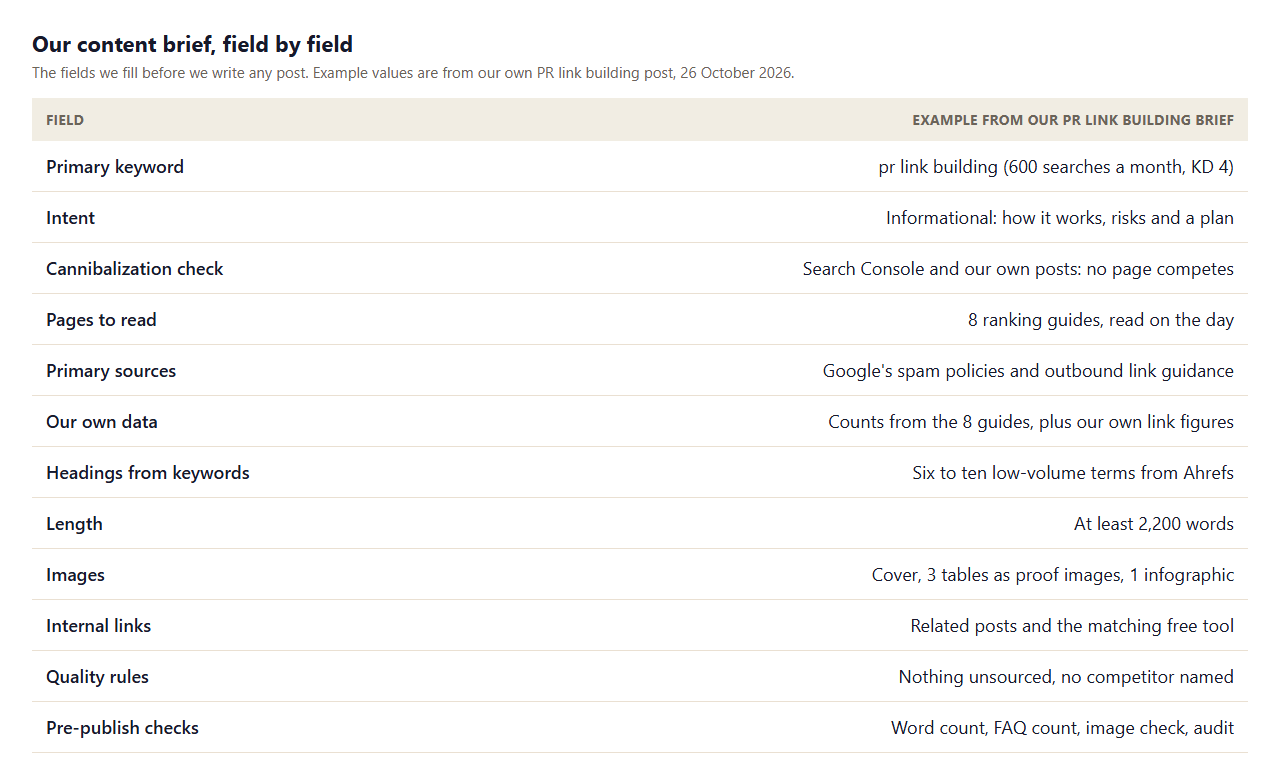
- Primary keyword. One per page, with volume and difficulty so you know what you are targeting.
- Intent. What the searcher wants: to learn, compare, buy or find a page. It decides the format.
- Cannibalization check. Confirm that no other page on your site targets the same keyword. In Search Console, filter queries by the main word and see which pages appear.
- Pages to read. The results that already rank. Read them on the day, note what they cover and what they skip.
- Primary sources. The documents that settle facts, such as the search engine's own documentation.
- Your own data. Something only you can add: a measurement, a count, a screenshot, a test.
- Headings from keywords. Six to ten related low-volume terms that become the H2s and FAQ questions.
- Length. A target based on what ranks, not a guess.
- Images. What visuals the page needs, with alt text.
- Internal links. Related pages to link to, and which pages should link back.
- Quality rules. Nothing unsourced, dates stated, no claims you cannot back.
- Pre-publish checks. The checks a reviewer will run.
SEO Content Brief: What 218 Ranking Pages Show
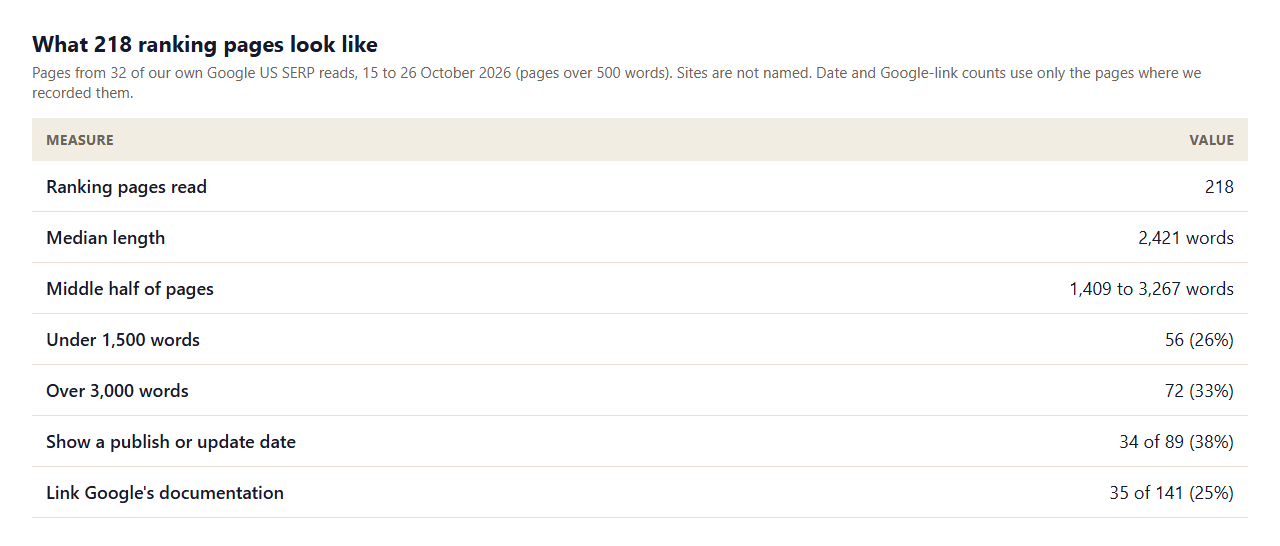
Most briefs set a word count by habit. We set ours from data. Across 32 searches we read 218 ranking pages. The median is 2,421 words and the middle half run from 1,409 to 3,267. 56 pages (26%) are under 1,500 words and 72 (33%) are over 3,000, so length varies a lot by topic. Use the SERP for your keyword, not an average, but it is a useful reminder that a thin page can rank and a long one is not a requirement.
Two other numbers matter for a brief. Of the 89 pages where we recorded it, only 34 (38%) showed a publish or update date. And of 141 pages, only 35 (25%) linked to Google's own documentation. Both are easy wins: put "state the date" and "link the primary source" in the brief, and your page will do something most of the pages it competes with do not.
Content Brief Template Pages: What 5 Cover
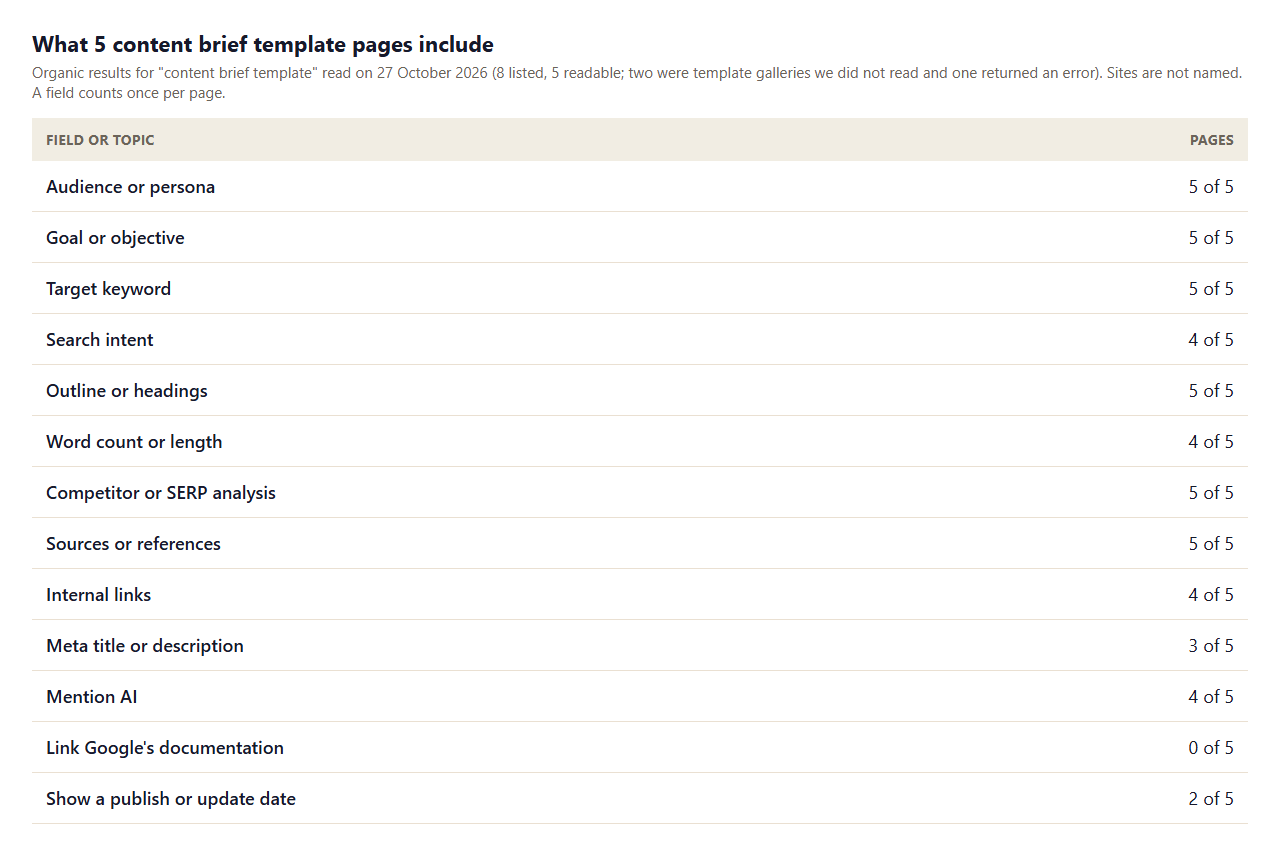
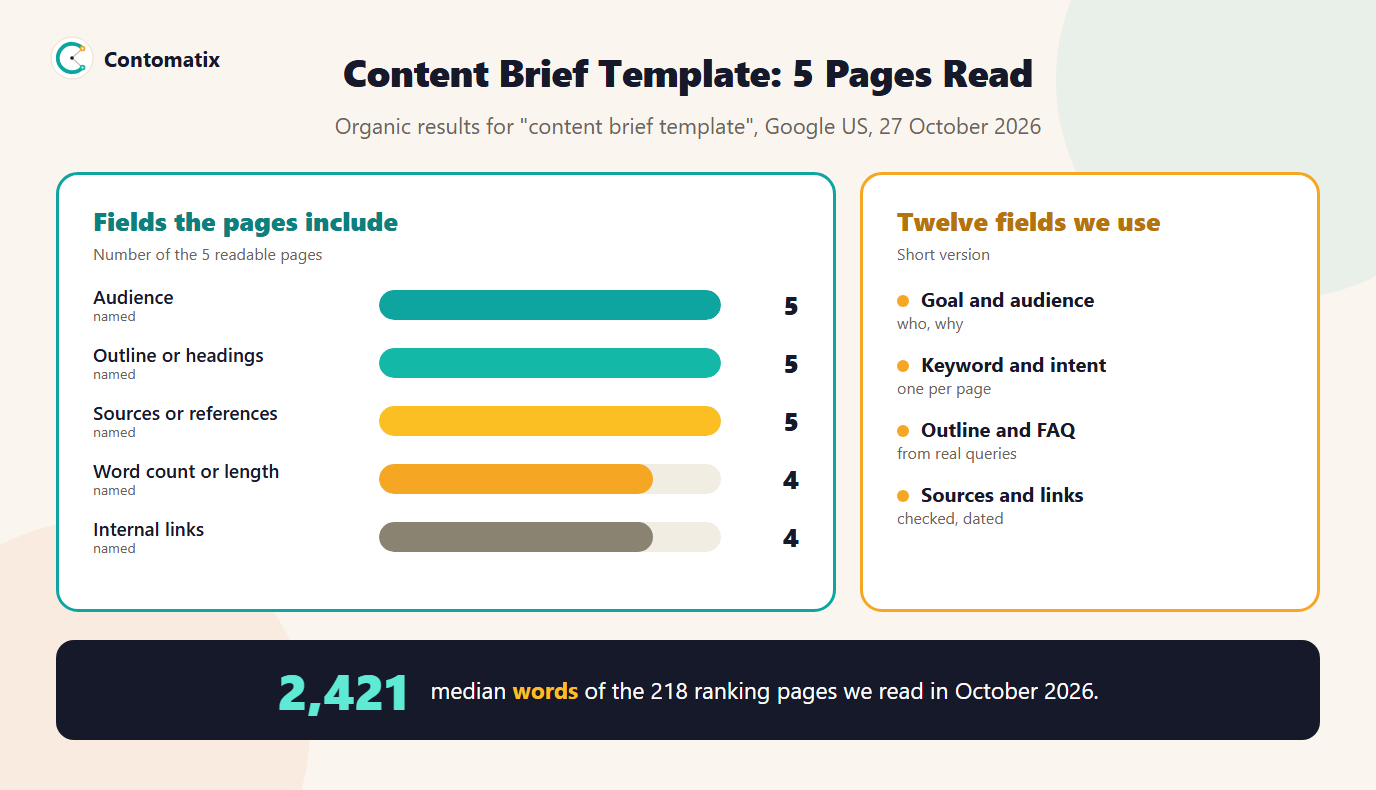
The 5 readable pages agree on the core fields. Audience, goal, keyword, outline, competitor analysis and sources appear in all 5. 4 cover intent, 4 word count, 4 internal links, 4 questions or an FAQ, and 3 a meta title or description. 4 mention AI, 5 name tools and 5 mention a deadline or timeline. They run a median of 3,064 words. What is missing is evidence: none link Google's documentation, and only 2 show a date. A template is only as good as the research that fills it.
How to Write a Content Brief, Step by Step
- Pick one keyword and check that nothing on your site already targets it.
- Read the results. Open the top pages. Note the headings, the length, the examples, the sources and what is missing.
- Find your angle. What can you add that is true and checkable: a count, a test, a first-hand step?
- List sources. Primary sources first, such as Google's documentation for anything about Google.
- Pull related keywords and map six to ten of them to headings and questions. Our guide to long-tail low-competition keywords explains how.
- Write the outline and the FAQ questions as readers would ask them.
- Set the rules: length, tone, images, links, what to avoid.
- Add the checks a reviewer will run before publishing.
SEO Content Brief Example: Our PR Link Building Brief
Here is the shape of a real brief, using the one for our PR link building post. The keyword was "pr link building" at 600 searches a month and KD 4. The intent was informational. We checked Search Console and found no page on our site competing for it. We read the 8 pages that ranked, and the primary sources were Google's spam policies and its guidance on qualifying outbound links. The data we added was a count of what the 8 guides covered and skipped. Headings came from related low-volume terms, the length target was 2,200 words or more, and the pre-publish checks covered word count, FAQs, images and our site audit. Written down, it takes one page.
Blog Content Brief vs Website Content Brief Template
- Blog content brief. Focuses on one question and one keyword, an outline of H2s, sources, and internal links to related posts. Length follows the results.
- Website content brief template. For service, product and landing pages. Add the offer, the proof (reviews, results), the call to action and any legal or compliance notes. Length is usually shorter, and conversion matters as much as ranking.
- Content strategy brief. One level up: the topics, audiences and goals across many pages, which then become individual briefs.
All three share the same discipline: one clear purpose per page, and evidence for claims. If you run a content programme, keep one master brief template and change the fields that differ.
AI Content Brief: What to Automate and What Not To
4 of the 5 pages mention AI. It can help with routine parts of a brief: collecting the headings of ranking pages, grouping keywords, drafting a first outline. Do not hand it the parts that need judgement and checking: which angle is true, which sources are authoritative, what your own data shows. Google's guidance on generative AI content says AI can be useful for research and structure, and that using it to produce many pages without adding value for users may violate its spam policy on scaled content abuse, so a brief should require human fact-checking of anything the tool produces. Our AI SEO tools for small business guide covers what such tools cost and limit.
Content Creation Brief: Who Fills Each Field
- Strategist or editor: keyword, intent, cannibalization check, internal links.
- Researcher or writer: pages to read, sources, your own data.
- Writer: outline and headings, within the rules.
- Reviewer: pre-publish checks.
On a small team one person does all four, but separating the roles in the brief makes it clear what has to be done before drafting can begin.
Content Brief Software and Tools
5 of 5 pages name tools, from document templates to dedicated platforms. You can do everything above in a document. If you want a faster start, our content brief generator builds the structure from your inputs, and the keyword mapping tool helps you give each keyword to one page. For measuring results after publishing, see Search Console impressions explained.
A Blank Brief You Can Copy
Paste this into a document and fill in each line. The free generator produces the same structure from your inputs.
Primary keyword:
Volume and difficulty:
Intent (learn, compare, buy, find):
Audience:
Goal of the page:
Pages already on our site for this keyword: (none / list)
Pages to read: (the top results)
Primary sources:
Our own data or test:
Headings from keywords (6 to 10):
FAQ questions (as readers ask them):
Target length and why:
Images and alt text:
Internal links in and out:
Rules (tone, claims, dates):
Pre-publish checks:
If you cannot fill in a line, that is a finding. "Our own data or test" left empty means the page will say what every other page says. "Pages already on our site" left unchecked means you may be about to compete with yourself.
How to Review a Draft Against the Brief
- Check the promise. Does the first paragraph answer the main question and state what the page adds?
- Check the headings. Is each one a topic or question from the brief, in a sensible order?
- Check every figure. Does each number have a source and a date, and does it match the source?
- Check the extras. Are the images, internal links and FAQ in place?
- Check for overlap. Search your own site for the main phrase and confirm no other page is aimed at it.
- Record the result. Note what went wrong and change the template so it does not happen again.
This review takes minutes if the brief is clear, and it is the main reason to write one. A brief is not a form to fill in for its own sake: it is the standard against which you judge the work. When the draft and the brief disagree, change whichever one is wrong, and note why, so the next brief is better than this one.
Common Content Brief Mistakes
- Skipping the cannibalization check. Two pages for one keyword compete with each other.
- Setting length by habit. Look at the results for your keyword.
- Briefing from keywords alone. Keywords do not tell a writer what is true or useful.
- No sources. 106 of 141 pages we checked did not link Google's documentation. Do not copy that.
- No date. Only 38% of the pages we checked showed one. Readers cannot tell if a page is current.
- Too long a brief. If it needs five pages, nobody reads it.
How We Read the Data
- Template page data comes from the organic results for "content brief template" on Google US, 27 October 2026. 8 were listed; 5 returned a readable page. A field counts once per page when its term appears in the text, so it shows presence, not quality.
- The benchmark uses 218 readable pages (over 500 words) from 32 of our own SERP reads between 15 and 26 October 2026, for topics on link building, technical SEO and SEO tools. It describes those searches, not the web. Date and Google-documentation counts use only the 89 and 141 pages where we recorded them.
- Our example brief is the one we used for our PR link building post on 26 October 2026.
Key Takeaways
- A content brief fixes the keyword, intent, sources and rules before drafting.
- Our 12 fields are listed above, and the free generator builds them into a document.
- Across 218 ranking pages the median is 2,421 words, but length varies by topic, so read your own SERP.
- Only 38% of pages show a date and 25% link Google's documentation: put both in your brief.
- Use AI for routine steps, and keep judgement and fact-checking human.
Frequently Asked Questions
What is a content brief?
It is a short document that tells a writer what a page must achieve and contain: the keyword, intent, audience, outline, sources and rules.
What goes in a content brief template?
At least the audience, goal, primary keyword, intent, outline, sources, length, internal links and pre-publish checks. We use 12 fields.
How long should a content brief be?
One or two pages. A brief nobody reads does not help the writer.
How do I write an SEO content brief?
Pick one keyword, check that no page of yours competes, read the results, list sources, map related keywords to headings and set the rules.
How long should the content be?
It depends on the topic. The median of 218 ranking pages we read was 2,421 words, and a quarter were under 1,500. Check the results for your keyword.
Can AI write a content brief?
It can help with routine parts such as collecting headings. A person should decide the angle and check sources and claims.
What is the difference between a blog brief and a website brief?
A blog brief centres on one question and keyword. A website brief adds the offer, proof and call to action for service or product pages.
Is there a free content brief generator?
Yes. Our content brief generator builds a structured brief in your browser from the inputs you enter.
How do I avoid two pages competing for one keyword?
Assign each keyword to one page. Our keyword mapping tool helps, and Search Console shows which pages appear for a query.