Last updated: October 2026
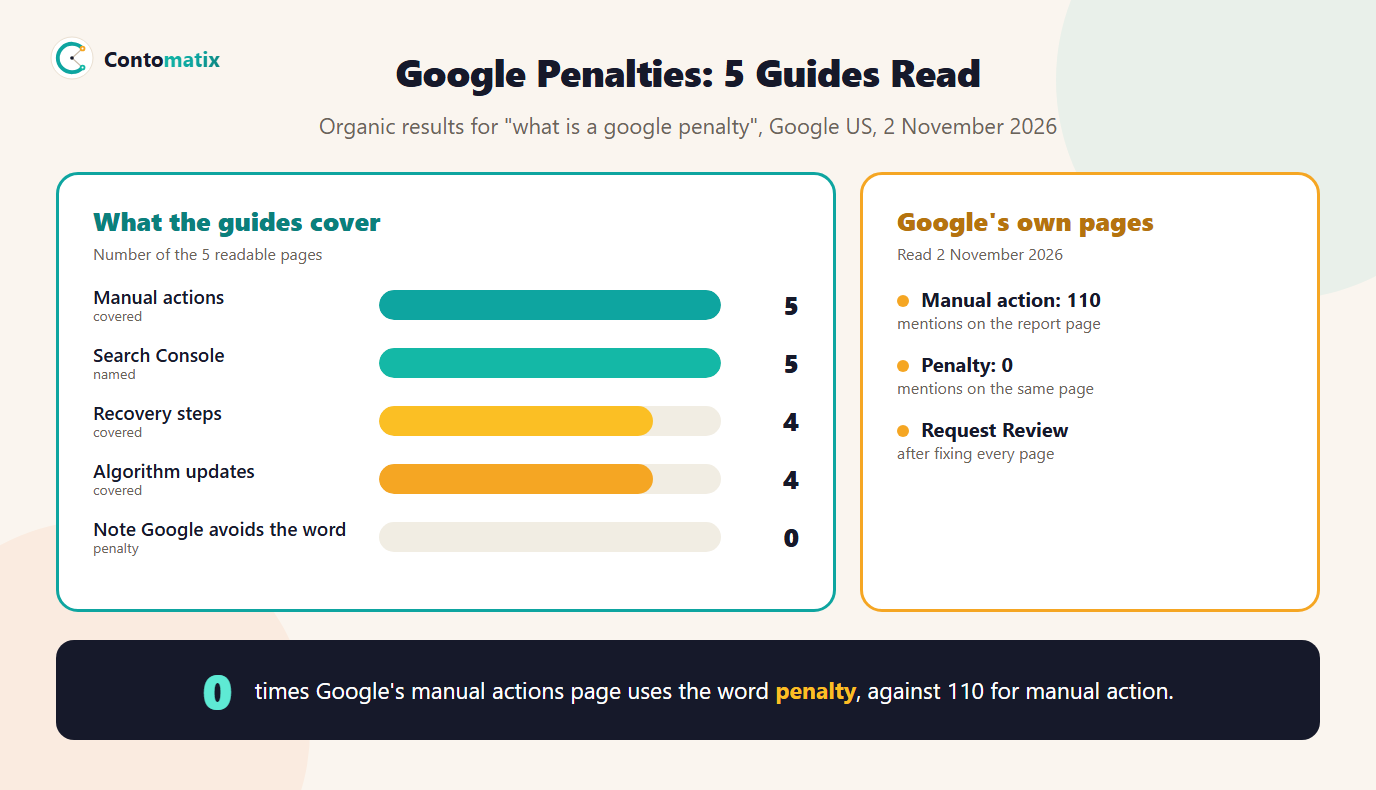
A Google penalty is the common name for a situation where Google has lowered a site's visibility or removed it from search results for breaking its rules. Google itself does not use that word much. Its manual actions help page mentions "manual action" 110 times and the word "penalty" not once, and its page on reconsideration requests does not use it either. We read 5 pages that rank for "what is a Google penalty" on 2 November 2026: all 5 explain manual actions and 4 cover recovery, but none points out that Google's own help pages avoid the word, and only 1 quotes Google.
This guide explains what Google says, how to check whether you have a manual action, why a drop in traffic is usually not a penalty, what Google's spam policies say can trigger action and how to recover. It uses our own Search Console as the example: we have no manual action, and we also have 87% of our impressions at position 21 or lower, which shows the difference.
What Is a Google Penalty? (What Google Calls It)
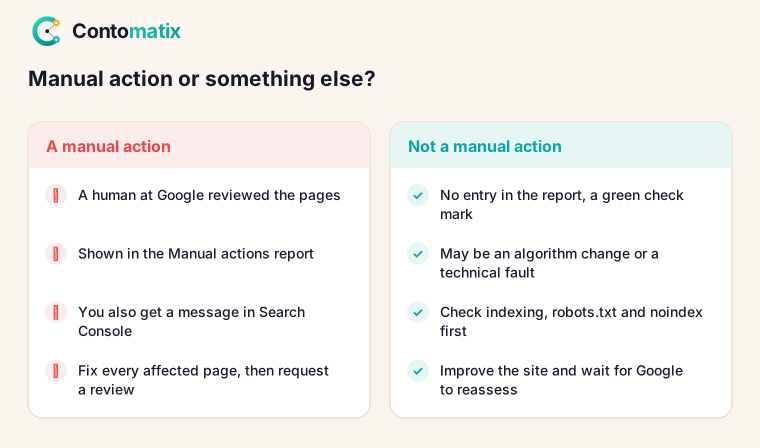
Two different things get called a "Google penalty". The first is a manual action: Google's page says it issues one when a human reviewer at Google has determined that pages on the site are not compliant with Google's spam policies. The second is an algorithmic change, where Google's automated systems rank a page lower. Google's spam policies page describes both in one sentence: it detects policy-violating practices "through automated systems and, as needed, human review that can result in a manual action", and sites that violate the policies "may rank lower in results or not appear in results at all". Only the first kind is shown to you in a report.
What 5 Ranking Guides Say About Google Penalties
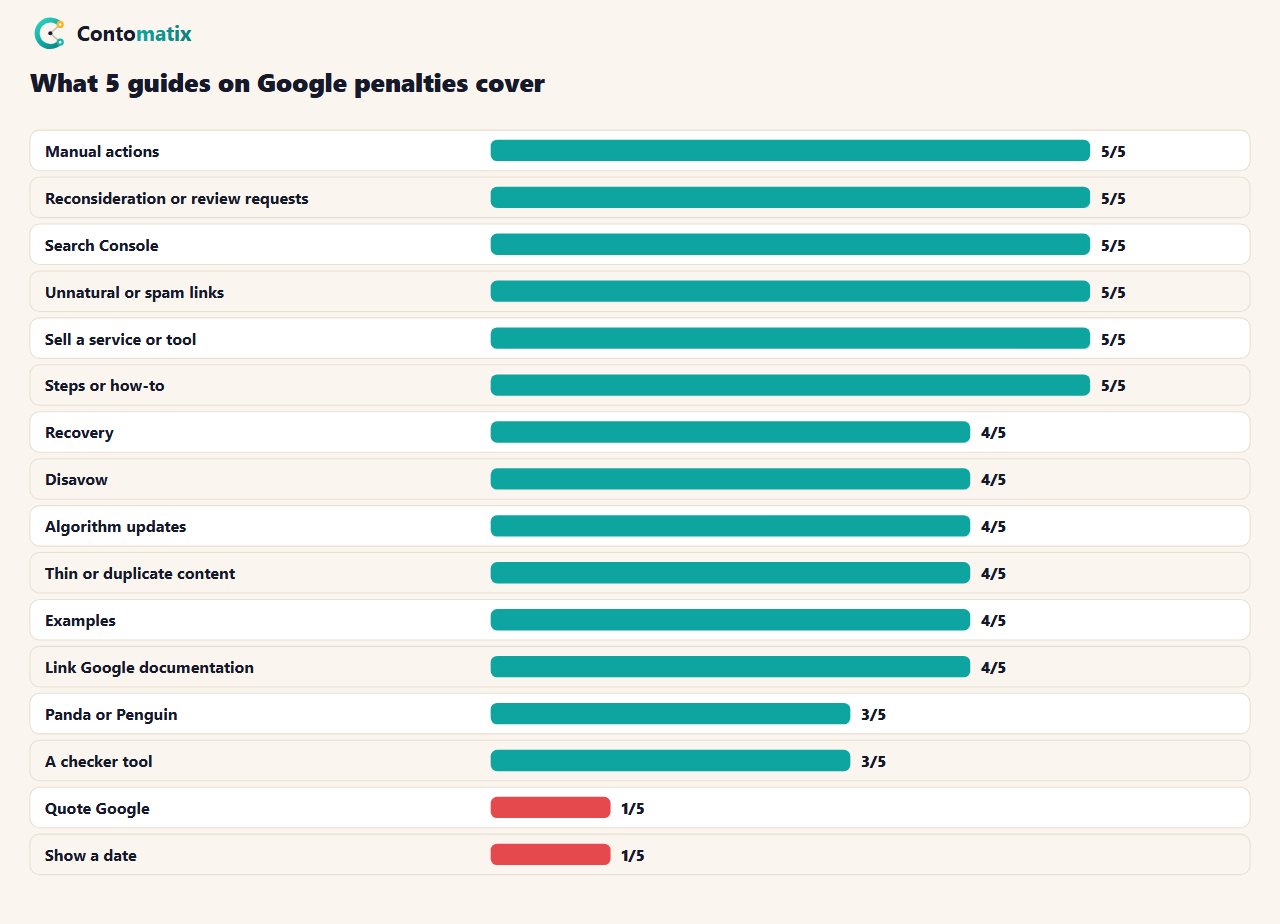
The median guide has about 2,650 words. 5 of 5 also sell a service or a tool, 3 mention a penalty checker and 3 still talk about Panda or Penguin, the older names for algorithm changes. We did not see any of the 5 note that Google's own pages avoid the word, and only 1 quotes Google. 1 shows a date.
Manual Action vs Algorithm Update: What Google Says
On its Manual actions report page, Google explains why manual actions exist: its algorithms are "extremely good at detecting spam", and in most cases it automatically discovers it and removes it from results. To protect the quality of the index, it is also willing to take manual action. If a site has one, "some or all of that site will not be shown in Google search results". Google notifies you in the Manual actions report and in the Search Console message center.
That gives a practical rule. If there is a message and an entry in the report, you have a manual action. If there is none, a fall in traffic is not a manual action: it may come from an algorithmic change, from your own site, or from competitors. The page lists 12 types of manual action, including unnatural links to your site, unnatural links from your site, thin content with little or no added value, user-generated spam, cloaking and sneaky redirects, hidden text or keyword stuffing, structured data issues and spammy free hosts.
Google Manual Penalty: How to Check Your Site
- Open Search Console for your property and choose Security and Manual Actions, then Manual actions.
- Read the result. Google says that if your site has no manual actions, you will see a green check mark and an appropriate message.
- Check the message center for any notice from Google.
- Open the Security issues report too: Google's page on reconsideration requests treats a manual action and a security issues notification as the two kinds of problem you can ask Google to review.
We did this for contomatix.com on 2 November 2026. The Manual actions report said "No issues detected". So did the Security issues report. If your report shows an action, expand it to see which pages are affected: Google says some entries affect the entire site, and others a pattern of pages.
Google Penalty Checker: Is Your Traffic Drop a Penalty?
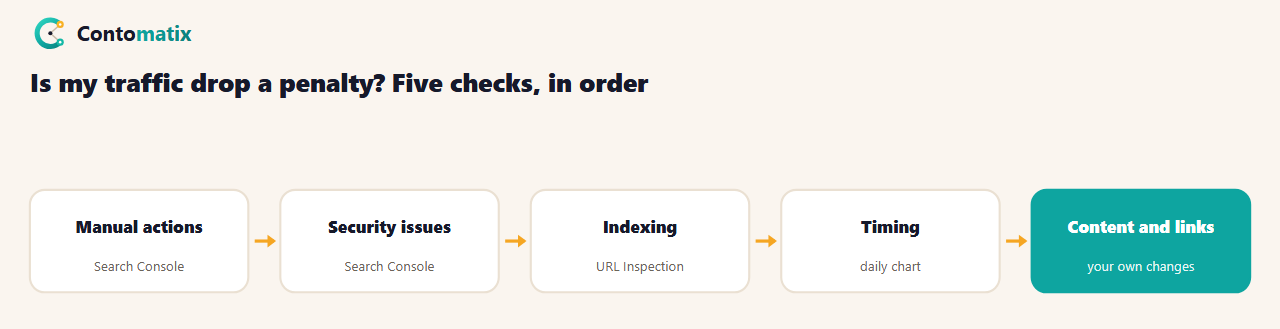
Paid "Google penalty checker" tools, which 3 of 5 guides mention, compare your traffic drop against dates of known updates. That can suggest a cause, but it cannot tell you what Google did. The reliable check is the order above. Start with the two reports. Then confirm the pages are still indexed and not blocked: a robots.txt or noindex mistake can look exactly like a penalty, and our robots.txt tester and guide to setting up Search Console help. Then look at when the fall started and which pages and queries moved. Finally review what changed on your side: content, links and redirects.
Low Rankings Are Not a Penalty: Our Own Numbers
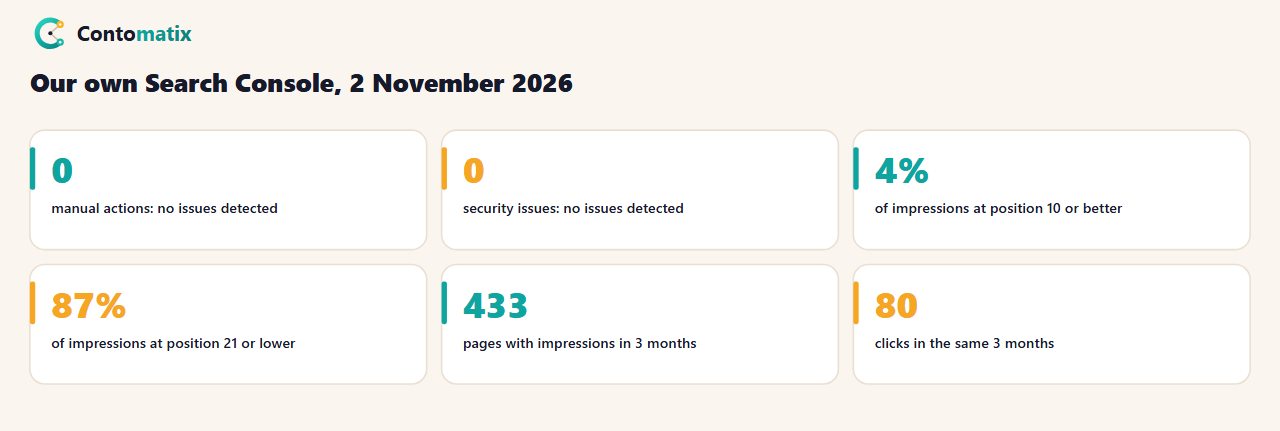
Our site is a useful example because it ranks poorly and is not penalised. In the three months to 28 October 2026 our pages earned 130,114 impressions, but only 5,209 (4%) were at position 10 or better, and 113,160 (87%) were at position 21 or lower. We earned 80 clicks across 433 pages. A person reading those numbers might think Google is punishing us. The Manual actions report says otherwise. Our problem is that most pages are new and have few links, which our monthly SEO report and topical map work looks at. A penalty is a cause you can find in a report. Low rankings are a result of weak signals.
What Google's Spam Policies Say Can Lead to Action
Google's spam policies page says the policies protect users and improve the quality of results, and that Google may act against any type of spam practice it detects. The page lists practices including cloaking, expired domain abuse, hacked content, keyword stuffing, link spam, machine-generated traffic, misleading functionality, scaled content abuse and scraping. Two are worth reading in full. Link spam is defined as creating links to or from a site primarily for the purpose of manipulating search rankings. Keyword stuffing is filling a page with keywords or numbers to manipulate rankings, often in unnatural lists. If you have used link schemes, bulk bought links or hidden text, check those first.
Google Unnatural Links Penalty and the Disavow Question
Two of the manual action types are about links: unnatural links to your site and unnatural links from your site. 5 of 5 guides cover them and 4 discuss the disavow tool. The safe approach is the one in Google's own link guidance, which we cover in our guide to blogger outreach: earn links, qualify paid links with rel="sponsored" or rel="nofollow" and avoid exchanging links at scale. If a report says you have unnatural links, remove or disavow the links you can identify, then document what you did.
Duplicate Content and Thin Content: What We Can and Cannot Say
4 of 5 guides link thin or duplicate content to penalties. Google's list of manual actions includes "thin content with little or no added value", and its spam policies include scraping and scaled content abuse. We did not find the phrase "duplicate content" on the manual actions, spam policies or reconsideration pages we read, so we cannot say that duplicate content alone causes a manual action. If your pages are copied from elsewhere or generated in bulk with little value, the risk is real. If you simply have two similar pages, fix it as a quality issue and choose one canonical page.
Google Penalty Recovery: Steps From Google's Own Page
- Read the action's description and the pages it affects.
- Fix the issue on all affected pages. Google says fixing only some pages will not earn a partial return to search results.
- Make sure Google can reach the pages: not behind a login, not blocked by robots.txt, no noindex.
- Select Request Review in the report and describe your fixes. Google says a good request explains the exact quality issue, describes the steps you took and documents the outcome.
- Wait. Google says most reconsideration reviews take several days or weeks, and link-related ones can take longer. Do not resubmit before you get a decision.
Google defines a reconsideration request as a request to have Google review your site after you fix problems identified in a manual action or security issues notification. If there is no manual action, there is nothing to request: you improve the site and wait for Google's systems to reassess it.
Panda, Penguin and Other Old Names
3 of 5 guides still use the names of older algorithm updates. None of the three Google pages we read uses them, and they talk only about spam policies, manual actions and algorithms. If an article says you have been hit by an update with an old name, ask what evidence it has. Our guidance is to check the reports, then the site, and treat any other claim as a guess.
Common Mistakes When You Think You Have a Penalty
- Assuming a drop is a penalty without checking the report.
- Paying for a recovery service before reading Google's page. Google's page says what a request needs, and the fix is yours to make.
- Fixing some pages. Google says partial fixes do not earn a partial return.
- Mass disavowing without a reason. Disavow what you have identified as unnatural, not everything.
- Resubmitting too soon. Google says not to resubmit before a decision.
Reading the Manual Actions Report: What You Would See
At the top of the report is a count of manual actions against your site. If there are any, each one has a type, a short description and a list of affected pages. Google's page explains that the list shows patterns of pages, such as everything under a folder like real-estate, and that not every page matching the pattern is necessarily affected. Each entry has a "Learn more" link to detailed steps for that type, and a Request Review button once you have finished fixing. If you manage a site for someone else, take a screenshot of the report each month, including when it is clear, so there is a record of when an action appeared.
What a Good Reconsideration Request Contains
Google says a good request does three things: it explains the exact quality issue on your site, describes the steps you have taken to fix it and documents the outcome of your efforts. A useful structure is three short paragraphs. First, name the issue as Google described it, for example unnatural links to your site. Second, list what you did, with numbers, such as how many links you removed, how many you asked other sites to remove and how many you disavowed, with a link to a shared sheet. Third, show the result: which pages are fixed, and how you will avoid the problem again. Keep the tone plain and factual. The reviewer is checking that the problem is fixed, not that you are sorry.
If It Is Not a Penalty: What to Do After a Drop
- Do not make large changes in a panic. Change one thing at a time so you can tell what helped.
- Look at which pages and queries fell. A drop on a handful of pages points to those pages, while a site-wide drop points to something broader such as a technical fault.
- Compare your pages with the ones now ranking above you. Read them as a visitor would.
- Improve the pages that matter most and earn links to them, as we describe in our guide to a backlink strategy.
- Give it time. Google's automated systems reassess sites over time, not on request.
A Monthly Check That Catches Problems Early
Add two lines to your monthly report: "Manual actions: none" and "Security issues: none", with the date you checked. It takes under a minute, and it means you find a problem the month it appears instead of after weeks of lost traffic. Our monthly SEO report format has a technical section where it fits, next to indexing and speed. Pair it with a quick look at the Page indexing report, so you see pages dropping out of the index at the same time.
Key Takeaways
- Google's manual actions page says "manual action" 110 times and "penalty" 0 times.
- A manual action is shown to you in Search Console. If you have none, a drop is not a manual action.
- Check manual actions, security issues, indexing, timing and content, in that order.
- Our site has no manual action, yet 87% of its impressions are at position 21 or lower: weak rankings are not a penalty.
- To recover, fix every affected page, request a review and wait.
Frequently Asked Questions
What is a Google penalty?
A common name for Google lowering or removing a site from results for breaking its rules. Google's own term for the reported kind is manual action.
How do I know if I have a Google penalty?
Open the Manual actions report in Search Console. If there is an action, it is listed there and in the message center. If not, you will see a green check mark.
Is a traffic drop a penalty?
Not necessarily. It can come from an algorithm change, a technical problem such as robots.txt or noindex, or competitors.
What is the difference between a manual action and an algorithmic change?
A manual action is issued when a human reviewer at Google decides pages break the spam policies. Algorithmic changes are automatic and are not shown in a report.
How long does it take to recover from a Google penalty?
Google says most reconsideration reviews take several days or weeks, and link-related ones can take longer.
Do I need a penalty recovery service?
Google's page describes what a request must contain. A service can help with the work, but it cannot do more than fix the issue and request a review.
Does duplicate content cause a Google penalty?
We did not find that statement in the Google pages we read. Thin content with little added value and scraping are covered.
What is the unnatural links penalty?
A manual action type for links to or from a site that manipulate rankings. Fix or remove the links, then request a review.
Did you check your own site?
Yes. On 2 November 2026 our Manual actions and Security issues reports both said no issues detected.


