Last updated: October 2026
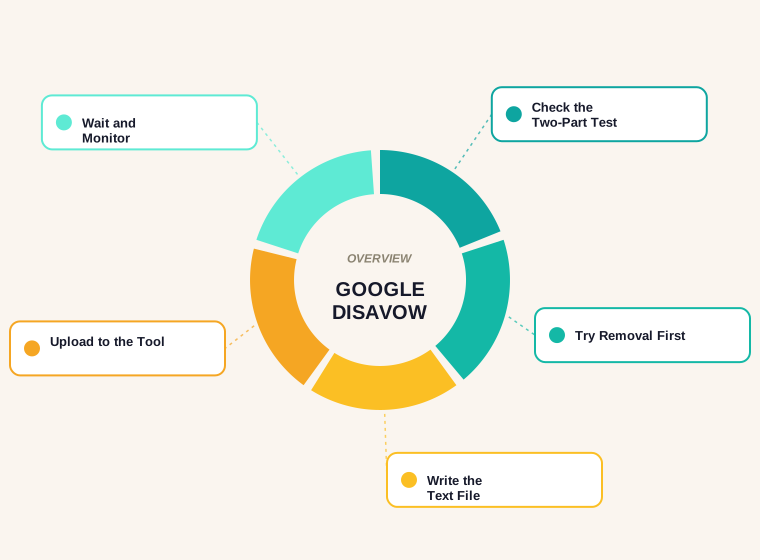
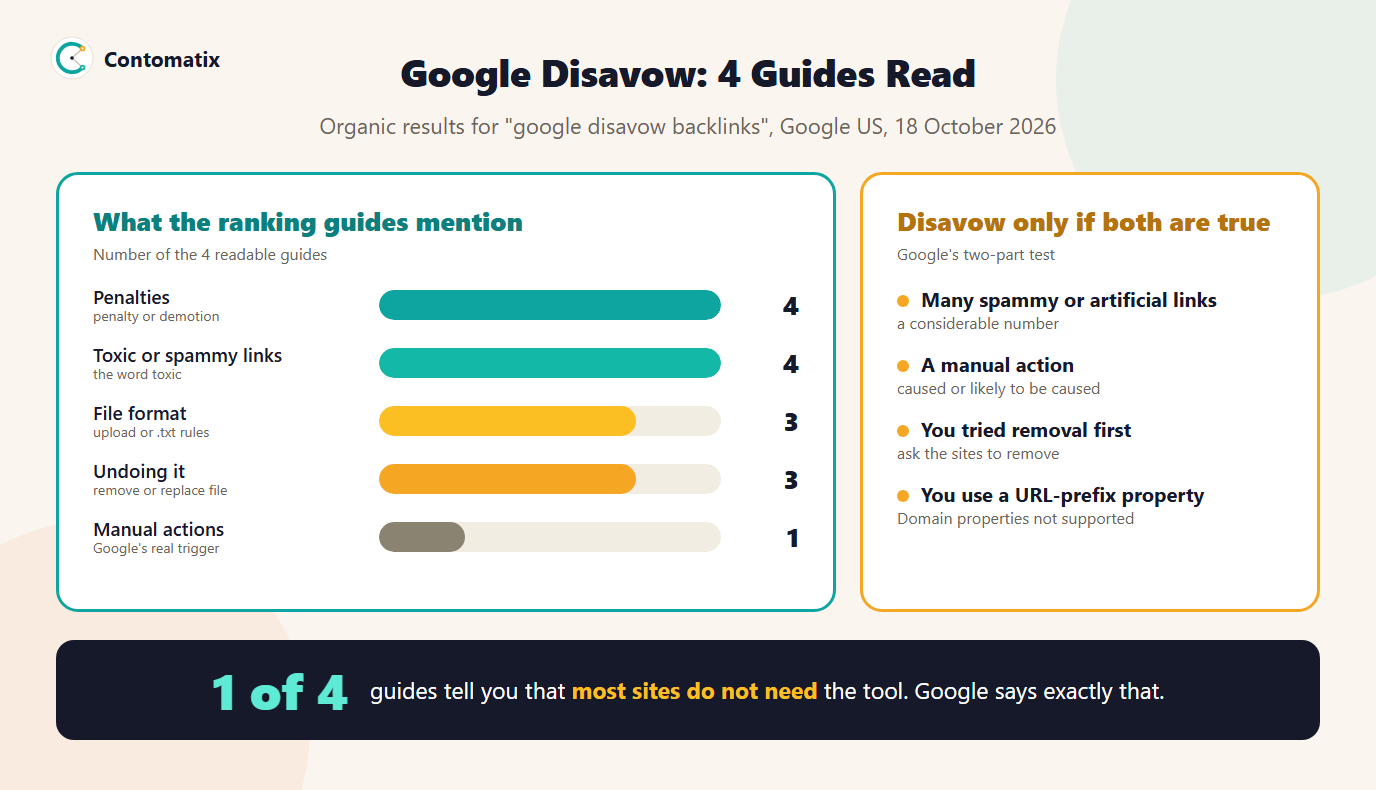
The Google disavow tool lets a site owner upload a text file telling Google to ignore specific links or whole domains that point to their site. Google calls it an advanced feature and says most sites will not need it. We read the 4 guides that rank on Google US for the term: all 4 use the word "toxic" or "spammy", but only 1 says most sites do not need the tool and only 1 mention manual actions, which is the condition Google actually sets. This guide follows Google's own help page.
Below you will find what the tool does, Google's two-part test for using it, what the ranking guides say, how to check your own links, how to build and check a disavow file, how to upload and undo it, and the mistakes that cause harm. If you are trying to prevent the problem, read our guide on backlink exchanges as well.
What the Google Disavow Tool Does
The tool, also called link disavow, is a way to tell Google not to take certain links into account when assessing your site. You upload a text file listing individual page URLs or whole domains. Google says the list applies only to the property you upload it to, you can have one list per property and a new upload replaces the old one. Disavowed links still appear in the Links report. It can take a few weeks for Google to reflect the list as it recrawls the web. Note that Google says the disavow tool does not support Domain properties, so it applies to URL-prefix properties.
Google's Two-Part Test: When You Should Disavow
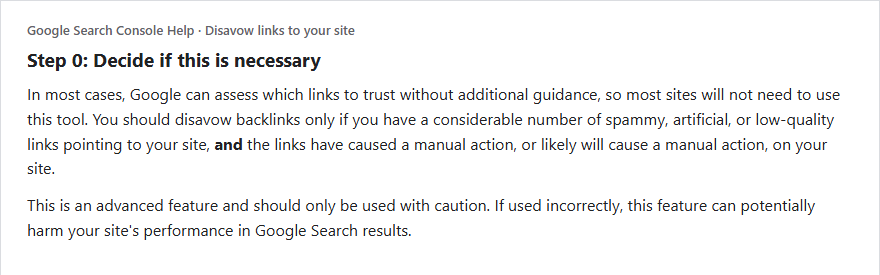
Google's help page sets a two-part test, and both parts must be true. First, you have a considerable number of spammy, artificial or low-quality links pointing to your site. Second, those links have caused a manual action, or are likely to cause one. If you have a few odd links, or a tool shows a high "toxicity" score, that does not meet the test. Google adds that it works hard to make sure that actions on third-party sites do not negatively affect your site, and that it recommends removing as many spammy or low-quality links from the web as possible first.
What the Ranking Guides Say, and Do Not Say
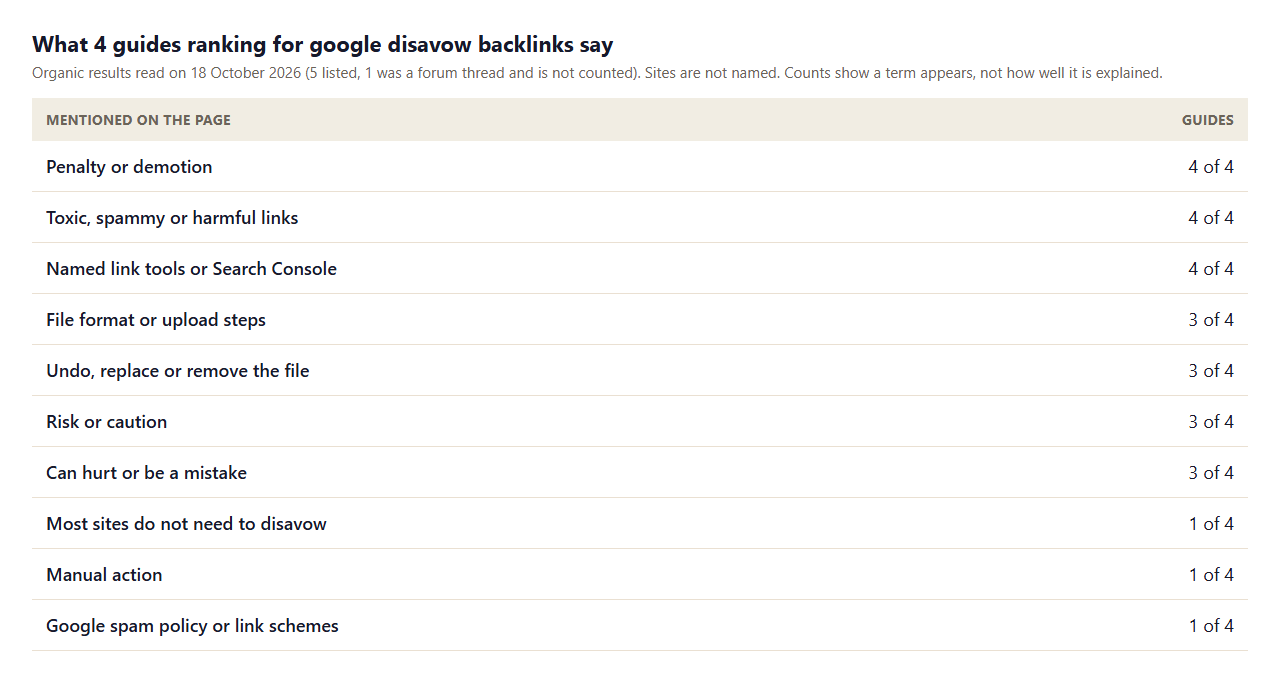
- Penalty is the headline. 4 of 4 talk about penalties or demotion, while only 1 use Google's own term, manual action.
- "Toxic" dominates. 4 of 4 use the word toxic or spammy. Google's page does not use a toxicity score, and it does not say a tool's rating decides anything.
- The practical steps are covered. 3 of 4 explain the file and upload, and 3 explain how to undo it.
- Warnings exist but are soft. 3 of 4 mention risk and 3 say it can hurt, yet only 1 says plainly that most sites do not need to do it.
- The rule is rarely linked. Only 1 of 4 mentions Google's spam policy or link schemes.
How to Decide Whether You Need to Disavow
- Check for a manual action. In Search Console, open Manual actions. If it says no issues, the second part of the test is not met today.
- Export your links. Download the Links report. For the method, see our guide to checking the backlinks of a website.
- Look for a pattern, not a score. Paid links, link exchanges, thousands of links from unrelated sites with the same anchor, or hacked pages are patterns. A tool's toxicity number alone is not.
- Remove what you can. If you built the links, ask the sites to take them down or add a nofollow or sponsored attribute. Keep a record of your attempts.
- Disavow what remains, only if the two-part test is met.
We applied the test to ourselves. The Links report for contomatix.com showed 13 external links from 4 linking sites when we last checked. In our guide to relevant backlinks we scored all of them, and 12 were topic-related listings. There is no considerable number of spammy links and we have no manual action, so the test fails at the first step and we would not upload a file. For most sites with a small, ordinary profile, the honest answer is the same.
How to Create a Disavow File
Google's format rules are short. Put one URL or domain per line. To disavow a domain or subdomain, start the line with domain:, for example domain:example.com. You cannot disavow an entire subpath such as example.com/en/. The file must be a text file in UTF-8 or 7-bit ASCII with a name ending in .txt. The maximum URL length is 2,048 characters, and the maximum file size is 100,000 lines (including blank and comment lines) and 2MB. A line that begins with # is a comment and is ignored.
To test the rules, we wrote a sample file with ten lines and checked each against them. 6 were valid and 4 were not. The invalid lines show the usual mistakes: a bare host name with no domain:, a URL placed after domain:, and a path with no scheme.
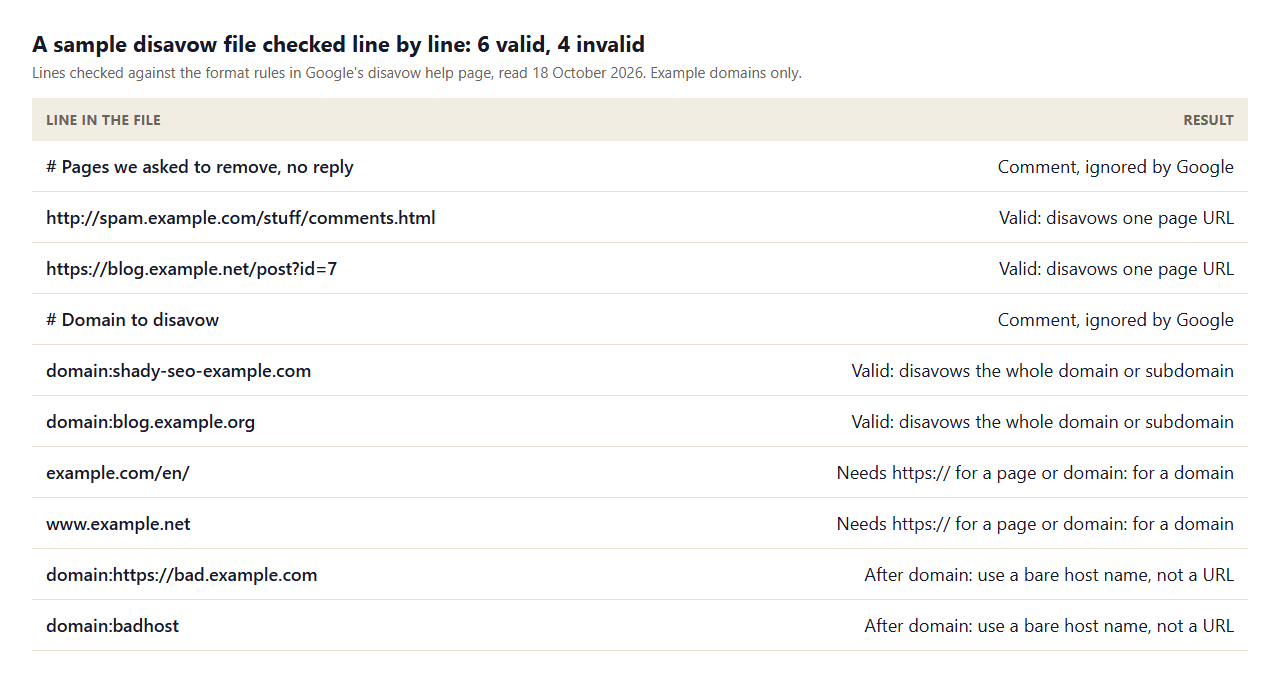
Prefer the domain: form when a whole site is the problem and page URLs when only a few pages are. Keep comments to remind yourself why each entry is there.
A Disavow File You Can Adapt
Here is the shape of a clean file, using example names. Replace the entries with your own, keep the comments so you remember the reason for each group, and save it as a plain .txt file.
# Paid links bought in 2024, owner did not reply to two requests
domain:paid-links-example.com
domain:article-network-example.net

# Single spam pages with keyword anchors
http://forum.example.org/thread/123
https://blog.example.com/best-links-page
Keep a separate note outside the file with the date, the evidence and the removal requests you sent. If you ever need to explain the file to someone, that note is what they will want to see.
How to Find Links Worth Reviewing in the Links Report
Open the Links report and look at the top linking sites and the top linked pages, then export both. Sort the linking sites by the number of links and look at the biggest outliers first. A site that gives you thousands of links from a footer or sidebar, a network of similar sites with the same anchor text, pages in an unrelated language or topic and anything that looks hacked deserves a closer look. Open a few of the pages, check where your link sits and decide whether you or someone you hired created it. If you cannot say how the link came to exist, check whether it is a scraper or a normal citation, which Google can usually handle on its own.
Do not try to review every link. A short list of clear patterns is enough, and a patient review of a few dozen examples will tell you whether you have a problem or just a long tail of ordinary web noise.
If You Do Have a Manual Action
If Search Console shows a manual action for unnatural links to your site, Google's guidance is to remove the links where you can, disavow the rest and then submit a reconsideration request from the Manual actions report, explaining what you did. Keep the explanation factual: how the links were created, what you removed, what you disavowed and what you have changed so it does not happen again. A rushed or vague request is likely to be turned down, so take the time to document the work properly before you send it.
How to Upload, Replace and Remove a Disavow File
- Open the disavow tool page and choose the property. Remember that Domain properties are not supported, so use the URL-prefix property for your site.
- Upload your text file. If the file has errors, Google shows them at once and keeps your old list.
- Wait. If the upload succeeds, it can take a few weeks for Google to incorporate the list as it recrawls.
- To replace the list, just upload a new file. You do not need to cancel the old one.
- To remove every disavowal, select the property and click Cancel disavowals. That also takes a few weeks to take effect.
If your property exists in both http and https versions, upload a list for each, since the list applies to the property you chose and its child properties.
What Not to Disavow
- Links just because a tool calls them toxic. A score is an estimate from a third party, not Google's view.
- Normal low-value links. Odd directory listings and scraper sites appear on most profiles. Google says it can generally assess which links to trust without help.
- Links you earned. Disavowing good links removes value you wanted.
- Nofollow links. They are already qualified, so there is little to gain.
- A guess at a penalty. A drop in rankings has many possible causes. Check for a manual action before you act.
Disavowing Toxic Backlinks: A Safer Order of Operations
- Stop creating the links that caused the problem. For exchanges and paid links, our guide to backlink exchanges explains what Google counts as link spam.
- Ask the site owners to remove or qualify the links, and keep the emails. You can draft polite requests with the outreach email generator.
- Use the dofollow link checker to see which remaining links pass credit.
- Disavow only the remainder, with comments, and only if the two-part test is met.
- Record the date and the reason, then monitor Search Console for the manual action status and your impressions.
Prevention Beats Disavowing
The best disavow file is the one you never need. Most problems come from a short list of habits: buying links, trading them in volume, letting an outside provider build links with no oversight and creating links with automated programs. Each of these is named in Google's link spam policy. If you hire help, ask for a list of every placement, check a sample yourself and insist that paid links carry a sponsored or nofollow attribute. If you run your own campaign, plan it with goals and review points, as in our link building campaign guide. A clean, relevant profile is easier to defend than a large profile you have to clean up.
How We Read the Pages
- We read the 5 organic results for one query on one day (Google US, 18 October 2026). Four were guides we could read, and one was a forum thread that we did not count.
- Counts show whether a page mentions a term, not how well it explains it.
- The sample file was checked against the format rules on Google's disavow help page, read on 18 October 2026, using example domains only.
- The statement about our own profile reflects our Links report on the last check and a review of all 13 links. It is not advice for your site.
- Results in other countries or at other times will differ, so read Google's current page before you upload a file.
Key Takeaways
- Google says most sites will not need the disavow tool.
- Use it only if you have a considerable number of spammy, artificial or low-quality links and a manual action, actual or likely.
- Try removing links first, then disavow the rest in a .txt file with
domain:lines for whole sites. - The tool does not support Domain properties, and uploads take a few weeks to count.
- Do not disavow because of a third-party toxicity score alone.
Frequently Asked Questions
What is the Google disavow tool?
It is a Search Console tool where you upload a text file of URLs and domains you want Google to ignore when assessing links to your site. Google calls it an advanced feature to be used with caution.
When should I use the disavow tool?
Only if you have a considerable number of spammy, artificial or low-quality links and they have caused, or are likely to cause, a manual action. Most sites do not need it.
What is a disavow file format?
A UTF-8 or 7-bit ASCII text file ending in .txt, with one URL or domain per line. Use domain: before a domain, and start comment lines with #.
How do I disavow toxic backlinks?
First try to have them removed. Then list the remaining pages or domains in a text file and upload it to the disavow tool for the right property, if Google's two-part test is met.
Does disavowing links remove them from the Links report?
No. Google says disavowed links continue to be shown in the Links report.
How long does a disavow file take to work?
Google says it can take a few weeks to incorporate the list as it recrawls the web and reprocesses the pages.
Can I disavow links in a Domain property?
Google says the disavow tool does not support Domain properties. Use a URL-prefix property for your site.
How do I undo a disavow?
Upload a new file to replace the list, or select the property and click Cancel disavowals to remove all of them. Both take a few weeks to apply.
Can disavowing hurt my site?
Google says that if used incorrectly the feature can potentially harm your site's performance in Search. Disavowing good links or too many links is the main risk.