Last updated: October 2026
Local SEO for restaurants is the work of making sure that when someone nearby types "italian restaurant," "brunch near me" or "late night tacos," your restaurant shows up with the right hours, the right menu and a reason to choose you. Most of that work happens in two places: your Google Business Profile, and the website that profile points to. Get both right and a restaurant can compete with larger neighbours that have bigger budgets.
This guide walks through how Google decides which restaurants to show, what to set up on the profile (category, hours, menu, links, attributes, photos), how to handle reviews, what your website needs, and how to keep everything accurate across one location or many. It sticks to what Google documents itself, and flags the places where advice is a judgement call rather than a rule.
How Google Decides Which Restaurants to Show
Google's own explanation of local results is short. In its guide to how local ranking works, Google says results are based mainly on three factors: relevance, distance and prominence. Relevance is how well a profile matches what the person searched for. Distance is how far each business is from the searcher, or from the location named in the query. Prominence is how well known a business is, and Google says that includes information like review count and ratings, along with links and articles from across the web.
Two things follow from that. First, you cannot change distance, so the other two factors are where effort pays off. Second, Google states plainly that there is no way to request or pay for a better local ranking. Anyone selling a guaranteed number-one spot on the map is selling something Google says does not exist.
For a restaurant, relevance is mostly about category, menu content and the words customers use in reviews. Prominence is mostly about review volume, review quality and how widely the restaurant is mentioned online. Distance is a reminder that a diner standing outside your door and a diner across town see different results for the same search.
Claim and Verify the Profile First
Every piece of local SEO for restaurants depends on this step. Nothing else works until the profile is claimed and verified. Google's ranking guidance lists verification as the first step, and its photo guidance notes that photos and videos only show on a profile once the business is verified. Search for your restaurant on Google Maps and check whether a profile already exists, because many restaurants have one created automatically from public data. If it does, claim it instead of creating a duplicate.
Duplicates are a common restaurant problem, especially after a rename, a change of owner or a move. Two profiles for one dining room split reviews and confuse customers about which hours are right. Search your name and address, and if more than one listing appears, resolve it before doing anything else.
Choose the Right Primary Category
Google's category guidance is straightforward: the categories you choose affect your local ranking, and you should select the most specific one available. Google's example is choosing "Nail salon" rather than "Salon." The same logic applies to food. "Italian restaurant," "Mexican restaurant," "Pizza restaurant" or "Brunch restaurant" tells Google far more than a bare "Restaurant" label.
Pick one primary category that describes what the place is, then add a few secondary categories for genuinely separate things you do, such as a bar attached to a restaurant or a takeaway counter. Google specifically advises against selecting a category for every product or service. A restaurant that lists twelve categories looks less clear, not more visible. Also note that editing a category can trigger a request to verify the business again, so make the change deliberately and not as an experiment.
Keep the business name equal to the real-world name on your sign and menu. Adding "best pizza downtown" to the name field is a fast route to a suspension, and the category field is where that descriptive signal belongs.
Menu: Use Google's Editor and Your Own Link
A diner deciding where to eat wants to see food and prices before anything else. Google's menu editor lets food and drink businesses list menu items with descriptions and prices, organised into sections such as appetizers, desserts and main courses. Google notes changes can take 24 to 48 hours to appear on Maps and Search, and customers find the items listed under "Menu" on the profile.
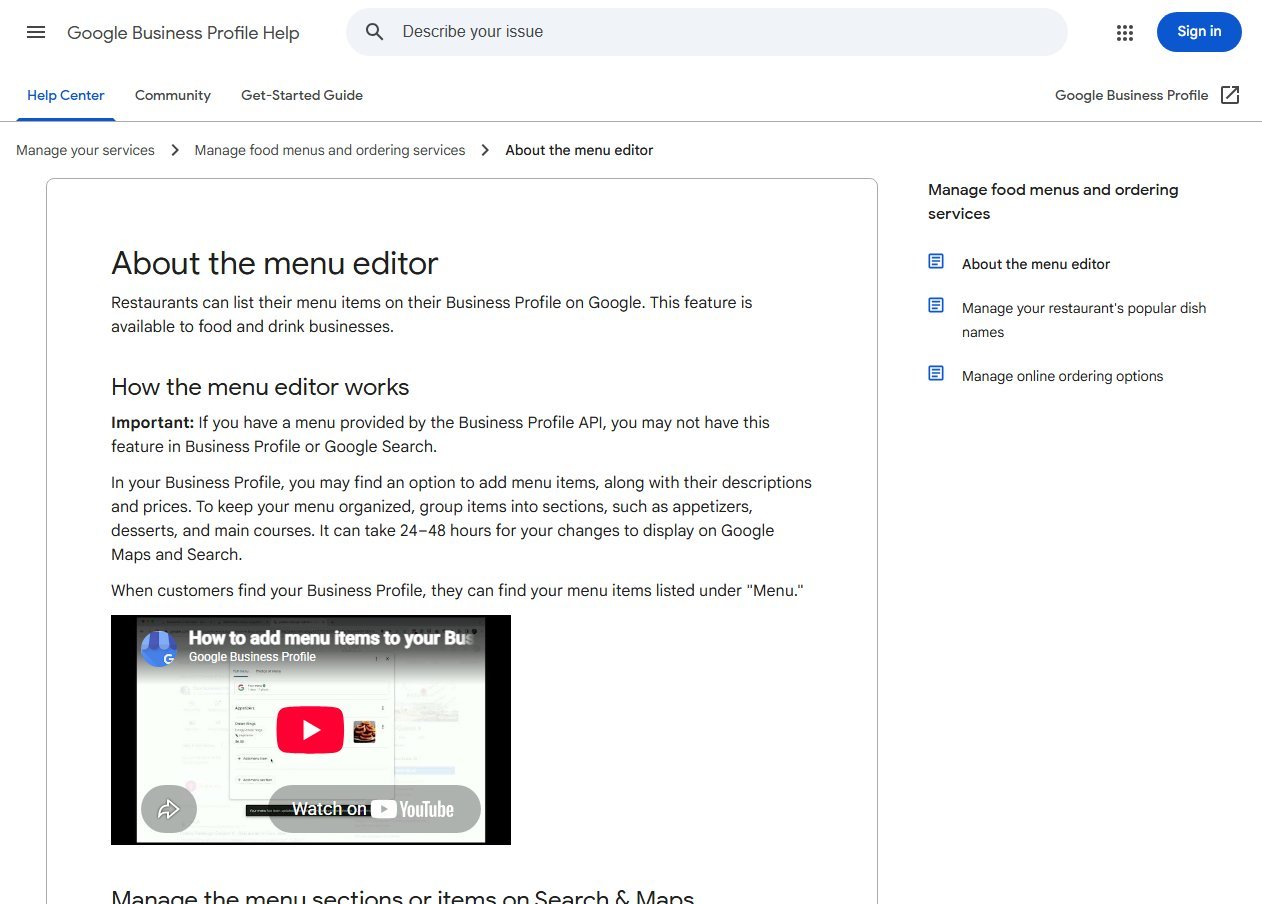
The same help page covers a few details worth knowing. If your menu comes through the Business Profile API, for example from a third-party provider, the in-profile editor may not be available to you. You can also enter a direct menu link under the Contact section of your business information. And when more than one menu source exists, Google lets you choose a preferred one.
Whichever route you use, the rule is the same: the menu on Google, the menu on your website and the menu on the wall should match. A price that differs between sources is the kind of small inconsistency that produces angry reviews.
Hours, Including Special Hours
Wrong opening hours are the fastest way to turn a nearby searcher into a one-star review. Google's help page on special hours says you can set them for holidays, events and other exceptions, for up to six days in a row. A closure of seven days or more should be set as temporarily closed. Google also recommends confirming your hours for official holidays even when they match your normal hours, so customers can trust what they see.
A few practical notes for restaurants. Special hours only show when your regular hours are set to open with main hours. Each special-hours entry covers up to 24 hours, so a kitchen that runs past midnight needs separate entries per calendar day. And if you run split service, with a lunch window and a dinner window, enter both rather than one long block.
Reservation and Ordering Links
Google Business Profile supports links for booking and for food ordering, and a profile can carry up to ten links per type. In Google's guidance on online ordering options, restaurants can add custom links to their own site or ordering page, and third-party provider links can be added by services with an authorized relationship. If you have several links, you can mark one as the preferred link so the main button points where you want.
Point these links at pages you control whenever possible. A direct reservation page or a simple order page on your own domain keeps the customer relationship with you. Check that each link works on a phone, since most people tapping "Order" or "Reserve" on Maps are on one. If you switch off order acceptance on the profile, Google says third-party order options and links are hidden, so confirm after any change that the buttons you expect are still visible.
Attributes, Photos and Popular Dishes
Attributes are the small tags that answer practical questions before anyone has to call: dine-in, takeaway, outdoor seating, Wi-Fi, wheelchair-accessible entrance, and so on. Google notes some attributes are only available in certain regions, and some can be suggested by customers as well as owners. Review yours periodically, because an attribute set a year ago may no longer be true.
Photos matter more for restaurants than for most businesses. Google's photo guidance asks for at least three food and drink photos showing popular items, lit evenly, plus exterior photos so people can recognise the place and interior photos for atmosphere. Files should be JPG or PNG between 10 KB and 5 MB, with a recommended size of 720 by 720 pixels. Google also says photos should look like the real thing, with no heavy filters or AI edits.
Popular dishes are a separate feature managed through the Google Maps app. Google says dish names you add take precedence over those added by customers, so if guests are tagging a dish with the wrong name, correcting it is worth five minutes.
What the Local Results Actually Look Like
A live search shows how these pieces appear to a customer. Here is Google Maps for an Italian restaurant search near Chicago.
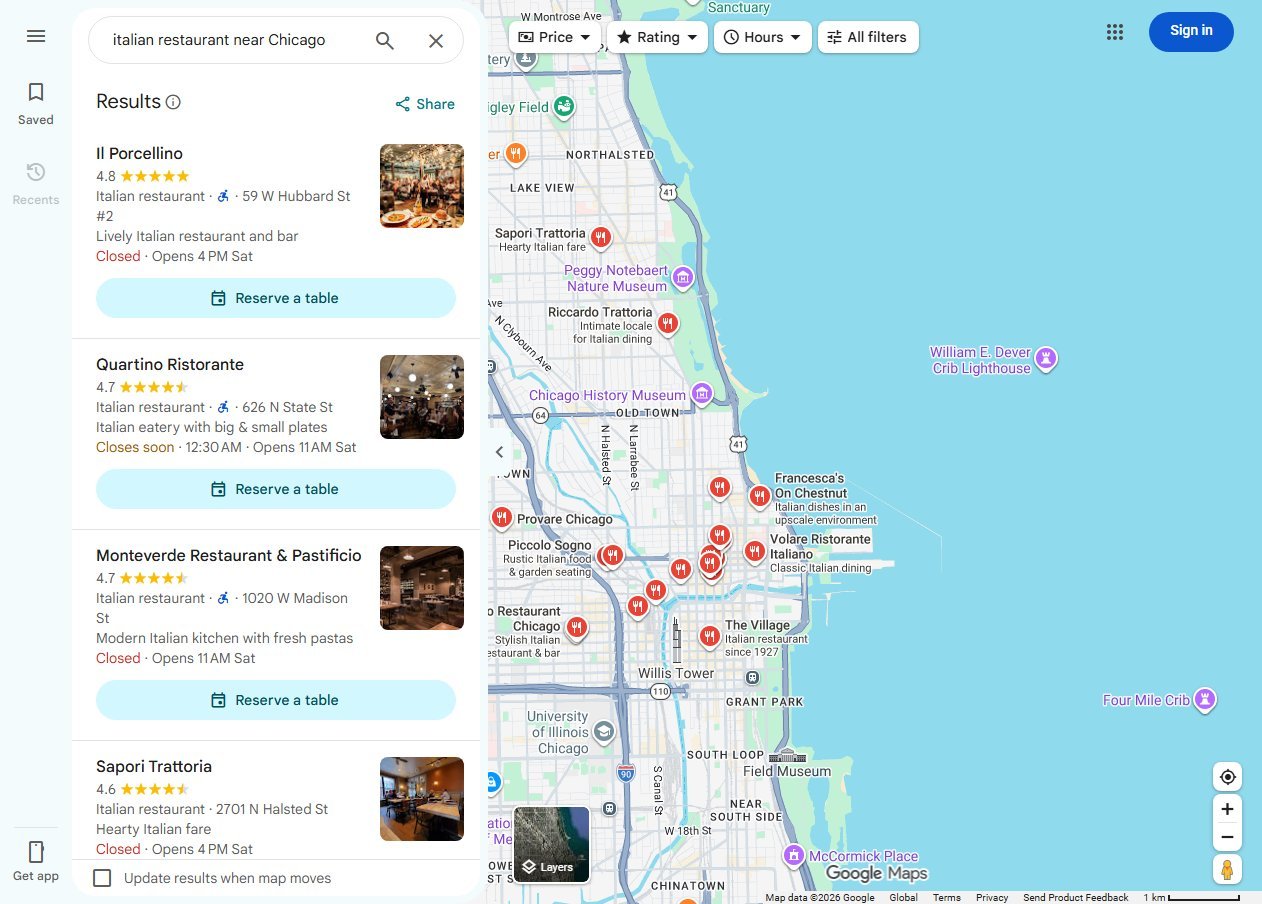
Each listing shows a star rating, a specific category label, an address, whether it is open right now, a photo and, where the restaurant has set it up, a "Reserve a table" button. Every one of those elements comes from something the restaurant controls or influences: category, hours, photos, the reservation link and the review score. A restaurant missing the button or showing a wrong open status is giving a competitor the click.
Reviews: Ask, Reply and Stay Within the Rules
Google's local ranking guide names review count and ratings as part of prominence, and says more positive reviews can improve ranking. For a restaurant, reviews also act as content: diners mention dishes, wait times and atmosphere, which feeds the relevance side. The sensible routine is to ask every guest the same simple way, for example with a card or QR code at the table or on the receipt, and to make it easy to leave a review in under a minute.
Do not offer discounts, free dessert or entry into a draw in exchange for reviews. Google's policy on incentivized reviews prohibits offering incentives for posting or changing a review, and review gating, where only happy customers are sent to the review link, is also against its rules. Ask everyone and accept the mix you get.
Replying matters too. Google's ranking guidance says replying to reviews shows you value feedback, and its help page on managing reviews explains that replies appear publicly as your business and the reviewer is notified. Keep replies short, polite and specific. Thank the person, mention something real from their visit, and for a complaint offer a way to resolve it offline. Never argue in public and never reveal details about a guest's visit that they did not post themselves.
Questions and Answers: What Changed
Restaurants used to rely on the public Q&A section of a profile to answer things like parking or allergen policy. Trade reports indicate Google has been phasing that section out in favour of AI-generated answers inside Maps. Whether or not the public Q&A box still appears on your listing, the practical response is the same: put the answers into places Google reads, which means attributes, the description, the menu, photos and your website. Facts such as "gluten-free options," "dog-friendly patio" or "reservations for six or more" should be stated plainly in more than one place, so any system summarising your restaurant has them to work with.
Restaurant Website Basics
The profile gets you seen; the website closes the visit. Good local SEO for restaurants treats the two as one system. The basics are not complicated, and a lot of restaurant sites still get them wrong.
- Put the menu on the page as real text. A menu that exists only as a PDF or a photo is hard to read on a phone and harder for search engines to understand. This is a recommendation rather than a Google rule, but Google does say it may transcribe menu data from a restaurant's website, which works best when the text is plain HTML.
- One page per location. Each location needs its own page with its own address, phone number, hours, directions and menu notes, not one page listing everything.
- Same name, address and phone everywhere. Match the website to the profile exactly.
- Click-to-call and a visible address near the top, with the reservation or order button above the fold on mobile.
- Fast loading on a phone. Oversized hero photos are the usual culprit.
The same fundamentals apply to any neighbourhood business, and our guide to local SEO for small business covers them in more general terms.
Structured Data for Restaurants
Structured data is code that tells search engines what a page is about in a standard format. Google's local business structured data documentation says to use the most specific LocalBusiness subtype possible, and names Restaurant as an example. Name and address are the required properties. Recommended properties include opening hours, a menu URL, the cuisine served, a telephone number, the URL of the specific location and a price range.
Treat structured data as a way of stating facts you already show on the page, not a ranking shortcut. The markup must match what visitors can see, so keep the hours, address and menu link in the code consistent with the visible page, and update them whenever the real details change. Google's page also lists a restaurant carousel example marked as limited access, so do not expect that particular feature to appear just because you added markup. After adding it, test the page with Google's tools and fix any errors it reports.
Citations and Mentions Beyond Google
Citations are mentions of your restaurant's name, address and phone number on other sites: local directories, regional food guides, the city's tourism site, chamber of commerce listings. They support prominence, and their biggest practical value is consistency. A closed-down phone number or an old address on a directory can send guests to the wrong place.
Start by auditing the places that already list you, fix mismatches, and add the few that matter locally rather than submitting to hundreds of directories. Local press, food bloggers and community events produce mentions and links that a reviewer would recognise as real, and these are worth more than a pile of low-quality listings. If you want a deeper look at what a local specialist should cover, see our overview of local SEO services.
Multi-Location Restaurants
Each physical location gets its own profile, its own page on the website and its own review stream. Do not clone one description across all of them. Write each profile around what is specific to that site: the neighbourhood, the parking, the patio, the hours, the local phone number. Use consistent naming across locations, with the brand name as it appears on the sign and no area keywords added to the name field.
Google notes that businesses managing many profiles need to use the Business Profile API to update menus across profiles in bulk, as the standard editor works one profile at a time. For a small group, a shared spreadsheet that records hours, menu links, holiday hours and owners for every site prevents most mistakes. Assign one person per location to check reviews and replies weekly.
Common Local SEO for Restaurants Mistakes
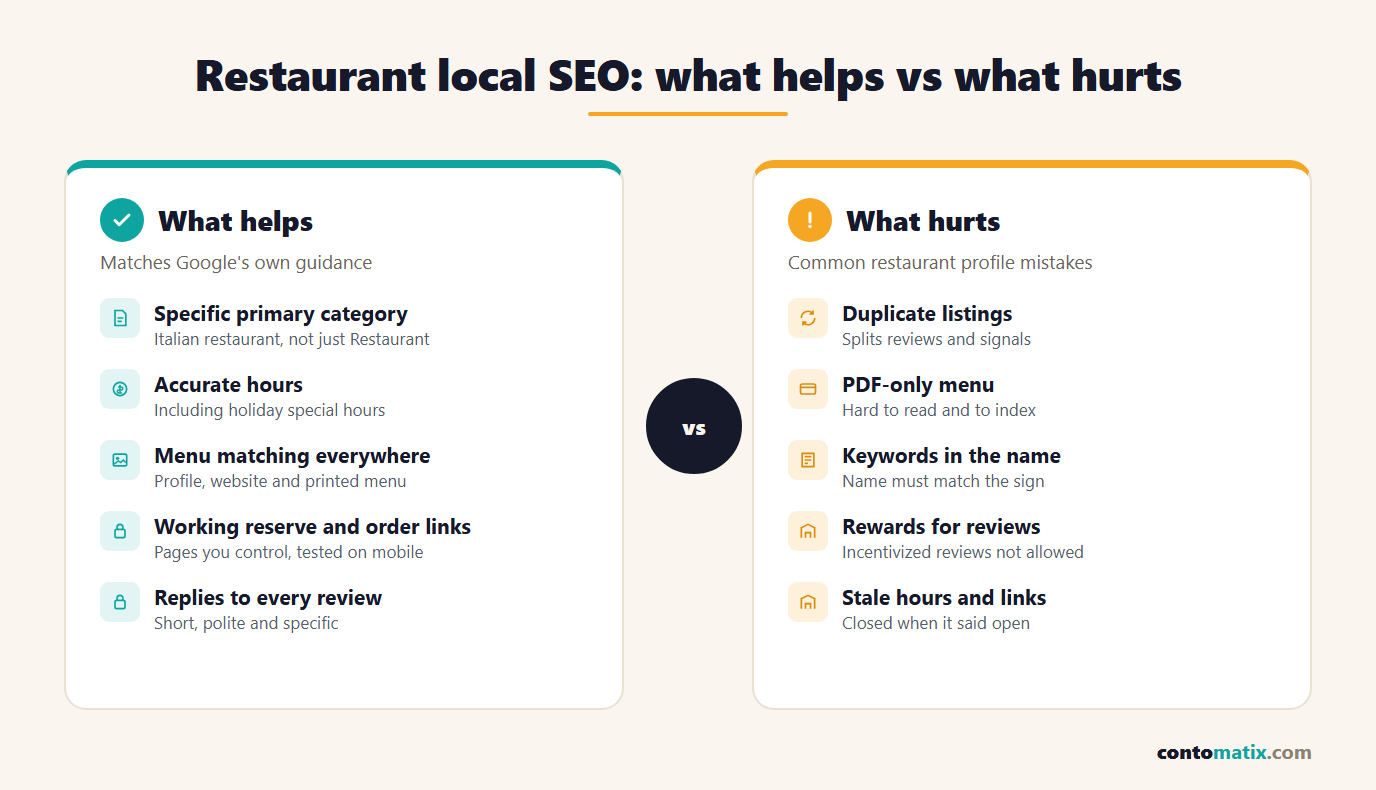
- Leaving the generic "Restaurant" category when a specific cuisine category exists.
- Forgetting holiday and special hours, then collecting reviews that say "closed when it said open."
- Keeping the menu only as a PDF or image, or letting the Google menu drift from the real one.
- Leaving the reservation or order link pointing to a dead or outdated page.
- Stuffing keywords into the business name.
- Ignoring reviews, or replying to every one with the same copied sentence.
- Paying for or incentivizing reviews, or only asking happy customers.
- Running duplicate profiles after a rebrand or relocation.
A Weekly Routine That Takes Under an Hour
- Read and reply to every new review, starting with the most critical.
- Check that hours are correct for the next two weeks, including any holiday or event closure.
- Upload two or three fresh photos: new dishes, the dining room, the patio in good weather.
- Confirm the menu, specials and prices on Google match the website and the printed menu.
- Test the reservation and order buttons on a phone.
- Search your category and neighbourhood on Maps and note who appears above you and what their listing shows that yours does not.
- Log anything you changed, so you can see what moved your calls, direction requests and bookings.
Quick Recap
- Google ranks local results on relevance, distance and prominence, and says a better ranking cannot be requested or bought.
- Claim and verify one profile, resolve duplicates, and choose the most specific primary category.
- Keep the menu, hours and special hours accurate, and set reservation and order links that you control.
- Fill in attributes, add real food, interior and exterior photos, and correct popular dish names.
- Ask every guest for a review, offer nothing in return, and reply to reviews politely and briefly.
- On the website, publish the menu as text, build one page per location and add accurate Restaurant structured data.
- Keep name, address and phone consistent everywhere, and review the profile weekly.
Local SEO for Restaurants Checklist
- Search for existing or duplicate profiles and claim or merge them.
- Verify the business.
- Set a specific primary category and a few honest secondary ones.
- Use the exact name from your sign, with no keywords added.
- Enter regular hours, split service and the next set of holiday hours.
- Add the menu in the menu editor or link to a text menu on your site.
- Add reservation and order links that work on mobile, and mark a preferred link.
- Complete attributes and upload at least three food photos plus exterior and interior shots.
- Create a one-step review request and a reply routine.
- Publish location pages with matching name, address and phone, plus Restaurant markup.
- Audit citations for mismatches.
If you would rather hand part of this over, Contomatix offers local SEO support for businesses that want the profile and website work handled together.
Frequently Asked Questions
What is local SEO for restaurants, in plain terms?
It is the practice of improving how a restaurant appears in Google Maps and local search results. It centres on the Business Profile, reviews and a website with accurate menu, hours and location details.
How does Google decide which restaurants to rank locally?
Google says local ranking is based mainly on relevance, distance and prominence. Prominence includes things like review count and ratings, and Google states you cannot pay for a better local ranking.
Which category should a restaurant choose?
Choose the most specific primary category that fits, such as an Italian or Mexican restaurant, instead of the generic option. Add only a few secondary categories for genuinely separate services.
Should I use Google's menu editor or a menu link?
Either can work. The menu editor lists items with descriptions and prices on the profile, and you can also add a menu link. What matters most is that every version matches your real menu.
How do I set holiday hours on Google?
Use special hours in the Hours tab of your profile. You can set them for up to six days in a row, and Google suggests confirming official holidays even if your hours do not change.
Can I add reservation and order buttons to my profile?
Yes. Profiles can carry booking and food ordering links, up to ten per type, and you can mark one as preferred. Point them at pages you control and test them on a phone.
Is it okay to give a free dessert for a Google review?
No. Google's policy does not allow offering incentives for reviews, and sending only happy customers to the review link also breaks its rules. Ask everyone the same way.
Should my restaurant menu be a PDF?
Plain text on a web page is the better choice. It reads well on phones and is easier for search engines to understand. A PDF can sit alongside it as a printable copy.
Do restaurants need structured data?
It is not required, but Google recommends using the most specific LocalBusiness type, such as Restaurant, with details like hours, menu URL and cuisine. The markup must match what visitors see on the page.
How do multi-location restaurants handle local SEO?
Give each location its own profile, its own website page and its own reviews. Write each profile around site-specific details and keep naming consistent with the real signage.