Last updated: October 2026
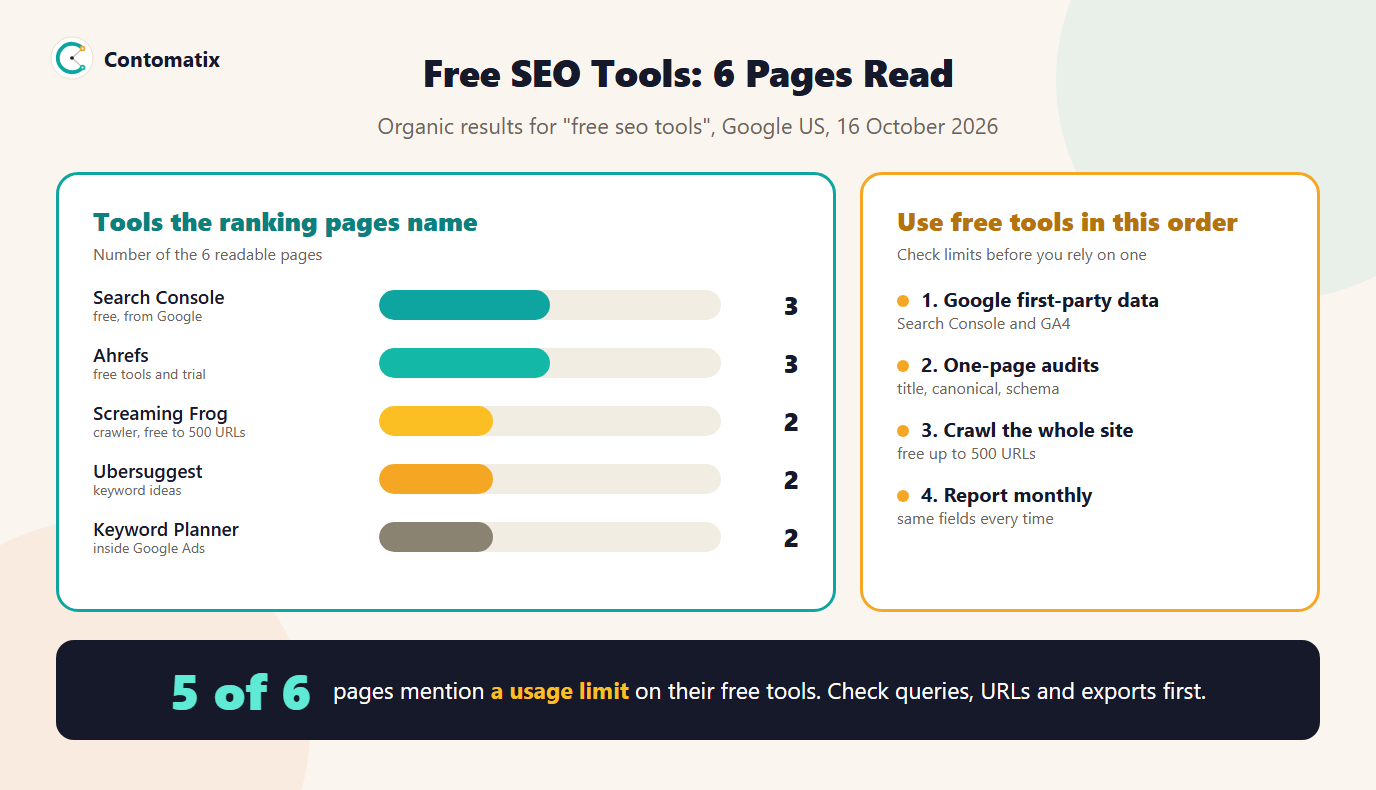
Free SEO tools are tools you can use without paying to check, plan and measure a site's search performance. Before writing this guide we read the 6 readable pages that rank on Google US for the term. They run a median of 1,526 words, only 3 of 6 name Google Search Console, and 5 of 6 mention a limit on free use. This page puts everything in one place: the free Google tools, the limits to check, and all 28 free tools we have built, grouped by job.
Below you will find what the ranking pages recommend, a free stack to use in order, every tool on contomatix.com with a link, and the limits to check before you rely on any free tool.
What the Ranking Pages Recommend
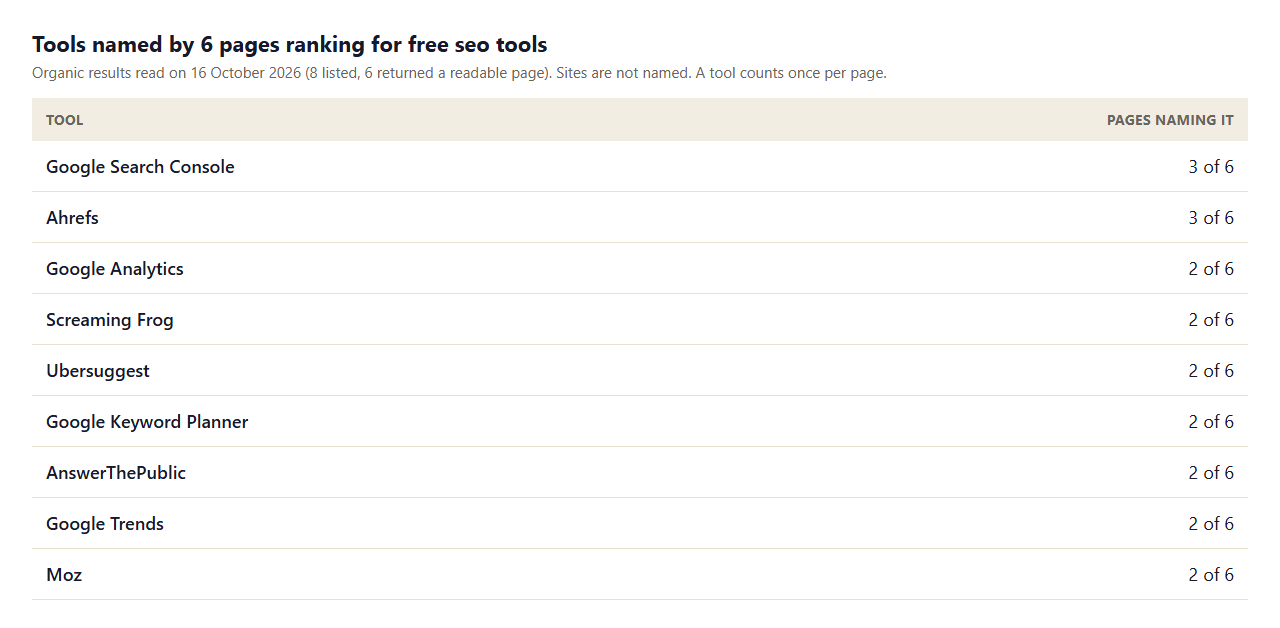
- No single tool wins. The most-named tools appear on only 3 of 6 pages, so every list is different. Build your own by job.
- Several "free" pages are vendor pages. Some results are a vendor's own tool hub, designed to lead to a paid plan. That is fine, but read the limit before you rely on one.
- Limits are common. 5 of 6 pages mention a usage limit or cap, such as a number of queries, URLs or reports. 4 of 6 mention a free plan or trial.
- Prices are rare. Only 2 of 6 show a dollar figure, so check the vendor's pricing page for what happens after the free tier.
- Reports are everywhere. 5 of 6 mention reports, which is the step our tools help with too.
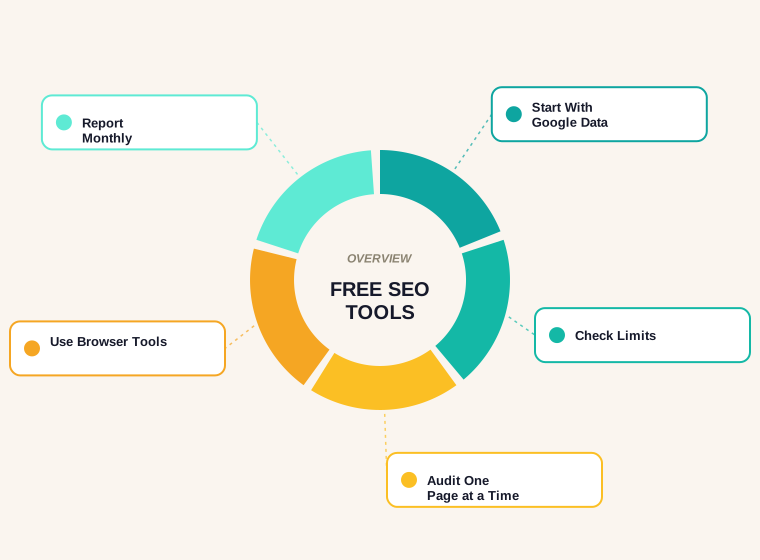
A Free SEO Stack, in Order
Search for "free SEO tools" and you will find hundreds of names. A short list covers most needs, and it should be used in this order.
- Google Search Console. It shows the queries and pages that bring impressions and clicks to your site. It is the only source of your own search data, so open it first.
- Google Analytics 4. It shows what visitors do after they arrive and, with key events set up, which pages lead to enquiries or sales.
- PageSpeed Insights. It reports real-user speed data where enough is available. In Google's documentation a page is rated good when Largest Contentful Paint is 2.5 seconds or less, Interaction to Next Paint is 200 milliseconds or less and Cumulative Layout Shift is 0.1 or less.
- Google's Rich Results Test. It previews whether a page is eligible for rich result features, although Google notes that structured data enables a feature but does not guarantee it will appear.
- A free crawler. The Screaming Frog SEO Spider is free to crawl up to 500 URLs, according to its pricing page, which is enough for most small sites.
- Keyword ideas. Google Trends and the Keyword Planner inside Google Ads show demand, and the Performance report in Search Console shows the queries you already rank for.
- Single-page checkers. The tools below run in your browser, take your own input and need no account.
All 28 Free SEO Tools on Contomatix, by Job
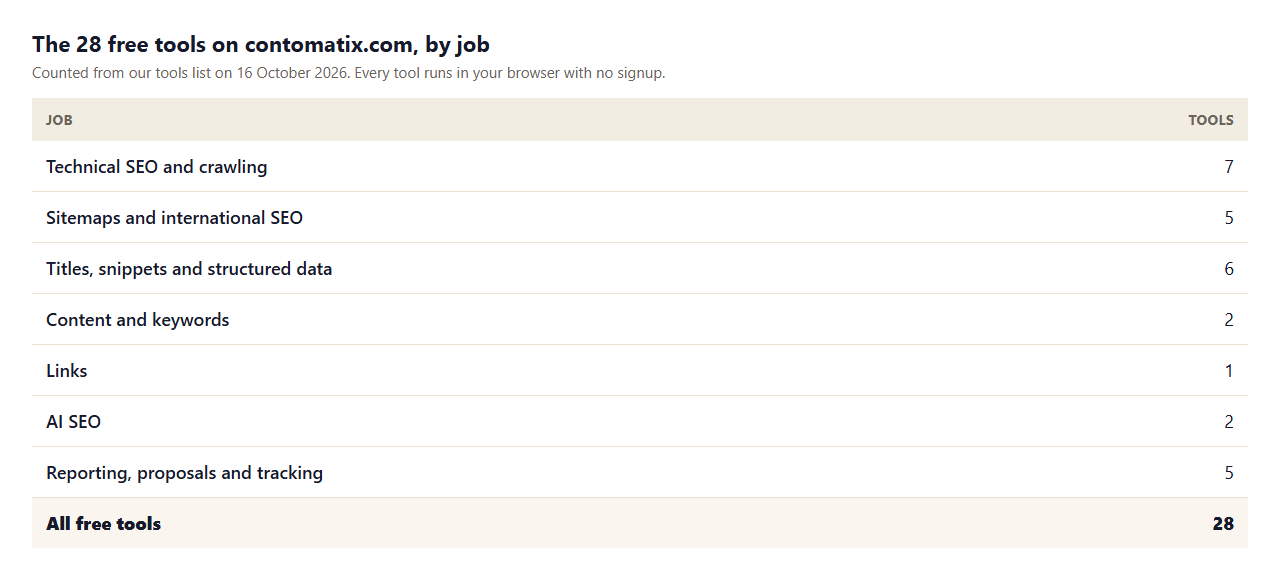
Every tool below runs in your browser. Nothing you paste is uploaded or stored, and there is no signup, usage cap or watermark. You can also browse them together on our free tools page.
Technical SEO and crawling
- Technical SEO Audit Tool: Paste a page HTML and check its title, meta description, headings, canonical, robots meta, hreflang, structured data, images and links.
- Robots.txt Tester: Paste a robots.txt, pick a crawler and test URLs against it with Google matching rules. See which rule allows or blocks each one.
- Robots.txt Generator: Build a valid robots.txt file in seconds — control crawler access, block AI bots, and reference your sitemap.
- Canonical Tag Checker: Paste a page URL and its HTML source to find missing, duplicate, relative or misplaced canonical tags and compare them with the page URL.
- Redirect Mapper: Match old URLs to new URLs for a site move, flag weak matches and chains, and export Apache or Nginx 301 rules and a CSV.
- Heading Checker: See a page H1-H6 outline and flag skipped levels, empty headings, a missing H1 and repeated heading text.
- Internal Link Checker: Sort a page links into internal, external and non-crawlable, and flag empty, generic and nofollowed anchors.
Sitemaps and international SEO
- XML Sitemap Generator: Turn a plain list of URLs into a valid sitemap.xml file in seconds.
- Sitemap Validator: Check a sitemap.xml file for structural errors, invalid URLs, duplicates, and limit violations — for free, in seconds.
- Sitemap URL Extractor: Pull every URL out of a sitemap.xml into a clean list or CSV, with last-modified dates and a path filter. Reads sitemap index files too.
- Hreflang Generator: Generate correct, reciprocal hreflang tags for multi-language and multi-region sites.
- Hreflang Sitemap Validator: Check hreflang annotations in a sitemap.xml for missing self-references, missing return links, and invalid language or region codes.
Titles, snippets and structured data
- Meta Tag Generator: Generate a complete, ready-to-paste HTML head block of meta tags in seconds.
- SERP Snippet Checker: See exactly how your title and meta description will look in Google search results, with live character-count warnings.
- Social Share Preview Generator: See how your link looks on Facebook, LinkedIn, and X, and generate the Open Graph tags to fix it.
- Slug Generator: Turn any page title into a clean, lowercase, hyphen-separated URL slug — accents stripped, stop words optional.
- Schema Markup Generator: Generate valid FAQ, HowTo, Local Business, or Article JSON-LD schema markup — ready to paste into your site.
- Schema Markup Validator: Paste JSON-LD or page HTML and check syntax plus the required and recommended properties Google documents for FAQ, Breadcrumb, Article, Product, LocalBusiness and Organization markup.
Content and keywords
- Keyword Mapping Tool: Match keywords to your page URLs, flag keywords that need a new page and group near-duplicate keywords — export to CSV.
- Readability Checker: Check your Flesch Reading Ease score, word/sentence counts, keyword density, and passive voice usage instantly.
Links
- Dofollow Link Checker: Paste a page HTML and see every link marked followed, nofollow, sponsored or ugc, internal or external, including page-level nofollow.
AI SEO
- llms.txt Generator: Build a valid llms.txt file in seconds — a plain-language map of your site for ChatGPT, Claude, and other AI assistants.
- LLM SEO Checker: Check which AI crawlers (GPTBot, ClaudeBot, PerplexityBot, Google-Extended) your robots.txt allows or blocks — for free, in seconds.
Reporting, proposals and tracking
- SEO Report Generator: Type in Search Console figures for two periods and get a plain-language monthly SEO report with changes, CTR, top pages, work done and next priorities.
- SEO Proposal Generator: Build a structured, client-ready SEO proposal with scope, timeline, reporting and terms — copy, download or print to PDF.
- UTM Tag Generator: Build properly tagged UTM campaign URLs for Google Analytics tracking in seconds.
- Geo-Grid Rank Planner: Plan a local geo-grid check around your business, enter the ranks you see on Google Maps, and get an average, top-3 coverage and a heatmap.
- Invoice Generator & Template: A free freelance invoice template that generates a professional, itemized PDF in seconds — no signup, nothing leaves your browser.
Limits to Check Before You Rely on a Free Tool
A free tool can still cost you time if it hides a limit. Before you build a process around one, check these points.
- Volume. How many URLs, keywords or checks do you get? A crawler that stops at 500 URLs is fine for a 200-page site and not for a 20,000-page one.
- Data source. Does it use your own data, the vendor's index or a sample? Search Console is first-party. Third-party volume and difficulty figures are estimates.
- Export. Can you take the results out as a file or text? A report you cannot copy is hard to use.
- Account. Does it need a login, and what does it do with your email? Browser-based tools that never upload your input avoid the question.
- Freshness. When was the tool last updated? Google changes its guidance, and checks built on old rules mislead.
Free Versus Paid: Where Free Tools Stop
Free tools are excellent for checking your own site and weak for competitor research. They tell you what is wrong with a page, which queries bring you impressions and how a change performed. They rarely give you a competitor's keywords, a full backlink index or rank tracking across thousands of terms. If your question is "what is broken on my page", free tools answer it. If it is "what do my rivals rank for", you will need data from a paid source. Our guide to the best SEO tools in 2026 compares paid options once you reach that point, and our B2B SEO tools guide builds a stack for software companies.
Which Free Tool Answers Which Question
- "Why is this page not showing a good snippet?" Preview it with the SERP snippet checker and compare the title and description with the queries in Search Console.
- "Is this page blocked or duplicated?" Test the URL in the robots.txt tester and check the tag with the canonical tag checker.
- "Are my links passing credit?" Paste the page HTML into the dofollow link checker.
- "Which page should target this keyword?" Use the keyword mapping tool so two pages do not compete.
- "Are we ready for AI search?" Run the LLM SEO checker and create an llms.txt file if you want one.
- "What do I send the client?" Use the SEO report generator each month and the SEO proposal generator for new work.
Each of these questions has a cheap, fast answer. If a question needs data you cannot get from your own site, that is the moment to consider a paid tool, not before.
How to Use Free SEO Tools in a Monthly Routine
- Week 1: measure. Export the month's clicks, impressions, CTR and position from Search Console and note the top pages.
- Week 2: audit. Run the SEO page audit on your five most important pages and fix titles, canonicals and headings.
- Week 3: fix structure. Validate your sitemap and your robots.txt, and check structured data on templates you changed.
- Week 4: report. Turn the numbers into a one-page summary with the SEO report generator and list next month's priorities.
Keep the same four weeks each month and you will see what moved and why. That habit matters more than any single tool.
How We Read the Pages
- We read the 8 organic results for one query on one day (Google US, 16 October 2026); 6 returned a readable page and two blocked our request.
- A tool counts once per page, whether the page recommends it or only mentions it. Counts are a reading aid, not a ranking of tools.
- The tool counts for contomatix.com come from our own tools list on the same date.
- Free limits come from each vendor's own pages and may change.
- Results in other countries or at other times will differ, so rerun the check on your own market.
Key Takeaways
- Start with Google's free tools: Search Console, Analytics and PageSpeed Insights.
- Check the limit on any free tool before you build a process around it.
- Use one-page checkers for titles, canonicals, sitemaps and structured data.
- Report monthly with the same fields every time.
- Pay only when you need competitor data or scale the free tools do not give.
Frequently Asked Questions
What are the best free SEO tools?
Start with Google Search Console, Google Analytics 4 and PageSpeed Insights, then add a free crawler and single-page checkers. No single tool covers every job.
Are there free SEO tools with no signup?
Yes. All 28 tools on contomatix.com run in your browser with no account, and nothing you paste is uploaded.
Is there a free SEO audit tool?
Our free SEO page audit checks one page's title, meta description, headings, canonical, robots meta, structured data, images and links. The Screaming Frog SEO Spider crawls up to 500 URLs for free.
What is the best free keyword research tool?
Search Console shows the queries you already rank for. Google Trends and the Keyword Planner show demand. Third-party free tools usually limit how many searches you can run.
Can I do SEO with only free tools?
Yes for your own site: performance, speed, audits, structured data and reporting. Competitor research and large-scale rank tracking usually need a paid tool.
Are free SEO tools accurate?
First-party tools such as Search Console report your own data. Third-party volume and difficulty numbers are estimates, so treat them as guides, not facts.
What is a good free SEO report template?
A one-page monthly summary with clicks, impressions, CTR and position against the previous month, top pages, work done and next steps. Our free SEO report generator builds one from your numbers.
How do I check my site's technical SEO for free?
Run a single-page audit on key pages, validate your sitemap and robots.txt, check structured data and use Search Console's indexing reports for site-wide problems.
Do free SEO tools have limits?
Many do. 5 of the 6 pages we read mention a limit on queries, URLs or reports, so check the limit before you depend on a tool.