Last updated: October 2026
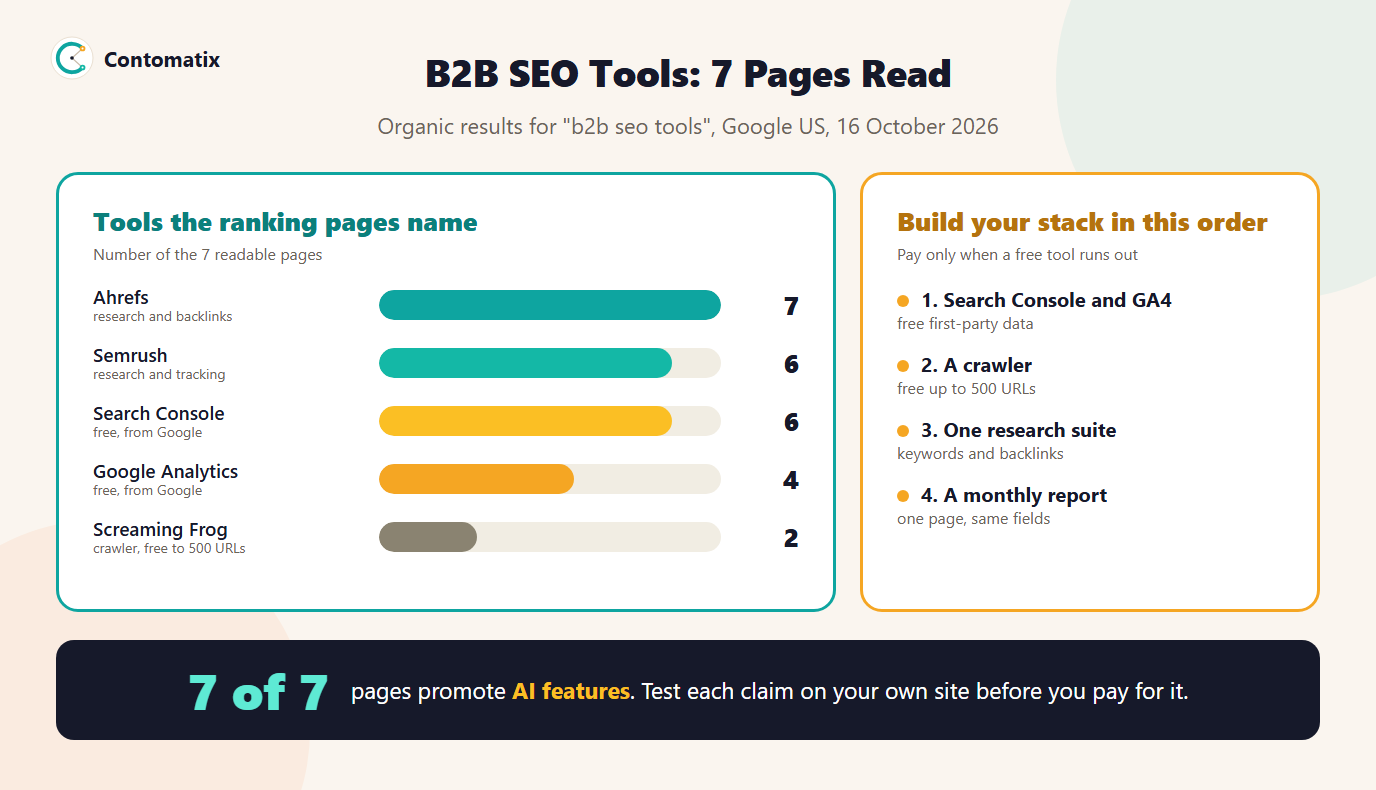
B2B SEO tools are the software a business-to-business company uses to find keywords, check its site, track search performance and analyse backlinks. Before writing this guide we read the 7 readable pages that rank on Google US for the term. They run a median of 3,028 words, 7 of 7 name the same research suite, and all 7 promote AI features. This guide turns that into a stack you can build by job, starting with what costs nothing.
Below you will find what the ranking pages recommend, why B2B and SaaS teams need a different stack from a local shop, a table of free options with their documented limits, how to decide when to pay, and how to judge AI claims. If you are comparing paid suites in depth, our best SEO tools comparison goes further.
What the Ranking Pages Recommend
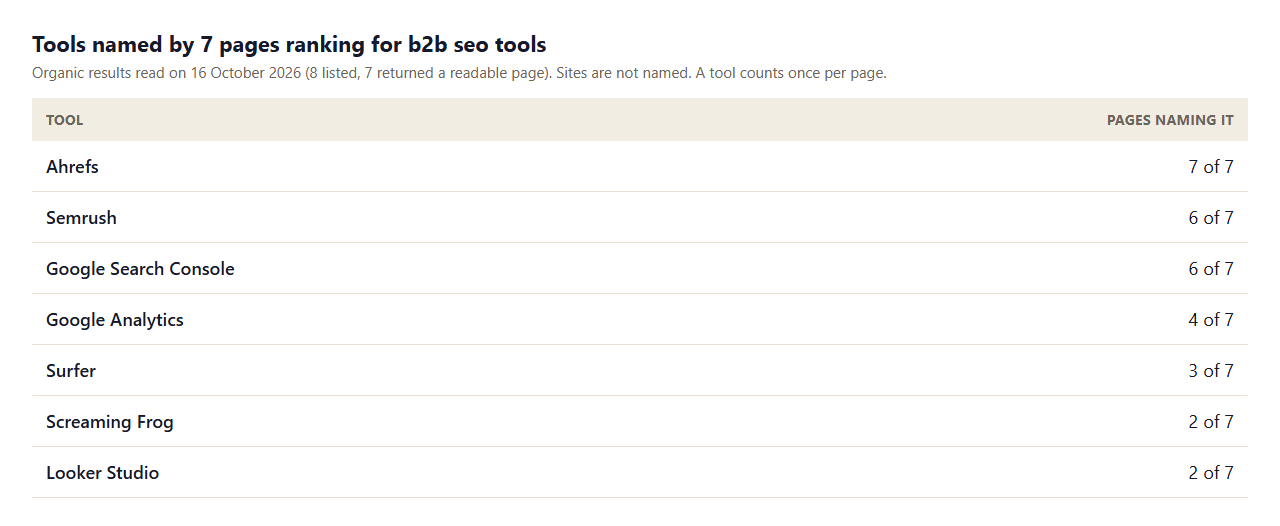
- The large research suites dominate. 7 of 7 pages name Ahrefs and 6 of 7 name Semrush. These cover keyword research, backlinks and competitor data in one login.
- Google's free tools are named less than you would expect. Search Console appears on 6 of 7 pages and Google Analytics on 4, even though they are the only source of your own search and visit data.
- Crawlers and reporting tools are an afterthought. Screaming Frog appears on 2 pages and Looker Studio on 2, yet audits and monthly reporting are where most teams lose time.
- Prices are inconsistent. 5 of 7 pages show a dollar figure; 3 show monthly prices for the smaller tools they list, in a range from $21 to $129 a month. Plans and limits change, so check the vendor's own pricing page.
- Everyone promotes AI. All 7 pages mention AI features, and 6 of 7 also mention a usage limit or cap, which is where the real cost sits.
Why B2B and SaaS Teams Need a Different Stack
A B2B or SaaS site has fewer pages, longer buying cycles and a smaller, more specific audience than a consumer site. That changes what the tools must do. You rarely need to track thousands of keywords. You need to track the dozens that map to a product, a use case or a comparison, and to connect search visits to demos and signups. You also need competitor data, because in software the competing pages are named, indexed and constantly updated. A SaaS SEO platform is therefore less about volume and more about three jobs: knowing which topics buyers search, seeing who already ranks, and proving that organic visits turn into pipeline.
People look for the same thing under many names: SaaS SEO tools, an SEO tool for SaaS, a top SEO tool for B2B, the best platform for SEO for B2B or SEO SaaS software. They all point at the same stack, covered below.
The B2B SEO Tool Stack by Job
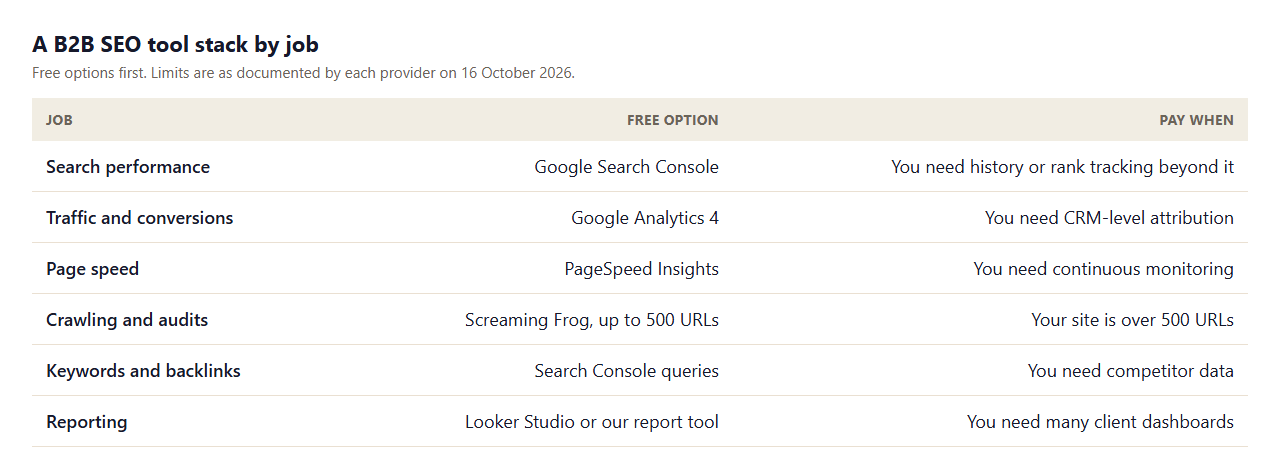
Start with tools that cost nothing, because they hold your own first-party data. Google Search Console shows the queries and pages that already bring impressions and clicks. Google Analytics 4 connects visits to key events such as demo requests. PageSpeed Insights reports real-user data where enough is available, and classes a page as good when its Largest Contentful Paint is 2.5 seconds or less, its Interaction to Next Paint is 200 milliseconds or less and its Cumulative Layout Shift is 0.1 or less, according to Google's documentation read on 16 October 2026. For crawling, the Screaming Frog SEO Spider is free for up to 500 URLs and its pricing page says a licence is needed to crawl more, which is enough for most early-stage SaaS sites.
Only then add a paid research suite. You need one, not three. Choose by the job you cannot do for free: competitor keywords, backlink data or rank tracking at the scale you need. Our guides to backlink analysis tools and keyword research tools compare options for those two jobs.
Free Tools From Contomatix for the Same Jobs
Several jobs in the stack can be done in the browser without an account. These run on your own data and nothing leaves your browser:
- SEO page audit for the title, headings, canonical, robots meta and structured data of one page.
- Schema markup validator to check JSON-LD against the properties Google documents.
- SEO report generator to turn Search Console numbers into a monthly report.
- Keyword mapping tool to assign each keyword to a page and spot cannibalisation.
- Dofollow link checker to see whether a link passes credit.
When to Pay for a B2B SEO Tool
Pay when a free tool stops answering a question you actually have. Use this list.
- You need competitor data. Search Console only shows your own queries. A research suite shows what rivals rank for and who links to them.
- Your site outgrows the free crawler. Past 500 URLs you either license the crawler or use a cloud one.
- You manage several sites or clients. Dashboards and white-label reports start to save real time.
- You need history. Search Console data is limited in what it keeps, so a rank tracker helps you compare over long periods.
- You want content scoring. Only 3 of 7 pages name a content optimisation tool, so test it on three pages before you commit.
A practical way to decide is to run a two-week trial with a written question. For example: "Which five competitor pages rank for our top comparison query, and which sites link to them?" If the trial answers it and you would act on the answer, the tool earns a place in the budget. If you finish the trial with a long export and no decision, it does not. Cancel before the renewal date, and put that date in your calendar when you start.
How to Judge AI Features in SEO Tools
All 7 pages we read promote AI. Test the claim, not the label. Pick one task you already know the answer to, such as a keyword cluster you have mapped by hand or a technical issue you have already fixed, and see whether the AI feature reaches the same result and shows its reasoning. Ask what data the feature uses, whether it saves time on a real job and whether the output is something you would publish or send to a client. Features that only reword a brief are not a reason to pay. Our guide to AI-powered SEO tools shows how to compare them.
How B2B Keyword Research Differs
Consumer keyword research chases volume. B2B keyword research chases fit. A term with 50 monthly searches that is typed by the person who signs the contract can be worth more than a term with 5,000 searches typed by students. So when you use a research suite, filter for intent first: problem phrases (how to reconcile invoices), solution phrases (invoice reconciliation software), comparison phrases (this tool vs that tool) and integration phrases (a tool plus the platform it connects to). Then check who ranks. If the first page is full of large publishers and review sites, plan content that adds something they lack, such as original data or a free tool, rather than another list.
Search Console is the best place to begin because it shows the long, specific queries you already appear for. Sort by impressions, find queries where you rank between positions 8 and 20, and map each to a page using our keyword mapping tool. Those are often faster wins than a new article for a head term.
Technical Checks a B2B Site Needs From Its Tools
A software site is usually built on a JavaScript framework, has a separate app subdomain and ships changes weekly. That creates a short list of checks worth automating. Confirm that important pages return a 200 status and are not blocked in robots.txt, using a tester such as our robots.txt tester. Check that each page has one canonical and that the canonical points to the version you want indexed. Validate the structured data you actually use, for example with the schema markup validator. Review rendered HTML, not only the source, because content injected by scripts may not appear in a basic crawl. And watch the sitemap: pricing, integration and comparison pages should be in it, while login and app URLs should not.
None of this needs an expensive suite. A free crawler under 500 URLs, Search Console's indexing reports and a few single-page checkers cover the checks above for a typical early-stage SaaS site.
Comparison and Integration Pages: Where B2B Tools Earn Their Keep
Two page types decide most B2B search results: comparison pages ("us versus them" and "alternatives") and integration pages ("our product with that platform"). Use your tools to answer three questions about each. Who ranks today, and what do they cover that you do not? Which queries bring impressions to your existing page, and does the title match them? And which sites link to the pages that rank, because that shows where links can come from. Write down the answers in the keyword map before you create or rewrite the page, so each page has a clear job.
Common Mistakes When Choosing B2B SEO Tools
- Paying for three suites that overlap. Keep one research suite and use free tools for the rest.
- Tracking too many keywords. A short list tied to products and use cases is easier to act on than thousands of terms.
- Trusting a single score. Difficulty and authority metrics are estimates from each vendor and differ between tools.
- Ignoring first-party data. Search Console and GA4 show what your own audience does, so open them before any paid dashboard.
- Buying before you have a process. A tool does not decide which page to improve. Write the process, then choose software to support it.
Reporting: The Step Most Stacks Skip
A stack without a report is a set of logins. Decide on one page per month: Search Console clicks, impressions and position for this period against the last, the top pages, work done and next priorities. It is the same format whether you are a founder or an agency. Use the free SEO report generator to produce the first version and refine it. Add a business result next to traffic, such as demo requests, so the report speaks the language of the buyers who read it.
How We Read the Pages
- We read the 8 organic results for one query on one day (Google US, 16 October 2026); 7 returned a readable page and one blocked our request.
- A tool counts once per page, whether the page recommends it or only mentions it. Counts are a reading aid, not a ranking of tools.
- Prices are as shown on the pages that day and change often.
- Free limits come from the vendors' own pages on 16 October 2026 and may change.
- Results in other countries or at other times will differ, so rerun the check on your own market.
Key Takeaways
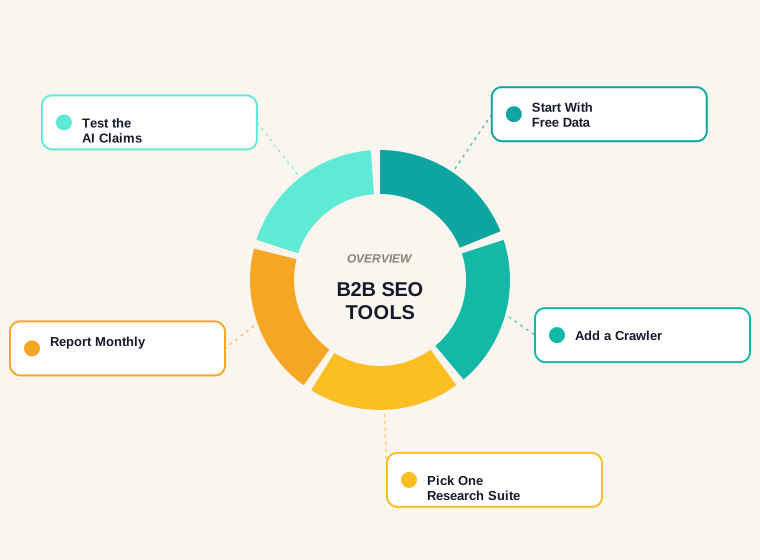
- Build the stack by job and start with free first-party data: Search Console and GA4.
- Add a crawler next, free up to 500 URLs, then one paid research suite for competitor data.
- Test AI claims on a task you already know the answer to.
- Publish one monthly report with the same fields every time.
- Pay only when a free tool stops answering a question you have.
Frequently Asked Questions
What are the best B2B SEO tools?
The pages we read most often name one large research suite plus Google Search Console and Google Analytics. A sensible stack adds a crawler and a reporting step, and pays only for what free tools cannot do.
What is a SaaS SEO platform?
It is a tool or suite used to research keywords, audit the site and track search performance for a software company. For most teams it is one paid research suite plus Google's free tools.
Which SEO tool is best for SaaS?
No single tool wins on every job. Choose the one that answers the question you cannot answer free, usually competitor keywords and backlinks, and test it on your own site first.
Can I do B2B SEO with only free tools?
Yes, for your own site. Search Console, GA4, PageSpeed Insights and a free crawler cover performance, conversions, speed and audits. You need a paid tool mainly for competitor data.
How much do B2B SEO tools cost?
The smaller tools on the pages we read show monthly prices from $21 to $129. The large suites cost more and change plans often, so check the vendor's pricing page.
Is there a free SEO tool for crawling a website?
The Screaming Frog SEO Spider is free for up to 500 URLs, according to its pricing page. Our free SEO page audit checks one page at a time in your browser.
What is a good SEO tool for B2B reporting?
Looker Studio works for live dashboards. For a monthly written summary, our free SEO report generator turns Search Console numbers into a report.
Do I need an AI SEO tool?
Only if it saves time on a real job. Test it on a task you already know the answer to before paying for it.
How many SEO tools does a B2B company need?
Usually one paid research suite plus the free Google tools and a crawler. More logins rarely create more insight.