Last updated: September 2026
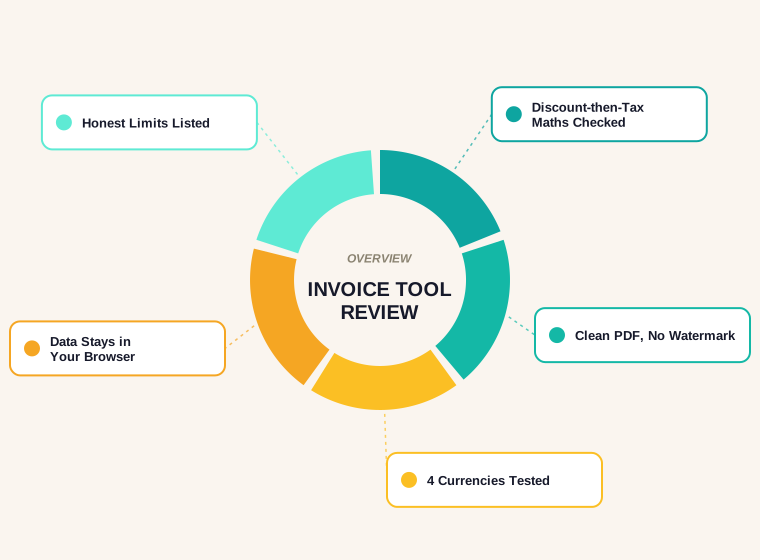
We built a free invoice generator no sign up tool for our own site, so this review comes with an obvious bias. To offset that, we tested it the way a sceptical freelancer would: real line items, a discount, tax, a logo, four currencies, and a close look at the PDF that comes out the other end. One of those tests found a bug on the day we tested it. We fixed it before publishing, and it is written up below.
If you only want the short answer: it is a good fit for freelancers and small businesses who send a handful of invoices a month and don't want another account. It is the wrong tool if you bill the same clients every month, need online payment links, or have to keep a searchable history inside the app. You can try the invoice generator here while you read.
Why We Are Reviewing Our Own Tool
Contomatix is an SEO and link building agency. The invoice generator sits in our free tools section because a lot of the freelancers and small agencies we talk to were paying for invoicing software they barely used. They sent a few invoices a month, and every time they had to log in, dodge an upgrade prompt, and download a PDF with someone else's branding in the footer.
So yes, we made it, and yes, we would like you to use it. That is exactly why this page lists what the tool can't do as well as what it can. A review that only praises the product it sells is an advert, and you would be right to ignore it.
How We Tested It
We ran every test on 22 September 2026 in a desktop Chrome browser, using made-up business and client details. The test invoice had two line items: one website audit at $450 and three blog posts at $120 each. On top of that we applied a 10% discount and 5% tax, then repeated the same invoice in US dollars, Pakistani rupees, Indian rupees and UAE dirhams.
For each run we checked three things. Did the on-screen preview add up? Did the downloaded PDF match the preview? And did anything look wrong once the PDF was opened in a normal viewer? We also uploaded two logos of different sizes to see what they did to the file. Google's guidance on writing high quality reviews asks for evidence of real use and honest weaknesses, and that is the standard we tried to hold ourselves to.
Free Invoice Generator No Sign Up: What You Actually Get
The page is a single form on the left and a live invoice on the right. There is no email box to fill in before you start and no account screen. You type, and the preview updates as you go.
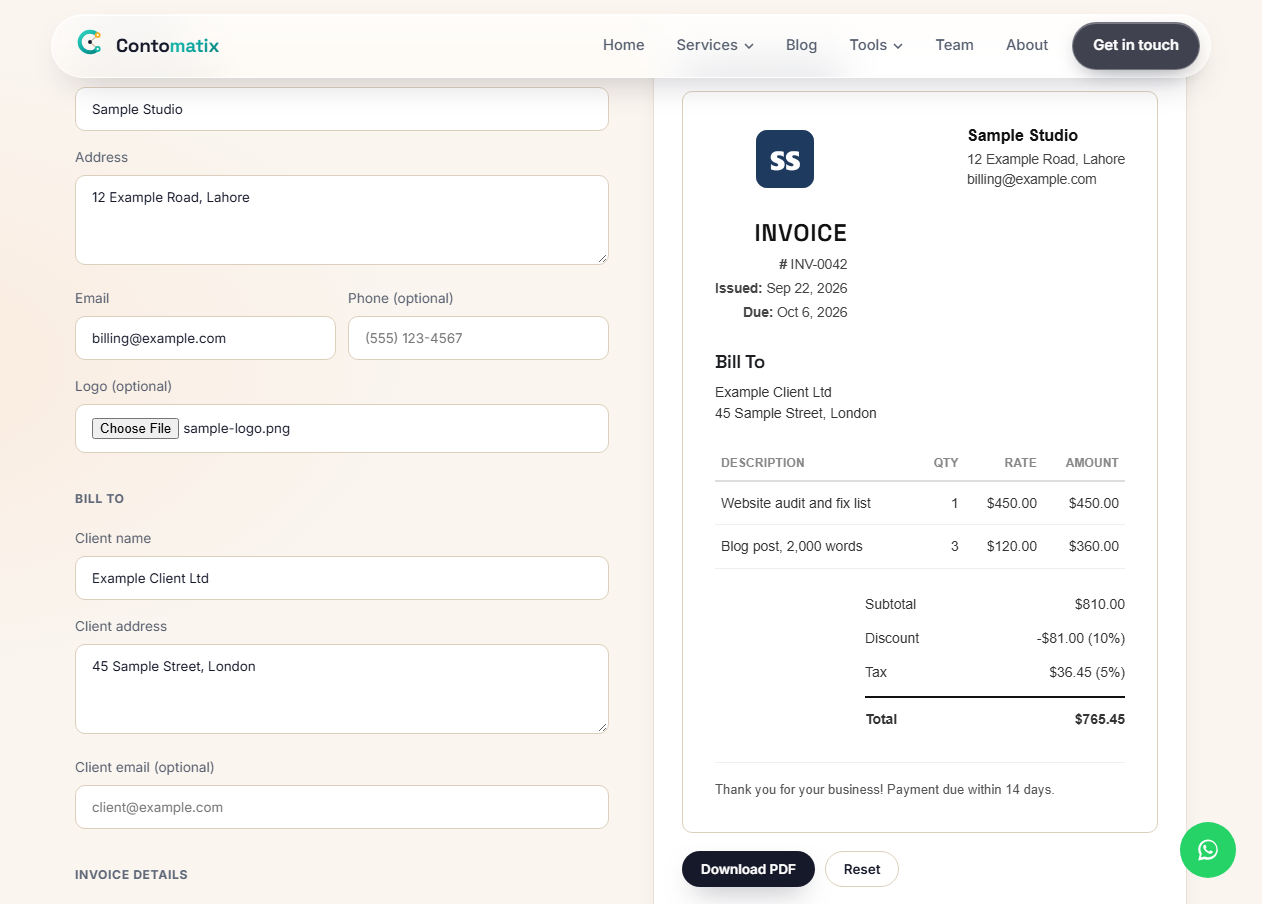
Here is what the form covers:
- Your business name, address, email and an optional phone number
- An optional logo, which appears on both the preview and the PDF
- The client's name, address and an optional email
- An invoice number, issue date and due date
- Line items with a description, quantity and rate, and as many rows as you need
- A discount percentage and a tax percentage
- A notes box for payment terms or bank details
- A choice of eight currencies: USD, EUR, GBP, CAD, AUD, PKR, INR and AED
Descriptions can run over two lines if you press Shift+Enter, which matters more than it sounds. "Website audit" tells a client very little. "Website audit: 42 pages, fix list delivered 20 Sept" answers the question their accounts team would otherwise email you about.
The Maths: Discount First, Then Tax
This is the part we checked by hand, because a wrong total on an invoice is worse than no invoice at all.
The two lines came to $810. The tool took 10% off first, which is $81, leaving $729. It then added 5% tax to that discounted figure, which is $36.45, for a final total of $765.45. That is the order most accounting systems use, and it is the order your client's finance team will expect. If a tool applied tax before the discount, the total would come out 5% higher on the discount alone, a small error that still gets invoices sent back.
Every currency we tried gave the same numbers, with thousands separators in the right places and two decimal places throughout. The preview and the PDF agreed on every line.
The PDF Your Client Receives
Pressing Download PDF saves the file straight away. There is no print dialog to fight with and no "save as PDF" setting to hunt for. The file is named after your invoice number, so INV-0042 downloads as INV-0042.pdf, which saves a step when you file it.
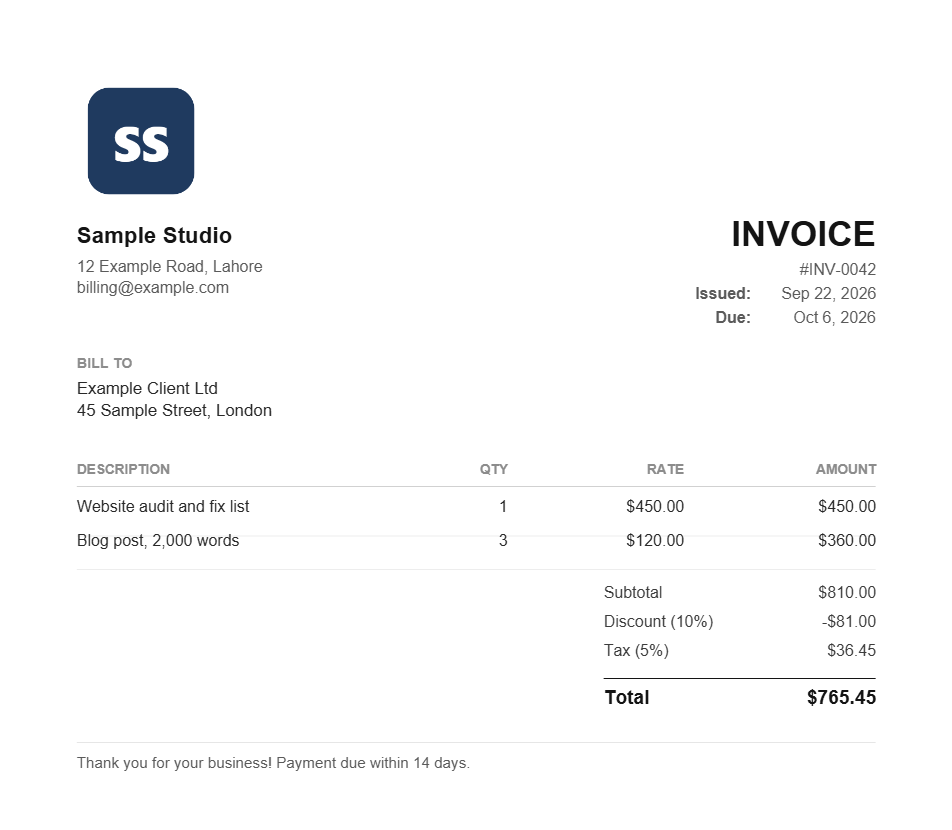
The layout is plain on purpose: black text, grey labels, your logo top left, and "INVOICE" with the number and dates on the right. There is no watermark and no "made with" line in the footer. It looks like something a real business sent, which is the whole point.
Two practical notes from testing. First, the page size is A4. That is standard in the UK, Europe, Pakistan, India and the Gulf. In the US and Canada, where Letter paper is normal, most PDF viewers scale it to fit when printing, but it is worth knowing. Second, keep your logo small. With a 240-pixel logo our PDF was about 12 KB. With a 512-pixel PNG it jumped to about 1 MB, which is still fine by email but noticeably heavier than it needs to be.
We also spotted one cosmetic difference. When a logo is added, the on-screen preview moves the "INVOICE" heading under the logo, while the PDF keeps the business details on the left and the invoice details on the right. The PDF is what your client sees, so it is a minor point, but it can look odd the first time.
The Rupee Bug We Found, and How We Fixed It
This is the finding we did not expect. In the preview, Pakistani and Indian rupee invoices looked perfect, with the ₨ and ₹ signs in place. In the downloaded PDF, those signs came out as stray marks. The Pakistani total read as "¨765.45" and the Indian one as "¹765.45".
The cause was the font. PDFs made in the browser use a small built-in font set, and that set simply has no rupee signs in it, so the file substituted whatever character sat in that slot. Dollars, euros and pounds were never affected, and dirhams were already printed as the letters "AED".
We changed rupee invoices to print the currency code instead, so amounts now read "PKR 765.45" and "INR 765.45". That is how banks and most international invoices show them anyway. While testing larger rupee amounts we also found that a figure like PKR 125,000.00 crowded the quantity column, so we widened the rate column in the PDF. Both fixes went live on 22 September 2026. If you downloaded a rupee invoice before that date, it is worth regenerating it.
Privacy: What Happens to Your Data
Everything happens in your browser. The page builds the PDF on your own device, and the form data is never sent to our server. We checked the tool's code for any request that sends data out and found none. Your logo is read locally too.
The flip side is that nothing is saved. Close the tab and your invoice is gone, so download the PDF before you navigate away. For some people that is a feature: no client addresses sitting in a third-party database. For others it is a reason to use proper invoicing software, which we cover next.
Where It Falls Short
Being honest about the gaps is the most useful part of any review, so here they are in plain terms:
- No saved clients or templates. You re-enter your details and your client's details on every visit. The browser may autofill some fields, but the tool itself remembers nothing.
- No recurring invoices. If you bill the same retainer every month, you rebuild it every month.
- No payment links. The invoice can't take a card payment. Put your bank details or payment instructions in the notes box.
- No invoice history. Keep your own folder of PDFs. Nothing is stored for you to search later.
- One tax rate per invoice. If different lines carry different tax rates, you will need separate invoices or software that supports line-level tax.
- Discounts are percentages only. A flat "£50 off" has to be converted to a percentage, or added as a negative line.
- No dedicated tax ID or supply date fields. These go in the notes box, which works but is easy to forget.
- No emailing from the tool. You download the PDF and attach it to your own email.
None of these are surprising for a free invoice generator no sign up tool, because there is no account behind it. You can't have saved clients without storing something about them somewhere. But if two or three of these describe your week, you have outgrown a free generator.
Does a Free Invoice Meet Tax and Legal Rules?
The tool follows the standard layout, but the rules depend on where you trade, and they are your responsibility, not the software's.
In the UK, GOV.UK lists what an invoice must include: a unique number, your business name and address, the customer's name and address, a description of what you supplied, the date of supply, the invoice date, the amounts, any VAT and the total. The generator has a field for all of these except the supply date, so add a line to the notes such as "Services supplied: 1 to 20 September 2026". If you are VAT registered, a VAT invoice needs further details, including your VAT number, which also belongs in the notes.
In the US there is no single federal invoice format, but the IRS expects you to keep records that support your income. Because the tool stores nothing, your downloaded PDFs are those records. Save every one, including any you later correct. In Pakistan, India and the UAE, registered businesses usually need a tax registration number on the invoice, and that goes in the notes box too. If you are unsure, a short conversation with your accountant costs less than a rejected invoice.
Who Should Use It, and Who Shouldn't
After testing, the dividing line was clearer than we expected. It comes down to how often you invoice and whether you need the software to remember anything.
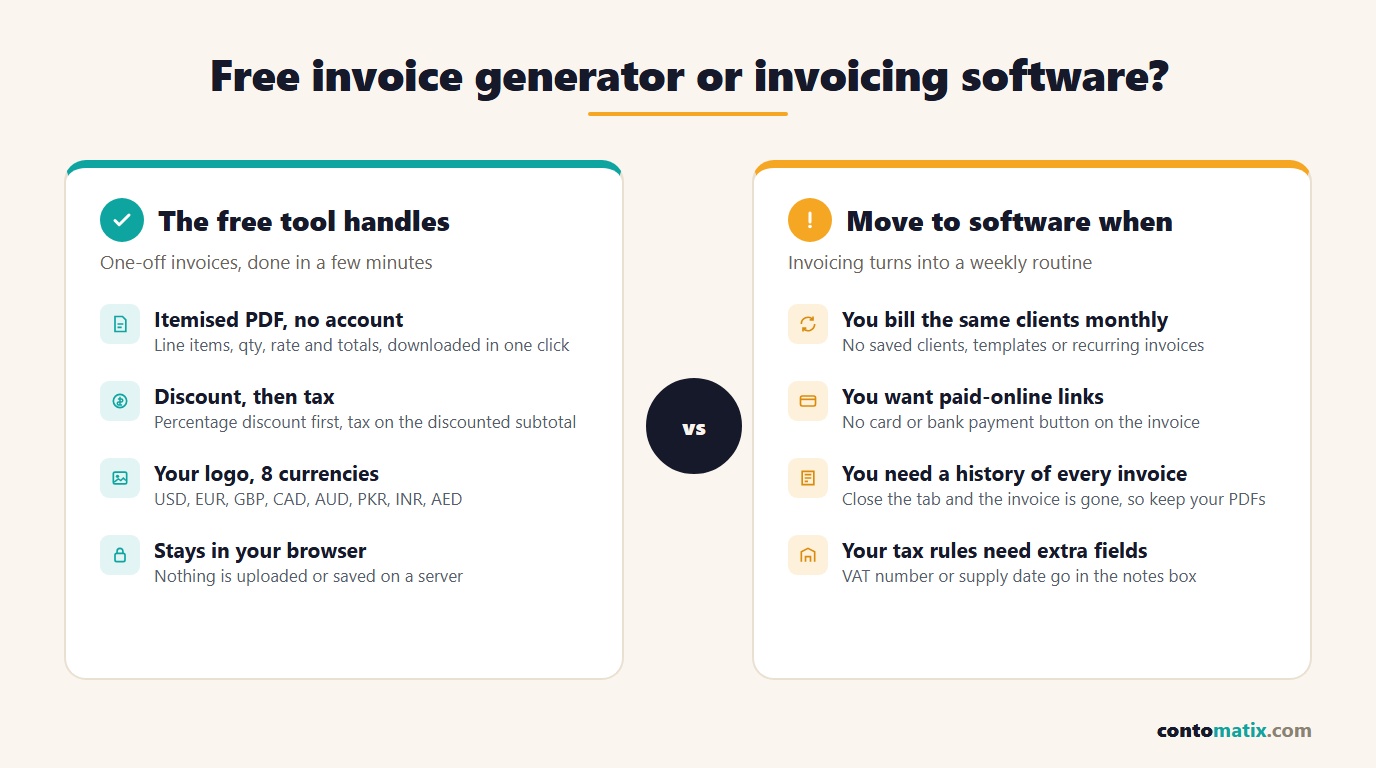
A free invoice generator no sign up tool suits you if you are a freelancer sending two to ten invoices a month, a small business billing the occasional one-off job, someone who needs an invoice today and has no software set up, or anyone who prefers not to hand client details to another online service.
It doesn't suit you if you run monthly retainers, want clients to pay by card from the invoice, need reminders for overdue payments, or share billing with a bookkeeper who works inside accounting software. In those cases, paid invoicing or accounting software will save you more time than it costs. Much of it connects to your bank feed as well, which a standalone generator can never do.
How to Make Your First Invoice in Five Minutes
- Fill in your details once, carefully. Use the business name your client knows you by. An invoice from a name the finance team does not recognise can get held for review.
- Add the client's legal name and billing address. Ask for them if you are not sure. The person you email is often not the entity that pays.
- Choose a numbering system and stick to it. INV-0001, INV-0002 and so on is fine. Never reuse a number, even for a cancelled invoice.
- Write one line per piece of work. A lump sum invites questions. Separate lines get approved faster.
- Set a real due date. "Due on receipt" tends to get paid last. A date gets scheduled.
- Put payment details and any tax numbers in the notes. Include the supply date if you trade in the UK.
- Download, check, and file. Open the PDF, check the total, then save it in a folder by year before you send it.
Our Verdict
As a free invoice generator no sign up option, it does the core job well. The totals are right, the PDF is clean and unbranded, and nothing leaves your browser. The rupee bug was a real problem for our Pakistani and Indian users, and it was only visible in the PDF, never on screen. That is a good reminder to open any generated invoice before you send it, whichever tool made it.
Use it for quick, occasional invoicing. Move to proper software once invoicing becomes a weekly routine. If you want to test it against your own numbers, the rest of our free tools work the same way: no sign up and no watermark.
Frequently Asked Questions
Is there a free invoice generator with no sign up?
Yes. The Contomatix invoice generator needs no account or email address. You fill in the form, check the live preview and download the PDF straight away, with no watermark.
Does the tool save my invoices?
No. Everything runs in your browser and nothing is stored, so closing the tab clears the form. Download the PDF and keep your own copy of every invoice you send.
How does it calculate discount and tax?
It applies the discount percentage to the subtotal first, then calculates tax on the discounted amount. In our test, $810 with a 10% discount and 5% tax came to $765.45.
Why does my rupee invoice show PKR or INR instead of the symbol?
The built-in PDF font has no rupee signs, so older rupee invoices printed stray characters. Since 22 September 2026 the PDF uses the currency code instead, which is also the format most banks use.
Can I add my business logo?
Yes. Upload it in the logo field and it appears on the preview and the PDF. A small image around 200 to 300 pixels wide keeps the file light. A large PNG can push the PDF to about 1 MB.
What paper size is the PDF?
The PDF is A4. That is standard outside North America. On US Letter paper, most PDF viewers scale it to fit the page when printing.
Can I use it for VAT or GST invoices?
You can, as long as you add the details your tax authority requires. Put your VAT or GST number, and in the UK the supply date, in the notes box. Check your local rules with an accountant if you are unsure.
Can I send the invoice or take payment from the tool?
No. The tool creates the PDF only. Attach it to your own email, and put your bank details or payment instructions in the notes so the client knows how to pay.
When should I switch to paid invoicing software?
Switch when you bill the same clients every month, want card payment links or automatic reminders, or need a searchable invoice history shared with a bookkeeper.