Last updated: October 2026
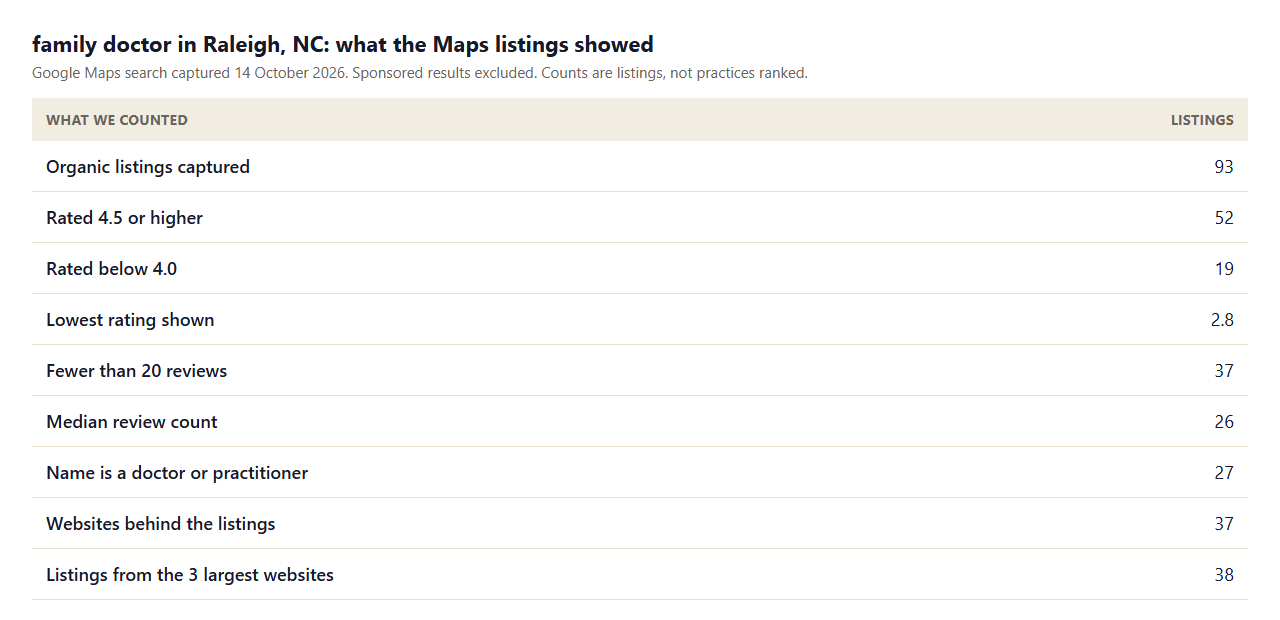
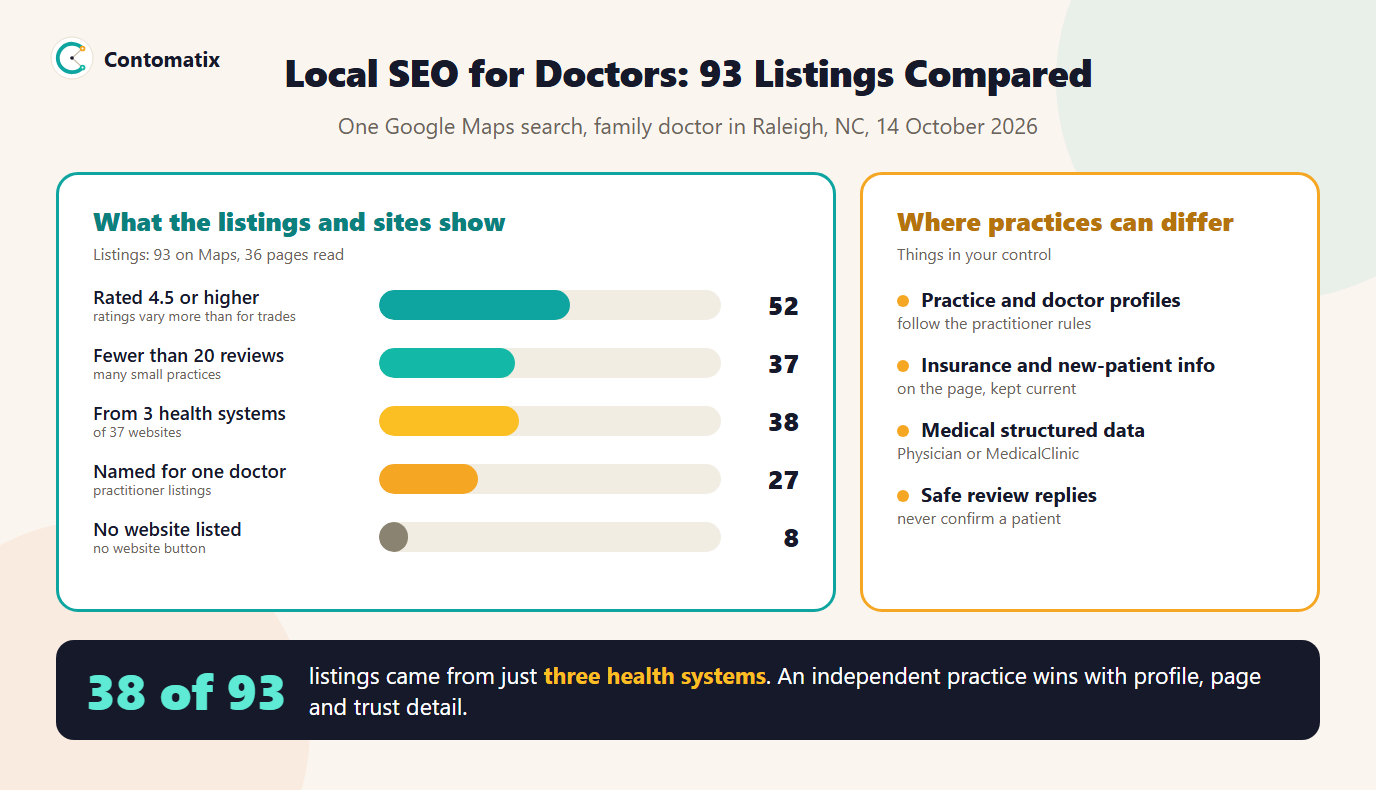
In one Google Maps search for a family doctor in Raleigh, 38 of the 93 organic listings came from just three health-system websites, and only 5 of the 36 practice pages we could read used a medical schema type. That is the picture behind local SEO for doctors: big systems fill the map pack, independent practices have fewer reviews, and the difference is made by profile set-up, trust pages and a clear route to an appointment.
We captured the listings, then fetched the pages behind them to see what each practice actually puts in front of a patient. This guide shares the findings, adds Google's rules for practitioner profiles and ends with a checklist. For a neighbouring vertical, see our guide on SEO for dentists.
What We Checked
We searched Google Maps for family doctor in Raleigh, NC, scrolled until no more results loaded and kept the 93 organic listings after removing duplicates and one sponsored result. For each we read the rating, review count, category, name and website. We then fetched 47 of the linked pages, 36 of which returned a readable page, and checked for signals patients look for: insurance information, phone links, hours, booking, new-patient status and structured data. We do not name practices. Health systems with many listings share one site, so we fetched each site's main location or home page once.
What the Maps Listings Show
- Health systems dominate. 38 of 93 listings, 41 percent, came from the three largest websites, and the biggest single site accounted for 15. Another 26 sites each had just one listing.
- Ratings spread more than for trades. 52 listings are rated 4.5 or higher, but 19 are below 4.0 and the lowest is 2.8. A good rating does stand out here.
- Review counts are small. The median is 26 reviews, and 37 listings have fewer than 20. Only 6 have 500 or more.
- Many listings are individual doctors. 27 are named for a person, such as a doctor with a credential, which follows Google's practitioner rules.
- No listing shows 24-hour opening. Unlike trades, a family practice is a scheduled service, so hours and appointment access matter more than being open all day.
What the Practice Websites Show
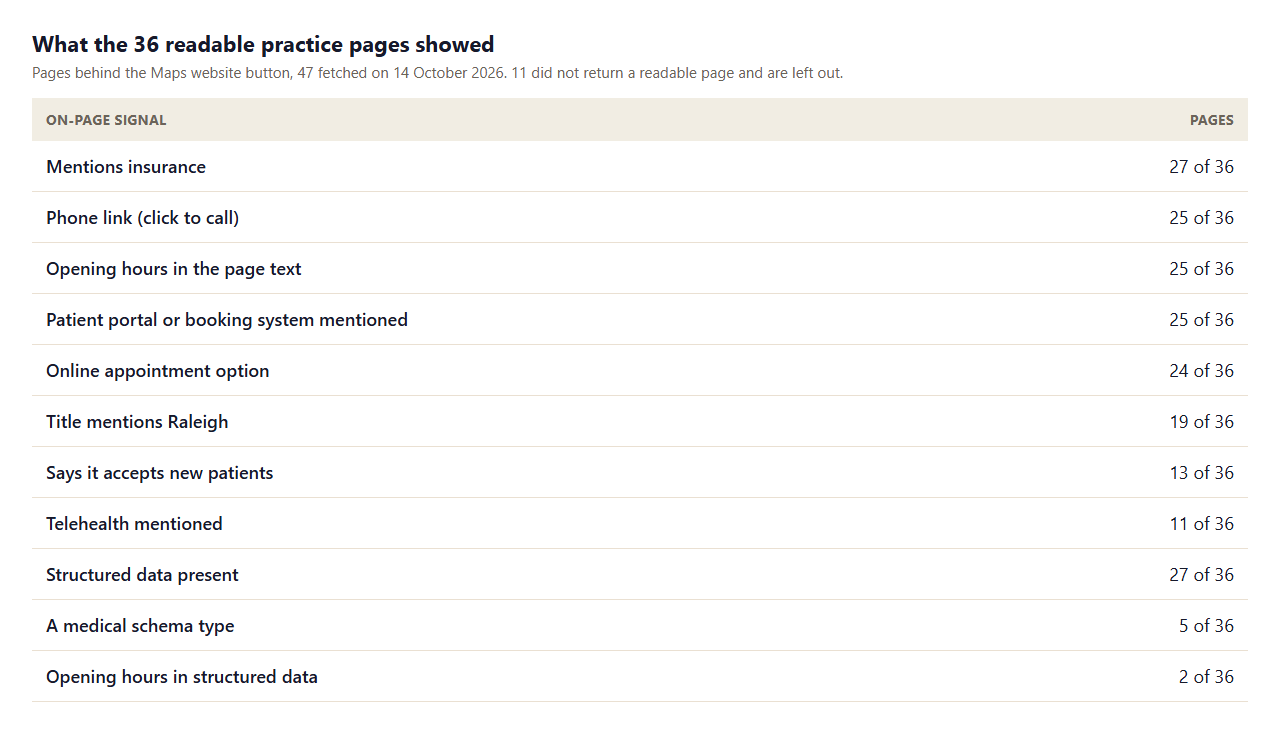
- The basics are common. 27 of 36 mention insurance, 25 have a click-to-call phone link and 25 show hours in the text.
- Booking is common, new-patient status is not. 24 of 36 offer an online appointment, but only 13 say they are accepting new patients. A patient searching for a new doctor often needs exactly that answer.
- Structured data is present but generic. 27 of 36 use structured data, and only 5 use a medical type such as Physician or MedicalClinic. Only 2 include opening hours in the markup.
- Telehealth is mentioned by 11 of 36. Where offered, it deserves its own clear mention.
Step 1: Set Up the Practice and Doctor Profiles Correctly
Google's Business Profile guidelines treat an individual practitioner as a public-facing professional with their own customer base, and doctors are named in that definition.
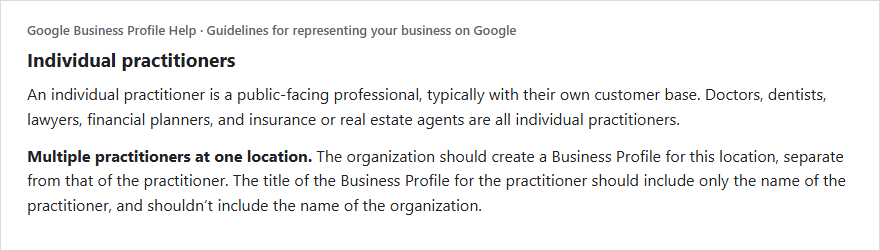
- Several doctors at one address. The organisation has a profile for the location, and each public-facing doctor can have their own. The doctor's profile title includes only the doctor's name, not the organisation's.
- A solo doctor in a branded organisation. Google's guidance is generally to share one profile with the organisation, so do not duplicate it.
- One profile per doctor. A practitioner should not have multiple profiles to cover specialisations.
- Staff do not get profiles. Support staff should not create their own.
Our guide to local SEO for multiple locations covers how to keep the location, practice and practitioner records consistent.
Step 2: Build Pages Patients Can Trust
A medical site needs more than a homepage. Build four page types and link them to each other.
- A practice page for each location. Address, hours, parking, phone and a map, with the services offered there.
- A page for each doctor. Photo, credentials, training, languages, special interests and which locations they see patients at. Several listings in our sample landed on a doctor's own page, which matches the doctor-named profile.
- A page for each major service. Annual physicals, chronic care, vaccinations and sports exams, written in plain language by or reviewed by a clinician, with the reviewer named.
- A patient information page. Insurance accepted, new-patient steps, forms, portal login and what to bring.
Step 3: Say Plainly Who You Are Accepting and How They Pay
Patients choose on practical questions. State whether you accept new patients, which insurance plans you take and how to check, whether you offer same-day visits and whether telehealth is available. Keep it current, because a wrong statement costs trust and phone time. Only 13 of 36 pages in our sample state new-patient status, so the practice that does is easy to choose.
Step 4: Use Medical Structured Data
Schema.org has types for this sector, including Physician and MedicalClinic. Mark up the practice or doctor name, address, phone, hours, website and the medical specialty where it applies, and keep every value the same as the Business Profile. Only 5 of 36 sites in our sample used one of these types, which makes it a small, low-risk way to be clearer to search engines. Do not mark up reviews you cannot show on the page.
Step 5: Make Booking and Hours Obvious
Put the phone number and the booking route at the top of every page. Show real hours, including lunch closures and holidays, in the page text and in the profile. If you use a booking or portal system, link to it directly. 24 of 36 pages in our sample offer an online appointment, so this is the expected standard, not a differentiator.
Step 6: Handle Reviews and Privacy Carefully
Ask satisfied patients for reviews, in line with the platform's rules and without offering incentives. When you reply, avoid confirming that the reviewer was a patient or sharing anything about their care, since that can disclose protected health information. A safe reply thanks the person, states your general standards and invites them to contact the practice. Have your compliance lead approve a template.
Step 7: Report What Matters
Track calls, direction requests, appointment requests, new-patient inquiries and the pages that produced them, compared with the same period last year. Our local SEO reporting guide gives a six-block report to adapt, and the earlier local SEO for electricians study shows the same method on a trade.
A Doctor Page Template
A doctor page is often the first page a patient reads, and it is also the landing page for a profile named for that doctor. Use the same structure for every clinician so the pages are complete and easy to compare.
- Name and credentials in the heading, such as the full name followed by MD, DO or NP.
- A recent photo and a short, human introduction in the first person or a calm third person.
- Specialties and interests, written as the patient would describe them, such as diabetes care, women's health or sports injuries.
- Training and board certification, with the licensing or certifying body named so that a patient can check.
- Locations and days where the doctor sees patients, linked to each location page.
- Languages spoken and whether the doctor is accepting new patients.
- A booking link for this doctor, and the phone number for the location.
Service Page Outline and Medical Review
Health content is held to a high bar. For each service page, say what it is, who it is for, what happens at a visit, what to prepare and when to seek urgent care instead. Add a short note stating who reviewed the page and when, and link to the clinician's page. Cite primary sources such as public health agencies where you use figures, and keep the language plain. Avoid promises of outcomes, and do not publish claims that you cannot support.
Local Searches Practices Can Target
Head terms such as family doctor near me are crowded, with the map pack dominated by large systems. Smaller, specific searches are more winnable and show clearer intent: new patient family doctor, same day appointment primary care, annual physical near me, sports physical for school, DOT physical, pediatric and adult primary care, primary care that accepts a specific insurance plan, Saturday primary care, Spanish-speaking family doctor and telehealth visit for a refill. Check each against your own Search Console queries and the search terms shown in your Business Profile performance data, then give the best ones their own page or section. Our local keyword research guide shows how to do this without a paid tool.
Telehealth, Walk-In and Urgent Care Overlap
Patients do not always know which kind of visit they need, and search results mix primary care, walk-in clinics and urgent care in the same results. Be clear on each page about what you offer, such as scheduled primary care, same-day sick visits or telehealth, and what you do not, such as emergencies. A short line explaining when to call emergency services avoids a poor patient experience and shows care. If you offer telehealth, give it a page of its own that explains who can use it, what to prepare and which states you can serve.
A 90-Day Plan for a Small Practice
- Days 1 to 30. Audit the practice and doctor profiles against the practitioner rules, then fix names, categories, hours and services. Make sure insurance, new-patient status and booking are on the website and the profile and that the details agree.
- Days 31 to 60. Build or rewrite a page for each doctor and for the three highest-volume services, with named review. Add medical structured data and click-to-call to every page.
- Days 61 to 90. Set up a compliant review request after visits, write reply templates and start a monthly report on calls, direction requests and appointment requests against the same period last year.
Common Mistakes
- Duplicate practitioner profiles. One doctor, several profiles, breaks the guidelines.
- Organisation name in the doctor's profile title. Use only the practitioner's name where the practice has its own profile.
- Out-of-date insurance lists. They send patients to the phone line with the wrong expectations.
- Medical claims with no reviewer. Name the clinician who reviewed the page.
- Replying to reviews with patient details. It can breach privacy rules.
Limits of This Snapshot
- One search in one city on one day. Maps results change by location and device.
- We read 36 of 47 pages, one page per website, and health-system sites have many location pages we did not read.
- A text mention of insurance or a portal shows presence, not accuracy.
- Practitioner-named listings were identified by a title or credential in the name, so a few may be missed.
Key Takeaways
- Health systems fill much of the map pack, so independent practices win on detail and trust.
- Follow Google's practitioner rules: a profile per location and per public-facing doctor, with the doctor's name only.
- State new-patient status, insurance and booking clearly, and keep them current.
- Use medical structured data that matches the profile.
- Reply to reviews without confirming patient status.
Want local SEO for a medical practice? Get in touch and we will review your profiles and pages.
Frequently Asked Questions
What is local SEO for doctors?
It is the work of making a medical practice or individual doctor visible for local searches such as family doctor near me, through Business Profiles, location and doctor pages, structured data, reviews and accurate practical information.
Can each doctor have their own Google Business Profile?
Public-facing doctors can, and where several practise at one location the organisation has a separate profile for the location. A doctor should have only one profile, not one per specialisation.
What should a doctor's profile name be?
For a practitioner who has a profile separate from the organisation, Google's guidance is that the title includes only the practitioner's name, and may include a credential such as Dr. or MD, not the organisation's name.
Should a solo doctor share the practice profile?
Google says a practitioner who is the only public-facing practitioner at a location and represents a branded organisation is best off sharing a profile with that organisation.
What schema type should a doctor use?
Schema.org has Physician for an individual doctor and MedicalClinic for a clinic. Use the one that matches and keep values consistent with your Business Profile.
How many reviews does a doctor need?
There is no fixed number. In the Raleigh listings we read, the median was 26 and 37 listings had fewer than 20, so steady, genuine reviews matter more than a target.
Is it safe to reply to patient reviews?
Yes, if you do not confirm the reviewer is a patient or mention any care details. Use an approved template that thanks them and invites contact.
What should a doctor's website include?
Location pages, a page for each doctor, service pages, insurance and new-patient information, hours, a phone link, a booking route and the clinician who reviewed medical content.
How do I track results from local SEO for a practice?
Use calls and direction requests from the profile, appointment requests and calls from the website, and compare them with the same period last year.


