Last updated: October 2026
Most local keyword research advice is a spreadsheet exercise: export a list, sort by volume, pick the biggest numbers. For a business that serves one town and a handful of neighbouring ones, that approach fails quietly. The biggest numbers belong to the nearest large city, the terms people really type are often too small for any tool to show, and the same words can trigger a map with three businesses on it or a page of articles, depending on who is searching and from where.
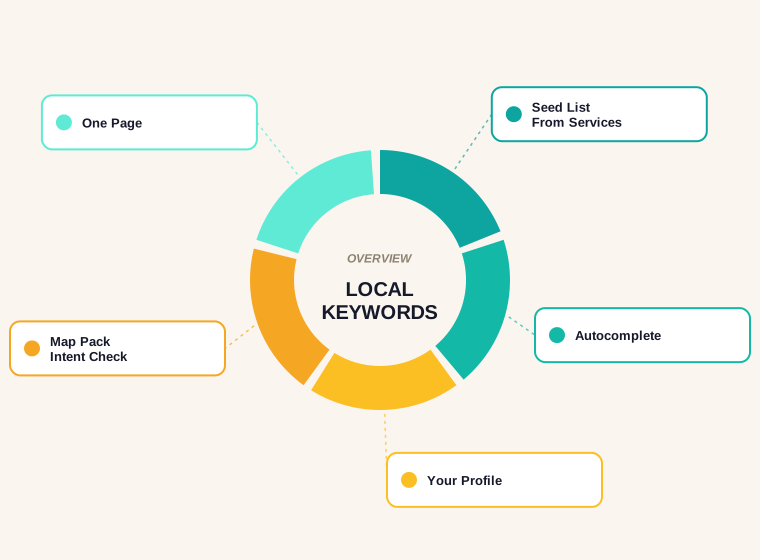
This guide is a method you can run in an afternoon with free sources: how to build a seed list from your own services and streets, how to mine Google itself and your own accounts for real phrasing, how to confirm that a term has local intent, and how to decide whether a keyword belongs on a service page, a location page or your Business Profile. It assumes you already know why local visibility matters. If you want the wider picture first, start with our local SEO for small business guide.
What Makes Local Keyword Research Different
National keyword research asks one question: what do people type to find this thing? Local research asks three. What do people type, where are they when they type it, and will Google answer with a map, a list of businesses, or articles? A phrase like "emergency dentist" is a completely different task depending on whether the searcher is standing on your high street or three counties away.
That is why the usual metrics mislead. Search volume is measured for a phrase, not for a neighbourhood. A term can show a healthy monthly number nationally while only a tiny fraction of those searches could ever turn into a customer for you. And the reverse is common: a phrase with a volume of zero in a tool can be typed by a few dozen people a month in your service area, every one of whom is ready to book.
Because of that, the goal of this process is not to find the biggest keyword. It is to find the set of phrases that real nearby customers use, then match each one to the right place on your site or profile. Our keyword research tools guide covers the tool side. This post is about the thinking that makes any tool useful for a local business.
Understand How Google Ranks Local Results First
Before choosing keywords, it helps to know what they are feeding. Google's own help page on local ranking says results are mainly based on relevance, distance, and popularity, and that together these factors help it find the best match for a search. It defines relevance as how well a Business Profile matches what someone is searching for, distance as how far each business is from the searcher, and prominence as how well-known a business is.
Each of those maps to a keyword decision. Relevance is where your wording matters: the services, categories and descriptions you choose decide which searches you are even considered for. Distance is the one thing you cannot optimise with words, which is why researching phrases tied to the places you actually serve beats chasing a big city you do not sit in. Prominence comes from reviews, links and general reputation, and it decides whether a relevant, nearby business actually wins.
The same page makes one more point worth remembering: it states there is no way to request or pay for a better local ranking. So keyword research here is not about gaming anything. It is about making sure that when you are the right nearby answer, Google can tell.
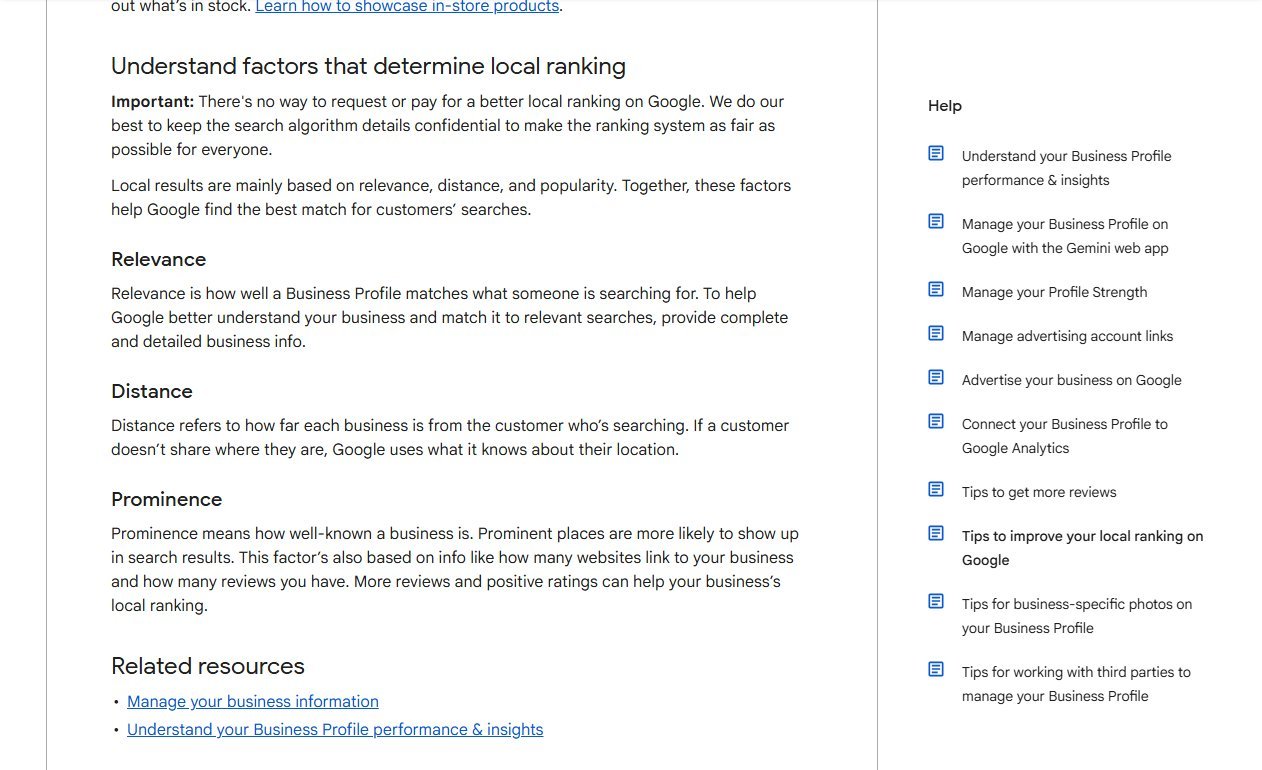
Read that section once with your own business in mind. If a phrase you are considering would describe something you do not really offer, or a place you do not really serve, it will not survive the relevance and distance tests however attractive the volume looks.
Step 1: Build a Seed List From Your Own Business
Start with a blank document and three columns: what you sell, where you sell it, and the words customers use. Do this before opening any tool, because your own knowledge is the best filter you have.
- Services. List every distinct job or product, at the level a customer would ask for it. "Boiler repair" and "boiler installation" are separate needs, not one keyword.
- Service areas. Write down the towns, suburbs, districts and neighbourhoods you genuinely cover, including the informal names locals use that never appear on a map.
- Customer language. Add the phrases from emails, calls, quote requests and reviews. Customers rarely use trade vocabulary, and a review that says "fixed our leaking tap same evening" is a keyword source you already own.
- Modifiers. Note the qualifiers that come up: emergency, same day, cheap, family, commercial, open Sunday, mobile.
Now combine them loosely, not mechanically. You are not generating every service-by-town pairing; you are noting which pairings feel plausible. A business with eight services and twelve towns does not have ninety-six keywords. It has a handful of strong service terms and a handful of strong places, and the research below tells you where the two genuinely meet.
Step 2: Mine Google Itself for Real Phrasing
Google shows you what people type, for free, in several places. Use a private window or a signed-out browser so your own history does not skew what you see, and search from a location close to your service area where you can.
- Autocomplete. Type a service followed by a space, then a letter, and note the suggestions. Repeat with place names. Suggestions that include a town, a "near me" variant or a qualifier are a good sign of live demand.
- People Also Ask. These questions show what searchers want to know before they choose. They are a good source for FAQ content and for deciding which services need their own page.
- Related searches. The block at the bottom of the results page often exposes alternative wordings, including regional vocabulary you would not have guessed.
- The map itself. Search a service in Google Maps and look at how the nearby businesses name and categorise what they do. Category labels are a quiet hint about the terms Google groups together.
Copy anything that looks like a real customer phrase into your list. Do not worry about volume yet. At this stage you are collecting vocabulary, and a phrase that autocomplete offers is one that enough people have typed.
Step 3: Read What Your Own Accounts Already Tell You
Two sources show how people already find you, and they are better than any estimate because they are your actual data.
The first is your Business Profile performance report. Google's help documentation for Business Profile performance describes the Searches metric as the search terms people used to find your business, and says it is updated at the start of each month and might take up to 5 days to show up. It also notes that these queries show up whenever your profile appears for a certain search, and that you cannot directly manage them. Treat the list as a report card on relevance: it shows which phrases already connect your profile to searchers, including ones you never planned for.
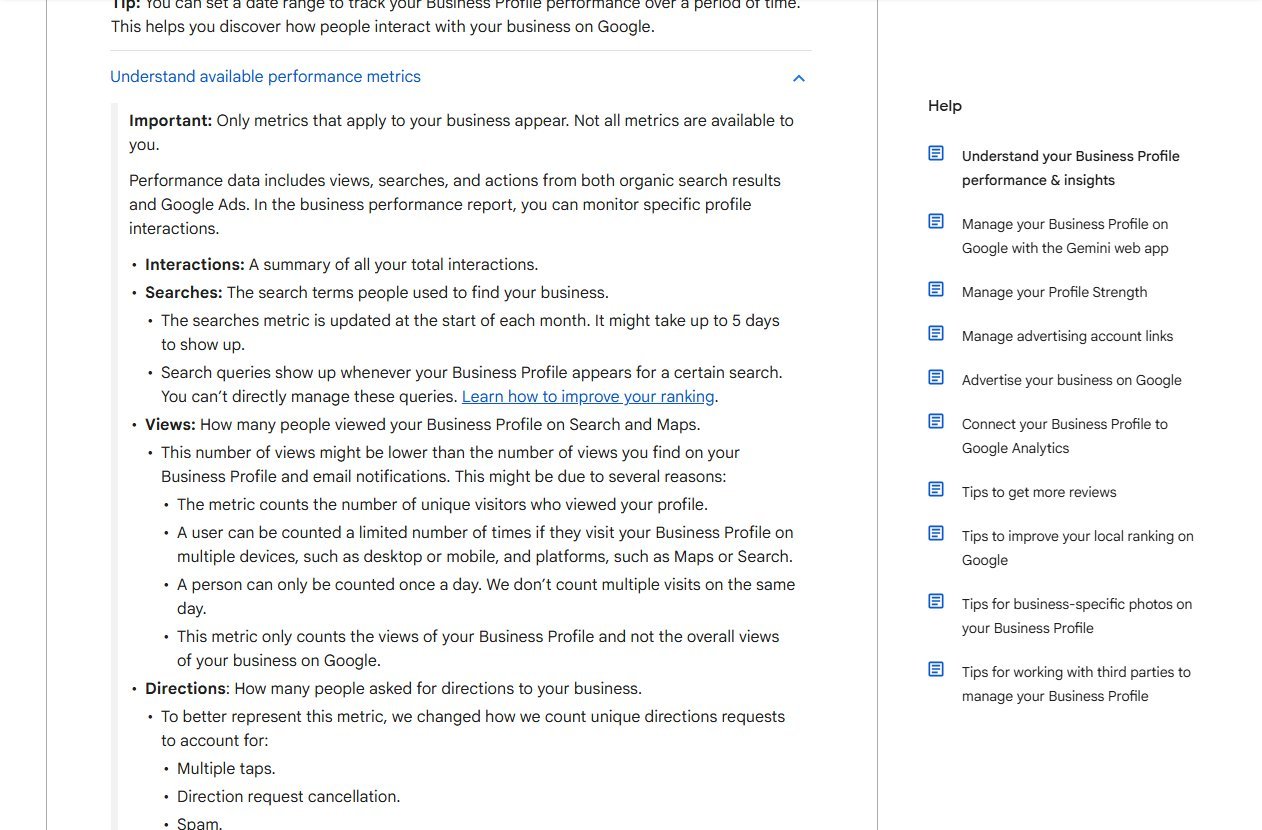
The second is Search Console. The Performance report lets you group data by the search query people typed, so you can filter to pages or countries and sort the queries that bring impressions to your site. Look for two things: queries where you appear but rarely get clicked, which usually means the page does not match the wording, and queries containing a town you never deliberately targeted, which tells you where Google already associates you.
Both sources are most useful for existing businesses. If you are brand new, there is no data yet, which makes Steps 1 and 2 doubly important. Come back to these reports every month or two once the business is live and treat them as the loop that keeps your keyword list honest.
Step 4: Handle "Near Me" and Implicit Location
Many local searches never contain a place name. "Plumber near me" and, increasingly, a bare "plumber" typed on a phone both rely on the searcher's location. Google's help page on distance says that if a customer does not share where they are, it uses what it knows about their location. In other words, the town name is often supplied by the device, not typed by the person.
This has two practical consequences. First, you do not need to stuff "near me" onto pages. The phrase is a request, and your pages answer it by being clearly about a real place: an address, a service area, local landmarks and a profile that lines up with it. Second, a keyword like "dentist" can be a perfectly good local keyword even though it looks generic, because Google treats the intent as local when the results are businesses nearby.
Use "near me" variants as evidence of demand, not as copy. If autocomplete or your Searches report keeps surfacing them for a service, that service deserves prominence on your site and a clear, well-categorised profile, rather than a page padded with the phrase.
Step 5: Check the Results Page for Local Intent
A keyword is only local if Google treats it as local. The quickest test is to search the phrase from a location inside your service area and look at what comes back.
- A map with a list of businesses above the organic results. Google reads the intent as local. Your Business Profile is your main route in, with your website as support.
- Mostly articles, guides and comparison pages. The intent is informational. A profile will not help here; a well-written page might.
- A mix of both. Common for terms like "how much does a boiler repair cost", where people research first and hire later. You may want a page for the research and the profile for the hire.
- Big national brands or directories dominating. A hard organic target for a small firm. Look for a narrower variant instead.
Run the same search with and without a town name. If adding the town swaps articles for a map, you have just learned that the town-specific version is the commercial phrase. Also search from a neighbouring town: results can change noticeably over short distances, which tells you how tight your realistic catchment is.
Step 6: Understand the Limits of Local Search Volume
Volume figures are useful for comparing ideas against each other, but they need careful handling for local terms.
- Small places often show zero or no data. A tool that estimates volume from broad datasets will frequently miss phrases for villages, districts and informal neighbourhood names. Zero rarely means nobody searches; it often means the estimate is too coarse to tell.
- Similar phrases get grouped. Tools tend to merge close variants, so one number can hide several distinct local wordings, or flatten a service-plus-town phrase into its parent term.
- Numbers are not location-specific. A national figure for "electrician" includes people hundreds of miles away.
- Intent beats size. Fifteen searches a month for "emergency boiler repair" in your town can be worth more than thousands for "boiler" nationally.
The sensible way to use volume is as a rough sort: is this phrase tiny, modest or large relative to my other options? Then let the autocomplete evidence, your Searches report and the results page decide. A low-volume local term with a visible map and no strong competitors is often a better first target than a high-volume one you have no realistic chance of reaching.
Step 7: Map Each Keyword to the Right Place
This is the step most guides skip, and it is where research turns into rankings. Every keyword on your list should end up with exactly one home.
- Service page. For a specific job, with or without a place. "Boiler installation" belongs on one page about boiler installation, covering your whole area.
- Location page. For a place you genuinely serve that has its own needs, staff, premises or proof. A real branch or a distinct service area with local details earns a page of its own.
- Business Profile. For the broad head terms, your category and the "near me" intent. Your categories, services, description and reviews feed this, and the website supports it.
- Blog or guide page. For informational phrases such as costs, comparisons and how-to questions that bring in people earlier in the decision.
- Nowhere. A phrase you cannot honestly serve or answer should be dropped, not forced onto a page.
The test for a separate page is whether you can say something specific and useful that would not apply if you swapped the place name. If you can, build it. If you cannot, fold the town into a service page or your profile's service area and move on.
Restaurants, for instance, usually need a different mix from tradespeople, with menu, cuisine and neighbourhood terms leading. Our guide to local SEO for restaurants shows how that mapping plays out for a business whose customers search by dish and by area.
Avoid the One-Page-Per-City Trap
The temptation after building a seed list is to publish a page for every town, swapping the place name in an otherwise identical template. Google's spam policies describe this pattern. Doorway abuse is defined there as sites or pages created to rank for specific, similar search queries that lead users to intermediate pages that are not as useful as the final destination, and one of the listed examples is having pages targeted at specific regions or cities that funnel users to one page.
The distinction is usefulness, not the number of pages. A page about the town where you have a shop, with its address, opening hours, directions, local projects and real customer feedback, is a genuine page. Thirty near-identical pages listing the same services with a different suburb in the headline are not. When in doubt, write fewer pages and make each one clearly better than what a visitor would get from the nearest competitor.
Prioritise: Which Keywords to Target First
With a mapped list in front of you, rank the phrases with a simple filter rather than a formula.
- Commercial intent. Would someone typing this plausibly be ready to call, book or visit?
- Fit. Do you offer it, in the place implied, at a quality you are proud of?
- Winnability. Does the results page show businesses similar to yours, or only large brands and directories?
- Margin. Is the job worth the effort of acquiring the customer?
Start with phrases that pass all four, which are usually a core service in your home town. Then widen outwards: neighbouring places, secondary services, and informational questions. This order also matches how local ranking works, since distance and relevance are strongest close to home and prominence builds as reviews and mentions accumulate.
Common Local Keyword Research Mistakes
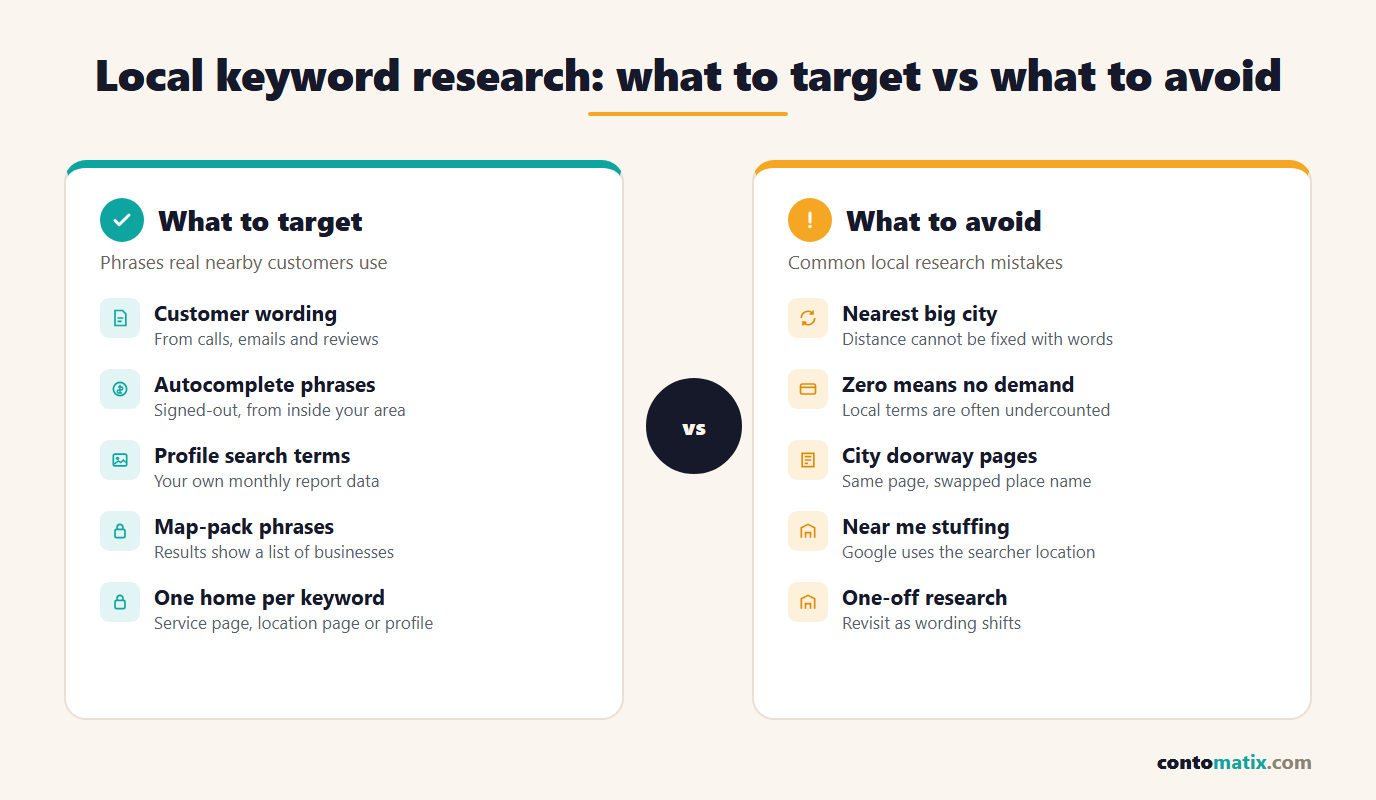
- Targeting the nearest big city. If your premises are in a smaller town, ranking for the city is mostly a distance problem that wording cannot fix.
- Trusting zero-volume as zero demand. Local phrases are the most likely to be undercounted.
- Treating every phrase as a page. Several variants usually belong on one page.
- Ignoring the results page. A keyword with no map and a wall of guides needs a different asset to the one you planned.
- Copying competitor wording blindly. Rivals may be guessing too. Your Searches report is better evidence.
- Stuffing the profile name. Keywords belong in categories, services and descriptions, not in the business name.
- Doing it once. Language shifts with seasons and trends. Revisit the list every few months.
A Local Keyword Research Checklist
- List every service, every real service area and the customer wording from calls, emails and reviews.
- Collect autocomplete, People Also Ask and related-search phrases from a signed-out browser.
- Pull the search terms from your Business Profile performance report and the queries from Search Console.
- Search each shortlisted phrase from inside your area and note whether a map, guides or brands appear.
- Compare volumes only as a rough sort, and trust real data over estimates.
- Assign every keyword to one home: service page, location page, profile, guide, or nowhere.
- Prioritise by intent, fit, winnability and margin, and start close to home.
- Write each page with details only your business could supply.
- Review the list again after the next monthly profile report.
Quick Recap
- Local keyword research is about finding the phrases nearby customers actually use and matching each to the right page or profile, not about picking the highest volume.
- Google says local results mainly depend on relevance, distance and popularity, so research the places you genuinely serve.
- Free sources go a long way: autocomplete, People Also Ask, related searches, your Business Profile search terms and Search Console queries.
- Confirm local intent by checking whether a map appears for the phrase from inside your service area.
- Local volume figures are often undercounted or grouped, so use them for rough sorting only.
- Give each keyword one home, and avoid near-identical city pages that Google's spam policies call doorway abuse.
If you would rather have a second pair of eyes on your keyword map before you build anything, Contomatix works through exactly this process with local businesses.
Frequently Asked Questions
What is local keyword research?
It is the process of finding the search phrases that nearby customers use to look for your products or services, then matching each phrase to a page on your site or to your Business Profile. It differs from general keyword research because location and the type of results Google shows matter as much as volume.
Can I do local keyword research for free?
Yes. Google autocomplete, People Also Ask, related searches, Google Maps, your Business Profile search terms and Search Console queries cost nothing and reflect real searches. Paid tools help with scale but are not required for a business serving a few towns.
Where do I find the search terms people use to find my Business Profile?
In the Performance section of your profile. Google describes the Searches metric as the search terms people used to find your business, updated at the start of each month and sometimes taking up to 5 days to appear.
Do I need to put "near me" on my pages?
No. It is a request that Google answers using the searcher's location. Pages that clearly show your address, service area and real local details match that intent far better than repeating the phrase.
Why does a keyword tool show zero searches for my town?
Estimates for small places are often too coarse to register, and similar phrases may be grouped together. Zero in a tool does not prove nobody searches. Check autocomplete and your own search reports before dismissing a term.
How do I know if a keyword has local intent?
Search it from inside your service area. If Google shows a map with a list of businesses, the intent is local. If the page is mostly articles and guides, it is informational and needs a content page rather than a profile.
Should I create a page for every town I serve?
Only for places where you can add something genuinely specific, such as a branch, local proof or distinct service details. Near-identical pages with only the place name changed risk falling under Google's doorway abuse policy.
Do I target the city or my smaller town?
Target the places where you actually operate. Google lists distance as one of three core local ranking factors, so ranking for a big city far from your premises is difficult regardless of the wording you use.
How many local keywords should one page target?
One main intent, with a few close variants. Grouping unrelated services or places on one page dilutes it. If you can answer two phrases with the same content, they belong together; if not, they need separate pages.
How often should I redo local keyword research?
Review your Business Profile and Search Console data monthly or every couple of months, and run a fuller refresh when you add a service, open in a new area or notice shifts in how customers phrase things.