Last updated: October 2026
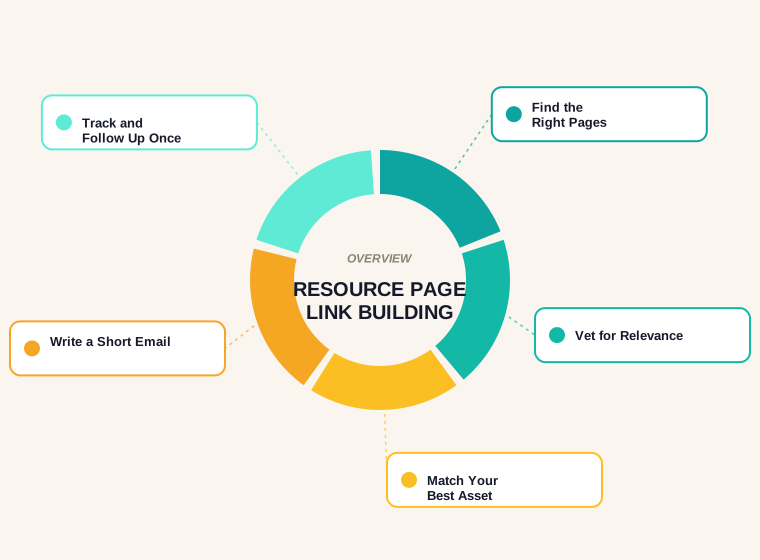
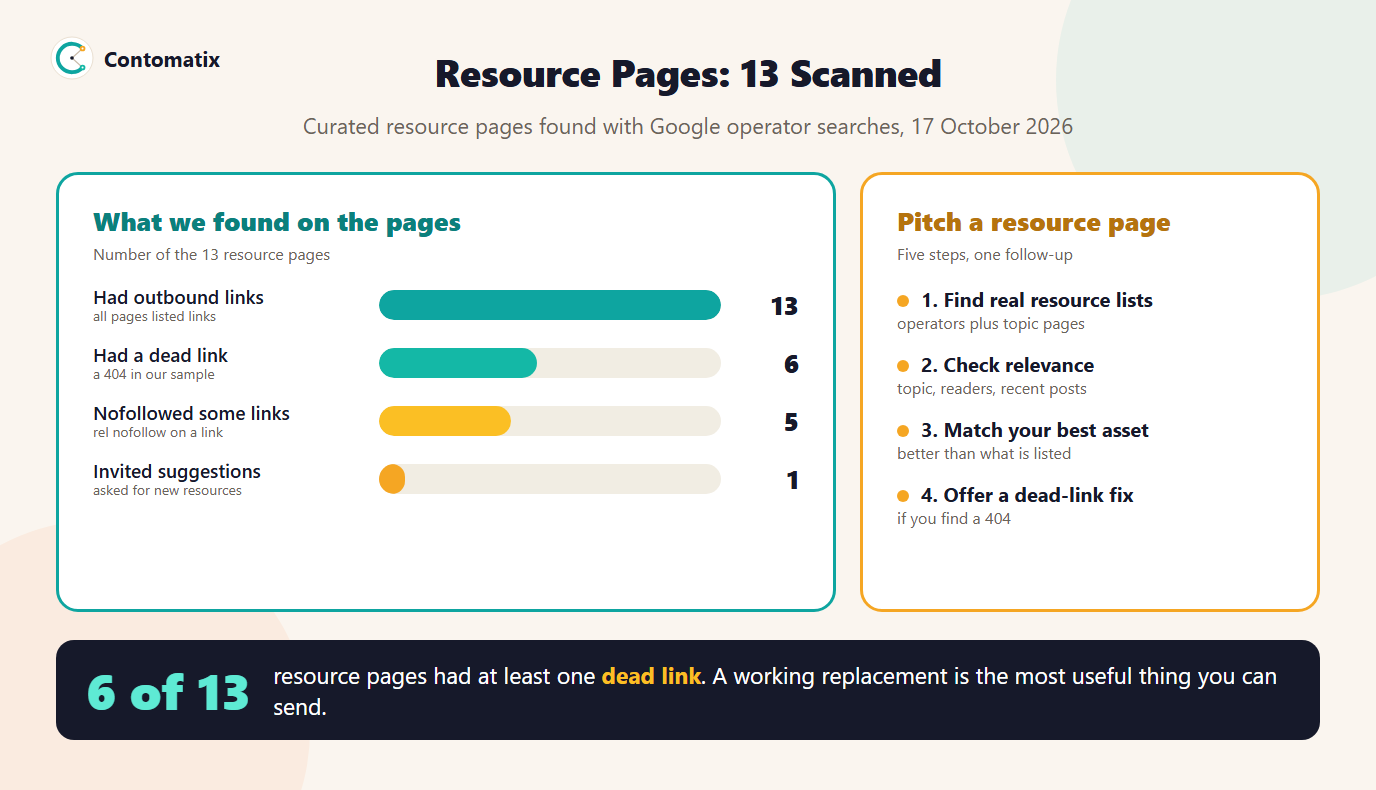
Resource page link building is the tactic of finding web pages that curate useful links on a topic and asking the owner to add your page if it genuinely belongs. To see how it works in practice, we read the 5 readable pages that rank on Google US for the term and fetched 13 real curated resource pages found with search operators. Of those pages, 6 had at least one dead link in our sample, which makes a working replacement the most useful thing you can offer.
Below you will find what a resource page is, how to find them, what the ranking guides say and skip, what 13 real pages showed, how to vet a page, what to pitch, how to write the outreach email, and the mistakes that waste effort. It fits inside a wider link building campaign.
What a Resource Page Is and Why It Links Out
A resource page is a page whose job is to point readers to other useful pages: a list of tools, guides, templates, courses or references on one subject. Because its whole purpose is to link out, a relevant new addition is a normal request. It differs from a guest post (you write something new) and from a link insertion (you ask for a mention inside an article). The ask is small, which is why the tactic is popular, and also why owners get many requests and ignore weak ones. Resource page link building works only if the page you suggest is better than, or different from, what is already listed.
What the Ranking Pages Say, and Do Not Say
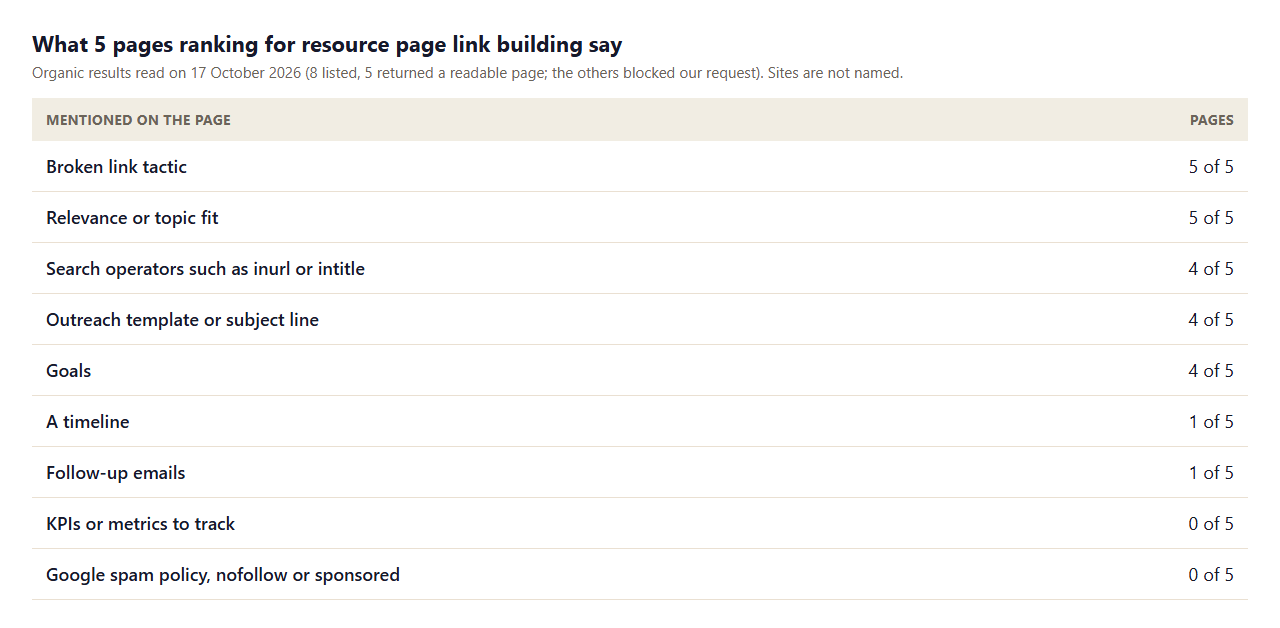
- The broken link tactic is paired with it everywhere. 5 of 5 pages mention broken links, and our scan shows why.
- Finding pages means search operators. 4 of 5 explain operators such as
inurl:andintitle:, and 5 of 5 stress relevance. - Templates are common, process is not. 4 of 5 give an outreach template, but only 1 mention follow-up and 1 give a timeline.
- Measurement and rules are missing. No page names a KPI, and none mention Google's spam policy or marking links as nofollow or sponsored.
Three more organic results blocked our request, so these counts cover the 5 we could read. Search results change, so treat them as a snapshot.
What 13 Real Resource Pages Show
To go beyond the guides, we ran Google operator searches for curated "SEO resources" and "useful links" pages, fetched 13 of them and checked up to 40 outbound links on each. Our first operator search returned mostly tool roundups and blog lists, so true resource pages are less common than the guides imply. Treat any list of this kind as something to read before you pitch.
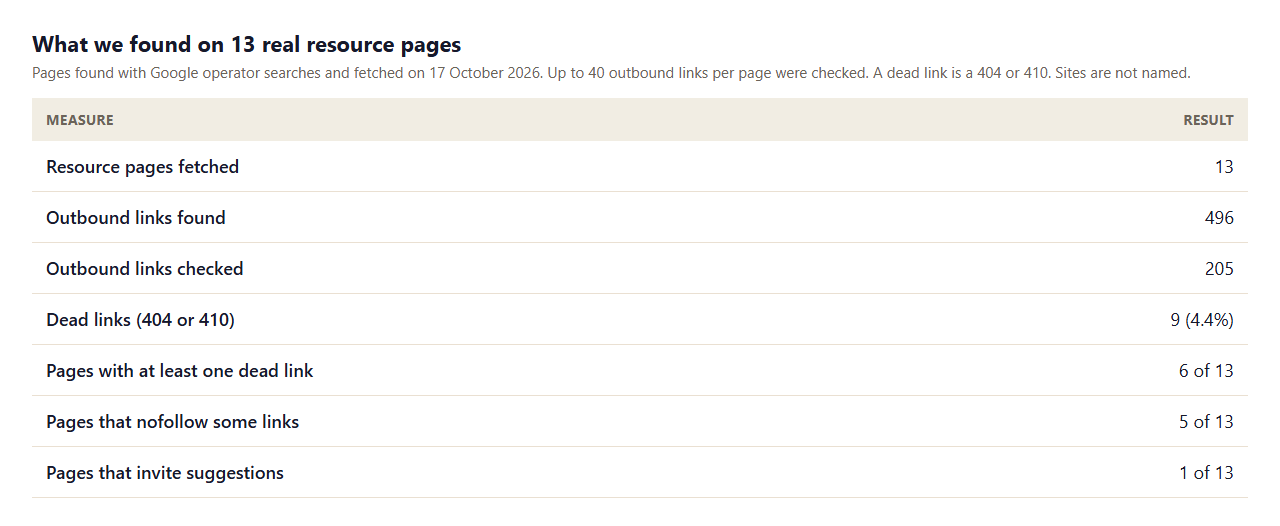
- Dead links are common. 9 of 205 checked links (4.4%) returned a 404, and 6 of 13 pages had at least one.
- Few pages ask for suggestions. Only 1 of 13 invited readers to submit a resource, so most owners must be approached by email.
- Some pages qualify links. 5 of 13 applied nofollow to at least some links, so check the attribute before you count on a link passing credit. The free dofollow link checker shows it per link.
- Size varies a lot. Some pages list a handful of links and one listed over 100, so the owner's effort per page differs, and so does the odds of being added.
How to Find Resource Pages
Start from your topic and look for pages built to list other pages. Useful search patterns include a topic word plus "resources", "useful links", "recommended reading" or "further reading", combined with intitle: or inurl:. Another way is to look at who links to your competitors' guides: a page that links to three similar guides will often link to a fourth. Use the Links report in Search Console to see which sites already link to you, and our guide to checking backlinks of a website for the free method. Search for the same terms with your niche added, because a topical list from a university department, association or specialist site is worth more than a generic roundup.
How to Vet a Resource Page Before You Pitch
- Is it relevant? Your page must fit the topic of the list, not just the industry. Our guide to relevant backlinks gives a scoring method.
- Is it maintained? Look for a recent update date, working links and active site news. A page with many dead links may be abandoned, or a good place for a broken-link fix.
- Does the site have readers? Check that it publishes real content and attracts an audience in your area.
- Is it a link farm? If the page lists hundreds of unrelated links, skip it.
- Is there a contact? Find the editor or owner by name. A named contact beats a generic address.
- Does your asset belong? If it is no better than what is listed, improve it first.
What to Pitch: The Asset That Earns the Link
The best asset for a resource page is useful on its own: a free tool, a template, a data study or a guide that answers a question clearly. A plain service page is rarely added. Match the asset to the list. A page of checklists suits a template; a list of tools suits a free tool. If your asset is new, say what it does in one sentence in the email. Our internal link building work shows how to connect the asset to the pages you want to lift once a link arrives.
The Broken Link Version of the Pitch
When you find a dead link on a relevant resource page, the pitch changes from a request to a favour. You tell the owner something they did not know, you name the broken URL and you offer a working replacement. This works because it saves the owner time. Check that your page truly covers what the dead page did, or the replacement will look forced. Our guide to finding broken backlinks shows how to confirm the error status.
Outreach Link Building Email: A Short Example
Keep the email short, specific and easy to decline. Here is a simple structure with example details:
Hi Priya,
I was reading your SEO resources page. The section on log file analysis was the clearest I have read.
I wrote a guide to sitemap priority (contomatix.com/blog/sitemap-priority). It shows how 20 real sitemaps use the tag. It might fit your list of technical SEO references.
If it is useful, feel free to add it. If it is not a fit, no problem at all.
Thanks,
Sam
You can write this kind of email for any tactic with the free link building outreach email generator, which also writes three subject lines and one follow-up, and flags filler phrases. Send one follow-up after about a week and then stop.
A Workable Routine for Your First 20 Prospects
Do not start with hundreds of pages. Pick 20, and run them in a single week of focused work. On day one, build the list with search operators and note each page's topic, last update and contact. On day two, vet each page against the checklist above and drop any that fail. On day three, open every outbound link on the pages that remain, using the free internal link checker to sort links and a quick status check to find 404s, and note which pages have dead links you can offer to replace. On day four, write the emails, personalising the first line. On day five, send them. Follow up once the next week, log the outcomes and compare the reply rate with your expectations. Twenty good prospects will teach you more than two hundred weak ones, and the replies show you what to change in the asset or the email.
How Resource Pages Compare With Other Tactics
Resource page outreach is one of the lower-effort tactics, because the ask is small and the owner already links out. The trade-off is that the best pages receive many requests, and a link in a long list may carry less weight than a link inside an article that discusses your topic. It works best alongside other tactics: use a resource page for a reference asset, a link insertion for a detailed guide and a guest article when you can add expertise. Pick the tactic by the asset and the page, not by habit, and review results after each wave.
Staying Within Google's Link Rules
None of the ranking pages we read discuss Google's spam policy, but it applies. Google defines link spam as creating links primarily to manipulate rankings, and lists exchanging money, goods or services for links, excessive link exchanges, and using automated programs to create links as examples. It also says that buying and selling links is acceptable when they are qualified with nofollow or sponsored. For resource page outreach, that means: do not offer payment or a link swap, do not use tools that mass-create links and be transparent if anything of value changes hands. Our look at automated link building explains why automation is risky.
Tracking Results
Log every page in a sheet: URL, contact, date emailed, reply, follow-up, outcome and live link. For each link that goes live, check the URL, the anchor, the link attribute and that the page is indexed. Compare referring pages and the impressions of the target page in Search Console before and after. If you run resource outreach as part of a larger effort, report the results with the other tactics using the SEO report generator.
Resource Page Link Building Mistakes
- Pitching an unrelated page. Relevance is the first thing an owner checks.
- Sending a generic email. Name something specific from their page.
- Asking for a link, not offering value. Explain what your page adds to the list.
- Offering a swap or payment. That moves you into Google's link spam territory.
- Following up repeatedly. One follow-up is enough.
- Ignoring results. Check whether the link went live and how it is marked.
How We Read the Pages
- We read the 8 organic results for one query on one day (Google US, 17 October 2026); 5 returned a readable page and three blocked our request.
- The 13 resource pages came from three Google operator searches on the same day. They are a convenience sample of curated lists, not a random sample of the web.
- We checked up to 40 outbound links per page, excluding social profiles. A dead link means a 404 or 410 response; links that timed out or blocked our request are not counted as dead.
- Counts show whether a page mentions a term, not how well it explains it.
- Results in other countries, topics or dates will differ, so run the check in your own niche.
Key Takeaways
- Resource page link building asks a curator to add a genuinely relevant page. Keep the ask small and the asset strong.
- 6 of 13 resource pages we scanned had a dead link, so pair the tactic with broken link replacement.
- Vet every page for relevance, upkeep and real readers before you email.
- Send a short email, one follow-up and never offer a swap or payment.
- Track each reply and verify each live link and its attribute.
Frequently Asked Questions
What is resource page link building?
It is asking the owner of a curated resource page to add your page to their list of useful links because it genuinely fits the topic.
How do I find resource pages for link building?
Search your topic with words such as resources, useful links or recommended reading, combine them with intitle or inurl, and look at which pages link to similar guides.
Does resource page link building still work?
It can, when the page you suggest is relevant and useful. Many owners ignore weak requests, so the asset and the email matter more than the volume you send.
What should I put in an outreach email to a resource page?
A specific detail from their page, a one-sentence description of your page, why it fits and an easy way to say no. Keep it short.
How do broken links help resource page outreach?
A dead link on a resource page is a favour to report. In our scan, 6 of 13 pages had one, so a working replacement gives the owner a reason to reply.
Is link building outreach by email allowed by Google?
Asking for a link editorially is fine. Exchanging money, goods or services for links, or creating links with automated programs, is link spam under Google's policy unless qualified with nofollow or sponsored.
Can I automate resource page outreach?
You can use tools to organise a list and draft emails, but each message should be personal. Automated programs that create links are listed by Google as link spam.
How many follow-ups should I send?
One, after about a week, that adds a reason and lets the owner say no.
How do I know if the link passes ranking credit?
Check the link's rel attribute. Nofollow, sponsored and ugc values qualify a link. The free dofollow link checker shows the attribute for every link on a page.


