Last updated: October 2026
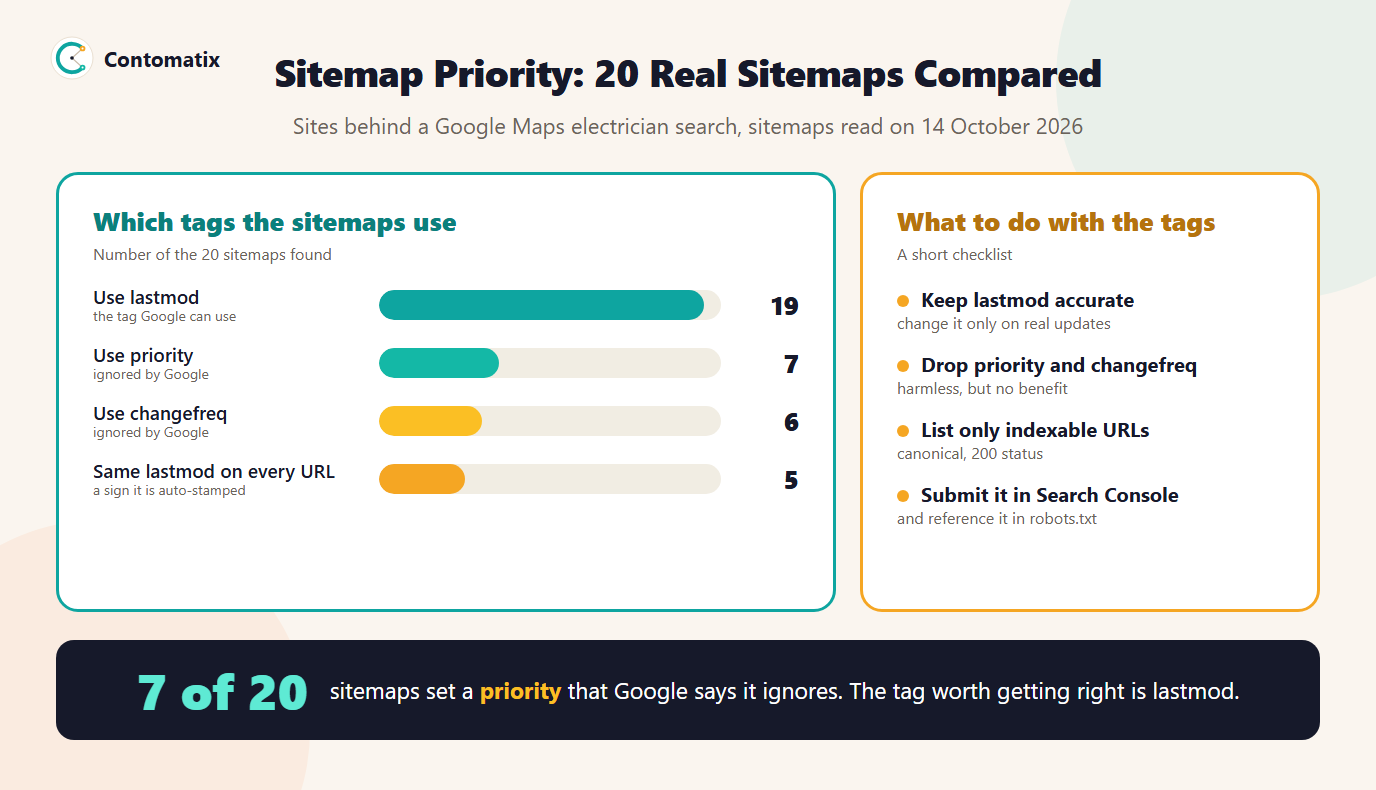
We read the sitemaps of 29 real business websites and found that 7 of the 20 sitemaps set a priority value, and 6 set changefreq. Google's documentation says it ignores both. That is the short answer to sitemap priority: it is a legitimate part of the sitemap format, it does no harm, and it does not change how Google crawls or ranks your pages.
The tag that can matter is lastmod, and the same sample shows how often it is set badly. This guide explains all three tags, what Google actually says, what we found and what to put in a sitemap in practice. If you are still building one, start with our guide to creating a sitemap.
What the Priority Tag Is Meant to Do
The sitemaps protocol defines an optional priority tag with a value from 0.0 to 1.0, with a default of 0.5. It was designed to tell crawlers how important one URL is compared with other URLs on the same site. The idea was that a site owner could mark the homepage at 1.0 and an archive page at 0.2. The protocol also says the value only describes pages relative to one another within a single site and does not affect how a site ranks against other sites.
A companion tag, changefreq, is meant to hint at how often a page changes, using values such as always, hourly, daily, weekly, monthly, yearly and never. The third optional tag, lastmod, gives the date a page was last modified.
What Google Says About Priority and Changefreq
Google's documentation for building a sitemap is direct about the first two tags and conditional about the third.
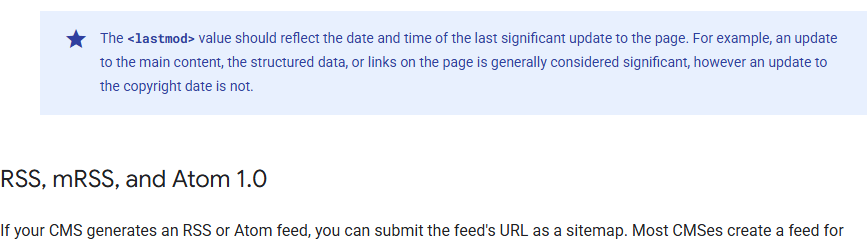
- Priority and changefreq are ignored. Google says it ignores both values. Setting them will not make a page crawl more often or rank higher.
- Lastmod is used when it is reliable. Google says it uses the lastmod value if it is consistently and verifiably accurate, for example by comparing it with the last modification of the page.
- Only significant updates count. The value should reflect the last significant update to the page, such as a change to the main content, not a footer tweak.
The same page sets the size limits that still apply: a single sitemap can hold up to 50MB uncompressed or 50,000 URLs, and larger sites should split into several sitemaps and list them in a sitemap index file.
What 20 Real Sitemaps Show
To see how the tags are used in practice, we took the websites behind 29 local businesses from a Google Maps search, looked for each site's sitemap through robots.txt and the common default addresses and read the first sitemap file that listed pages. 20 had one we could read, and 9 did not return a sitemap at those locations.
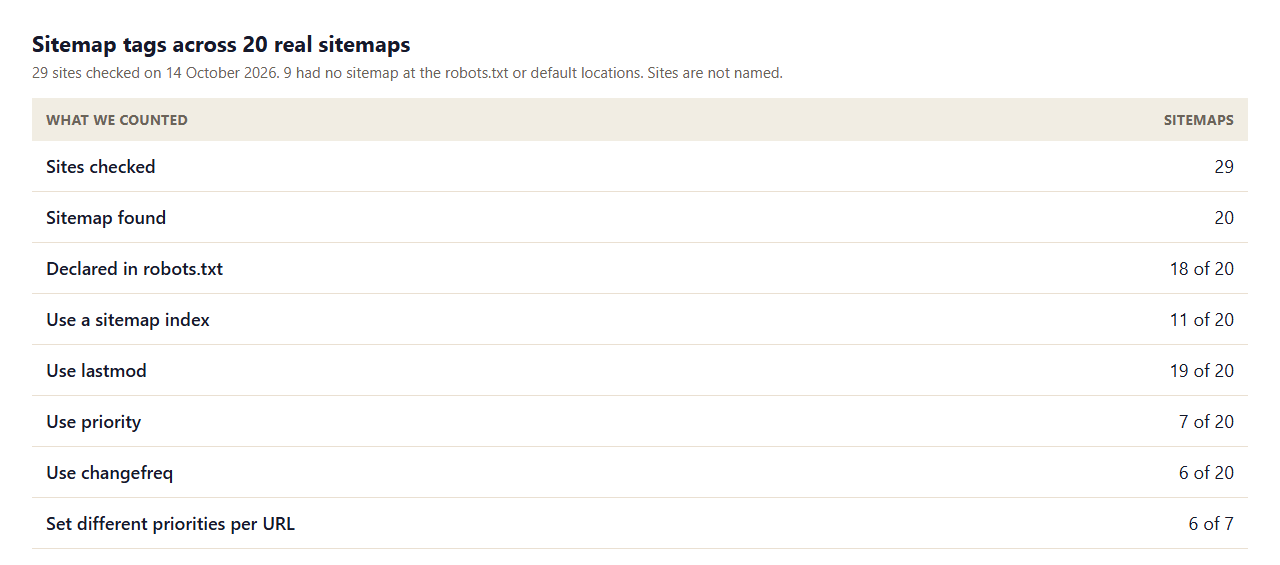
- Lastmod is nearly universal. 19 of 20 sitemaps include it, mostly because the CMS or plugin writes it automatically.
- Priority is used by about a third. 7 of 20 set it, and 6 of those 7 give different pages different values, so someone deliberately ranked their pages, to no effect on Google.
- Changefreq follows the same pattern. 6 of 20 include it, typically as weekly or monthly.
- Some lastmod values look auto-stamped. In 5 of the 19 sitemaps with lastmod, every URL carries the same date. When every page claims to have changed on the same day, the value says nothing about which pages did.
Why Priority Does Nothing for Google
A tag that site owners set themselves is easy to abuse. If everyone marks every page at 1.0, the value stops carrying information, and a search engine that wants to know what to crawl needs better signals. Crawlers learn from the site itself: how pages link to each other, how often they actually change, how popular they are and how fast the server responds. For that reason a sitemap is best seen as a discovery list, a way of making sure URLs are known, not a ranking instruction.
Lastmod: The Tag Worth Getting Right
Lastmod is the only optional tag Google says it uses, and only when it proves reliable. That means three things in practice.
- Change it only when the page really changes. If your plugin stamps today's date on every URL each time the sitemap is generated, the value is noise, and Google can learn to ignore it.
- Use the content's date, not the build date. A page's lastmod should come from the content record, such as the date of the last edit, not from the time the file was written.
- Format it properly. Use W3C date format, a full date such as 2026-10-14, or a date and time with a time zone.
An easy check is to open the sitemap and look at the distribution of dates. If every URL shows the same day, or the date matches the day you looked, the value is not telling anyone anything. Our sitemap URL extractor pulls every URL and its lastmod into a list so you can sort them.
What to Put in a Sitemap
- Only canonical, indexable URLs. Pages that return 200, are not blocked by robots.txt, carry no noindex and are the canonical version of their content. Redirects, errors and duplicates do not belong.
- Absolute URLs. Use the full address, with protocol and host, exactly as it should be indexed.
- A true lastmod, or none. It is better to omit the tag than to publish a wrong one.
- Specialist sitemaps where they help. Images and videos have their own extensions. See our image sitemap and video sitemap guides.
You can leave priority and changefreq in if your generator writes them, since they do no harm. If you control the template, removing them makes the file smaller and the intent clearer.
A Clean Minimal Example
A minimal valid entry needs only the location. Add lastmod only if you can keep it accurate.
<urlset xmlns="http://www.sitemaps.org/schemas/sitemap/0.9">
  <url>
    <loc>https://example.com/services/panel-upgrade</loc>
    <lastmod>2026-10-14</lastmod>
  </url>
</urlset>
Submit and Monitor the Sitemap
Reference the sitemap in your robots.txt file with a Sitemap line, and submit it in Search Console's Sitemaps report. The report shows when it was last read, how many URLs were discovered and any errors. If you use both a sitemap and robots.txt, check that your rules do not block pages you list, which our guide on robots.txt and sitemaps covers, and validate the file with our sitemap validator. For the wider question of whether you need one at all, see is a sitemap important for SEO.
Sitemap Choices by Type of Site
- A small business site of 10 to 50 pages. One file, a clean list of canonical URLs and an honest lastmod or none. The pages are usually all linked from the navigation, so the sitemap is mainly a safety net.
- A blog or publisher. The sitemap should pick up new posts quickly, and lastmod should change when a post is edited in a meaningful way. Do not bump the date for typo fixes.
- An ecommerce store. Split by type, for example products, categories and content, using an index file. Remove out-of-stock products only if the page is gone, and leave out faceted and filtered URLs that you do not want indexed.
- A site with many locations or services. List every location and service page, because these are often thin on internal links. Our multi-location guide covers how those pages should be built.
How Lastmod Gets Set in a CMS
Most sitemap files are written by a CMS or a plugin, so the lastmod you publish depends on what that software reads. A good setup takes the date from the content record's modified field and updates it only when the content is saved with changes. A poor setup uses the current time when the file is generated. You can tell which you have by loading the sitemap on two different days: if every date moves forward without any edits, the generator is stamping the request or build time. Fix it in the plugin settings or the template, and if you cannot make it accurate, omit the tag for those URLs.
A 15-Minute Sitemap Audit
- Open the sitemap in a browser and confirm it loads with a 200 status and valid XML.
- Count the URLs and compare with the number of indexable pages you expect.
- Sample ten URLs. Each should return 200, be indexable and be canonical to itself.
- Sort lastmod values and check they differ and match real edits.
- Confirm the file is referenced in robots.txt and submitted in Search Console.
- Check the Sitemaps report for errors and the gap between submitted and indexed URLs.
Sitemaps and Internal Links Work Together
A sitemap helps a crawler discover a URL, but it does not tell the crawler how the page relates to the rest of the site. Internal links do that. A page listed in the sitemap but linked from nowhere is known, but unsupported. Use the sitemap as a complete list and internal links as the structure, and check both when a page is slow to be indexed.
When to Use a Sitemap Index
A sitemap index is a file that lists other sitemap files. Use one when you pass the 50,000 URL or 50MB limit, or when splitting by section makes the reports easier to read. In Search Console you can submit just the index and still see each child file's status. A practical split is one file for pages, one for posts, one for products and one for images or video. When you read a sitemap index in our sample, we followed only the first child file, which is why we describe the data as a sample, not a full census of each site.
Keep each child file consistent: the same host, the same protocol and no URL repeated across files. Duplicated or mixed-host entries make the reports harder to trust and can hide real coverage problems. If you rename a file, update the index and the robots.txt reference together, so crawlers never follow a stale address.
Common Sitemap Mistakes
- Spending time on priority values. The effort has no effect on Google, so spend it on the content and links.
- The same lastmod everywhere. It drains the value of the tag.
- Listing URLs that redirect or error. It wastes crawling and hides real problems.
- Listing noindex or non-canonical URLs. The sitemap and the page then disagree.
- Forgetting to update the file. A static sitemap that never changes will not list new pages.
- No sitemap reference. Without a robots.txt line or a submission, the file may never be found.
In short, treat the sitemap as a clean, accurate list of the URLs you want found, and spend your effort on keeping that list true rather than on tags the search engine has told you it does not read.
Limits of This Sample
- The sites are 29 local service businesses from one search, so the figures describe small business sites, not the whole web.
- For sitemap indexes, we read only the first child sitemap that listed pages.
- 9 sites returned no sitemap at the locations we tried, which may mean a custom address was in use.
- A match on lastmod date shows a pattern, not intent, and some single-date sitemaps may be correct for small, static sites.
Key Takeaways
- Google ignores priority and changefreq, so you can leave them out.
- Lastmod is used only when it is consistently and verifiably accurate.
- List only canonical, indexable URLs that return 200.
- Stay under 50MB or 50,000 URLs per file, and use an index for more.
- Reference the sitemap in robots.txt and submit it in Search Console.
Not sure your sitemap is helping? Get in touch and we will review it as part of a technical audit.
Frequently Asked Questions
Does sitemap priority affect rankings?
No. Google's documentation says it ignores priority values, so setting them does not change how a page ranks or how often it is crawled.
What does changefreq do in a sitemap?
It hints at how often a page changes. Google says it ignores the value, so it has no effect on crawling.
Does Google use lastmod?
Yes, if the value is consistently and verifiably accurate, for example when it matches the page's real last modification. A value that is always the current date is not reliable.
Should I remove priority and changefreq from my sitemap?
You can. They do no harm, but removing them makes the file smaller and avoids implying a signal that does not exist.
What is the default priority value?
0.5 on a scale from 0.0 to 1.0, according to the sitemaps protocol. It is relative to other pages on the same site.
How many URLs can a sitemap hold?
Up to 50,000 URLs or 50MB uncompressed. Larger sites must split into several sitemaps and can list them in a sitemap index.
Should every page be in the sitemap?
Only the canonical, indexable pages you want in search. Leave out redirects, error pages, duplicates and anything with noindex.
How do I tell Google where my sitemap is?
Add a Sitemap line to robots.txt and submit the file in the Sitemaps report in Search Console.
Do other search engines use priority?
Support varies and is not documented the same way. Do not rely on it, and focus on accurate URLs and lastmod.