Last updated: October 2026
Declaring a sitemap in robots.txt is one line, and most of the ways that one line fails don't throw an error anywhere you'd notice. The declaration sits in the file looking correct, Google never flags it in Search Console, and the sitemap simply doesn't get discovered through that path — crawled late, or not through robots.txt at all. This is a diagnostic walkthrough of the specific things that make a Sitemap: line fail silently, each one checked against Google's own specification.
What the Sitemap Field Actually Does
A Sitemap: line in robots.txt isn't a crawling rule like Allow or Disallow — it's a pointer. It tells any crawler reading the file where to find a sitemap or sitemap index, independent of which paths that crawler is allowed to visit. It's one of the few fields in robots.txt that every major crawler reads the same way, and it's also one of the easiest to get subtly wrong because nothing about a broken declaration looks broken.
The value of putting it here at all comes down to discovery order. robots.txt is typically the first file a well-behaved crawler requests when it visits a site, before it's crawled a single page. A sitemap reference sitting right there means discovery doesn't depend on the crawler finding an internal link to the sitemap, or on someone remembering to resubmit it after a redesign — it's found the same way, every time, as a side effect of the very first request the crawler makes.
That also means a broken declaration is found the same way, every time — silently, as part of that same first request, with nothing downstream ever knowing the pointer didn't resolve to anything useful.
Rule One: It Must Be a Fully Qualified URL
Google's robots.txt specification is direct about this: the sitemap value "must be a fully qualified URL, including the protocol and host." A relative path like /sitemap.xml is not valid here, even though that exact same path works fine as a Disallow or Allow value. The two fields follow different rules, which is part of why this mistake is easy to make — a relative path is normal everywhere else in the same file.
It's worth noting this isn't Google being unusually strict. The underlying sitemaps.org protocol that Google, Bing, and other engines share describes sitemap locations the same way, so a relative sitemap declaration tends to fail consistently across search engines rather than working for some and not others.
Sitemap: /sitemap.xml          ← invalid, not fully qualified
Sitemap: https://example.com/sitemap.xml   ← valid
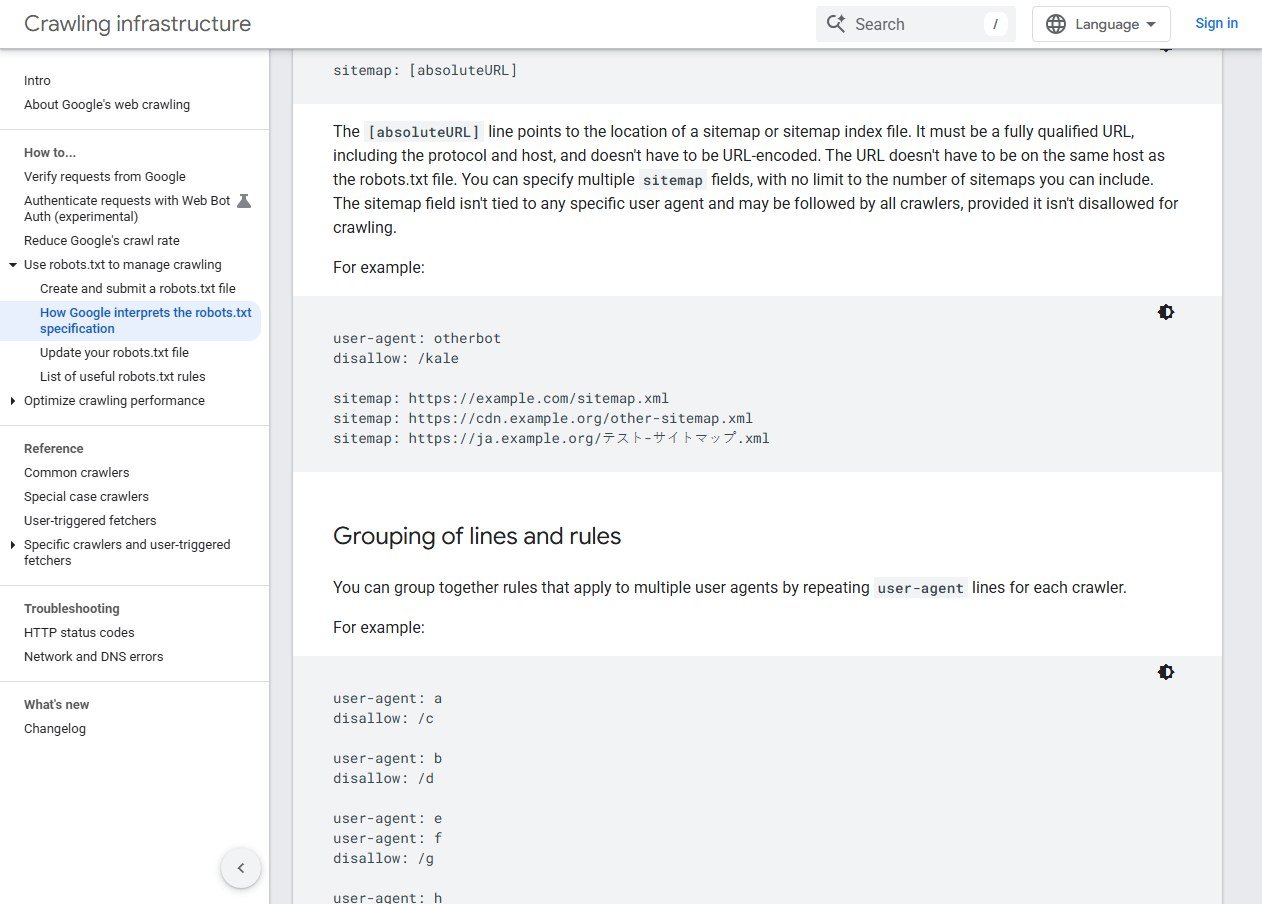
Here's that requirement stated directly on Google's own specification page, in the example block showing three valid Sitemap lines side by side.
Rule Two: The Value Is Case-Sensitive
The field name itself — sitemap — is case-insensitive, so Sitemap:, sitemap:, and SITEMAP: all work identically. The URL you put after it is not. If the file is actually served at /sitemap.xml but the robots.txt declares /Sitemap.xml, that's two different paths as far as the crawler fetching it is concerned, and the mismatch produces a 404 with nothing in the robots.txt file itself to flag it as wrong.
This is a realistic mistake specifically because it's inconsistent within the same spec: the directive name forgives case, the value doesn't. Worth a direct check against the live file rather than assuming.
Rule Three: It Can Live on a Different Host
A sitemap declared in robots.txt doesn't have to be hosted on the same domain as the robots.txt file itself — Google's specification confirms this explicitly. That means a sitemap served from a CDN subdomain, a separate sitemap-hosting service, or a different internal system is a legitimate setup, not something that needs to match the main domain. The thing that does need to match is the URL you actually declare versus the URL that actually resolves — cross-host sitemaps just add one more place for that mismatch to happen unnoticed, usually after a migration where the old sitemap host gets decommissioned but the robots.txt line pointing at it never gets updated.
Rule Four: Multiple Sitemap Lines Are Fine — and Expected at Scale
There's no limit to how many Sitemap: lines a robots.txt file can have. A site with a sitemap index plus several child sitemaps can declare the index alone, or declare every individual sitemap — both work, but declaring only the index and forgetting that its own child sitemaps should also generally be reachable from it is a common half-finished setup. The field also isn't tied to any specific user-agent group; one declaration, usually placed early in the file, applies to every crawler that reads it, rather than needing to be repeated per bot.
Rule Five: The Trap That Catches Experienced Teams
This is the one that isn't about the Sitemap line at all — it's about what else is in the same file. Google's specification notes that the sitemap field "may be followed by all crawlers, provided it isn't disallowed for crawling." A broad Disallow pattern — something like Disallow: /*.xml$ meant to block XML exports elsewhere on the site, or an overly wide Disallow: /sitemap meant to block one specific page — can end up matching the sitemap file's own URL and blocking crawlers from fetching the exact file the Sitemap line is pointing them to.
The declaration and the rule that blocks it can sit in completely different sections of the same robots.txt file, written at different times for different reasons, with nobody connecting the two until the sitemap quietly stops getting read.
A Realistic Way This Happens
A common version of this: a site migrates to a new platform, and the new CMS auto-generates a robots.txt file with a sensible default Disallow block for admin paths and search result pages — something like Disallow: /search or a wildcard pattern meant to catch filtered URLs. Separately, someone adds the Sitemap: line manually, pointing at the new sitemap. Both edits are individually correct. Nobody runs the sitemap's exact path against every Disallow pattern in the file, because there's no obvious reason to — the two lines were written for unrelated purposes, by people who may not have even touched the file at the same time.
Months later, someone notices a chunk of the site isn't getting crawled as fast as expected, or at all through this path, and starts debugging from the crawl behavior backward — checking server logs, checking the pages themselves, checking internal links — rather than starting from the one-line declaration that was always the actual cause. The fix, once found, takes seconds. Finding it is the expensive part, precisely because nothing about either line looked wrong in isolation.
Seeing a Correct Declaration
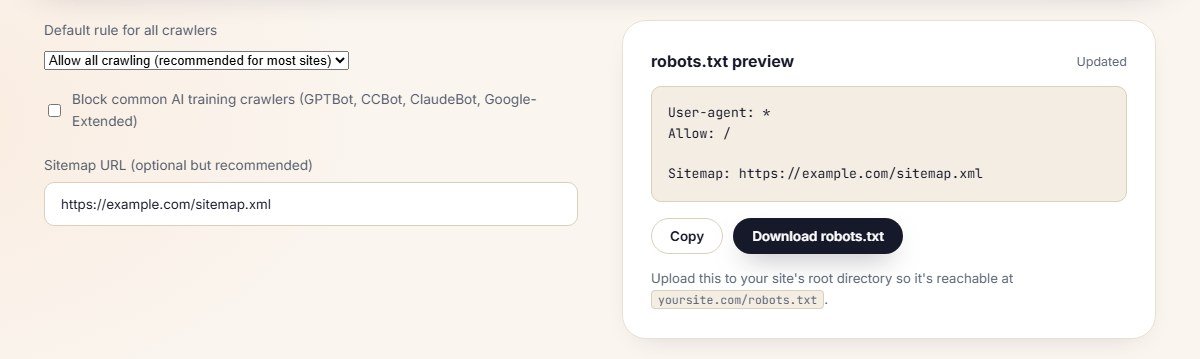
Here's what a clean Sitemap line looks like generated through Contomatix's free robots.txt generator — fully qualified, placed outside any user-agent-specific group, ready to catch all four of the mistakes above before they go live.
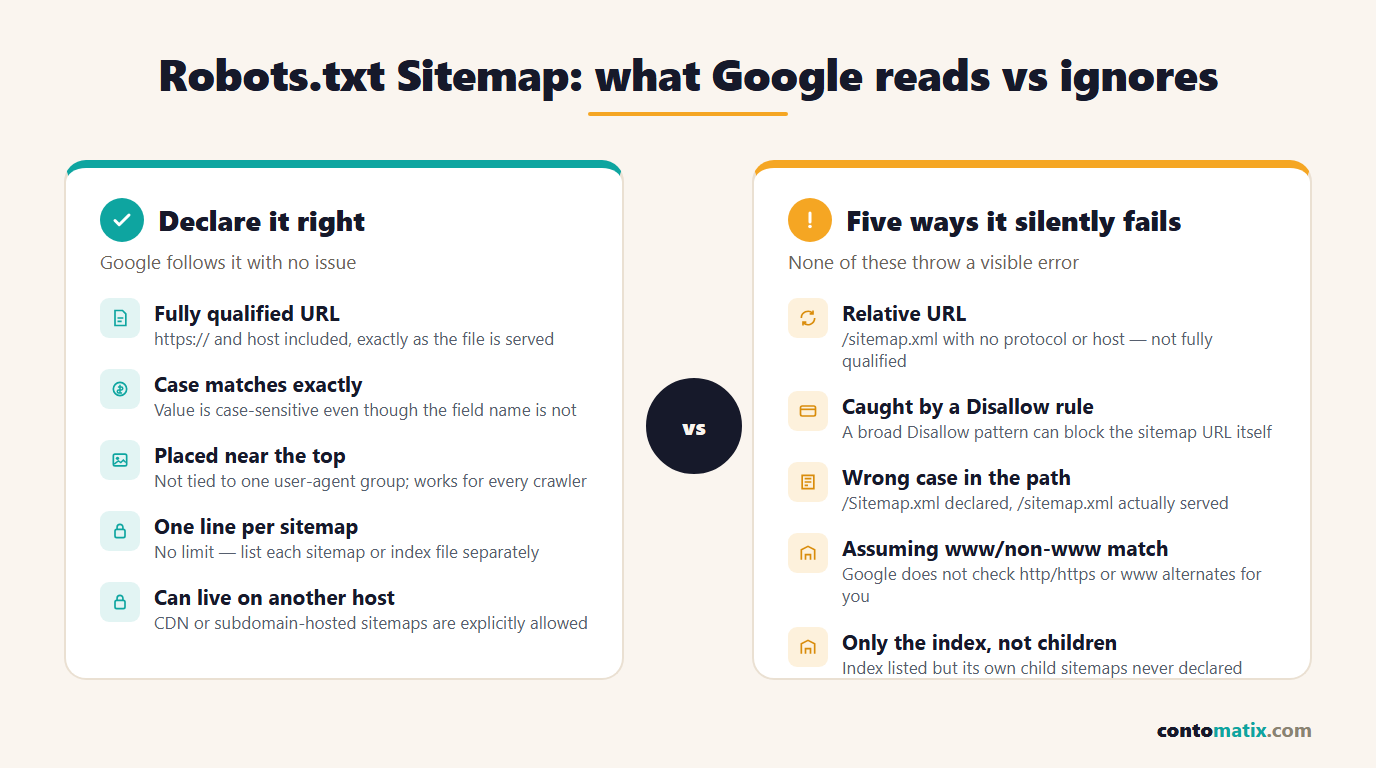
Put together, the five rules form a short checklist worth running through every time the sitemap or the robots.txt file changes.
Sitemap in Robots.txt vs. Submitting It in Search Console
These aren't competing methods — they're two separate discovery paths, and using both is standard practice rather than redundant. Submitting a sitemap directly in Search Console confirms Google has it and shows indexing stats for it; declaring it in robots.txt means any crawler, including ones that never touch Search Console, can discover the same file without being told about it individually. A site relying only on the Search Console submission has no fallback for crawlers that only check robots.txt, and a site relying only on robots.txt gets none of Search Console's reporting. Doing both costs nothing and covers both paths.
If the sitemap itself hasn't been built yet, that's a separate step from declaring it — our guide to how to create a sitemap covers the file formats, size limits, and a free generator, and the robots.txt line only becomes useful once that file actually exists at the URL you're about to declare.
Why This Specific Mistake Is Worth Checking Separately
Most robots.txt problems get caught because they're visible — a blocked page stops showing up in search results, or Search Console flags a crawl error directly tied to a URL someone can look up. The Sitemap field doesn't work that way. A wrong declaration doesn't block anything, doesn't produce a crawl error against a real page, and doesn't change what's indexed in any way that's easy to trace back to one line in one file. The sitemap just goes undiscovered through that specific path, while everything else about the site keeps functioning normally.
That gap is exactly why it's worth treating as its own checklist item rather than assuming it's fine because nothing else is obviously broken — a site can have healthy indexing, a clean crawl report, and still be running on a sitemap declaration that's pointed at the wrong case, the wrong host, or a URL a Disallow rule is quietly swallowing.
A Quick Way to Check What's Actually Live
None of the five mistakes above require guessing — they're all directly verifiable against the live file.
- Open the robots.txt file directly at
yoursite.com/robots.txtand read the exact Sitemap line character by character against the sitemap's real URL. - Request that exact URL in a browser or with a quick fetch and confirm it returns a 200, not a 404 or a redirect.
- Check it against every Disallow rule in the same file — does any pattern match the sitemap's own path?
- Confirm the host resolves if the sitemap is hosted somewhere other than the main domain, especially after any migration.
Does This Matter for a Small Site?
The smaller the site, the less likely a broken sitemap declaration gets noticed through normal monitoring — fewer pages means fewer chances for a gap in crawling to show up as a visible problem, and it's easy to assume everything's fine because rankings haven't obviously dropped. That's not the same as the declaration being correct; it just means the cost of it being wrong is lower and slower to surface. Checking the four rules above takes a few minutes regardless of site size, and it's one of the only technical SEO checks that's genuinely identical whether a site has fifty pages or fifty thousand.
Quick Recap
- The Sitemap value must be a fully qualified URL with protocol and host — a relative path like /sitemap.xml is invalid here even though it's valid elsewhere in the same file.
- The field name is case-insensitive; the URL value is not.
- A sitemap can be hosted on a different host than the robots.txt file itself.
- Multiple Sitemap lines are allowed with no limit, and the field applies to all crawlers rather than one user-agent group.
- A broad Disallow pattern elsewhere in the same file can block crawlers from fetching the sitemap the Sitemap line points to.
- Declaring a sitemap in robots.txt and submitting it in Search Console are complementary, not redundant.
Frequently Asked Questions
Does Disallow actually block the Sitemap line's own declaration?
No — the declaration line itself is always read. What can be blocked is the crawler's ability to fetch the sitemap file that line points to, if a Disallow rule elsewhere in the file matches that file's URL path.
Do I need to declare every child sitemap, or just the index?
Declaring just the index is valid, since the index file itself lists the child sitemaps. Many sites also declare children directly for redundancy, but it isn't required if the index is correctly formed.
Where should the Sitemap line go in the file?
Near the top is the common convention, since it isn't tied to a specific user-agent group and applies to every crawler regardless of position, but placement elsewhere in the file still works as long as it isn't nested inside something that changes its meaning.
Can I point robots.txt to a sitemap on a completely different domain?
Yes, Google's specification explicitly states the sitemap URL doesn't have to be on the same host as the robots.txt file, which covers CDN-hosted sitemaps and dedicated sitemap services.
Is submitting a sitemap in Search Console enough on its own?
It's enough for Google specifically, but it doesn't help other crawlers that discover sitemaps only through robots.txt. Declaring it in robots.txt as well costs one line and covers both paths.
Does the Sitemap value need to be URL-encoded?
No, Google's specification notes it doesn't have to be URL-encoded, though a URL that's already correctly encoded (for non-ASCII characters, for instance) works fine too.
What happens if the sitemap URL in robots.txt returns a 404?
Crawlers following the link get a 404 and move on; it doesn't break robots.txt parsing or crawling access to the rest of the site, but it does mean that discovery path for the sitemap is effectively dead until the URL is fixed.
Can I have a Sitemap line and still block the sitemap file in Disallow by mistake?
Yes, and this is the least obvious failure of the group — both lines can exist correctly on their own, but a broad pattern in one can still catch the other's target URL without either line being individually wrong.
Does http vs https matter for the Sitemap value?
Yes — Google does not assume these are interchangeable for this field, so the declared URL should use the exact protocol the sitemap is actually served on.
If I fix a broken Sitemap declaration, how fast does it get picked up?
There's no fixed timeline, since it depends on how often a given crawler re-reads robots.txt, but submitting the sitemap URL directly in Search Console alongside the robots.txt fix is the faster path to confirming Google specifically has it, rather than waiting for passive rediscovery.