Last updated: October 2026
The Yoast SEO sitemap is an XML sitemap that the Yoast SEO plugin builds and updates automatically for a WordPress site. It lives at /sitemap_index.xml and lists your posts, pages and other public content so search engines can find them. To see what it really contains we scanned 66 business sites on 17 October 2026 and opened every sitemap built by Yoast, 15 in all. None of them used the priority tag, and all 15 included a last-modified date.
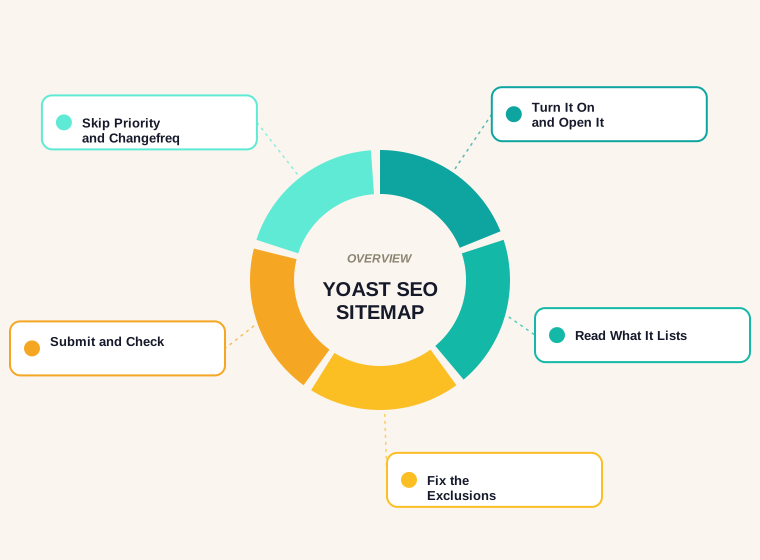
Below you will find how to turn the sitemap on and open it, what the real Yoast sitemaps contain, what Yoast leaves out on purpose, why there is no priority setting, how to submit the sitemap and fix common problems, and a short checklist. For a general walk-through of sitemap creation, see our guide on how to create a sitemap.
How to Turn On the Yoast SEO Sitemap and Find It
Per Yoast's help center, go to Yoast SEO, then Settings, then Site features, find the XML sitemaps toggle under Technical SEO and switch it on. Click View the XML sitemap to open it. The address is your domain plus /sitemap_index.xml. Yoast's developer documentation adds that requests to /sitemap.xml should redirect to that index file. Because the plugin is an automated sitemap generator, you do not edit the file by hand: it updates as you add, change or remove content.
If your sitemap sits at /sitemap.xml and does not redirect, Yoast says it is not being generated by its plugin. It may come from another plugin or from WordPress itself, so disable other sitemap generators before you rely on Yoast's.
What Real Yoast Sitemaps Contain
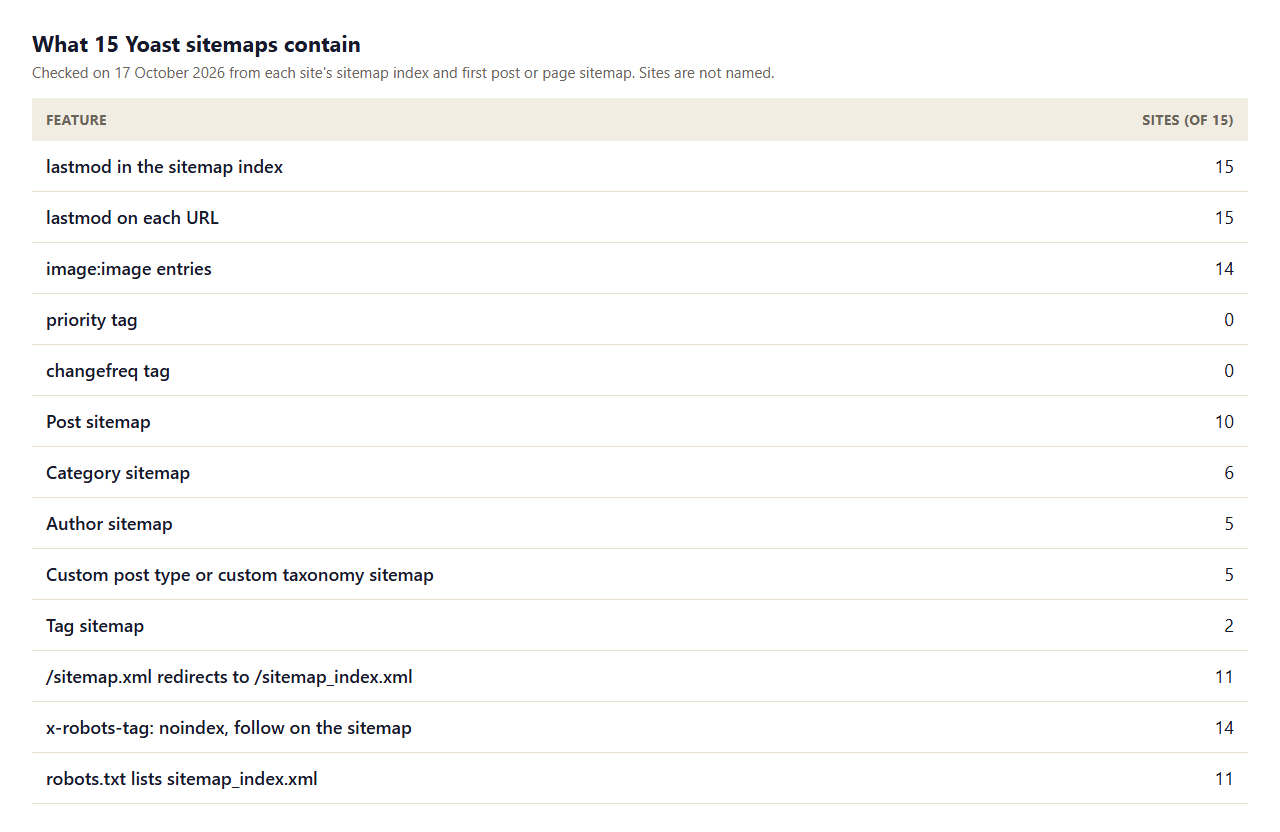
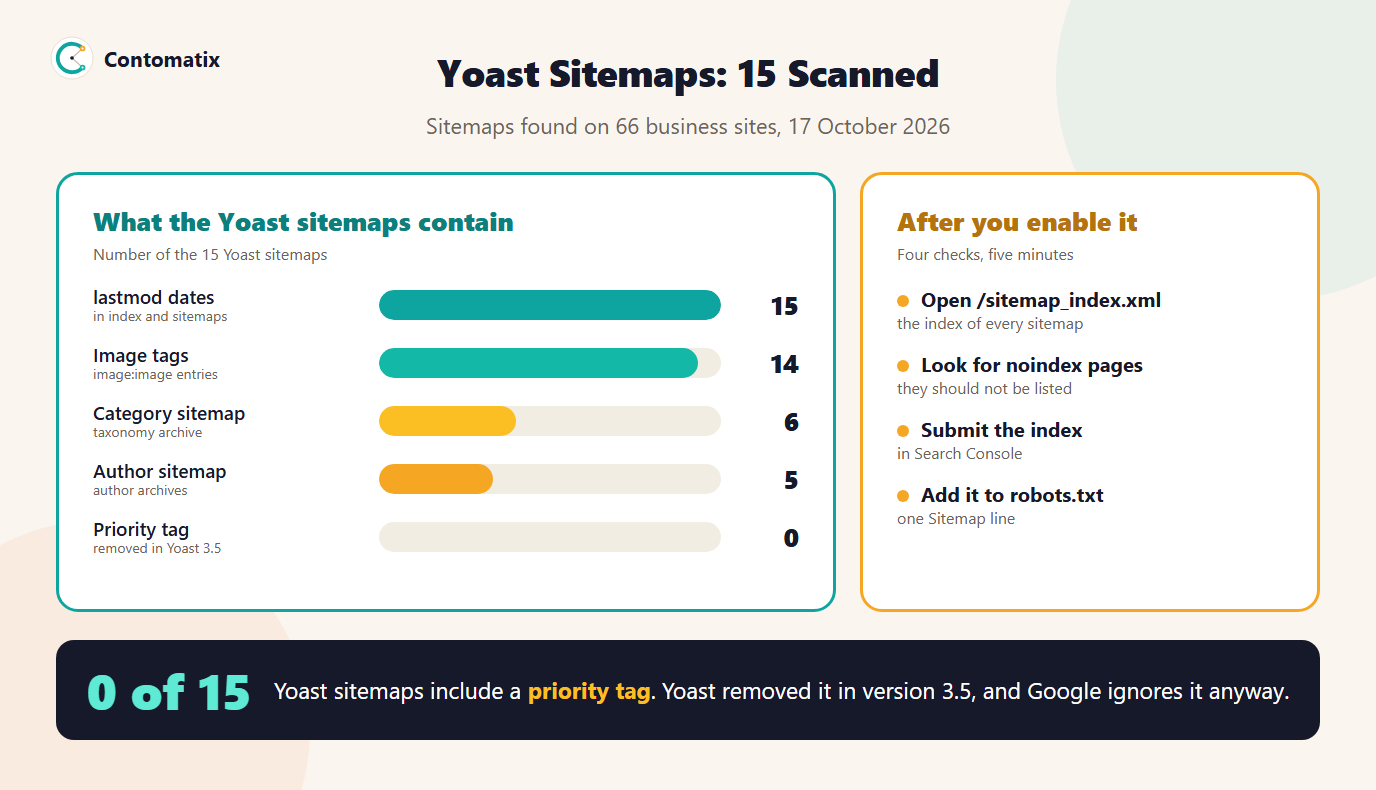
- Dates are always there. 15 of 15 sitemaps carry a last-modified date on each URL, and 15 of 15 also put one on each child sitemap in the index.
- Priority and changefreq are never there. 0 of 15 used priority and 0 of 15 used changefreq, which matches Yoast's documentation.
- Images ride along. 14 of 15 include
image:imageentries for the images on each page. - The index splits by content type. 10 of 15 had a post sitemap, 6 of 15 a category sitemap and 5 of 15 an author sitemap. 5 of 15 also listed a custom content type, such as a service, provider or portfolio type.
- Small sites stay small. 3 of 15 sites had a single page sitemap, because they had no blog.
- The sitemap tells search engines not to index it. 14 of 15 send an
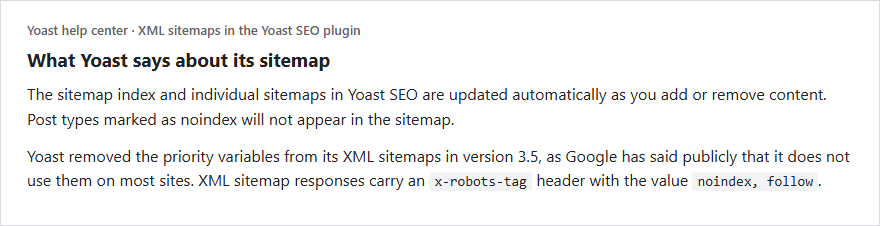
x-robots-tag: noindex, followheader on the sitemap, which Yoast explains is because sitemaps do not need to be indexed to be read.
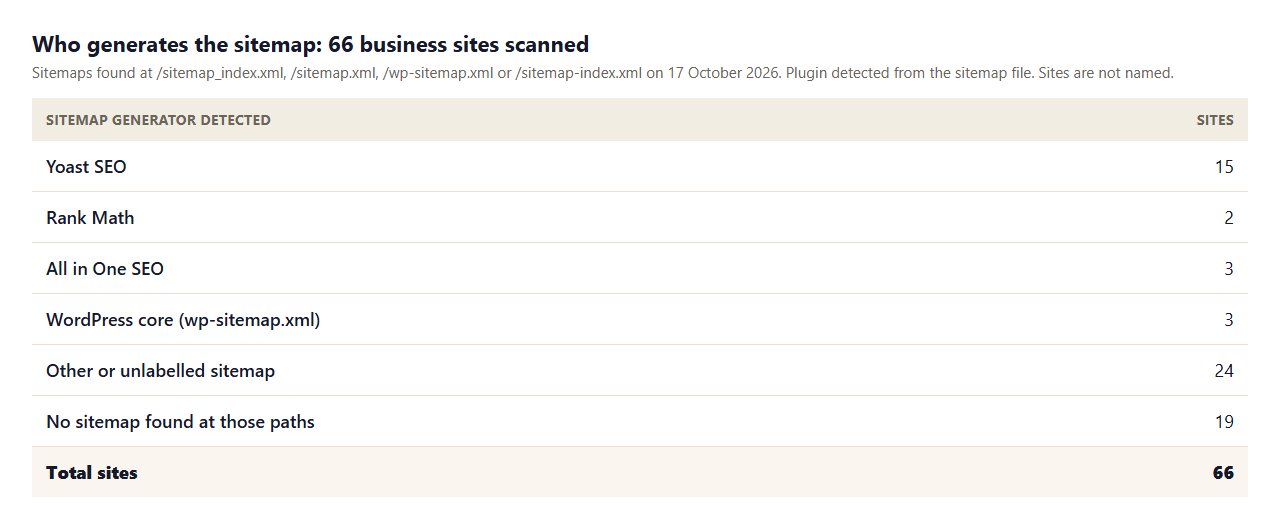
Of the 66 sites we scanned, Yoast generated the sitemap on 15. The rest used other plugins, WordPress core or a platform we could not label, so a sitemap at /sitemap_index.xml is a good sign of Yoast but not proof.
What Yoast Includes and Leaves Out
Yoast builds one sitemap per public content type: posts, pages, custom post types, taxonomies and authors who have at least one published, indexable post. It also leaves things out. According to Yoast's functional specification, a URL is excluded if it outputs a noindex directive, if it has a manual canonical that differs from its default one, if it is private or password protected, if it is an error page or search results page, or if it is a paginated archive such as /blog/page/2/. If you set the whole site to discourage search engines in WordPress, the sitemap lists nothing.
This is useful in practice. If a page you want indexed is missing from the sitemap, check three things in order: is it set to noindex in Yoast's settings, does it have a custom canonical pointing somewhere else, and is its post status published. You can test a page's tags quickly with our SEO page audit.
Why There Is No Priority or Changefreq Setting
Yoast removed the priority variables in version 3.5 because Google had said publicly it does not use them on most sites. Google's own sitemap documentation says it ignores the priority and changefreq values, and uses lastmod only if it is consistently accurate. That fits the scan: Yoast gives you the one tag that can matter and drops the two that do not. We tested that claim ourselves in our study of sitemap priority across 20 real sitemaps.
Submit and Check Your Yoast Sitemap
- Submit the index. In Google Search Console, open Sitemaps and submit
sitemap_index.xml. Google allows an index file, and a single sitemap is limited to 50MB uncompressed or 50,000 URLs. - Add it to robots.txt. 11 of the 15 Yoast sites did, with a line such as
Sitemap: https://example.com/sitemap_index.xml. See our guide to the robots.txt sitemap field. - Validate it. Paste it into our sitemap validator to catch structure errors.
- Extract the URLs. Use the sitemap URL extractor to get a clean list and compare it with the pages you expect.
- Watch the status. In Search Console, check that the sitemap shows as processed and that submitted pages are indexed.
Common Yoast Sitemap Problems and Fixes
- The sitemap is empty. The site may be set to discourage search engines, or every post type is noindex. Check Settings, Reading in WordPress and your Yoast content type settings.
- /sitemap.xml shows a different file. 4 of the 15 Yoast sites answered with a 200 at
/sitemap.xmlinstead of a redirect. Make sure you submit the index you actually mean to submit. - Two sitemaps at once. Another SEO plugin, a sitemap plugin or the theme can create a second one. Disable the extras so there is one source of truth.
- Author or tag sitemaps you do not want. 5 of 15 sites exposed an author sitemap and 2 of 15 a tag sitemap. If those archives add little, set them to noindex and they drop out.
- Too many URLs per file. Large sites split into several files, for example
post-sitemap.xmlandpost-sitemap2.xml. Yoast lets developers change the page size with thewpseo_sitemap_entries_per_pagefilter. - Missing page after you publish. Clear any cache or security plugin that serves an old sitemap and reload the index.
Yoast Compared With the Other Sitemap Sources We Found
Yoast was the most common labelled generator in our scan, but not the only one. 2 sites used Rank Math, 3 used All in One SEO and 3 used the WordPress core sitemap at /wp-sitemap.xml. 24 more had a sitemap with no plugin signature, which is typical of site builders and custom setups, and 19 had no sitemap at the four paths we tried. The practical lesson is that you should never assume which tool made your sitemap. Open the file, look at the first lines and the address, and confirm.
The differences between generators matter less than people think. All of them list your canonical, indexable URLs, and Google needs only valid, accurate files. What matters is that the sitemap is correct, free of redirected or noindex URLs, and submitted. If you already use Yoast for titles and meta descriptions, using its sitemap keeps everything in one place. If you switch plugins, switch off the old sitemap first so you do not publish two.
How to Audit Your Yoast Sitemap in Search Console
A sitemap is only useful if the URLs in it are the ones you want indexed. After you submit the index, open the Page indexing report in Search Console and filter by your sitemap. Look at the pages marked as not indexed and read the reason. If a URL is listed in your sitemap but excluded because of a noindex tag, a redirect or a canonical pointing elsewhere, the sitemap and the page disagree, and you should fix one of them. Yoast already leaves noindex and mismatched canonicals out, so disagreements usually point to a caching issue, an old sitemap file or another plugin overriding the tag.
Next, compare counts. Use the sitemap URL extractor to count the URLs in each child sitemap, then compare the total with the number of pages you intend to rank. A large gap in either direction deserves a look. Too few means pages are missing; too many means archives or utility pages are sneaking in. Repeat the check after each major change, such as a theme switch, a migration or the removal of a plugin.
What to Do After a Migration or Redesign
Sitemap problems often show up after a site move. If the domain, the protocol or the permalink structure changed, the old sitemap URL may still be in Search Console and in robots.txt. Remove the old sitemaps, submit the new index and confirm that every URL in it returns a 200 status without a redirect. Check the sitemap in the browser, not only in the plugin screen, because caching layers can serve an old copy. Then spot-check a few new pages in the URL Inspection tool to see whether Google has seen them. If you changed URLs, map the old ones to the new with a redirect map and keep it in place; our redirect mapper helps build one.
Yoast Sitemaps for Ecommerce, HTML and Other Cases
An ecommerce site on WordPress usually has products and product categories. Because Yoast creates a sitemap for each public content type and taxonomy, they appear as their own files, such as a product sitemap and a product category sitemap, as long as they are not set to noindex. Check that filtered, sort or cart URLs are not listed. For a sitemap sample, the pattern above applies: an index file, then one file per type, each listing URLs with loc and lastmod.
An HTML sitemap is a different thing. It is a normal page of links for visitors, not an XML file for search engines. Yoast's XML sitemap does not replace it. If you want a hand-built XML file for a non-WordPress site, our XML sitemap generator creates one from a list of URLs.
Yoast Sitemap Checklist
- Enable XML sitemaps under Site features and open
/sitemap_index.xml. - Confirm no other plugin or file is publishing a second sitemap.
- Check that noindex and private pages are absent and important pages are present.
- Decide whether author, tag and category sitemaps should exist, and noindex the ones that should not.
- Submit the index in Search Console and add it to robots.txt.
- Recheck after theme, plugin or migration changes.
Keep the habit simple: open the sitemap index once a month, glance at the number of child sitemaps and the last-modified dates, and make sure they match what you published. A stale date on the post sitemap after a busy month is an early warning that caching or a conflicting plugin is serving an old file, and it is far easier to catch there than in a traffic report weeks later.
How We Read the Sitemaps
- We scanned 66 business sites we had already collected for earlier research, and looked for a sitemap at four common paths on 17 October 2026.
- A sitemap counts as Yoast when its file or stylesheet carries the Yoast signature. A site with a hidden or customised sitemap could be missed.
- Counts for each feature come from each site's index and its first post or page sitemap, not every file.
- Yoast's behaviour comes from its help center and developer documentation, and Google's from its sitemap documentation, all read on 17 October 2026.
- Results for other sites or later dates will differ, so open your own sitemap and check it.
Key Takeaways
- Yoast builds and updates your XML sitemap automatically at
/sitemap_index.xml. - It lists indexable content only, and drops noindex, private and paginated URLs.
- It has no priority or changefreq, because Google ignores them. It does include lastmod.
- Submit the index in Search Console and add it to robots.txt.
- If another file sits at
/sitemap.xml, make sure you know which sitemap you are submitting.
Frequently Asked Questions
Where is my Yoast SEO sitemap?
At your domain plus /sitemap_index.xml. Turn it on under Yoast SEO, Settings, Site features, XML sitemaps, then click View the XML sitemap.
How do I generate a sitemap with Yoast?
You do not generate it by hand. Enable the XML sitemaps feature and Yoast builds and updates the sitemap automatically as content changes.
Does Yoast create an HTML sitemap?
The Yoast XML sitemap is for search engines. An HTML sitemap is a separate page of links for visitors, and it is not the same thing.
Why is my page missing from the Yoast sitemap?
Usually because it is set to noindex, has a manual canonical pointing elsewhere, is private or password protected, or is not published.
Can I change the priority in the Yoast sitemap?
No. Yoast removed the priority variables in version 3.5 because Google does not use them on most sites.
Should I submit sitemap.xml or sitemap_index.xml?
Submit sitemap_index.xml. A sitemap at /sitemap.xml that does not redirect to it is not generated by Yoast.
Why does my Yoast sitemap say noindex?
Yoast adds an x-robots-tag noindex, follow header to sitemap responses because sitemaps do not need to be indexed to be read.
How many URLs can one sitemap hold?
Google limits a single sitemap to 50MB uncompressed or 50,000 URLs. Yoast splits large content types into several files and lists them in the index.
Does an ecommerce site need a different sitemap setup?
Not in Yoast. Products and product categories get their own sitemaps if they are public and indexable. Just keep filter and cart URLs out.


