Last updated: August 2026
A Shopify SEO consultant gets hired for a specific reason more often than not: a store's product pages aren't ranking despite decent traffic to the homepage, or a recent theme change quietly broke URL structures that took months to build authority. Shopify makes launching a store fast, but that same simplicity means a lot of SEO-relevant decisions — URL structure, duplicate product variants, app bloat — are made by default settings rather than deliberate choice.
This guide covers what Shopify SEO consulting actually involves in 2026, the platform-specific issues that don't show up in generic e-commerce SEO advice, and where the highest-leverage fixes actually are for a typical store.
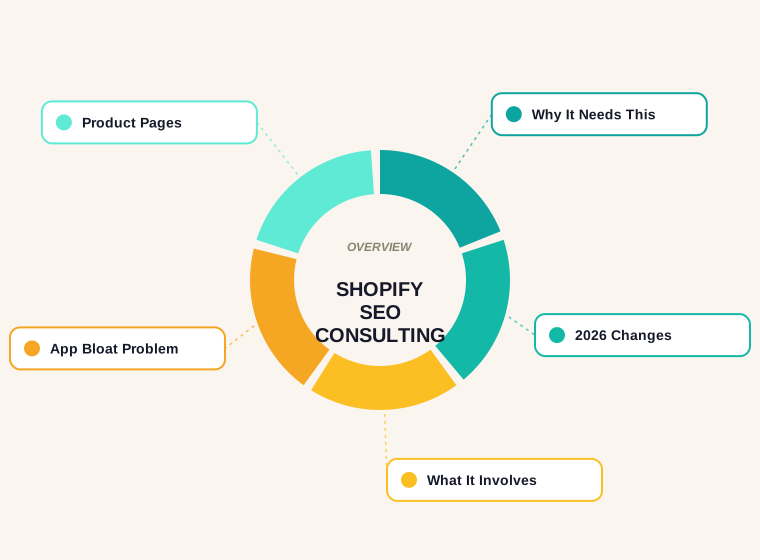
Why Shopify Needs Platform-Specific SEO Attention
Shopify's biggest SEO strength — how fast it lets a merchant launch and add products — is also the source of its most common SEO problems. Collection and product URLs follow a fixed structure (/collections/x/products/y) that can't be fully customized without a workaround, product variants (size, color) sometimes generate near-duplicate pages, and the app ecosystem that makes Shopify so extensible also means many stores run five or more apps injecting scripts on every page, most of them unnecessary on any given page.
A second recurring issue is thin collection pages — a collection page that's just a grid of products with no unique copy has very little for Google to differentiate it from every other store's version of the same category, especially in competitive niches with many nearly-identical dropshipping stores.
What's Changed for Shopify SEO in 2026
Core Web Vitals matter more for conversion-focused e-commerce than almost any other site type, since a slow product page directly costs sales, not just rankings — and Shopify's app-heavy ecosystem makes it easy to quietly regress performance with each new app installed. AI-generated shopping answers are also increasingly pulling structured product data directly, which raises the value of clean, complete product schema markup over generic descriptions.

What Shopify SEO Consulting Actually Involves
- App audit — identifying which installed apps are actually earning their page-weight cost versus running unnecessarily on every page
- Collection and product page content — writing genuine, differentiated copy for collection pages instead of leaving them as bare product grids
- Duplicate content cleanup — canonical tags and structure fixes for product variants and filtered/sorted collection views
- Product schema markup — price, availability, and review markup implemented correctly so products are eligible for rich results
- Link building for e-commerce — a genuinely different outreach approach than content-site link building, usually built around product reviews, gift guides, and affiliate relationships
The App Bloat Problem
Most Shopify stores accumulate apps over time — a reviews app, an upsell app, a currency converter, a countdown timer app — and rarely audit whether each one is still needed or how much page weight it's adding. Each app typically injects its own script on every page regardless of whether that page uses its feature, which compounds into meaningfully slower load times store-wide. A Shopify SEO consultant's first technical pass is usually measuring exactly this and cutting apps that aren't earning their weight, the same diagnostic used for WordPress page builders in our WordPress SEO guide.

Product and Collection Page Content
Manufacturer-supplied product descriptions, used unedited, are often identical across dozens of competing stores selling the same product — meaning Google has no reason to rank any particular store's version above another's. Rewriting product copy to be genuinely unique, even briefly, is one of the highest-leverage content fixes available to a Shopify store, and proper keyword research at the collection-page level (not just product-level) captures a meaningful amount of otherwise-missed category search traffic.
Common Shopify SEO Mistakes
- Leaving thin, copy-free collection pages that can't differentiate from competitors selling the same products
- Running unaudited apps that inject scripts on every page regardless of whether the page uses that app's feature
- Using unedited manufacturer product descriptions, creating duplicate content across competing stores
- Missing or incomplete product schema markup, losing eligibility for rich results in search
- Ignoring canonical tags on variant and filtered URLs, splitting ranking signal across near-duplicate pages
DIY vs. Hiring a Shopify SEO Consultant
A store owner can handle an app audit and basic collection-page copywriting without outside help — it's mostly time, not expertise. Where a consultant earns their cost is diagnosing why a specific theme change or app installation caused a ranking or conversion drop, which requires comparing before/after data the same way a WordPress migration issue would be diagnosed. Our agency versus freelancer comparison covers what to expect from paid help at that point.
Is a Shopify SEO Consultant Worth It?
For a store already generating consistent traffic, a focused technical and content audit is usually the highest-leverage single purchase available, since app bloat and thin collection pages are invisible day-to-day problems that quietly cap growth. For a brand-new store, getting the app stack and collection structure right from the start avoids the more expensive cleanup later.
A Quarterly Shopify SEO Health Check
Most Shopify SEO problems don't arrive all at once — they accumulate quietly between theme updates, app installs, and seasonal collection changes. A short recurring check catches drift before it compounds into a ranking drop that takes months to trace back to its cause:
- Run a crawl of the whole store — a free crawler set to a few thousand pages will surface orphaned collection pages, redirect chains left over from a past reorganization, and duplicate title tags across variant URLs.
- Check Core Web Vitals in Search Console — filter by template type (product, collection, homepage) rather than looking at a single sitewide average, since one slow template can drag down an otherwise healthy store.
- Re-audit installed apps — anything added since the last check should justify its page-weight cost or get removed. Apps installed for a single seasonal campaign are the most commonly forgotten.
- Spot-check product schema on a sample of pages using Google's Rich Results Test — a theme update can silently break structured data without throwing any visible error on the storefront.
- Review the sitemap for stale or discontinued products — a sitemap padded with hundreds of out-of-stock, permanently discontinued items wastes crawl budget that could go toward pages actually generating sales.
None of this requires specialized tooling beyond what's already free — Search Console, a basic crawler, and the Rich Results Test cover most of it. The value is in doing it on a schedule rather than only after a ranking drop forces the question.
Questions to Ask Before Hiring a Shopify SEO Consultant
Shopify-specific experience matters more here than general SEO credentials, because platform-level constraints — the fixed collection URL structure, the theme templating language, the app ecosystem — shape what's actually fixable and what isn't. A few questions separate a consultant who understands the platform from one applying generic e-commerce advice:
- "Which Shopify themes have you worked with directly?" — a consultant who's only worked on custom-built sites may not know the specific limitations of Shopify's templating language or common theme-store quirks.
- "Will you need theme code access, and what's your rollback plan if a change breaks something?" — any legitimate technical fix should come with a stated rollback path, not just an assurance that it'll be fine.
- "How do you handle the app audit — do you review installed apps as part of the engagement?" — if app bloat isn't mentioned unprompted, it's worth asking directly, since it's one of the most common and most overlooked issues on the platform.
- "What does reporting look like, and how do you separate SEO impact from a concurrent paid campaign?" — a store running ads alongside SEO work needs a consultant who can isolate organic movement from paid-driven traffic spikes.
- "What happens to collection and product URLs if we change themes later?" — the answer should show they've thought about URL stability across a future migration, not just the current build.
Migrating to Shopify Without Losing Existing Rankings
A platform migration — moving from WooCommerce, Magento, or a custom cart onto Shopify — is one of the highest-risk moments in a store's SEO history, and also one of the most common reasons a Shopify SEO consultant gets hired reactively rather than proactively.
- Map every existing URL to its new Shopify equivalent before launch, not after. A spreadsheet of old-URL-to-new-URL pairs is the foundation of the entire redirect plan.
- Set up 301 redirects for every mapped URL, and specifically check for redirect chains — an old URL redirecting to an intermediate URL that itself redirects again dilutes the signal passed through and slows crawling.
- Keep URL slugs as close to the original as Shopify's structure allows, since
/collections/x/products/yis fixed, but the slug portion itself can usually still match what was previously indexed. - Resubmit the new sitemap in Search Console immediately after launch, and monitor the Coverage report daily for the first two weeks for a spike in 404s or unexpected noindex tags.
- Keep the old platform's analytics accessible for at least a full quarter after migration, since comparing pre- and post-migration organic traffic by landing page is the only reliable way to confirm nothing important was lost in the move.
A migration done carefully can complete with organic traffic essentially flat through the transition. A rushed one, done without a URL map, is the single most common cause of a Shopify SEO consultant being brought in for cleanup rather than for growth work.
Signs a Shopify Store Is Already Losing Rankings to Its Own Setup
- Collection pages rank for the brand name but not the category term — a sign the page has no unique copy for Google to associate with the broader keyword.
- Product pages show near-identical content in a site search for a phrase from the description — meaning manufacturer copy was never rewritten and is competing against dozens of other stores using the same text.
- Search Console shows a rising number of pages marked "crawled — currently not indexed" — often filtered or sorted collection URLs that were never canonicalized back to the main version.
- Lighthouse scores vary wildly between a bare product page and one with reviews, upsells, and a countdown timer active — a clear sign specific apps are the bottleneck rather than the theme itself.
- Organic traffic to collection pages is flat while paid traffic to the same pages grows — often a sign the collection page itself was never given the content or internal linking needed to earn organic visibility independently.
None of these show up as an outright error message — they're the kind of gradual, low-visibility drag that a scheduled technical review catches long before a store owner notices the traffic decline on their own.
Related reading: our guide to Wix SEO specialists covers what Wix sites can and cannot do for search.
If it helps, we also wrote about ecommerce SEO strategy: category, product and technical priorities for online stores.
How many apps should a Shopify store run for good SEO?
As few as genuinely needed. Every installed app typically adds page weight on every page it runs on, whether or not that page uses its feature — audit and remove anything not earning its cost.
Do I need unique copy on every product page?
Ideally yes, but collection pages matter just as much and are more commonly left thin. Differentiated copy at both levels is the highest-leverage content fix for most Shopify stores.
Does Shopify support proper canonical tags for product variants?
Yes, though it requires deliberate setup — left on defaults, product variants and filtered collection views can create duplicate-content issues that split ranking signal.
How much does Shopify SEO consulting cost?
Typically a one-time audit cost rather than an ongoing retainer, scaled to store size and the number of issues found in the initial technical review.
Is link building different for e-commerce stores?
Yes — it usually centers on product reviews, gift guides, and affiliate relationships rather than the guest-post and content-outreach approach used for informational sites.
Can a bad theme change hurt my Shopify SEO?
Yes, especially if it changes URL structure or removes previously-indexed pages without redirects. Comparing pre- and post-change crawl data is the fastest way to isolate what broke.
Related Reading
- The same listing-optimization principles apply outside ecommerce too — see how to do SEO for Airbnb listings.
Contomatix builds the on-page, link building and content foundation that actually moves rankings — not just a checklist audit. Want a free review of where your site stands right now?
Get a free audit →