Last updated: October 2026
A good ecommerce SEO strategy is mostly a set of decisions about where to spend limited effort. An online store can have thousands of product pages, hundreds of filter combinations and a handful of people to look after them, so the question is never "what could we optimise?" It is "what do we do first, and what do we deliberately leave alone?"
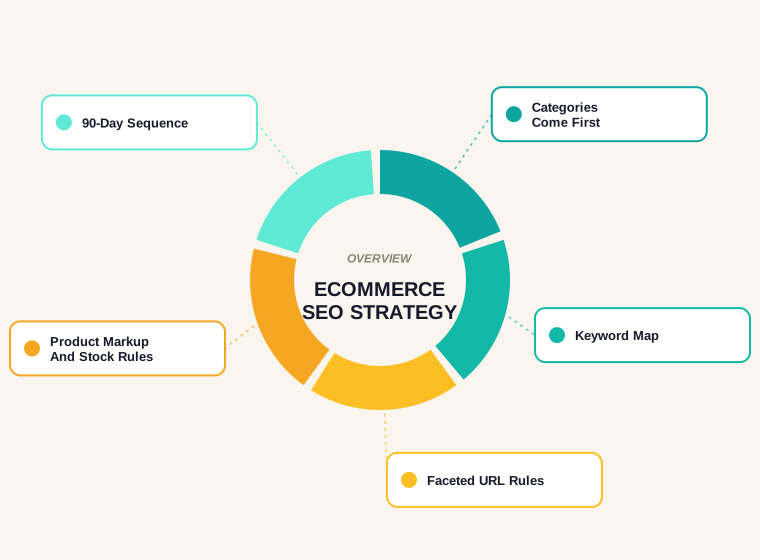
This guide is a plan, not a checklist of faults. If you already have a live store and want to find what is broken, our ecommerce SEO audit walks through that. Here the focus is the forward-looking part: which page types to prioritise, how to map keywords to them, how to build a site structure Google can crawl, what to do with product markup and out-of-stock items, and how to sequence it all across the first 90 days.
Start With the Business, Not the Keyword List
The most common reason an ecommerce SEO plan stalls is that it starts with a spreadsheet of keywords and no view of which products matter. Before researching anything, write down three things: the products or categories that carry your best margin, the ones you can realistically stock and ship in volume, and the ones where you have something genuine to say that a marketplace listing does not.
Those answers decide what the strategy is for. A store that sells commodity items against much larger retailers should lean on narrow categories, specific attributes and buying advice. A store with its own brand or a distinctive range can compete directly for product-name searches. Every ecommerce SEO strategy below assumes you have picked a small number of priority categories and are building outward from them rather than trying to rank the whole catalogue at once.
Which Page Types to Prioritise in an Ecommerce SEO Strategy
An online store has three families of pages, and they do different jobs. Treat them differently.
- Category and subcategory pages target the broad, repeatable searches such as "women's walking boots" or "standing desk converter". They collect the most demand and are usually where commercial intent is strongest. For most stores they are the first priority.
- Product pages target specific names, models and long-tail attribute searches. Individually they pull less volume, but they convert well and there are many of them. They need to be correct and complete at scale rather than hand-crafted one by one.
- Content pages such as buying guides, comparisons and how-to articles target people who are still deciding. They earn links, feed internal linking to your categories, and capture searches that a category page cannot sensibly answer.
A sensible order is categories first, product templates second, content third. Fixing a category page that currently has no copy, a vague title and thin internal links will usually do more than writing ten blog posts. Content then supports those categories instead of floating on its own.
Keyword Mapping for a Catalogue
Mapping means giving every important keyword exactly one page that owns it. Without that, a store ends up with a category page, a filtered URL and two blog posts all competing for the same phrase, and none of them wins. If you need a refresher on tooling, see our overview of keyword research tools.
- Group keywords by intent. Words like "buy", "best", "cheap" or a specific model number point to commercial pages. "How to", "what is" and "vs" point to guides.
- Assign head terms to categories. The broad term goes to the category, the narrower variants go to subcategories, and a term like "waterproof" may belong in a filter or an attribute rather than a page of its own.
- Assign model and name searches to product pages. Include the variations shoppers actually use, such as size, colour or compatibility, in the product title and description where they are true.
- Assign questions to content. A guide titled "how to choose a mattress" should link down to the mattress category, not compete with it.
- Record the map. One row per URL: target phrase, secondary phrases, page type, owner. This becomes the working document for the 90 days.
Cannibalisation shows up as two of your own URLs swapping places in search results for the same query. A one-owner map prevents most of it. For the duplicate-content side of the same problem, see why duplicate content is an issue for SEO.
Site Architecture That Search Engines Can Follow
Google's ecommerce documentation on site structure comes down to a simple point: pages should be reachable by following links through your navigation. In practice, that means menus link to categories, categories link to subcategories, and subcategories link to the products inside them. If a product can only be found through an internal search box, a crawler may never see it. Where linking every page is not possible, Google says a sitemap or a Merchant Center feed can help it find them.
A few architecture rules that hold up for most stores:
- Keep important categories within a few clicks of the home page.
- Use plain HTML links for navigation and pagination, not scripts that only respond to clicks.
- Give each paginated page its own unique URL and a self-referencing canonical.
- Do not rely on the folder path in a URL to express hierarchy; the links between pages do that work.
- Use breadcrumbs so that the category path is visible to people and consistent for crawlers.
Decide early whether products live under one canonical path or several. A product that appears under three category paths with three different URLs creates three near-identical pages. Pick one canonical URL for each product and make the others point to it.
Faceted Navigation and URL Parameters
Filters for size, colour, price and brand are good for shoppers and a hazard for crawling. Google's guide to managing crawling of faceted navigation URLs explains that a typical implementation, built on URL parameters, can generate effectively infinite URL spaces. It names two harms: overcrawling, where crawlers spend time on a huge number of filter URLs that turn out to be useless, and slower discovery of new and useful URLs.
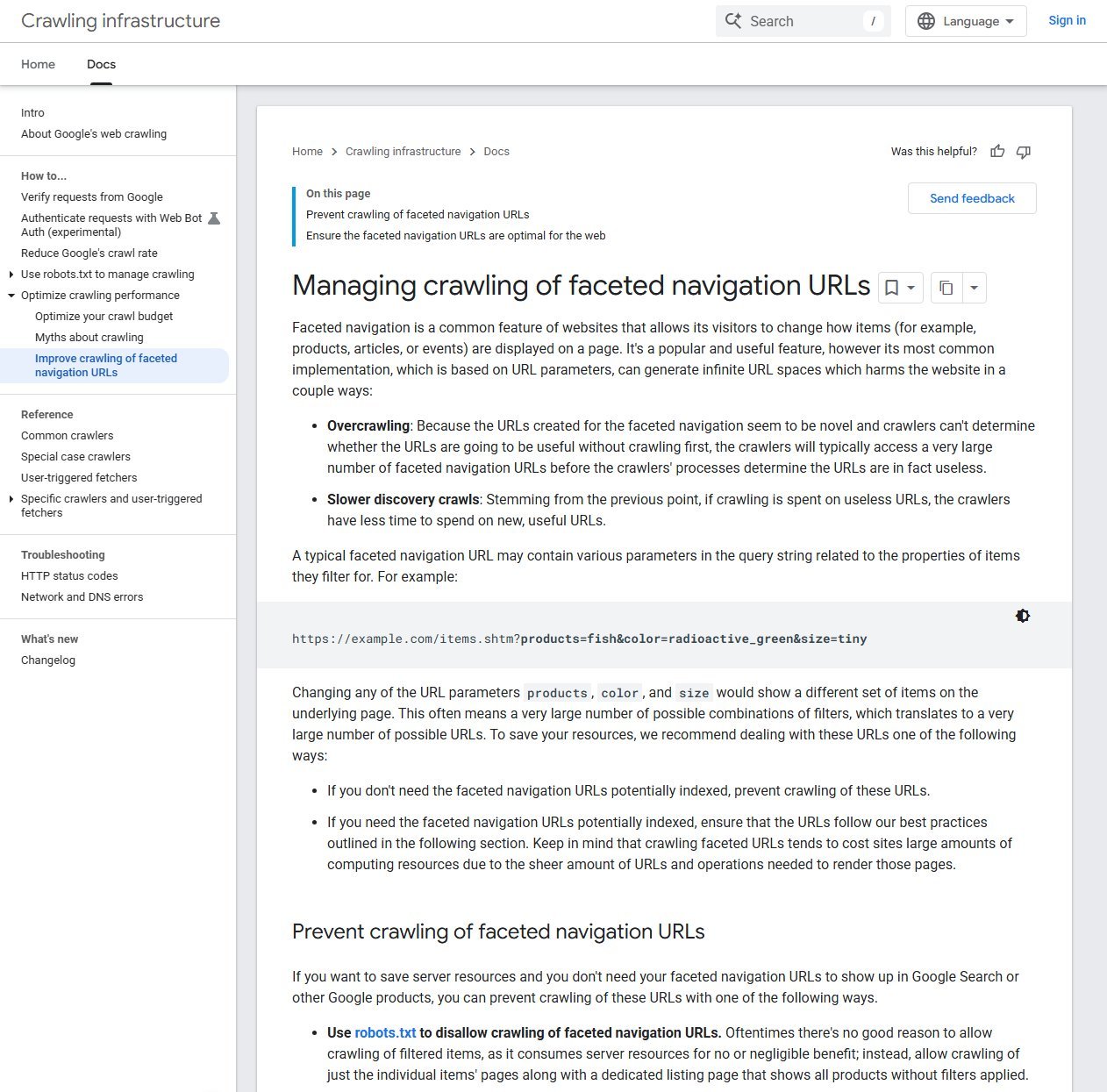
The decision in that guidance is blunt. If you do not need filtered URLs indexed, prevent crawling of them; Google's recommendation is to "use robots.txt to disallow crawling of faceted navigation URLs", while still letting product pages and one clean listing page be crawled. If you do need some filtered pages indexed, because a combination like "red running shoes" has real search demand, those pages should follow Google's URL best practices rather than being left to chance.
A workable approach for most stores is to split filters into two groups. Demand filters match a real search and get a clean, crawlable URL with its own title and a short intro. Utility filters such as sort order, price sliders and stock status stay out of the index, either blocked from crawling or kept in a form Google does not treat as a separate page. Add to that the general URL hygiene Google recommends: keep a consistent casing, avoid session IDs in URLs, and keep alternative URLs for the same content to a minimum.
Category Page Content Without the Fluff
A category page that is only a grid of products gives a search engine little to work with, but a wall of generic text at the bottom does not help either. Aim for a title and heading that name the category clearly, a short opening paragraph that says what the range includes and who it suits, and a product grid that loads quickly and links to real, crawlable product pages.
Below the grid, add useful material only if it exists: sizing advice, how to choose between sub-types, delivery and returns notes, and links to the two or three buying guides that matter. Our on-page SEO checklist covers titles, headings and descriptions in more detail. Write the copy for a shopper who has not decided yet, not for a bot.
Product Pages and Structured Data
Product pages are where templates matter. Unique, accurate product copy, good images, clear price and availability, and visible reviews do most of the work. Resist the temptation to paste manufacturer descriptions, because the same text appears on every other retailer that stocks the item.
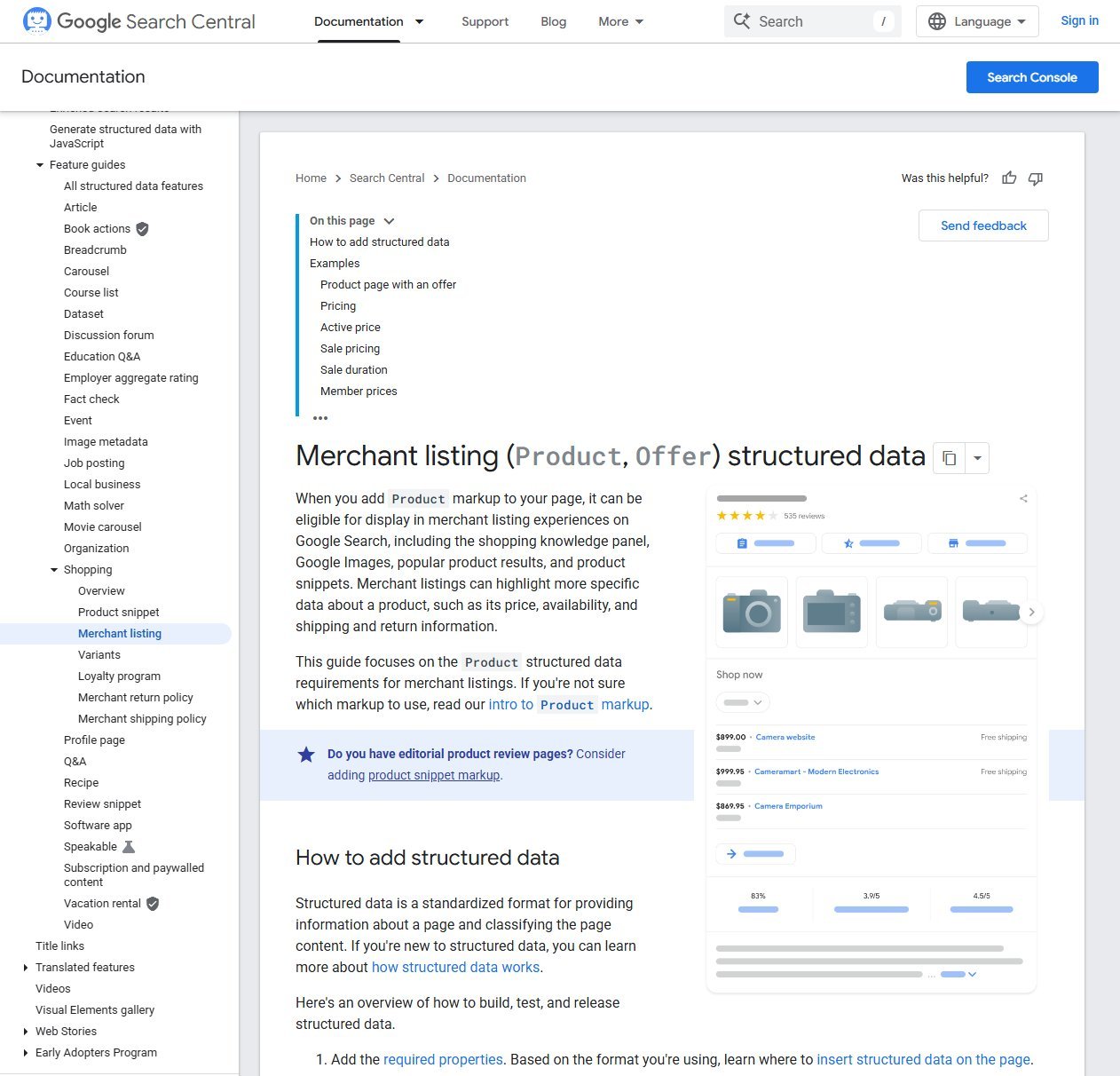
Structured data is the other half. Google's merchant listing structured data documentation says that adding Product markup can make a page eligible for merchant listing experiences in Search, including the shopping knowledge panel, Google Images and product snippets. The required properties are a product name, an image, and an offer with a price and currency. Availability is recommended, and that is where much of the value sits for shoppers.
Two practical rules follow. First, merchant listing eligibility applies to pages where a shopper can actually buy the product, not pages that only link elsewhere. Second, the markup has to match what is visible on the page; a price in the code that differs from the price on screen is a quick route to losing the enhancement. Use Google's testing tools after any template change, and check the Search Console enhancement reports for errors.
Product pages with variants such as colour or size should also be planned. Google's URL guidance allows a variant to live in a path or a query parameter, with the base product URL as the canonical version. Decide this once, document it, and make sure the structured data reflects the variants correctly.
Out-of-Stock and Discontinued Products
Stock changes constantly, and a bad rule here creates thousands of broken or thin pages. Google's guidance on pausing an online business is a useful reference even for single products: it advises you to "keep your site online and limit the functionality", for example by marking items as out of stock or restricting the cart and checkout. It also says not to block pages with 403, 404 or 410 responses or noindex tags when the pause is temporary.
That gives a straightforward set of rules:
- Temporarily out of stock: keep the page live, show the out-of-stock state clearly, update the availability in the markup, and offer an alternative or a back-in-stock alert.
- Gone for good, with a close replacement: redirect to the most relevant replacement product or subcategory, never to the home page.
- Gone for good, no replacement: return a proper not-found response, and link the customer onward from a helpful page.
- Seasonal items: keep the URL and update it year to year instead of creating a new page each season, so it keeps its history.
Whatever you choose, apply it by rule across the catalogue rather than deciding product by product.
Internal Linking and Reviews
Internal links are how authority and context flow through a store. Categories should link to their best-selling and highest-margin products. Product pages should link back up to their category and across to genuine alternatives or accessories. Guides should link down to categories with descriptive anchor text, not "click here". Each important URL should have a handful of links from relevant pages, which is easy to check by crawling your own site.
Reviews add unique text, answer objections and support the stars shoppers look for in results. Collect them from real purchasers, show them on the page, and do not copy them from elsewhere or write them yourself. Where review markup is used, it should describe reviews that appear on the page. Keep review requests simple and consistent, and never offer rewards in exchange for positive wording.
Content Strategy: Buying Guides That Earn Their Place
Content is the third priority, not the first, and it should always connect back to a category. The most reliable formats for stores are buying guides ("how to choose..."), comparison pages between your own product types, size and fit guides, care and maintenance articles, and compatibility explainers. Each should answer the question a hesitant shopper actually asks, with specifics from your range, and link directly to the relevant category and a few products.
Avoid publishing a long run of thin posts built around loosely related keywords. In any ecommerce SEO strategy, ten strong guides tied to your priority categories do more than fifty generic ones. For writing standards, our SEO content writing guide goes further.
Technical Must-Haves
The technical base for a store is short and unglamorous. HTTPS everywhere, with one preferred version of every URL. Fast category and product templates, especially on mobile. A sitemap that lists only indexable, canonical, 200-status URLs. Self-referencing canonicals on indexable pages. Rules for parameters, filters and internal search results so that they do not flood the index. Working structured data on product templates. Clean handling of redirects after any migration, with no chains.
These items rarely win rankings by themselves, but their absence limits everything else. If your platform makes any of them hard, raise it before you invest in content.
Links and PR for Online Stores
Online stores struggle to earn links to product pages, because few people link to a shop listing. The links that do come tend to point to useful resources and to the brand itself. Realistic sources include supplier and manufacturer stockist pages, local and trade press when you have news, original data or guides that journalists and bloggers can cite, and partnerships with creators who genuinely use the product. Pursue a small number of relevant links to your key categories and guides rather than volume. Buying links and sending mass outreach is the part of this area most likely to hurt you.
Measuring the Strategy in Search Console
Measurement should follow the page types in your plan. In Search Console, filter the performance report by URL pattern to look at categories, products and guides as separate groups, and watch impressions, clicks and average position per group over weeks rather than days. Check the page indexing report for large numbers of excluded filter or duplicate URLs, and the product and merchant listing reports for markup errors. Pair this with your store analytics to see which organic landing pages lead to revenue, not just sessions.
Set a review rhythm: a short check weekly for errors, and a deeper review monthly comparing priority categories against the map you built.
A 90-Day Ecommerce SEO Plan Checklist
This is the sequencing that keeps the work manageable. Adjust the dates to your capacity, but keep the order.
- Days 1 to 15: Foundations. Choose priority categories. Build the keyword map. Confirm indexing and sitemap health in Search Console. Decide the canonical URL rules for variants and paginated pages.
- Days 16 to 30: Control the crawl. Classify filters into demand and utility groups. Block or contain utility filter URLs. Fix redirect chains and duplicate paths.
- Days 31 to 50: Category pages. Rewrite titles, headings and intros for the priority categories. Add clear links from menus, from parent to child, and from guides.
- Days 51 to 70: Product templates. Fix the product page template: unique copy rules, images, visible reviews, Product markup with price and availability, and the out-of-stock rules.
- Days 71 to 85: Content. Publish three to five buying guides tied to the priority categories, each linking to the categories and key products.
- Days 86 to 90: Links and review. Start a small outreach effort around your best guide or data. Review Search Console groups, record results, and choose the next batch of categories.
Common Ecommerce SEO Mistakes
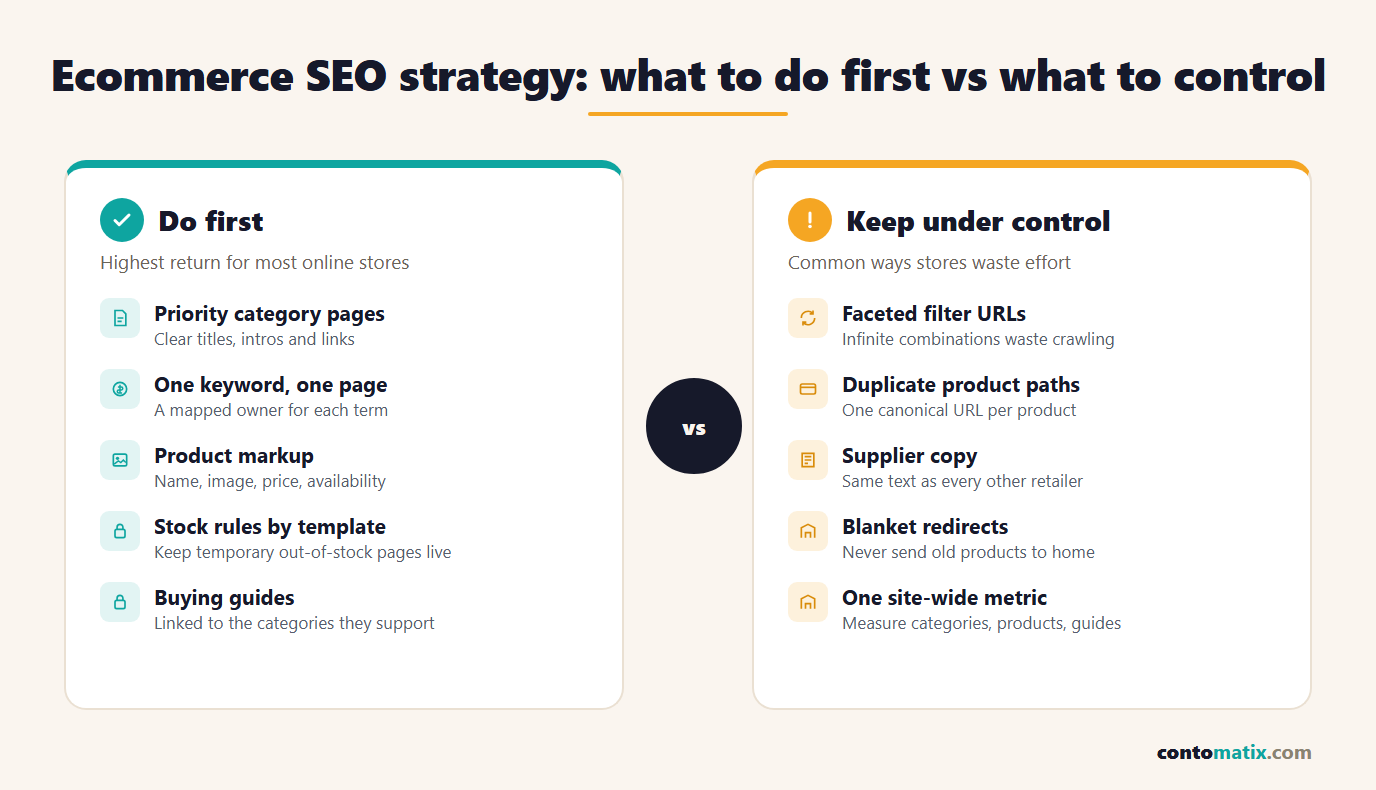
Most failed plans fail the same few ways. They try to optimise every product at once and finish none. They let filters generate thousands of indexable URLs. They copy supplier descriptions across every page. They delete or redirect everything that goes out of stock. They write guides that never link to a category. And they measure the whole site as one number, which hides which part is working. A realistic ecommerce SEO strategy stays narrow, and keeping the rules consistent and the measurement split by page type avoids most of these.
If you want an outside view of a plan like this, Contomatix works with online stores on exactly this kind of sequencing, though the steps above can also be run in house.
Quick Recap
- Prioritise categories first, product templates second and content third, starting from the products that matter most to the business.
- Give every important keyword exactly one owning page to avoid your own pages competing.
- Link menus to categories, categories to subcategories and subcategories to products with plain HTML links.
- Per Google, faceted navigation can cause overcrawling; block filter URLs you do not need indexed and keep the useful ones clean.
- Add Product structured data with name, image, price, currency and availability, and keep it matching the visible page.
- Keep temporarily unavailable products online and marked out of stock; redirect or retire discontinued ones by rule.
- Measure categories, products and guides separately in Search Console and follow the 90-day order.
Frequently Asked Questions
What is an ecommerce SEO strategy?
It is a plan for which pages on an online store to improve first, how keywords map to those pages, how the site is structured and measured, and in what order the work happens. It differs from an audit, which finds existing faults.
Should I optimise category pages or product pages first?
For most stores, category pages first. They target broader searches with stronger commercial intent, and a weak category page limits every product beneath it. Product templates come next, then content.
How do I stop filters from creating duplicate pages?
Decide which filter combinations have real search demand and give those clean URLs. For the rest, Google recommends preventing crawling, for example with robots.txt, if you do not need those URLs indexed.
What structured data does a product page need?
Google's merchant listing documentation requires a name, an image and an offer with price and currency. Availability is recommended. The markup must match what shoppers see on the page.
What should I do with out-of-stock products?
If the item is coming back, keep the page online, show that it is out of stock and update the availability markup. Google advises against blocking pages with 404 or noindex during a temporary pause.
What about products I will never restock?
Redirect to the closest relevant replacement or subcategory if one exists. If there is no equivalent, return a proper not-found response and point visitors to related products from a helpful page.
Do I need blog content for an online store?
Yes, but as support for your categories. Buying guides and comparisons capture early-stage searches and give you natural internal links to the category pages you want to rank.
Do product reviews help SEO?
Genuine reviews add unique content and help shoppers decide. Collect them from real buyers, show them on the page, and never pay for positive wording.
How do I measure ecommerce SEO progress?
Use Search Console to compare impressions, clicks and position for categories, products and guides separately, and check indexing and product markup reports. Pair this with revenue by organic landing page in your analytics.
How long does an ecommerce SEO strategy take to work?
Technical fixes can show effects within weeks, but category rankings and content gains usually build over several months. A 90-day plan sets the foundations; results continue to compound after it.