Last updated: October 2026
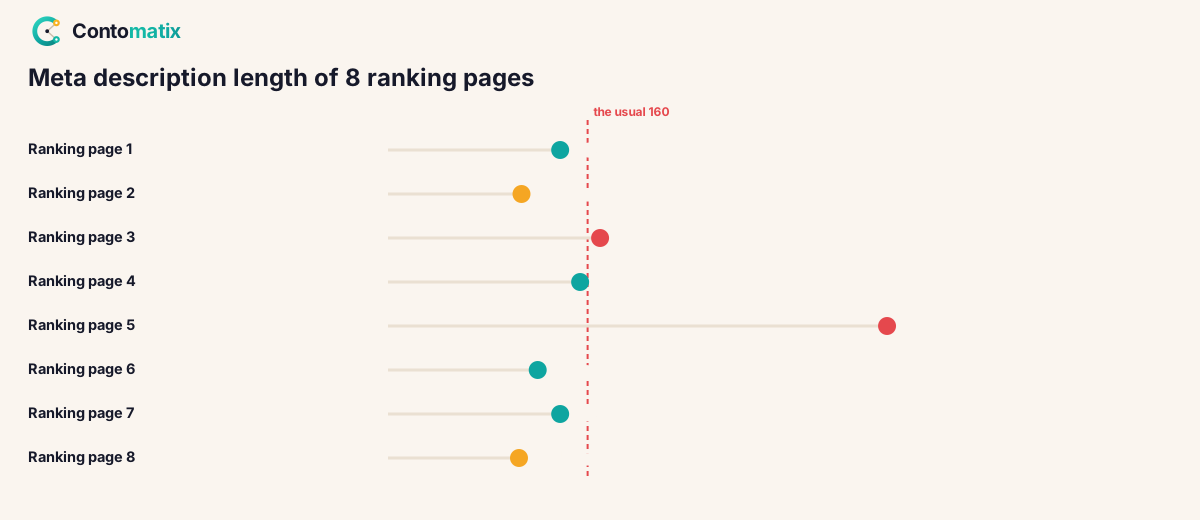
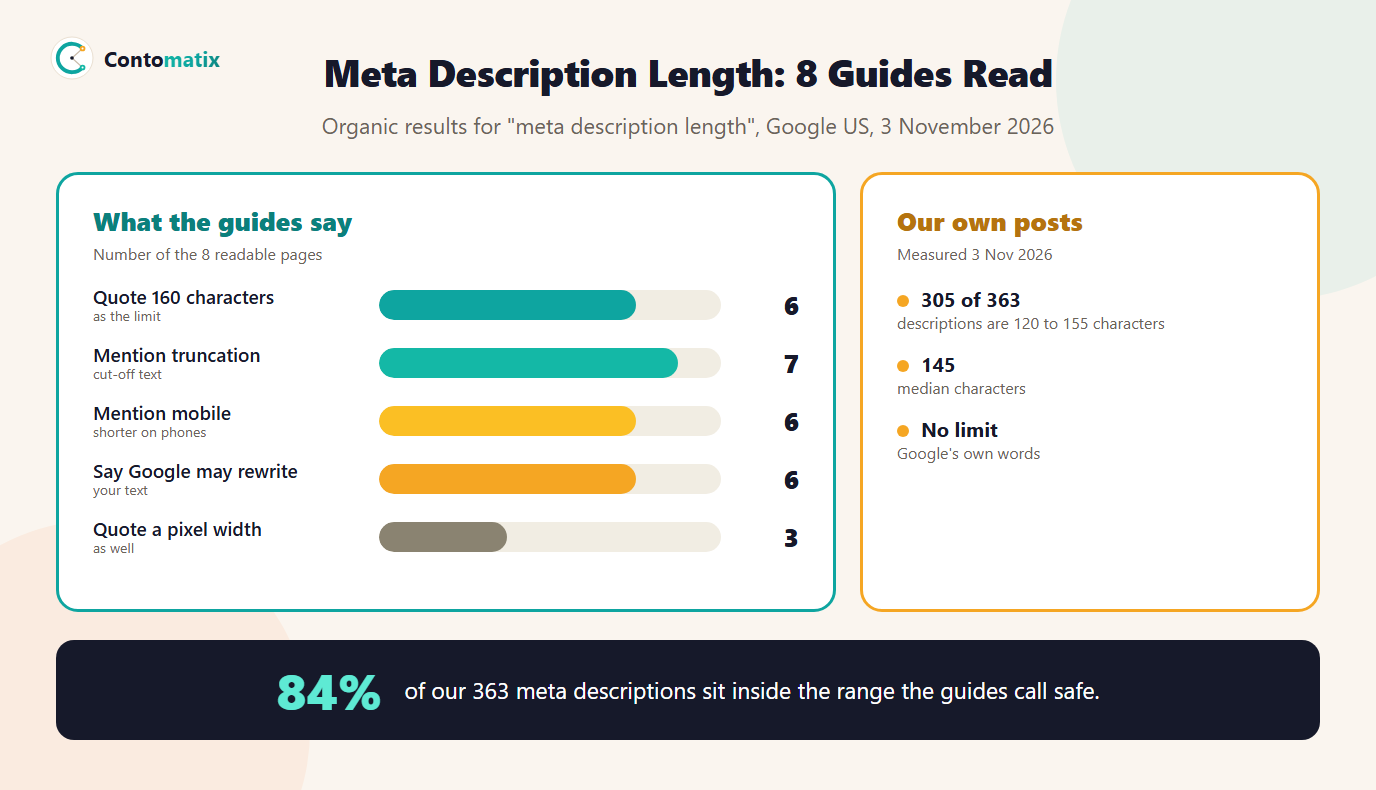
Meta description length is how many characters you write in a page's description tag. Google sets no limit. Its own page on snippets says there is no limit on how long a meta description can be, but the snippet is truncated in search results as needed, typically to fit the device width. In practice that means a long description gets cut off, so most guides give a safe range. We read 8 pages that rank for "meta description length" on 3 November 2026: 6 of 8 quote 160 characters as the limit, and 6 mention mobile. Then we counted the descriptions of all 363 posts on our own site. 305 of them, 84%, sit between 120 and 155 characters.
This guide gives the short answer, shows what Google says in its own words, compares what the ranking guides recommend, shares our own numbers, and then shows how to check and write descriptions that fit. If you want to see how a snippet will look before you publish, try our free SERP snippet preview, and for the full set of tags see our meta tags best practices guide.
Meta Description Length: The Short Answer
The ideal length of a meta description is about 120 to 155 characters. That range is a safe target, not a rule from Google. It keeps the whole text visible on most screens and leaves room for a short sentence that makes a searcher want to click. The maximum meta description length that most guides quote is 160 characters, and 3 of 8 use 155 as the safer figure. For SEO, the practical rule is simple: put the most important words first, so that if the end is cut off, nothing important is lost.
What Google Says About Meta Description Length
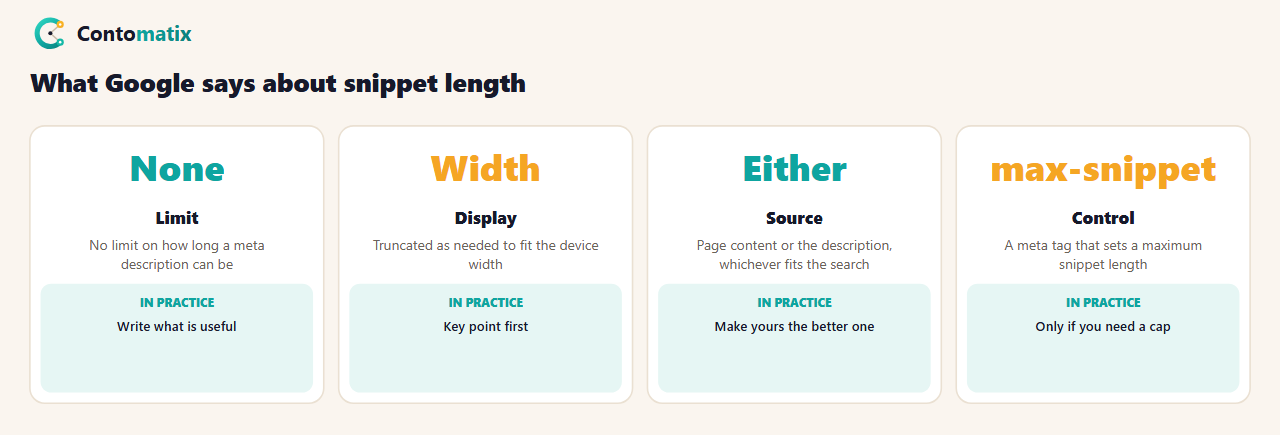
Google's page Control your snippets in search results says it was last updated on 20 April 2026. On length, it says: "There's no limit on how long a meta description can be, but the snippet is truncated in Google Search results as needed, typically to fit the device width." So the limit depends on the screen, not on a fixed number. The page also says Google "sometimes uses the meta description HTML element if it might give users a more accurate description of the page than content taken directly from the page". That means your description is a candidate for the snippet, not a guarantee.
Two more points matter for writing. First, Google warns that meta descriptions made of long strings of keywords do not give users a clear idea of the page's content and are less likely to be displayed as a snippet. Second, if you want to set a maximum, Google points to the max-snippet meta tag, which sets the maximum length of the snippet in characters. That tag limits how much text Google may show, which is a different job from writing a description.
What 8 Ranking Guides Say About Meta Description Length
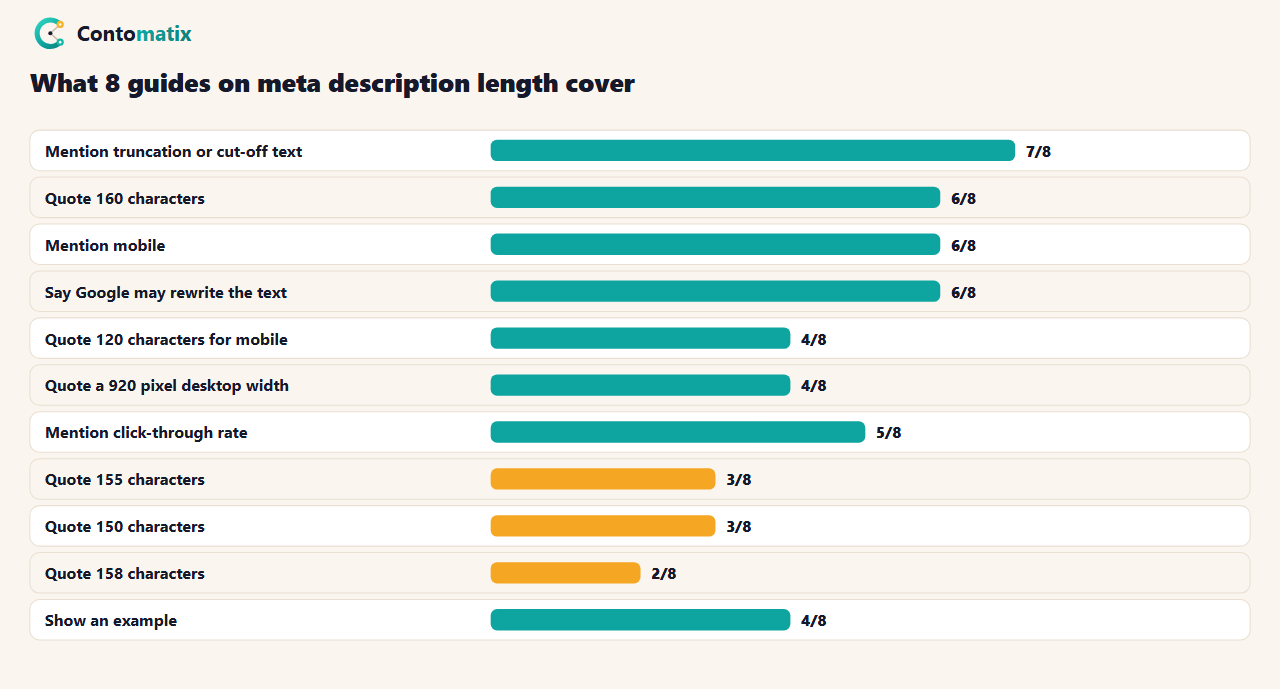
The guides agree on the broad idea and differ on the number. 7 of 8 talk about text being cut off. 6 quote 160 characters, 3 quote 155, 2 quote 158 and 3 quote 150. The spread is small but real, and it comes from the same cause: Google cuts by width, so the exact number of characters depends on which letters you use. A description full of narrow letters such as i and l fits more characters than one full of wide letters such as m and w. 3 guides explain this with a pixel width, and 4 give 920 pixels as the desktop limit. We did not test that figure, so treat it as the guides' claim.
6 guides add that phones show less. 4 give 120 characters as the mobile figure. Again this is what the guides say, not a number from Google, and Google's page only says "device width". The safest reading is that the first 120 characters carry the message and the rest is a bonus.
Why the Guides Say 155 to 160 and Where Pixels Come In
Search results are drawn in a fixed-width box, so a limit set in characters is always an estimate. Writers started quoting 155 or 160 because most descriptions of that length fit on a desktop screen. If you write 158 characters of wide letters, the end may be cut. If you write 158 characters of narrow letters, it may fit with space to spare. This is why a counter that only counts characters is a rough guide, and why a preview tool that shows the real width is more useful. It is also why we suggest 120 to 155 and not 160: the lower end keeps you safe on phones and the upper end leaves a margin on desktop.
Our Own Data: The Meta Description Length of 363 Posts
On 3 November 2026 we counted the meta description of every post on contomatix.com. On our site the description is the post's summary, and it is the text we put in the description tag. We checked the same range the guides recommend.
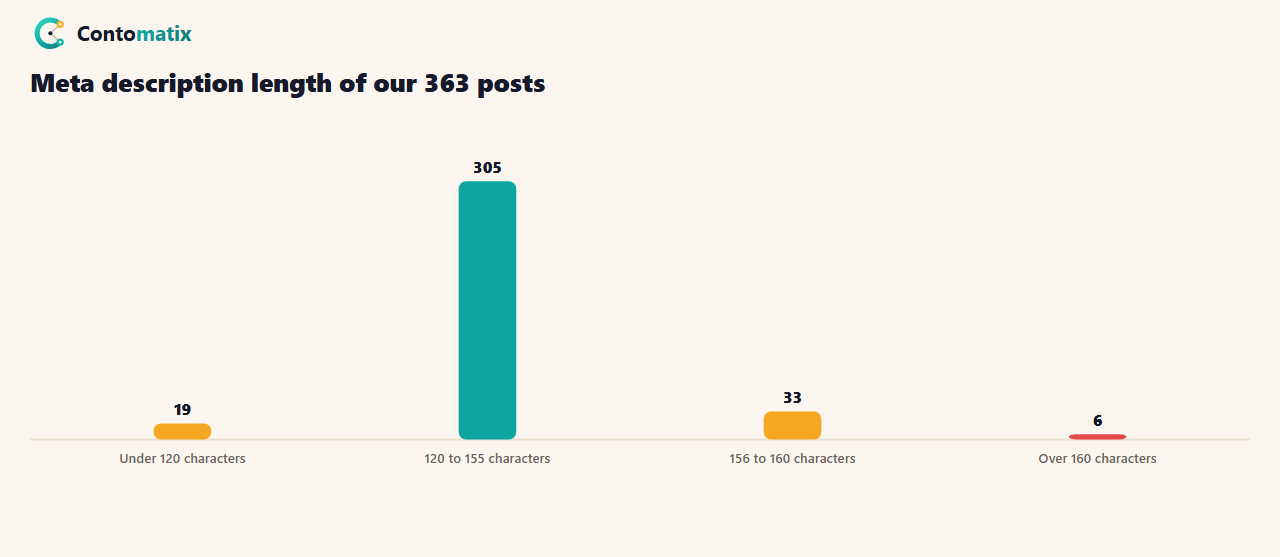
Of 363 posts, 305 (84%) are between 120 and 155 characters, 19 are under 120, 33 are between 156 and 160, and 6 are over 160. The median is 145 characters, the shortest is 111 and the longest is 165. Our build script prints the length of every new description, so a long one is easy to spot before it goes live. The 6 that are over 160 are the first ones we will shorten. Our post titles are in range too: none of the 363 is over 60 characters, and the median is 56.
Meta Description Length for SEO: Does the Number Affect Rankings?
Nothing in Google's page says description length is a ranking factor, and the guides we read do not claim it is. 5 of 8 mention click-through rate instead. The logic is that a description that fits, reads well and matches the search gets more clicks. We have no data of our own on clicks by description length, so we do not claim a measured effect. What the length does control is what the searcher sees: a cut-off sentence looks careless, and a very short description wastes space you could use to explain the page.
Title Tag and Meta Description Length
People often search for "title tag and meta description length" together, because both are cut by width. Google's page on titles has its own guidance, and we did not re-read it for this guide, so we only give our own practice: we keep titles to 60 characters or fewer and descriptions to 155 or fewer. Titles come first in the result, so a long one pushes the whole result down the page on a phone. If you are writing both, write the title to name the page and the description to give the reason to click. Our meta tag generator counts both as you type.
Meta Description Minimum Length
There is no minimum either. Short descriptions are allowed, and 2 of the 8 guides' own pages have descriptions under 120 characters. The problem with a very short description is that it wastes the space. A line such as "Meta description length guide." is 30 characters, it names the page and says nothing about why to read it. We treat anything under 120 characters as a prompt to add a benefit, a number or a detail, and 19 of our 363 posts are in that group today.
Meta Description Length Examples With Character Counts
| Example | Length | Verdict |
|---|---|---|
| Learn how long a meta description should be, what Google cuts off and how to write one that fits. Based on 8 guides and 363 of our own posts. | 141 | In range: names the topic, the promise and the proof |
| This guide to meta description length covers meta description length, ideal meta description length, the maximum meta description length, a meta description length checker and meta description length best practices for SEO in 2026 and beyond for every site. | 257 | Too long and stuffed with the same phrase, so it will be cut and reads badly |
| Meta description length guide. | 30 | Too short: gives no reason to click |
Notice what the first one does: it opens with the topic, uses the numbers that matter, and still reads like a sentence. The second repeats the key phrase and also runs past the usual limit. Google says keyword lists are less likely to be shown, so the stuffed one is likely to be replaced as well as cut.
How to Check Your Meta Description Length
- Find the description. View the page source (Ctrl+U) and search for name="description". The text in content is your description.
- Count the characters. Paste it into a counter or use the length of the string in a spreadsheet with LEN. Count spaces too.
- Preview it. Our SERP snippet preview shows how the title and description look in a result, so you can see where the cut falls.
- Fix the long ones first. Sort your pages by length and shorten anything over 155. Put the key point in the first 120.
- Check again after publishing. Search for the page and see what Google shows. It may differ from your text.
For a whole site, export your titles and descriptions from a crawl and sort by length. We did the same for our 363 posts using the data we already hold in our own files. A crawl takes minutes, and it also finds missing and duplicate descriptions, which matter more than a few characters over the line.
Meta Description Length Checker: What to Look For
All 8 of the 8 pages we read mention a checker, counter or tool, and several of the pages are tools themselves. A good meta description length checker should do three things: count characters including spaces, show a preview with a realistic width, and check the title as well. A counter that gives only a number can say 158 is fine when the text is cut at 150. Use the number as a guide and the preview as the check.
When Google Rewrites Your Meta Description
6 of 8 guides say Google may rewrite the text. Google's page agrees: it uses the description only when that gives a more accurate summary than the page content. You cannot force the snippet, but you can make your description the better choice. Describe what the page actually contains, match the wording of the searches you want, and keep it specific. If Google replaces the text for a query, that is a sign the description did not match what the searcher wanted, so rewrite it around that search. Our guide to setting up Google Search Console shows where to find the queries.
Meta Description Length Best Practices
- Aim for 120 to 155 characters. It is safe on desktop and mostly safe on phones.
- Front-load the point. Put the main words in the first 120 characters.
- Write for the person, not for a count. A natural sentence beats a padded one.
- Make each description unique. Duplicates give Google no reason to prefer yours.
- Do not stuff keywords. Google says keyword lists are less likely to be shown.
- Do not rely on the tag for rankings. It supports clicks, not a known ranking signal.
- Use max-snippet only if you need a limit. It restricts how much text Google may show.
Common Meta Description Length Mistakes
- Trusting a character count alone. Width decides the cut, so preview the result.
- Copying one description to many pages. Each page needs its own summary.
- Leaving it empty and hoping. Google will pick text from the page, which may not be the best part.
- Ending on the key point. If the end is cut, you lose it.
- Writing to a limit you never checked. We found 6 of 363 of our own over 160 until we measured.
Frequently Asked Questions
What is the ideal meta description length?
About 120 to 155 characters. Google sets no limit, but snippets are cut to fit the device width, and 6 of 8 guides we read quote 160 characters as the top. A range of 120 to 155 is a safe target.
What is the maximum meta description length?
Google says there is no limit, only truncation as needed to fit the device width. Most guides give 155 to 160 characters as the practical maximum, so keep to that range.
Does meta description length affect SEO?
Google does not say length is a ranking factor. Length affects how the snippet looks and whether it is cut off, which can affect clicks. We have no click data by length, so we do not claim a measured effect.
What is the meta description minimum length?
There is no minimum. We treat anything under 120 characters as a chance to add a benefit or detail, because a very short description wastes the space.
How do I check my meta description length?
View the page source, copy the text in the description tag, and count the characters, including spaces. A snippet preview shows where the text is cut, which a plain counter cannot.
Is the length shorter on mobile?
Guides say so, and 4 of 8 give 120 characters for mobile. Google only says the snippet fits the device width, so put the key point in the first 120 characters.
Does Google always use my meta description?
No. Google says it sometimes uses the description when it gives a more accurate summary than the page content. 6 of 8 guides also say it may rewrite the text.
What is the title tag and meta description length?
We keep titles to 60 characters or fewer and descriptions to 155 or fewer. Google gives no fixed number for either, and both are cut by width.
What is a meta description length checker?
A tool that counts the characters in a description and, in a good one, previews the snippet at a realistic width. Use the number as a guide and the preview as the check.
Want your site's titles, descriptions and snippets reviewed against your Search Console data? Talk to us and we will tell you where the quick wins are.


