
Last updated: October 2026
SEO for recruitment agencies is harder than SEO for most service businesses because a staffing firm sells to two different people at once. The hiring manager wants to know if you can fill a role. The candidate wants to know if you have a role worth applying for. Those two people type different words into Google, land on different pages and judge you on different things, and a site that blurs them together usually ranks for neither.
This guide walks through how to separate the two audiences, how to build sector and location pages that are genuinely useful instead of thin, how to mark up job pages the way Google documents it, what to do with filled and expired roles, and how to measure results in applications and client enquiries rather than raw traffic. Where a rule comes from Google, it is linked to the source and was checked against the current documentation.
Two Audiences, Two Sets of Search Intent
Start by writing down who each page is for. An employer searching for "healthcare staffing agency" or "temp-to-perm recruiters" is shopping for a service. They are comparing providers, so they need to see which sectors you cover, how you source people, what your process looks like and who you have placed work for. The conversion is a phone call or an enquiry form.
A candidate searching "warehouse jobs near me" or "accounting jobs hybrid" is looking for a vacancy. They want a list they can filter, a clear job description and an easy way to apply. The conversion is an application, and the page that earns it looks nothing like a services page.
There is also a third, quieter group: candidates who are not job hunting today but would talk to a recruiter about a career move, and employers researching how hiring in their field works. Guide-style content serves both, which is why it earns its place later in this article.
The practical rule in SEO for recruitment agencies is to keep the two journeys on separate parts of the site, each with its own navigation entry and its own calls to action. Mixing "hire talent" and "find a job" into one page forces Google to guess which query the page answers, and it forces the visitor to hunt for their own path.
Keyword Research for Staffing: Client Terms vs Candidate Terms
Build two keyword lists, not one. The client list is smaller and more commercial: the sector plus a service word (recruitment, staffing, executive search, contract, temp, permanent) plus often a place. The candidate list is larger and moves faster: role titles, locations, seniority, remote or hybrid, and the odd modifier such as "entry level" or "part time".
The method in our guide to local keyword research works well here: start from the sectors you really recruit in, add the places you really cover, and check the live results page for each term to see whether Google shows service pages, job listings or the job panel. If the results are mostly individual vacancies, your answer is a job page or a filtered listing. If they are agency homepages and service pages, your answer is a sector page.
Search volume numbers for individual role-and-city combinations are usually small, and tools only give rough estimates at that level. Treat them as a way to rank your ideas, not as a forecast. A page that serves ten employers who each place a dozen roles a year is worth far more than a page that attracts a thousand curious visitors.
Sector and Location Pages Without Doorway Spam
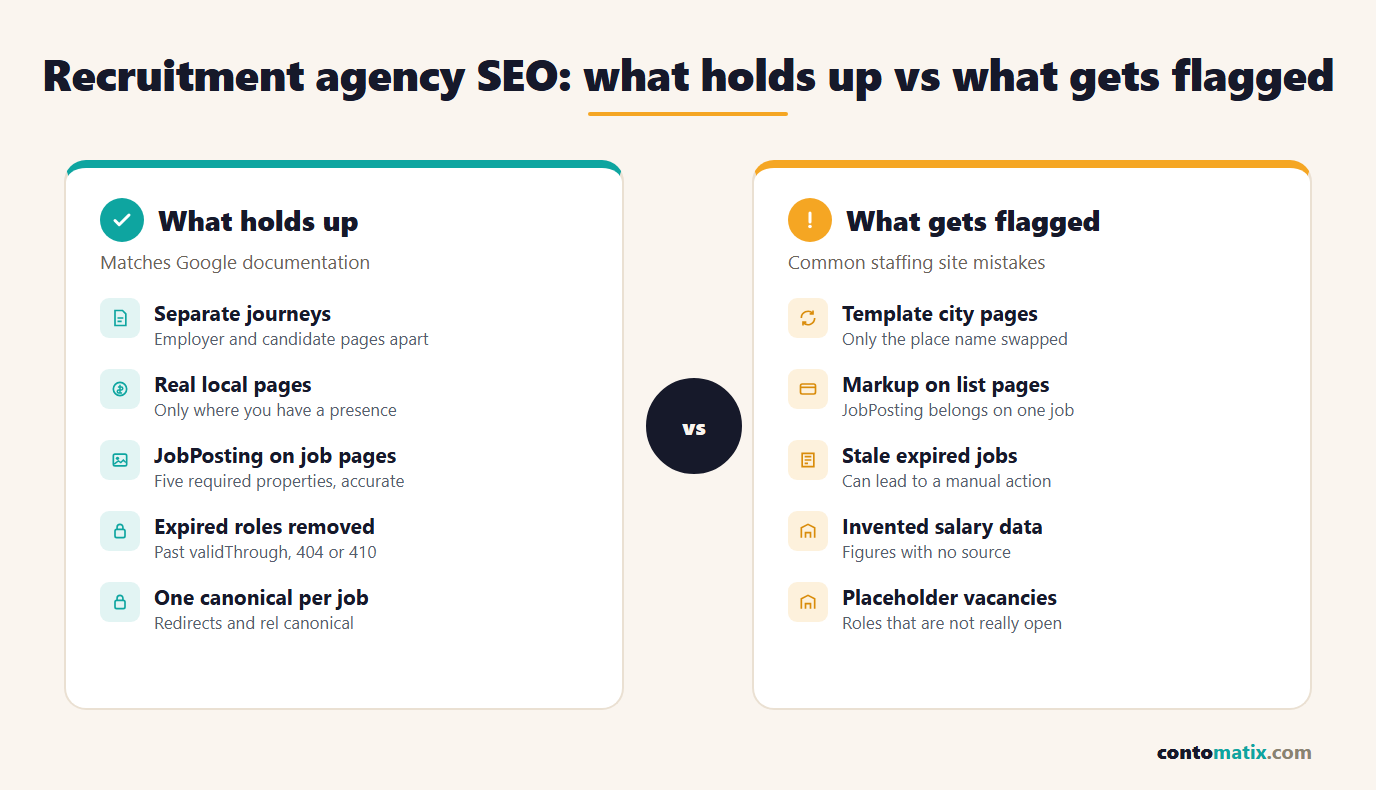
Most recruitment sites end up with some version of the same trap: a template page for every combination of sector and city, with only the names swapped. Google has a name for it. In its spam policies, doorway abuse is described as sites or pages "created to rank for specific, similar search queries" that lead users to intermediate pages less useful than the final destination. One of Google's listed examples is having multiple pages "targeted at specific regions or cities that funnel users to one page".
That does not mean location pages are banned. It means each one has to earn its existence. A good test is whether you could say something true and specific on the page that you could not say on its neighbour:
- Real activity in that place: sectors you actively recruit for locally, types of employers you work with (described in general terms if clients are confidential), and the commuting or hybrid patterns that affect hiring there.
- A real way to reach you: a branch address, a named consultant or a phone line that belongs to that market. If nobody on your team covers a city, do not build a page claiming you do.
- Your own content: placements you can describe, advice your consultants give, and process details that differ by market.
- Unique value per page: if two pages could be merged without losing anything, merge them.
A smaller set of strong pages beats a sprawl in SEO for recruitment agencies, as in most fields. Five sector pages that each explain how you recruit in that field, with a handful of genuinely local pages for the markets where you have people, will outperform two hundred near-identical ones, and they will not put the whole site at risk.
Site Architecture: Sector, Role, Location
A clean structure for the employer side is sector first, then role type, then location where it matters. For example: a hub for the sector, a page for each specialism inside it, and location pages only under the specialisms where you have a real presence. Each level links down to the next and back up, so a visitor and a crawler both understand where they are.
The candidate side has a different shape: a jobs listing, filtered views by sector and location, and then individual job pages. The filtered views are useful to searchers, but unlimited filter combinations create thousands of thin URLs. Decide in advance which filters deserve to be indexable (for instance sector plus city where there are enough live jobs) and keep the rest out of the index.
Keep URLs short and readable, use the role and place in the page title, and avoid burying job pages five clicks from the homepage. If a vacancy can only be reached through a search box, crawlers will not find it.
Job Pages and Google's JobPosting Structured Data
Individual job pages are where Google's job experience can pick you up, and Google documents exactly how to mark them up. The JobPosting structured data documentation (last updated 8 September 2026 when this article was checked) lists five required properties: title, description, hiringOrganization, jobLocation and datePosted. It then recommends properties including baseSalary, employmentType, validThrough, jobLocationType (for fully remote roles) and applicantLocationRequirements.
Here is the required-properties table as it appears in the documentation, with the datePosted, description and hiringOrganization rules.
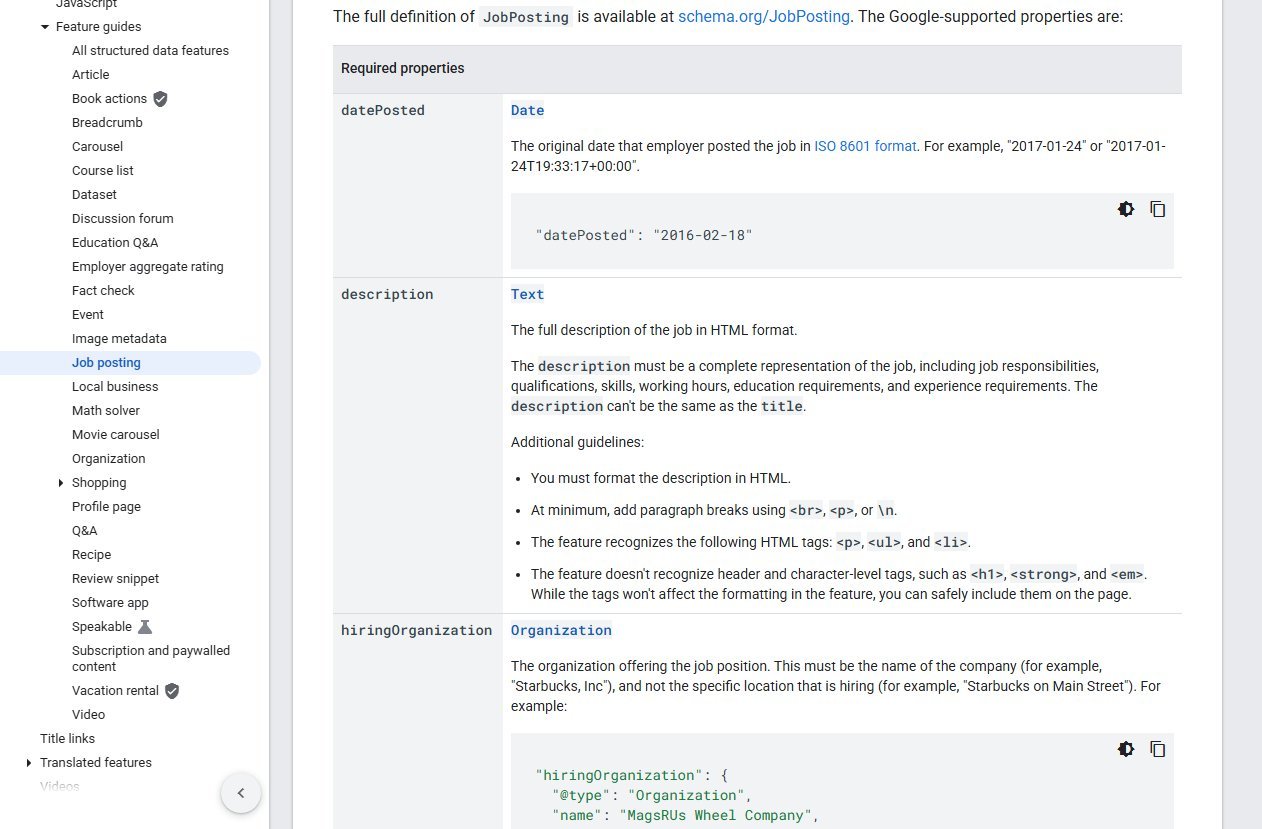
Several points in that documentation matter specifically to agencies:
- Put markup on the job page itself. Google says to add it to the most detailed page possible and not to pages that only list jobs. Your listings page should not carry JobPosting markup.
- The markup must match the visible page. The description, title and any salary shown in markup have to appear for the reader as well.
- The description must be complete. It should cover responsibilities, qualifications, skills and working hours, and it cannot simply repeat the title.
- Confidential clients are handled in the markup. For anonymous hiring, Google says to use the name "confidential" in
hiringOrganizationrather than disguise the real employer. Agencies advertising roles on behalf of unnamed clients should follow that. - Only genuine, open roles. Placeholder jobs used to attract applicants are not acceptable.
- Salary only if it is real. If you publish
baseSalary, it must be the actual pay for that role and visible on the page.
After you add the markup, test it with Google's Rich Results Test and watch the relevant reports in Search Console. For discovery speed, the same documentation notes a preference for the Indexing API over sitemaps for job posting URLs, because it prompts Googlebot to crawl sooner. A sitemap is still sensible for overall site coverage.
Filled and Expired Jobs: What Google Asks You to Do
A jobs board grows stale quickly, and stale roles frustrate candidates and weaken trust. Google's documentation is explicit on the technical side. Expired postings should be handled in one of three ways: make sure validThrough is populated and in the past, remove the page so it returns a 404 or 410 status, or remove the JobPosting structured data from the page. The same documentation warns that failing to act on expired jobs in good time may lead to a manual action.
That gives you a decision to make per role, not a one-size policy. A sensible approach for most agencies:
- Set validThrough whenever the role has a closing date, and keep it accurate. Do not extend dates artificially to keep a page alive.
- When a role fills and has no value afterwards, take the page down and return a 404 or 410, or remove the markup.
- When a role has a close equivalent, a redirect to the closest live vacancy or the sector listing is kinder to visitors who followed an old link. Redirect only when the replacement genuinely matches, not to dump every old URL on the homepage.
- Keep reusable content separate. If a role type recurs, a permanent page about that type of work (which does not carry JobPosting markup) can hold the evergreen content while individual vacancies come and go.
Do this automatically. If your applicant tracking system or website publishes jobs, have it update validThrough, the status code or the markup the moment a role closes. A manual clean-up every few months will not keep up.
Job Board Duplicates and Canonical URLs
Recruitment sites produce duplicates naturally. The same vacancy can appear under several URLs because of tracking parameters, filtered listings, a separate mobile path, or a partner board and your own site publishing the same text. Google's page on specifying a canonical URL says that you can indicate your preferred URL using redirects, rel="canonical" link annotations and sitemap inclusion, and that the first two are strong signals while the sitemap is a weak one. It also notes that these methods can be combined.
The documentation lists the three methods in order of how strongly they influence the outcome.
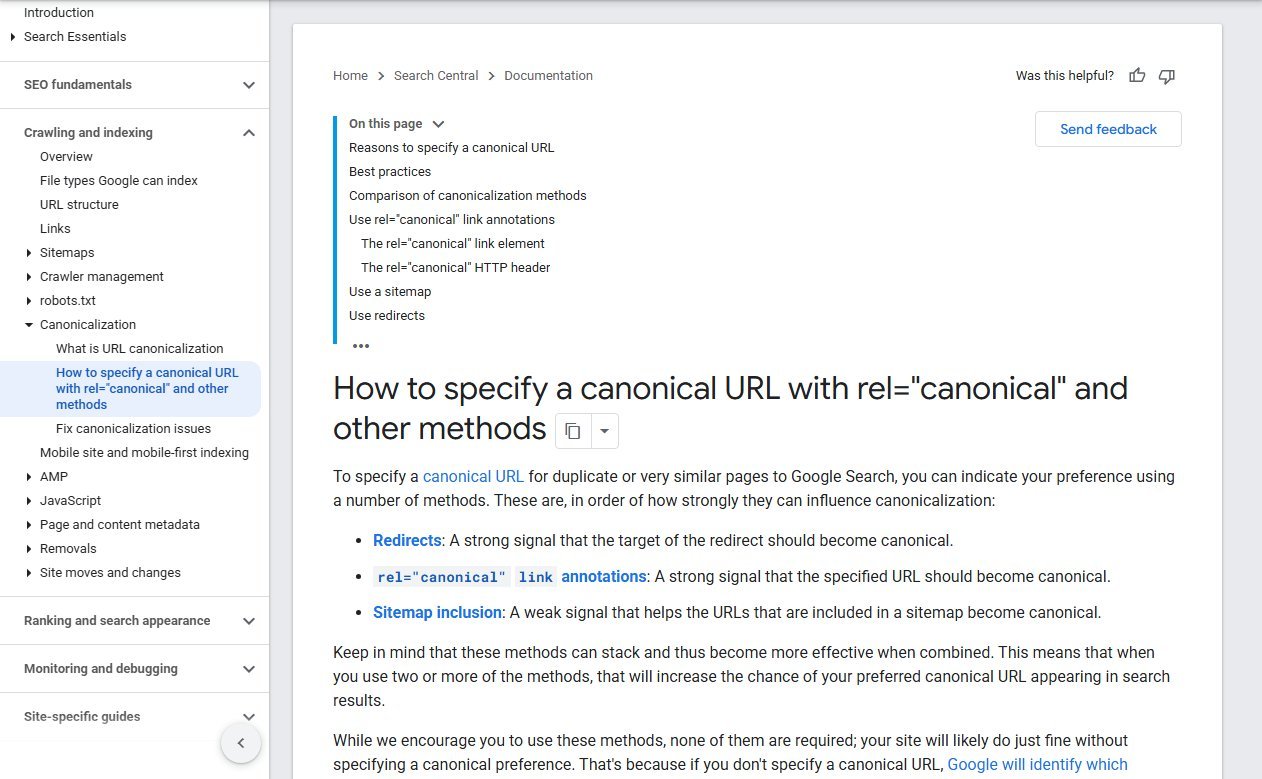
For a job site, that translates to a few habits:
- Pick one URL pattern per job and use it everywhere, including in internal links and sitemaps.
- Add a self-referencing canonical on each job page, and canonicals from parameter versions to the clean one.
- Do not set a canonical on one job page pointing at a different job, even a similar one. They are different vacancies.
- If you syndicate jobs to other boards, accept that the same text will exist elsewhere. Your own page should carry the fullest version, with details the copies lack, such as the full process or a named consultant.
Duplicate descriptions copied from a client can also hold you back. Writing your own opening paragraph for each role, and keeping the client's description underneath, costs little and gives each page something unique.
Employer-Side Content That Wins Clients
Hiring managers do not search for your brand. They search for the problem: how to hire a specialist, how long a type of search takes, what to include in an offer. Content that answers those questions makes you the first agency they meet before they ever compare providers.
- Hiring guides for the roles you fill most often: what the job involves, how to scope it, what to ask in interviews and what a realistic process looks like.
- Process explainers that describe how you source, screen and present candidates, written specifically enough that a reader could picture working with you.
- Sector commentary from consultants who place people in that field every week.
- Salary and market content, only with your own data. If your firm has real placement data, a clearly labelled summary of what you see is original and useful. If it does not, do not invent figures or borrow numbers without a source. Where you need official labour-market data, cite the government body that publishes it, with the date of the release, and say what it covers.
A guide written by someone who recruits in the field reads differently from a generic article. Name the consultant, describe the type of search, and keep claims you can stand behind.
Candidate-Side Content That Earns Applications
Candidates arrive from three kinds of searches: a specific vacancy, a general job type in a place, and career advice. Each needs its own page type.
For vacancies, the page needs a plain title, a complete description, the location, the pay if you can show it truthfully, and an application button that works on a phone. For a general job type, a filtered listing with a short introduction about the market can serve people who are browsing. For career advice, practical pages such as how to prepare for an interview in a specific sector, how contract and permanent work differ, or how your registration process works build goodwill and bring in people who will later apply.
Make registering simple. A long form that asks for everything before showing a single job will lose most candidates. Ask for the minimum first, then collect the rest later.
Google Business Profile for Branch Offices
If your agency has staffed offices that clients and candidates can visit, each real branch can have its own Business Profile with its own address, hours and phone number. The fundamentals are the same as for any local business, covered in our local SEO for small business guide: use your real-world name, choose accurate categories, keep hours current and link each profile to the matching branch page on your site rather than the homepage.
Two cautions. First, an address that nobody staffs does not qualify for a profile, so do not create listings for cities where you only have a mailbox or a remote consultant. Second, use one profile per real location and keep the name exactly as it appears on signage, without sector words added. The branch page it links to should carry the same address and phone number and include contact details a visitor can act on.
Reviews From Clients and Candidates
Recruitment is a trust business, and reviews do two jobs: they reassure employers who are about to hand you a vacancy, and they reassure candidates who are about to hand you their CV. Ask both groups. A client review that mentions the sector and how quickly a role was handled tells a prospective employer what to expect. A candidate review that describes how the consultant communicated tells a job seeker whether to register.
Ask everyone in the same way at the end of an engagement, offer nothing in return and never pick only the happy ones. Respond to reviews briefly and politely, including the poor ones, and avoid confirming private details such as who was placed with which client. Where a client is confidential, a general reply protects them.
Links Through Partnerships and Associations
Links to a recruitment site tend to come from the places a recruiter already belongs: professional associations in the sectors you serve, local chambers of commerce, industry events you sponsor or speak at, university and college career services that list approved agencies, and trade press that quotes your consultants. Each of those is a real relationship, and the link follows from it.
The approach is similar to the one in our guide to link building for real estate, another relationship-driven industry. Aim for a short list of relevant places that would genuinely mention you, and avoid bulk directories and paid link packages, which Google treats as link spam.
Measuring Results: Applications and Enquiries
Traffic is the wrong headline number when you measure SEO for recruitment agencies. Track the outcomes that match your two audiences:
- Candidate side: completed applications, registrations and clicks on the apply button, by page and by source.
- Client side: enquiry form submissions, calls and requests for a vacancy briefing, by landing page.
- Search Console: impressions and clicks for job pages separately from service pages, so you can see which side is growing.
- Index health: whether your live job pages are indexed and whether expired ones are dropping out.
Tag the two conversion types differently in analytics so the numbers never get mixed. If a sector page gets visits but no enquiries, the fix is usually on the page, not in more traffic.
A Short Checklist for Recruitment SEO
Use this list to audit your own SEO for recruitment agencies work, in roughly this order.
- Separate the employer journey and the candidate journey in navigation, page design and calls to action.
- Build one keyword list for client terms and one for candidate terms.
- Create sector pages for fields you genuinely recruit in, and location pages only where you have real presence and something specific to say.
- Mark up each individual job page with JobPosting data, with the five required properties and an accurate
validThrough. - Do not put JobPosting markup on listing pages.
- Automate expired roles: past
validThrough, a 404 or 410, or removal of the markup. - Set one canonical URL per job and clean up parameter duplicates.
- Publish hiring guides and candidate advice written by your consultants, using your own data only.
- Create a Business Profile only for staffed branches and link each to its own branch page.
- Ask clients and candidates for reviews the same way, with no incentive.
- Track applications and client enquiries as separate goals.
Quick Recap
- SEO for recruitment agencies starts from one fact: a staffing firm has two audiences, employers and candidates, with different keywords, page types and conversions.
- Location and sector pages must carry real, specific information. Template pages that only swap names fall under Google's doorway abuse policy.
- Use JobPosting structured data on individual job pages, with title, description, hiringOrganization, jobLocation and datePosted as the required properties.
- Handle expired jobs by setting a past validThrough, returning 404 or 410, or removing the markup, and automate it.
- Consolidate duplicate job URLs with redirects and rel canonical, which Google describes as strong signals.
- Only use salary or market figures that come from your own data or a cited official source.
- Measure applications and client enquiries, not just visits.
Frequently Asked Questions
What is SEO for recruitment agencies?
It is the work of making a staffing or recruitment website visible in search for two groups: employers looking for a recruiter and candidates looking for jobs. It covers service pages, job pages, structured data, local profiles, content and measurement.
Should a recruitment site target employers or candidates first?
Start with the group that pays you. Employer-side pages bring in fee-earning work, while candidate-side pages supply the people to fill it. Most agencies need both, but they should be built and measured separately.
Does Google require JobPosting structured data on job pages?
No, but without it your roles are less likely to appear in Google's job experience. Google's documentation lists title, description, hiringOrganization, jobLocation and datePosted as required for eligibility.
Can I add JobPosting markup to my job listings page?
No. Google says to put structured data on the most detailed page possible and not on pages that only list jobs. Mark up each individual vacancy page instead.
How do I show a client's job if the client wants to stay anonymous?
Google says to use the name "confidential" in the hiringOrganization field for anonymous hiring, instead of masking the real employer in some other way. Do that only where the client really has asked for anonymity.
What should I do with a job page after the role is filled?
Google gives three options: set validThrough to a past date, remove the page so it returns 404 or 410, or remove the JobPosting markup. Automate whichever you choose so it happens when the role closes.
Are location pages for every city a bad idea?
They are risky if the pages are near-identical. Google's doorway abuse policy covers pages made to rank for similar queries that funnel people elsewhere. Build location pages only where you operate and have specific content for that market.
How do I handle the same job appearing on several URLs?
Choose one preferred URL and signal it with redirects, a rel canonical annotation and sitemap inclusion. Google describes redirects and rel canonical as strong signals and sitemaps as weak, and says they can be combined.
Can I publish salary guides for my sector?
Yes, if they are based on data your firm actually holds or on an official source that you cite with its date. Do not invent figures or copy numbers without attribution.
Do recruitment agencies need a Google Business Profile?
Only for staffed offices where people can visit or be reached during stated hours. Each real branch can have one, linked to its own page. Locations without a staffed presence do not qualify.
How do I measure whether recruitment SEO is working?
Track completed applications and client enquiries as separate conversions, then compare them by landing page in analytics and Search Console. Visits alone do not show whether the right audience is arriving.
If you would like a second pair of eyes on how your sector, location and job pages fit together, the team at Contomatix works on this kind of site structure for service businesses.


